
When customer texts and website chats land in separate places, start with a shared inbox before adding more connections. For small service teams evaluating team inbox software integrations in 2026, VirtualText by VirtualPBX is a practical starting point for combining SMS, webchat, and shared replies; choose additional integrations around the work your team must complete.
- VirtualText by VirtualPBX fits small service teams combining SMS, webchat, and a shared team inbox.
- Evaluate team inbox software integrations by completed workflows, not directory size.
- Prefer built-in channels for consolidation; evaluate native connections when customer records must move between systems.
- Test record matching, reply handling, and failure recovery before approving any integration.
Why this matters
An integration directory tells you which applications a vendor names. It does not establish which fields move, whether replies return, or who handles a failed transfer. Your buying decision needs those details.
Keep the offers distinct. VirtualPBX provides the business phone system; VirtualText is the separate webchat and shared-inbox offer. A team that needs website lead capture has a different requirement from a team replacing its calling system.
For your 2026 shortlist, rank completed workflows first. Treat integration counts as a secondary comparison only after every vendor uses the same counting rules: direct connections, automation-platform connections, and custom development are different categories.
What makes the best team inbox software integrations
Use these criteria before comparing software or connection methods:
- Channel fit: Your inbox must cover the customer conversations you actually handle. SMS and website chat are separate requirements.
- Record matching: A connection should identify the right customer before creating or updating a record. Ask how it handles repeated inquiries.
- Useful data: Confirm which contact details, messages, and status fields move. A notification is not a customer-record update.
- Direction: Establish whether information moves into the inbox, out of it, or both ways. Do not assume a connection supports replies.
- Failure visibility: Identify where errors appear and who can resolve them. Silent failure leaves staff working from incomplete information.
- Ongoing ownership: Assign someone to maintain permissions, field mappings, and routing rules. Setup is not the end of the job.
The best integration is the one that completes your required handoff without making staff re-enter the same information. That is the standard behind the practical ranking below, rather than an unsupported leaderboard of application totals.
Team inbox integration options at a glance
This ranking prioritizes a small service team's path from scattered conversations to connected work. The options are configurations to evaluate, not claims that every inbox supports every connection method.
| Rank and option | Best for | Standout benefit | Key limitation | What to verify |
|---|---|---|---|---|
| 1. VirtualText consolidated inbox | SMS and website lead capture | Combines SMS, webchat, a shared team inbox, and an automated agent | Consolidation alone does not establish external-system connectivity | Your required external workflows |
| 2. Native application connection | A defined handoff between business systems | A direct connection can reduce separate configuration layers | A named application does not establish field coverage | Exact triggers, actions, and direction |
| 3. Automation-platform connection | Coordinating work across applications | Connects supported triggers to supported actions | Adds another place to maintain and troubleshoot workflows | Required events and error handling |
| 4. Custom API connection | A workflow that packaged connections cannot meet | Allows a purpose-built exchange between systems | Requires development and maintenance | Endpoint access, permissions, and ownership |
A meaningful integration-count comparison in 2026 must keep these categories separate. Count a supported direct connection as a direct connection, not as equivalent to an application reachable through custom code.
1. VirtualText: best team inbox for SMS and webchat consolidation
VirtualText combines SMS, webchat, a shared team inbox, and an automated agent for small-business service teams. Its stated audience includes insurance agencies, home services, and healthcare providers handling website and after-hours leads.
Start here when your immediate problem is fragmented communication. Bringing the required channels into a shared workspace addresses a different problem from transferring records into a separate business application.
VirtualText pros:
- Combines SMS and webchat in the same offer.
- Includes a shared team inbox for service-team conversations.
- Includes an automated agent for lead response.
- Fits the stated use case of website and after-hours inquiries.
VirtualText cons:
- Built-in channels do not replace a separate customer-record handoff when your workflow requires one.
- A shared inbox still needs clear staff responsibilities and escalation rules.
Best for: Small service teams whose first requirement is managing customer texts and website conversations together.
Your setup path should begin with the channels and the people answering them. Define which inquiries need a human, what information staff need, and where a completed conversation should leave a record. Then evaluate external connections against that map.
Verdict: Buy for SMS and webchat consolidation; hold any integration-dependent rollout until the required handoffs pass testing.
2. Native connections: best for a defined customer-record handoff
A native connection links supported applications through a packaged integration. Evaluate this configuration when your team needs a specific action, such as creating a customer record or passing conversation details into an existing system.
Ask for the actual field map. An application name in a directory does not explain whether the connection creates records, updates existing ones, or transfers a conversation transcript.
Native connection pros:
- Gives you a defined connection to evaluate against a specific handoff.
- Can reduce the need for a separate automation layer.
- Makes a focused demonstration easier to structure around your existing system.
Native connection cons:
- Supported actions can be narrower than your full workflow.
- Changes to fields or permissions still require someone to maintain the connection.
Best for: Teams with an established customer system and a clearly defined record-transfer requirement.
Use the guide to integrating business texting with your CRM to frame your evaluation. Ask the vendor to show the customer record before and after the handoff, including what happens when the customer already exists.
Verdict: Buy when the demonstrated connection covers your required fields and actions; skip a directory listing that cannot demonstrate the handoff.
3. Automation platforms: best for coordinating supported applications
An automation-platform connection uses an intermediary to respond to an event in one application and perform an action in another. Evaluate this approach when your workflow spans applications and a suitable direct connection is not the right fit.
Define the event and the result before choosing the connector. “Connect the inbox” is vague; “create a lead record when an eligible inquiry arrives” is a testable requirement.
Automation-platform pros:
- Provides a way to combine supported events and actions across applications.
- Lets you separate workflow rules from the inbox interface.
- Gives you a place to define conditional handoffs when supported.
Automation-platform cons:
- Adds another system that someone must maintain.
- A connector's application coverage does not establish support for your exact event or action.
Best for: Teams coordinating several applications with a named person responsible for automation.
For your 2026 evaluation, inspect the full workflow rather than the connector logo. Verify the starting event, required fields, destination action, and failure notice. Ask who investigates when the inbox receives a message but the destination does not receive its record.
Verdict: Buy when the supported workflow passes your acceptance test; hold if nobody owns troubleshooting.
4. Custom APIs: best for a specific unsupported workflow
A custom API connection uses software interfaces to exchange information between systems. Evaluate this route when a packaged connection cannot perform an essential business task and you have development ownership.
Write the requirement before requesting development. Specify what information moves, which system controls each field, and what staff should see when an exchange fails.
Custom API connection pros:
- Allows a connection designed around a specific requirement.
- Supports explicit decisions about field mapping and record matching.
- Gives your technical owner control over the connection's behavior.
Custom API connection cons:
- Requires development, testing, and ongoing maintenance.
- Depends on the access and capabilities each system exposes.
- Needs a recovery process when either system changes.
Best for: Teams with an essential workflow that packaged connections cannot satisfy and a technical owner who can maintain it.
Do not choose custom development merely to increase your integration count. Choose it because a documented requirement cannot be met another way.
Verdict: Hold until requirements and maintenance ownership are approved; skip for straightforward channel consolidation.
How to test team inbox software integrations
For a 2026 purchase, use the same acceptance test for every shortlisted configuration. Keep the example fictional and exclude real customer information, especially when your business handles sensitive inquiries.
Follow this sequence:
- Define the handoff: Write the customer event and the required business result.
- Map the fields: Specify 5 test fields: customer name, phone number, inquiry text, source channel, and owner.
- Test the reply: Confirm where a staff reply appears and what the customer receives.
- Test the failure: Interrupt a test connection and inspect the error and recovery process.
- Assign an owner: Name the person responsible for checking and fixing the workflow.
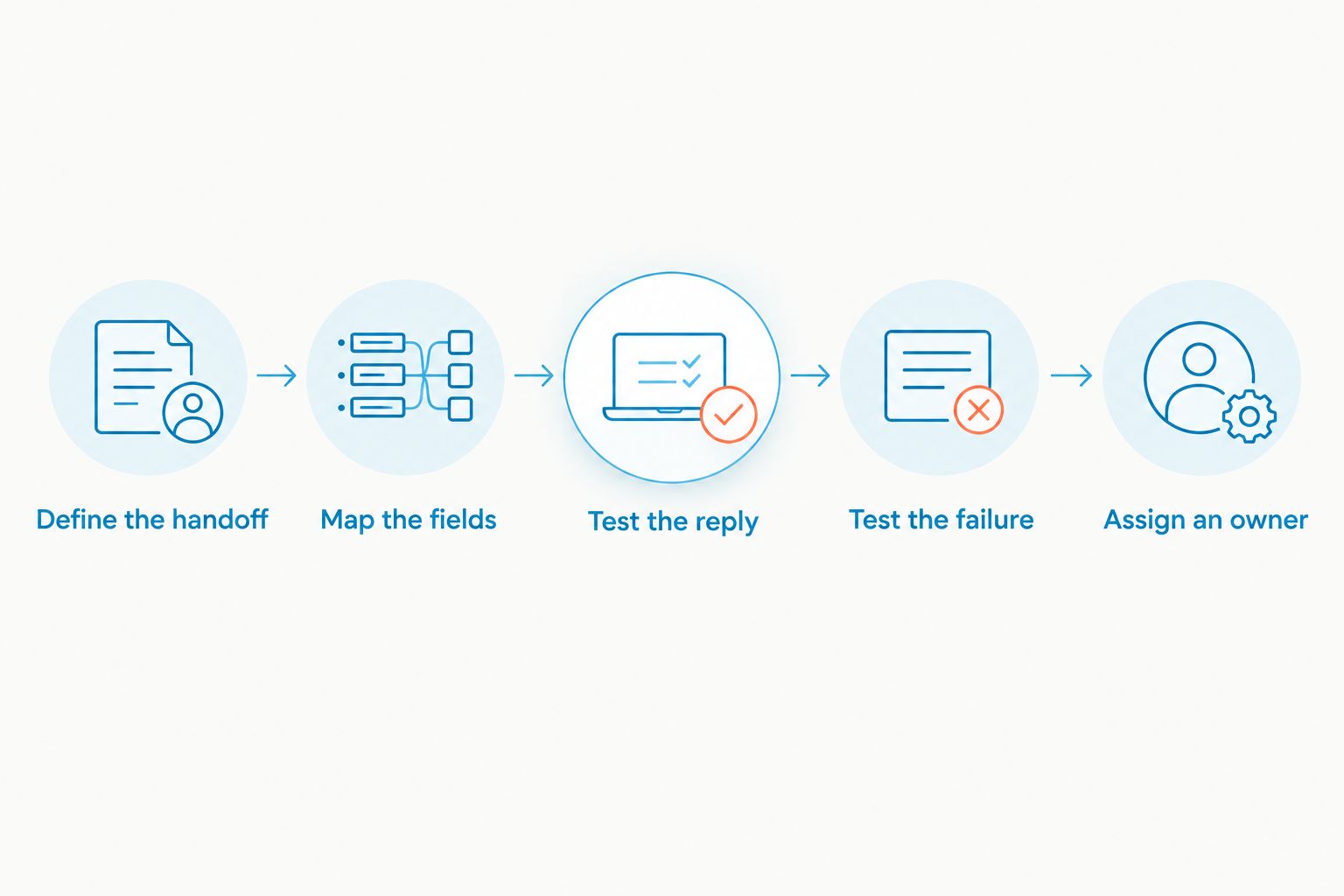
Run 3 test cases: a new inquiry, a returning customer, and a failed transfer. These are evaluation requirements, not vendor performance claims. Record the expected result before the demonstration so a successful-looking screen does not substitute for a completed task.
Check both SMS and webchat if your workflow needs those 2 channels. A successful text-message test does not establish that website conversations follow the same path.
How the ranking works
The ranking moves from consolidating conversations to connecting systems, then to coordinating applications and building a custom exchange. It prioritizes the smallest configuration that meets your documented requirement.
Integration totals belong in a separate comparison with consistent definitions. Require vendors to distinguish direct connections, intermediary connections, and custom possibilities. Do not add those categories together and call the result equivalent coverage.
Which team inbox configuration should you choose?
Choose VirtualText for a small service team that needs SMS, webchat, and shared lead response together. Add an external connection only when you can name the information that must move and the task that movement completes.
If your business also needs cloud calling, evaluate VirtualPBX as the phone-system decision. Keep phone requirements and inbox integration requirements on separate checklists so neither purchase is justified by features belonging to the other offer.
For an undecided buyer, the next step is a workflow demonstration—not a larger application directory. Bring your field map and ask the vendor to complete the handoff in front of you.
FAQ
What's the best way to compare team inbox software integrations?
Compare the workflows each connection completes before comparing directory totals. Verify supported fields, transfer direction, record matching, and failure recovery using the same test for every vendor.
Is VirtualText the same as the VirtualPBX phone system?
No. VirtualText is the separate webchat and shared-inbox offer, while VirtualPBX provides the business phone system. Evaluate each against the communication tasks your team needs to handle.
Does a larger integration directory mean better team inbox software?
A larger directory does not establish better workflow coverage. A listed application still needs to support your required event, action, fields, and reply path.
Is a native integration better than an automation-platform connection?
A native integration is the better choice when it meets your requirement without an additional automation layer. An intermediary is another configuration to evaluate when the required workflow depends on supported events and actions across applications.
Can a shared inbox replace our customer management system?
Do not treat a shared inbox as a replacement unless it meets your customer-record requirements. Define where customer details and conversation records must live, then test the handoff between systems.
What should we test before connecting a team inbox?
Test a new inquiry, a returning customer, and a failed transfer. Confirm the correct record, the required information, the reply path, and the person responsible for recovery.
When should a small business choose a custom API connection?
Choose a custom API connection when an essential documented workflow cannot be met by a suitable packaged connection. Assign development and maintenance ownership before approving the work.
One last thing
Ask the demonstrator to use an existing customer, not only a new lead. That test reveals whether your workflow preserves the right record or creates another entry for staff to reconcile. In 2026, a completed handoff remains a more useful buying signal than a headline integration total.