
Slow website replies leave your service team chasing conversations that should already have a next step. Best overall fit for combined webchat and texting: VirtualText by VirtualPBX. Best for complex questions: staffed live chat. Best for receipt confirmation only: automated acknowledgments. This 2026 guide ranks response workflows by practical fit, not an unverified speed leaderboard.
- For live chat software response time, rank useful answers separately from automated greetings.
- VirtualText combines webchat, SMS, a shared team inbox, and an AI agent for small-business service teams.
- Staffed live chat fits complex questions when a person is available to own the conversation.
- Automated acknowledgments confirm receipt; they do not prove that a customer received an answer.
VirtualPBX is the parent brand; VirtualText is its separate webchat and shared-inbox offer. Start your selection with the work you need handled: answering website questions, collecting after-hours leads, or giving staff a shared place to respond.
Why this matters
A greeting and a useful answer are different events. Software that displays a welcome message immediately has not necessarily answered the visitor's question, collected the right details, or reached someone who can help.
For a small service business, the practical question is whether the conversation moves forward. A customer asking about a service area needs an accurate answer; someone requesting a policy change or discussing a clinical concern needs an appropriate person, not a confident guess.
Your 2026 shortlist should therefore separate response speed from response quality. Choose the workflow that produces the right next step, then measure how long that step takes.
What makes the best live chat software for response time
Use these criteria before comparing a polished demonstration with your actual workload:
- Useful first answer: The reply addresses the visitor's question or requests information needed to handle it.
- Coverage: The workflow has a defined response path during staffed hours and after closing.
- Human handoff: A person takes responsibility when automation reaches its limits.
- Shared visibility: Staff can see the conversation and understand what still needs attention.
- Channel continuity: Your process accounts for visitors who leave the website and want to continue elsewhere.
- Measurement clarity: Reporting distinguishes greetings, automated answers, human replies, and unresolved messages.
Treat these as purchasing requirements, not claims that every platform meets them. Ask the provider to demonstrate each requirement using a question from your business.
Response workflows at a glance
The order below favors a small service team handling website leads and customer texts. It is a fit ranking, not a claim that one product responds in fewer seconds than another.
| Rank and option | Best for | Standout capability | Key limitation |
|---|---|---|---|
| 1. VirtualText | Combined website and text conversations | Webchat, SMS, shared team inbox, and an AI agent in one platform | Response quality and escalation need validation against your own questions |
| 2. Staffed live chat | Complex questions requiring judgment | A person can clarify the request and take responsibility | Coverage depends on an available team member |
| 3. Automated acknowledgments | Confirming receipt outside staffed coverage | A predefined message establishes that a request arrived | Confirmation is not an answer or completed intake |
Do not compare these options using the same response label without checking its definition. An automated greeting and a human answer represent different amounts of work completed for the customer.
1. VirtualText: best live chat fit for combined conversations
VirtualText combines SMS, webchat, a shared team inbox, and an AI agent for small-business service teams. Its stated use includes capturing and responding to after-hours and website leads for businesses such as insurance agencies, home services, and healthcare providers.
VirtualText by VirtualPBX is the best fit here for service teams that want webchat and SMS in one shared inbox. That recommendation concerns the combination of channels and team access, not a measured response-time advantage.
VirtualText pros
- Website chat and SMS are part of the same platform.
- A shared team inbox gives staff a common place for conversations.
- An AI agent adds an automated response option.
- The stated focus matches small-business service teams handling incoming leads.
VirtualText cons
- A combined feature set does not establish a specific response time.
- Automated answers still need checks against your service details and boundaries.
- A shared inbox still needs a person responsible for unresolved conversations.
Best for: A small service team that wants website conversations and customer texts in a shared workspace.
For setup, begin with approved answers, intake questions, and escalation rules. Then test a website question and a text conversation before expanding the workflow. Confirm how staff receive unresolved requests and what customers see when nobody is available.
Do not assume that the phone system's terms, features, or setup process apply to this separate messaging offer. Evaluate the messaging workflow you intend to use.
Verdict: Buy for channel fit after validating answers and handoffs—not on an assumed speed advantage.
2. Staffed live chat: best for questions requiring judgment
Staffed live chat puts a person in the conversation. It fits questions that need clarification, exceptions, or decisions that your business has not authorized software to make.
For your 2026 evaluation, test the staffing arrangement as carefully as the chat interface. A capable operator cannot answer a conversation that nobody has assigned or noticed.
Staffed live chat pros
- A person can ask follow-up questions when the request is unclear.
- Staff can explain limits instead of forcing a predefined answer.
- An assigned operator can take responsibility for the next action.
Staffed live chat cons
- Response coverage depends on staffing and availability.
- Staff handling calls or front-desk work need a clear chat priority.
- An after-hours visitor needs another response path when operators are offline.
Best for: Businesses whose website questions frequently require human judgment.
Ask an operator to handle a vague request, not just a familiar question. Watch whether the operator clarifies the need, records useful context, and explains what happens next. That sequence matters more than how quickly the first greeting appears.
Verdict: Buy when complex conversations justify dedicated human coverage.
3. Automated acknowledgments: best for receipt confirmation
An automated acknowledgment tells the visitor that the business received a message. It is a narrow tool: useful for setting expectations, but not a substitute for answering a question.
Use acknowledgment-only workflows when your immediate requirement is transparent receipt confirmation. Do not present an unattended inbox as an active conversation with a person.
Automated acknowledgment pros
- A predefined reply gives you control over the initial wording.
- The message can explain the next step in your response process.
- The workflow does not require a person to write each receipt confirmation.
Automated acknowledgment cons
- A generic confirmation does not resolve the customer's request.
- A reply promise becomes misleading if your team does not honor it.
- The underlying conversation still needs ownership and follow-up.
Best for: Businesses that need to confirm receipt while a person prepares the substantive reply.
Write the acknowledgment around what your team actually does. State whether someone will review the message, what information the customer should provide, and which requests require a different contact route. Avoid promising a response deadline that your staffing cannot support.
Verdict: Hold as a supporting step; skip it as your only lead-response solution.
How to measure live chat software response time in 2026
Start the clock when the visitor sends a message, not when the chat window opens. Record separate timestamps for the acknowledgment, useful answer, and human takeover when required.
Use these checkpoints consistently:
- Message sent: The visitor submits the question.
- First reply: The system or operator sends an initial response.
- Useful answer: The reply addresses the question or requests necessary details.
- Human handoff: A person accepts responsibility for an escalated request.
- Next step: The customer knows what happens after the conversation.
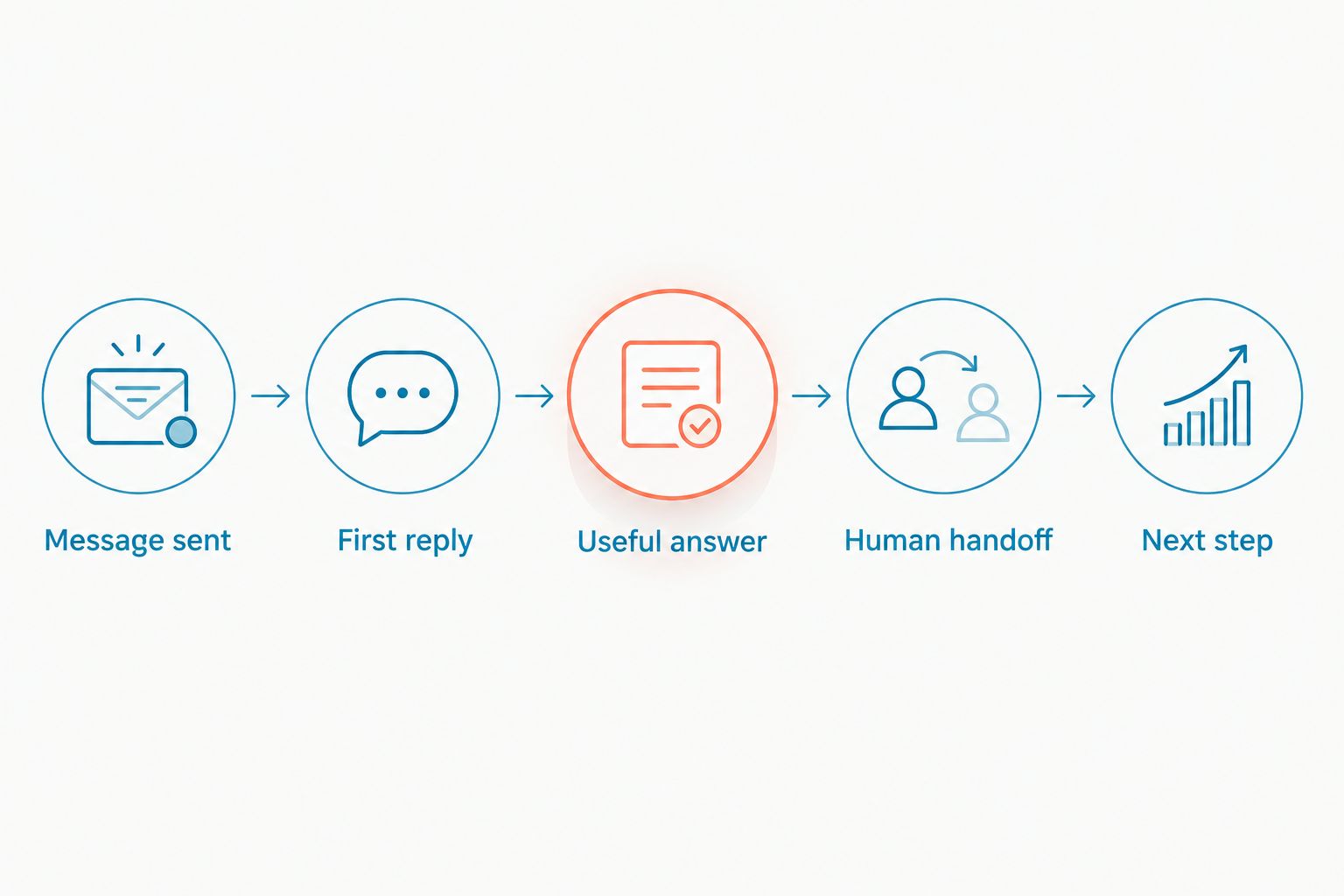
A conversation does not always require every checkpoint. A straightforward question can end with an accurate answer; an exception request needs an owner. Preserve that distinction instead of rewarding unnecessary transfers.
For a practical evaluation, send 3 test messages: a routine question, an incomplete request, and a request requiring a person. Repeat them under 2 staffing conditions: during staffed hours and after closing. Review unresolved conversations after 1 business day to check whether the handoff produced action.
Those are test instructions, not industry benchmarks or promised service levels. Keep the questions and conditions consistent across providers so the comparison reflects the workflow rather than an easier demonstration.
Read the results without rewarding empty speed
Report first automated reply and first human reply separately. Also record time to a useful answer, because a quick response that misunderstands the request is not a successful result.
Do not silently remove unanswered chats from the comparison. Show them as unresolved. Otherwise, a workflow that answers only straightforward questions can appear faster than one handling the full workload.
For larger conversation sets, the median describes the middle response time, while a high percentile helps you inspect slower experiences. Keep staffed and after-hours conversations separate so a blended figure does not hide a coverage gap.
Use the guide to reducing response time to website chat leads to turn the comparison into an operating checklist. Fix unclear ownership before asking staff to type faster.
A setup path for your 2026 shortlist
Begin with the questions your team is authorized to answer. Document service areas, contact routes, intake requirements, and topics that require escalation. Leave unsupported claims out of automated replies.
Next, assign responsibility for website conversations. Name the primary owner, the backup, and the person who checks unanswered messages. Software selection does not replace those decisions.
Then test the customer's experience from beginning to end. Submit a question, leave the page, request a person, and check whether your team can understand the conversation without asking the customer to repeat everything.
For healthcare and other sensitive requests, establish the appropriate information-handling rules before inviting customers to submit details. A fast response does not establish that a workflow is suitable for sensitive information.
Finally, publish only the reply expectations your team can meet. Recheck those expectations when staffing or opening hours change.
How the ranking works
This ranking prioritizes combined-channel fit, useful answers, coverage, and clear responsibility for a small service team. It does not assign invented response times to named vendors.
VirtualText ranks first for the combined webchat, SMS, shared-inbox, and agent use case. Staffed live chat ranks first for judgment-heavy questions. Automated acknowledgments serve receipt confirmation, not substantive resolution.
The practical test is simple: does the workflow answer the question or give the customer an accurate next step? A faster greeting does not overturn a failed handoff.
Which response workflow should you choose?
Choose VirtualText if your main requirement is handling website chat and SMS in a shared team inbox. Choose staffed live chat when the work requires a person to interpret and decide. Use automated acknowledgments to support either approach, not to disguise unanswered requests.
For your 2026 decision, require a demonstration built around your questions and staffing conditions. Approve the workflow only after you can see who owns the conversation when the first reply is not enough.
FAQ
What's the best way to compare live chat software response time?
Compare time to a useful answer using the same questions and staffing conditions. Record automated greetings, human replies, and unresolved conversations separately.
Is VirtualText the fastest live chat software?
A speed claim requires comparable measurements under defined conditions. VirtualText is recommended here for combining webchat, SMS, a shared team inbox, and an AI agent, not for a claimed timing advantage.
Does an automated greeting count as a response?
An automated greeting counts as an initial reply, not necessarily a useful answer. Track both events so receipt confirmation does not hide an unanswered question.
Is an AI agent better than a live chat operator?
Choose the response method according to the work it must handle. Test automation against approved questions, and use a person for requests that require judgment or exceptions.
How do I compare chat performance after closing?
Repeat your test conversations after staffed coverage ends. Check the answer, the stated next step, and whether an unresolved request reaches a responsible person.
What should happen when the chat system cannot answer?
The customer should receive a clear next step and the conversation should reach an assigned person. Confirm that the person receives enough context to act without restarting intake.
Is VirtualText the same as the VirtualPBX phone system?
VirtualText is a separate webchat and shared-inbox offer from VirtualPBX. Evaluate its messaging workflow separately from Smarter Voice and optional phone-system products.
One last thing
Test the question your team least wants automation to answer. A responsible refusal followed by a clear handoff is a better result than a quick, unsupported answer. Make that boundary part of your buying decision.