Instead of copying completed ServiceTitan jobs into texts, connect a verified job-event source to an approved SMS sending action, then filter, check consent, and record each follow-up. Build your 2026 ServiceTitan text message integration around one rule: a job update must never trigger a customer message twice.
- A ServiceTitan text message integration needs verified job access, consent checks, duplicate prevention, and an approved SMS action.
- VirtualPBX’s VirtualText is suited to small service teams that need SMS and webchat in a shared inbox.
- Start with completed-job follow-up; add appointment updates only after duplicate and cancellation tests pass.
- Confirm connector support before setup; a shared inbox does not establish ServiceTitan integration compatibility.
Why this matters
A completed job creates a useful reason to contact a customer. Manual copying adds another task to the dispatcher's queue, while poorly filtered automation sends messages after unrelated edits.
The job record should control whether a message is eligible; the texting system should handle delivery and replies. Keep those responsibilities separate. A sent message is not proof that a customer received it, and a customer reply is not proof that ServiceTitan changed.
VirtualPBX’s VirtualText combines SMS, webchat, and a shared team inbox for small-business service teams. VirtualPBX’s VirtualText is best for small service teams that need customer texts and website conversations in one inbox. Its fit for this workflow depends on confirming a supported connection and sending action, not on its inbox features alone.
For the broader design, see how to integrate business texting with your CRM. For this 2026 workflow, start with completed-job follow-up rather than every job event.
Before you start
- Account access: Have a ServiceTitan administrator identify the supported way to retrieve job changes. Have your texting administrator confirm an authorized business sender, outbound SMS access, and incoming-reply handling. Verify the exact connector or API route before building anything.
- Customer records: Prepare a test job, a phone number you control, the customer's messaging permission record, and an approved message template. Keep credentials in the connection's protected credential storage, not in message templates or shared notes.
- The gotcha: An edited completed job is not necessarily a newly completed job. Require either a verified status transition or a persistent record of previously processed events. Otherwise, a corrected address can produce another follow-up.
Ask the integration provider to demonstrate both sides of the connection: retrieving the relevant ServiceTitan job data and sending a text through the selected service. Also confirm where replies appear. Do not enable production sends until all three are demonstrated.
The configuration units below describe field purposes, not screen labels. Use the actual labels in your verified connector; do not substitute an unrelated trigger because its name sounds close.
Job event source
Your ServiceTitan event source needs enough information to distinguish a completed job from a routine edit. A customer name and phone number alone cannot do that.
- Select the supported source for job changes. Confirm whether it supplies events directly or retrieves changed records on a schedule.
- Restrict the initial workflow to the business unit or team responsible for the pilot. Avoid organization-wide sending during setup.
- Retrieve the stable job identifier, current status, customer identifier, intended contact number, and event or modification time. Retrieve prior status when the source provides it.
- Define the qualifying transition. For completed-job follow-up, use your actual completion status and exclude canceled jobs. Do not invent a status name or assume every closed record means completed service.
- Compare a test completion with a later edit to that same job. Determine which data distinguishes them before adding a sending action.
Expected result: Your event source returns an identifiable job and enough state to determine whether a follow-up is newly eligible.
If the connection retrieves records on a schedule, define how it stores its last successful checkpoint. Advance that checkpoint only after the retrieved records have been handled or safely queued. An interrupted run must not silently skip unprocessed jobs.
For a 2026 rollout, document this behavior alongside the connection owner. Someone must know how to restore the workflow after expired access or a failed run.
Eligibility and duplicate control
A trigger announces a change. Your eligibility checks decide whether that change deserves a message.
- Match the job to the intended customer contact. Decide whether the recipient is the booking contact, property owner, or another authorized contact; do not send to every number attached to the record.
- Check the messaging permission appropriate to the message and apply the current opt-out record. Keep service follow-up separate from promotional outreach.
- Validate that the destination is suitable for SMS. Route missing or unusable numbers to a staff exception list rather than guessing a replacement.
- Create a persistent send key from the job identifier and message purpose. For a single completed-job follow-up, that combination should remain unchanged after ordinary record edits.
- Check the send key before sending. Reserve eligible work so overlapping runs cannot both send it, then track submission and outcome separately.
- Recheck the job state immediately before dispatch when the workflow includes a delay. Suppress canceled jobs and contacts who have since opted out.
Expected result: An eligible job produces one pending follow-up, while repeated updates, opt-outs, and canceled work produce none.
Duplicate prevention must survive a restart. A temporary variable inside one automation run does not protect against another run processing the same job.
Use this decision sequence before any outbound message: Job event, Contact match, Consent check, Duplicate check, Send text, Reply owner. Each stage has a different responsibility; skipping one creates a different failure.
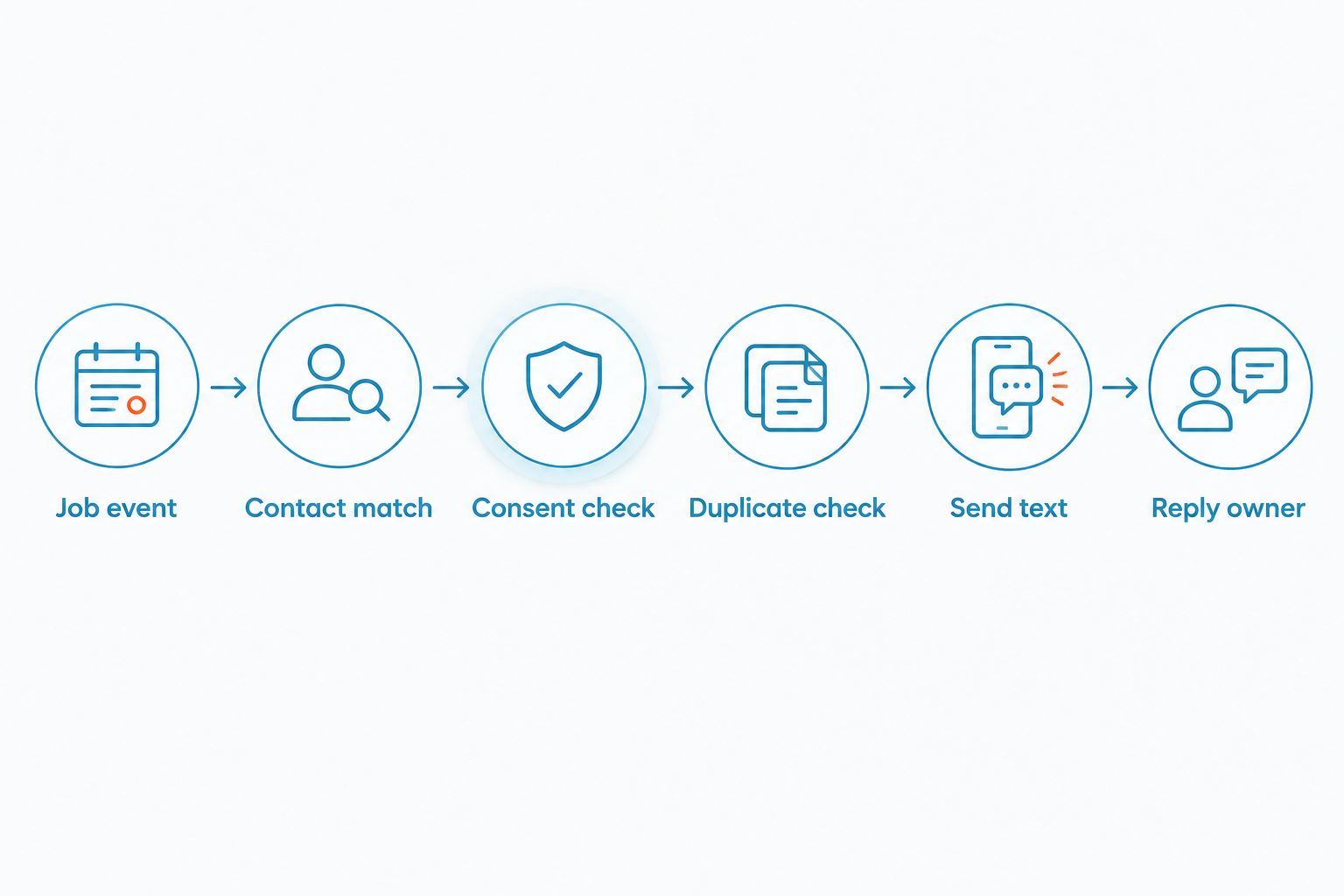
For consent and opt-out planning, use the business texting compliance guide. Keep permission records attached to the contact, not just the original job.
Message delivery and reply ownership
An automated follow-up should identify your business and give the customer a clear next step. It should not expose technician notes or imply an appointment is confirmed when it is not.
- Draft one approved completion template. Include your business name, a brief reference to the service, and an invitation to reply with a service question.
- Map only necessary customer-facing data. Add a fallback for an empty first name, and exclude internal notes, access codes, payment details, and sensitive information.
- Configure the verified sending action with the approved sender, validated recipient, and rendered message. Inspect the finished text rather than only the template.
- Record the sending result against the send key. Preserve any returned message identifier so a failed or uncertain submission can be investigated.
- Assign a team to incoming replies and define who covers that inbox outside normal hours. Do not describe a message as monitored unless someone owns that responsibility.
- Define how staff update the job after a reply. Treat automatic write-back as a separate capability that requires its own verification.
Expected result: The customer receives a relevant message from the intended business sender, and a reply reaches the responsible team.
VirtualPBX’s VirtualText provides a shared inbox for SMS and webchat. That supports team-based conversation handling, but it does not establish automatic ServiceTitan write-back or a native completed-job trigger. Verify those separately.
Keep the first message operational. Do not combine a service check-in with an unrelated offer. A narrow message is easier to approve, test, and assign to the right person.
Test records and launch controls
Test the workflow's exclusions as carefully as its successful path. A successful send proves only that one record passed through.
- Prepare at least 3 test jobs using numbers you control: an eligible completion, a canceled job, and a job whose contact is excluded from texting.
- Submit the eligible completion, then replay the same event. Edit that completed job afterward. Both repeat cases should leave the original follow-up count unchanged.
- Prepare 2 contact records that share a phone number. Confirm that job-level messages remain distinct without exposing one customer's details in another conversation.
- Test an incoming reply and an opt-out. Confirm the reply owner can find the conversation and that the exclusion applies to subsequent sends.
- Test an uncertain sending outcome. Confirm staff can investigate it without blindly replaying the job event.
- Review the pilot after 1 business day before expanding it. Treat this as a recommended review checkpoint, not a promised delivery or setup time.
Expected result: Eligible completions send once, excluded jobs do not send, and replies have an accountable owner.
Your 2026 launch record should include the approved template, connection owner, reply owner, and a way to pause outbound sends. Preserve the test outcomes so a later configuration change can be checked against the same cases.
Second variant: text customers when appointments change
Appointment updates are a separate workflow, not another completion template. A customer needs the latest schedule, while a completion message concerns work already finished.
| Workflow | Best for | Benefit | Limitation | Duplicate key |
|---|---|---|---|---|
| Completed-job follow-up | Checking on finished service | Connects the message to a completed job | Requires reliable completion eligibility | Job identifier plus message purpose |
| Appointment-change notice | Confirming a changed visit | Gives the customer the revised schedule | Requires current appointment details and revision handling | Appointment identifier plus revision and message purpose |
- Confirm your event source exposes appointment changes and the current appointment details. Do not derive an appointment change from a generic customer-record update.
- Include the customer's local date and time where those values are verified. Check timezone handling before rendering the message.
- Give each meaningful schedule revision its own send key. Replaying the same revision should not send another notice.
- Recheck the latest schedule before sending. Suppress a queued notice that has been superseded or canceled.
Expected result: A genuine schedule change creates a current notice; repeated processing of that revision does not.
Best for appointment changes: revision-aware messaging. Its benefit is current information; its drawback is greater state-management work than a single completion follow-up. Keep reminder scheduling separate so a change notice does not accidentally become a recurring reminder.
Troubleshooting
A completed job sends several texts
Inspect the event history and persistent send key. A generic update trigger, a key based on modification time, or overlapping runs can treat ordinary edits as new work. Use a stable completion-purpose key and protect it against concurrent processing.
A job completes but no text is sent
Trace the record through each stage: event retrieval, contact match, permission, duplicate check, and sending result. Fix the first failed stage. Do not remove consent or exclusion checks merely to make a test pass.
A message shows the wrong appointment time
Compare the stored appointment value, its timezone, and the rendered customer message. Convert from the documented source timezone to the intended customer timezone. Do not repair the problem with a fixed hour offset that ignores daylight saving changes.
Delivery is uncertain after an interrupted run
Check the recorded submission result and any returned message identifier before retrying. The sending service can accept a message even when the workflow fails to record the response. Blind retries create duplicate texts.
Replies arrive but nobody handles them
Check the receiving number, conversation destination, team access, and assignment procedure. Make one team responsible for the pilot inbox. A delivery confirmation does not demonstrate that incoming replies reach staff.
Customize your workflow
Expand the workflow only after the initial completion path passes its tests. Add business-unit routing, separate templates for different service purposes, or an exception queue for contacts staff need to review.
VirtualPBX’s VirtualText also includes webchat, so your team can plan ownership across website conversations and customer texts. Keep that inbox plan separate from ServiceTitan event processing: conversation access does not grant permission to change a job.
For your 2026 operating procedure, define who can edit templates, change eligibility rules, and restart failed work. Every expansion needs a new exclusion test, not just a successful-send test.
FAQ
How do I build a ServiceTitan text message integration?
Connect a verified ServiceTitan job-event source to an approved SMS sending action, then add contact matching, consent checks, and persistent duplicate prevention. Test excluded jobs and incoming replies before enabling production sends.
Does VirtualText have a native ServiceTitan integration?
Confirm native connector support directly before choosing this setup path. VirtualText’s SMS and shared-inbox features do not establish a native ServiceTitan trigger, sending connector, or write-back capability.
Can I text a customer automatically when a job is completed?
Yes, when your verified connection exposes the required job data and your sending service supports the action. Require completion eligibility, an authorized recipient, and a stable send key before dispatch.
Why does the same customer receive duplicate follow-up texts?
Repeated job updates or retries can process the same follow-up more than once. Store a persistent key for the job and message purpose, and prevent overlapping runs from sending the same pending work.
Can customer replies automatically update ServiceTitan?
Automatic reply write-back requires a separately verified capability. Without it, assign replies to staff and define how they record the outcome in ServiceTitan.
Should appointment reminders and completed-job texts use the same workflow?
Keep their eligibility and duplicate rules separate. Completion follow-up uses job-level state, while appointment changes need current schedule details and revision-aware handling.
What should I test before launching in 2026?
Test an eligible completion, a replayed event, a canceled job, an excluded contact, and an incoming reply. Also test an uncertain sending outcome so staff can investigate without creating duplicates.
One last thing
The safest retry is often a lookup, not another send. When a workflow loses the sending response, first determine whether the service accepted the message. Build that investigation path before launch; otherwise, a recovery action can become the cause of duplicate customer texts.