
Leads get lost when your website captures a request but your team has to copy it into another system. Best default for CRM-connected capture: HubSpot. Best for SMS and webchat conversations: VirtualText, a separate offer from VirtualPBX. Best for form-led intake: Typeform. Best for Salesforce-centered workflows: Salesforce Web-to-Lead. This 2026 guide ranks lead capture software integrations by the workflow you need, not connector counts.
- HubSpot is the default for lead capture software integrations built around CRM records and website forms.
- VirtualText fits service teams combining SMS, webchat, a shared inbox, and an AI agent.
- Typeform fits structured intake; Salesforce Web-to-Lead fits teams already managing leads in Salesforce.
- Choose the integration that preserves contact details, ownership, and follow-up context—not the longest app directory.
Why this matters
Capturing a name is not the same as creating a usable lead. Your team needs the request, a contact method, a destination record, and someone responsible for the next step.
An integration fails operationally when those details stop at the form or chat window. A notification alone does not prove that the CRM contains the right record or that anyone owns the reply.
For a small service business, the decision starts with the next action. Do you need someone to answer a conversation, qualify a request, or work a lead inside an existing CRM? Choose around that action before comparing app directories.
What makes the best lead capture software integrations?
Use these criteria for your 2026 shortlist:
- Destination fit: The connection must reach the CRM, inbox, or booking workflow your team actually uses.
- Field coverage: Check contact details, request details, source, and any permission information your workflow requires.
- Trigger precision: Identify the event that starts the transfer. A new contact and a new conversation are different events.
- Ownership: Decide who receives the lead and who handles an unanswered request.
- Failure visibility: Require a way to identify unsuccessful transfers and recover the affected records.
- Maintenance: Assign responsibility for credentials, field changes, and workflow updates.
A useful integration moves the information your team needs to take the next action. A large directory is not a substitute for a working handoff.
Lead capture software integrations at a glance
The order below reflects distinct buying situations, not a measured ranking of connector totals. Start with the row matching your existing workflow.
| Rank | Software | Best for | Standout capability | Key limitation |
|---|---|---|---|---|
| 1 | HubSpot | CRM-connected website capture | Website forms connected to HubSpot CRM | External systems still need a defined handoff |
| 2 | VirtualText | SMS and webchat lead conversations | SMS, webchat, shared inbox, and AI agent in one offer | Specific external connections need a workflow demonstration |
| 3 | Typeform | Structured form-led qualification | Question-based intake with integrations | Form submission does not replace ongoing conversation management |
| 4 | Salesforce Web-to-Lead | Existing Salesforce lead operations | Website submissions create Salesforce leads | Requires Salesforce administration and lead-process decisions |
1. HubSpot: best lead capture software for CRM-connected forms
HubSpot combines CRM software with website lead-capture tools, including forms. It is the strongest default here when your main requirement is to turn website submissions into records your team manages in HubSpot.
Start with the destination record. Then decide which fields the form should collect and what should happen after submission. This keeps the integration focused on usable information rather than collecting everything you can ask.
HubSpot pros:
- Forms and CRM records belong to the same product ecosystem.
- A CRM-centered approach gives your team a defined destination for captured contacts.
- Website intake can support a broader sales process instead of ending at an email notification.
HubSpot cons:
- Keeping another CRM as your primary system introduces a separate transfer requirement.
- Form capture does not, by itself, establish a staffed SMS or chat response process.
Integration check: Submit an existing contact with changed request details. Confirm whether the intended record updates, whether the request remains visible, and who receives responsibility for follow-up.
Do not approve the connection merely because a new contact appears. The record must contain enough context for someone to act without reopening the original submission.
Best for: Teams choosing a CRM alongside their website capture process.
Verdict: Buy for CRM-first capture; skip a CRM change made only to obtain a form.
2. VirtualText: best lead capture software for SMS and webchat teams
VirtualText combines SMS, webchat, a shared team inbox, and an AI agent for small-business service teams. It is a separate offer from VirtualPBX's core business phone system, not a replacement name for that system.
VirtualPBX's VirtualText offer is best for small service teams that need SMS and webchat lead capture in a shared inbox. That makes it relevant when your immediate problem is answering website inquiries and after-hours messages, rather than collecting another static form submission.
VirtualText pros:
- SMS and webchat are part of the same offer.
- A shared inbox gives the team a common place to handle customer messages.
- The AI agent adds an automated response option for service-team intake.
VirtualText cons:
- Combining communication channels does not establish compatibility with your particular CRM.
- A shared inbox does not remove the need to define response ownership and escalation rules.
Integration check: Ask for a demonstration using your actual destination system and required fields. Identify whether the route uses a direct connector, an automation service, or another method before treating it as an approved connection.
For this VirtualPBX lead capture software option, start with a website inquiry and follow it through the inbox to the destination record. Check what happens when a staff member takes over and what information remains available outside the conversation.
The guide to integrating business texting with your CRM provides a focused next step for planning that handoff.
Best for: Small service teams handling conversational leads across SMS and webchat.
Verdict: Hold purchase until your required external handoff passes a live demonstration.
3. Typeform: best lead capture software for structured intake
Typeform is a form-building platform with integrations for sending collected responses into other tools. It fits requests that benefit from a defined sequence of questions before your team starts a conversation.
Use this approach when qualification depends on specific answers, such as the requested service, location, or preferred contact method. Keep the form focused on information someone will actually use.
Typeform pros:
- Question-based intake supports a consistent set of requested details.
- Structured responses give you explicit fields to map into a destination system.
- The form can serve as a separate capture layer while you retain your existing operational tools.
Typeform cons:
- Your team still needs a destination and a follow-up process after submission.
- A form-led workflow is not a substitute for managing an ongoing text or chat conversation.
Integration check: Map every required answer to its destination field. Check how optional answers, changed question labels, and incomplete contact details affect the transfer.
Keep internal field names stable even when you improve customer-facing wording. Treat a form revision as an integration change, not just a copy edit, and retest the handoff before publishing it.
Best for: Teams qualifying requests through structured website questions.
Verdict: Buy for defined intake; skip as your only tool when customers need ongoing replies.
4. Salesforce Web-to-Lead: best lead capture software for Salesforce teams
Salesforce Web-to-Lead captures website form submissions as leads in Salesforce. It belongs on the shortlist when Salesforce already holds your lead records and your team wants website intake to feed that process.
This is a destination-first choice. Your Salesforce administrator needs to define the relevant fields and how incoming leads enter the team's existing operating process.
Salesforce Web-to-Lead pros:
- Website submissions enter the CRM your Salesforce team already uses.
- Lead fields provide a defined structure for mapping submitted information.
- Capture can align with an existing Salesforce lead-management process.
Salesforce Web-to-Lead cons:
- Setup depends on Salesforce configuration and administrative ownership.
- Website lead submission does not itself provide a shared SMS and webchat inbox.
Integration check: Submit records representing your actual lead types. Inspect required fields, ownership, duplicate handling, and the information visible to the person responsible for follow-up.
Do not select Salesforce solely to solve a small website-form problem. Select Web-to-Lead when the organization already wants incoming requests managed as Salesforce leads.
Best for: Businesses with an established Salesforce lead process and an administrator responsible for it.
Verdict: Buy within an existing Salesforce operation; skip as a standalone capture shortcut.
How the ranking works
This 2026 ranking prioritizes destination fit, field coverage, ownership, failure visibility, and maintenance. It does not assign scores to unverified integration catalogs or claim that the products underwent comparative testing.
HubSpot takes the default CRM-connected position. VirtualText owns the conversation-first slot, Typeform the structured-intake slot, and Salesforce Web-to-Lead the existing-Salesforce slot. These are different operating models, not interchangeable feature bundles.
Test the handoff before you commit
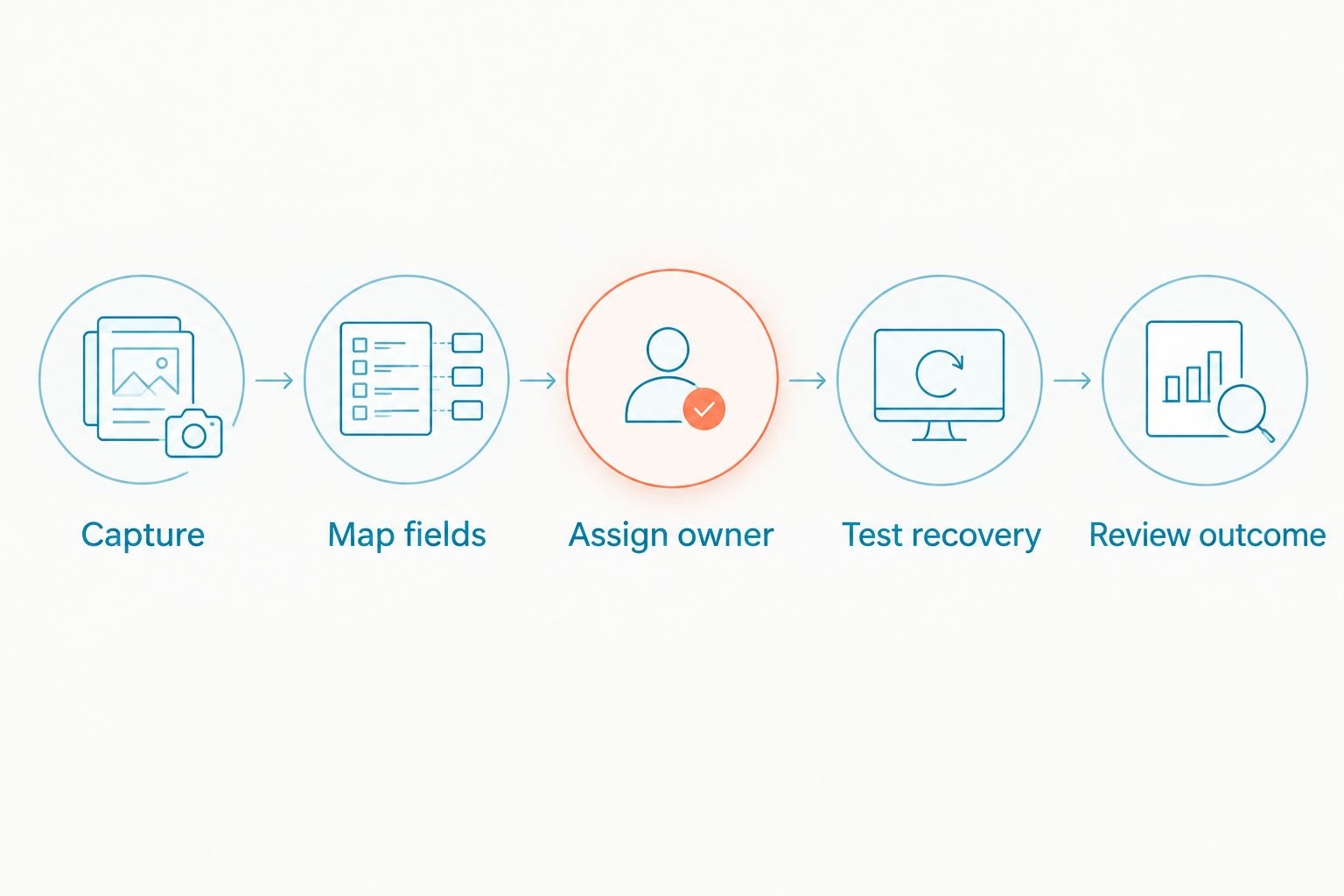
Use the same acceptance process for every shortlisted product in 2026. A successful demonstration should end with a usable record and an accountable person—not just a submission confirmation.
- Capture: Enter a realistic request through the actual customer-facing form or chat.
- Map fields: Inspect the name, contact method, request, source, and relevant permission details at the destination.
- Assign owner: Confirm who receives the request and what happens if that person is unavailable.
- Test recovery: Ask how your team identifies and retries an unsuccessful transfer.
- Review outcome: Confirm that staff can record what happened next without losing the original context.
These steps separate a working connection from a connector logo. Keep the acceptance checklist with the person responsible for the workflow so later changes receive the same checks.
Run at least 3 test submissions: a new contact, an existing contact, and a request with a missing optional field. Add 1 controlled failure test to establish who notices a broken transfer and how the team recovers it.
Treat those numbers as an acceptance checklist, not a performance benchmark. Your workflow determines whether you need additional cases, such as separate locations or different service requests.
Which lead capture software should you choose?
Choose HubSpot if you want the default CRM-centered capture approach. Choose Typeform when structured questions matter most, or Salesforce Web-to-Lead when Salesforce already owns your lead process.
For a small service team whose main problem is unanswered SMS and website conversations, evaluate VirtualText through VirtualPBX. Require the external handoff demonstration before committing to an integration-dependent workflow.
Start setup by naming the destination, selecting the minimum useful fields, and assigning an owner. Then test capture, transfer, and follow-up before sending live inquiries through the new route.
Test your lead handoff
Bring your CRM, required fields, and follow-up process to a product demonstration.
FAQ
What's the best software for lead capture integrations?
HubSpot is the default choice here for CRM-connected website capture. Choose a different option when your main requirement is conversational intake, structured forms, or an existing Salesforce process.
Is a direct integration better than an automation connector?
Choose the route that supports your required fields, events, and recovery process. A direct connection is not automatically better if it omits information your team needs, and an automation connector still needs an owner.
Can VirtualText handle website leads and text messages together?
VirtualText combines webchat, SMS, a shared team inbox, and an AI agent. Confirm the specific external handoff separately if your workflow also depends on a CRM or another destination.
Is Typeform better than a shared inbox for lead capture?
Typeform fits structured intake, while a shared inbox fits ongoing team conversations. Choose based on whether the customer needs to submit defined answers or exchange messages with your team.
Does a connected app mean every lead field will transfer?
No, a connected app does not establish complete field coverage. Inspect the actual trigger, destination action, field mapping, and update behavior before approving the workflow.
How should I test lead capture software integrations in 2026?
Test a new contact, an existing contact, a missing optional field, and a controlled transfer failure. Verify the destination record, follow-up owner, and recovery process for each relevant case.
Can healthcare teams use any lead capture platform?
Healthcare teams must evaluate the intended data and applicable privacy requirements before selecting a platform. Do not treat a healthcare use case, connector listing, or shared inbox as proof that a particular configuration meets those requirements.
One last thing
Test the second request from the same person. A workflow can create a clean first record yet mishandle a returning customer's new inquiry. Before your 2026 rollout, confirm that staff can distinguish the existing relationship from the new request and assign the next action correctly.