
Zoom handles video meetings and screen sharing, but your small business also needs someone to answer customer calls. A meeting platform alone does not solve call routing, missed inquiries, or after-hours follow-up. The best Zoom alternative in 2026 is VirtualPBX for small-business phone service; Google Meet is the better fit when you mainly need browser-based video meetings.
- Compare Zoom alternatives by job: business calls, video meetings, or customer messaging.
- VirtualPBX is best for small-business phone service with optional automated call handling and real human support.
- Microsoft Teams fits Microsoft-centered collaboration; Google Meet fits browser-based meetings.
- VirtualText combines SMS, webchat, and a shared team inbox; it is not a video-meeting replacement.
Why this matters
Searching for Zoom alternatives mixes different buying decisions. Replacing Zoom Meetings means choosing another way to hold video calls. Replacing Zoom Phone means evaluating business calling, number transfers, routing, and staff access.
Those decisions need different tests. A clear video call tells you nothing about what happens when a customer calls your business while everyone is busy.
For your 2026 shortlist, write down the problem before naming products. Choose meeting software for meetings, a phone system for customer calls, and messaging software for conversations that continue between appointments. You do not need to replace every communication tool at once.
Zoom alternatives at a glance
This comparison separates meeting replacements from phone-system and customer-messaging options. Zoom itself stays in the table so you can compare each alternative against the job you already use it for.
| Tool | Best for | Standout capability | How it differs from Zoom |
|---|---|---|---|
| Zoom | Teams already using video meetings successfully | Video meetings and screen sharing; Zoom Phone addresses business calling separately | The baseline: distinguish Zoom Meetings from Zoom Phone before switching |
| Smarter Voice | Small businesses prioritizing customer calls | Cloud calling, business SMS, routing, and optional AI FrontDesk | A phone-system-focused choice rather than a meeting-led decision |
| Microsoft Teams | Businesses centered on Microsoft collaboration | Meetings, team chat, and Microsoft 365 collaboration | Keeps meetings close to Microsoft-based teamwork |
| Google Meet | Businesses prioritizing browser-based meetings | Video meetings connected with Google Calendar | Fits a Google-centered scheduling and meeting workflow |
| VirtualText | Service teams handling website and text inquiries | SMS, webchat, a shared inbox, and an AI agent | Addresses customer messaging rather than replacing video meetings |
The right 2026 choice depends on which conversation you need to improve. Do not rank a customer inbox above a meeting platform unless customer messaging is the actual problem.
1. Smarter Voice: best for small-business customer calls
VirtualPBX provides Smarter Voice as its core business phone service. You get cloud calling, mobile, desktop, and web apps, business SMS, and routing, with optional AI FrontDesk and AI MessageDesk. The practical focus is handling business calls without making video meetings the center of your buying decision.
Where Smarter Voice shines
- Phone-system essentials: Calling, routing, and business SMS address everyday customer communication.
- Real human support: U.S.-based support gives you people to contact when you need help.
- Optional automation: Add AI FrontDesk or AI MessageDesk when your call-handling needs justify them.
- Switching support: Number transfers without downtime, no contracts, and a 14-day money-back guarantee address common switching concerns.
Where Smarter Voice falls short
- It is not the like-for-like choice when your main goal is replacing video meetings.
- AI FrontDesk and AI MessageDesk are optional products, not features to assume are part of every configuration.
- You still need to decide who answers, where calls go, and what happens after hours. Software does not make those operating decisions for you.
Smarter Voice versus Zoom
| Dimension | Smarter Voice | Zoom |
|---|---|---|
| Main evaluation | Small-business calling and customer access | Meetings, or business calling through Zoom Phone |
| Staff access | Mobile, desktop, and web apps | Evaluate the applications relevant to your Zoom product |
| Customer contact | Calling, business SMS, and routing | Compare against Zoom Phone, not Zoom Meetings alone |
| Automated handling | Optional AI FrontDesk and AI MessageDesk | Check the relevant Zoom product and configuration |
Best for: A small team that needs a business phone system and wants real people available for support.
Start with a phone-system demo. Ask to see an incoming customer call, an unanswered call, and an after-hours call follow your proposed routing. Confirm the number-transfer process before changing your existing service.
Verdict: Buy for business calling; skip it as a meeting-only replacement.
2. Microsoft Teams: best for Microsoft-centered collaboration
Microsoft Teams combines team chat and meetings with Microsoft 365 collaboration. It belongs on your shortlist when employees already work in Microsoft's document and scheduling environment. The reason to choose it is workflow fit, not the assumption that another meeting application will fix customer response.
Where Microsoft Teams shines
- Connected teamwork: Staff can work with meetings, conversations, and shared documents in a Microsoft-centered environment.
- Internal coordination: Team chat supports discussions that do not need a scheduled meeting.
- Existing habits: Microsoft-based businesses can evaluate Teams within tools employees already use.
Where Microsoft Teams falls short
- Moving meeting tools still means changing invitations, staff habits, and guest instructions.
- Teams meetings alone do not establish your customer-call routing process. Evaluate Teams Phone separately if calling is part of the project.
- A Microsoft-centered workflow is less compelling when your team works primarily elsewhere.
Microsoft Teams versus Zoom
| Dimension | Microsoft Teams | Zoom |
|---|---|---|
| Meeting role | Meetings within a collaboration workspace | Video meetings within Zoom's communications environment |
| Collaboration fit | Microsoft 365-centered teamwork | Teams already organized around Zoom workflows |
| Business calling | Evaluate Teams Phone separately | Evaluate Zoom Phone separately |
Best for: Businesses that want meetings and internal collaboration close to Microsoft 365 work.
During your evaluation, ask an external guest to join an actual meeting invitation. Check the guest experience rather than judging only how easily employees join from company accounts.
Verdict: Buy when Microsoft-centered collaboration is the reason to switch.
3. Google Meet: best for Google-centered video meetings
Google Meet is a video-meeting alternative connected with Google Calendar. It fits businesses that schedule and collaborate in Google Workspace. Start here when the requirement is straightforward: invite people, join a meeting, and share a screen.
Where Google Meet shines
- Browser-based meetings: You can evaluate a meeting workflow centered on joining through a browser.
- Calendar connection: Meeting invitations fit Google-based scheduling.
- Focused purpose: It is a direct meeting alternative when customer calling is outside the project.
Where Google Meet falls short
- A video-meeting change does not replace your business phone routing.
- Google Meet does not, by itself, solve ownership of incoming customer texts or website chats.
- Switching offers little operational value if your current Zoom meetings already work and your team does not need Google-centered scheduling.
Google Meet versus Zoom
| Dimension | Google Meet | Zoom |
|---|---|---|
| Main job | Video meetings | Video meetings |
| Workflow fit | Google Calendar-centered scheduling | Existing Zoom scheduling and meeting habits |
| Customer calls | Evaluate a separate business-calling solution | Evaluate Zoom Phone separately from meetings |
Best for: A Google Workspace-centered business replacing video meetings rather than its phone system.
Verdict: Buy for Google-centered meetings; hold if Zoom already meets your needs.
4. VirtualText: best for website and text inquiries
VirtualText is a separate customer-messaging offer from VirtualPBX, not the core Smarter Voice phone system. It combines SMS, webchat, a shared team inbox, and an AI agent for small-business service teams. Consider it when customers need to ask questions without booking or joining a meeting.
Where VirtualText shines
- Connected messaging: SMS and webchat sit within a shared team inbox.
- Service-team focus: The offer addresses customer inquiries for businesses such as insurance agencies and home services.
- After-hours use: Its AI agent supports the goal of capturing and responding to website and after-hours leads.
Where VirtualText falls short
- It is not a replacement for Zoom video meetings.
- It should not replace a business phone-system evaluation when live calling is the requirement.
- You still need clear rules for when staff take over and what customer information the automated agent should collect.
The distinction from Zoom is the conversation format: a customer sends a text or starts a website chat instead of joining a live video session. These products can serve different jobs within the same business.
Best for: A small service team that needs shared responsibility for incoming texts and website inquiries.
Verdict: Buy for customer messaging; skip it as a direct Zoom Meetings replacement.
Why people switch from Zoom
A switch needs a specific operational reason. These are reasons to evaluate alternatives, not claims about Zoom outages, service quality, or product changes.
- The requirement is business calling. Your shortlist should compare phone systems, not just video-meeting interfaces.
- Your team works in another collaboration environment. Microsoft Teams or Google Meet deserves a trial when it fits how staff schedule and share work.
- Customers need asynchronous contact. SMS and webchat address conversations that do not require everyone to be available together.
- You need a different support relationship. Ask prospective providers how staff get help with setup, routing, and number transfers.
For a 2026 migration, use a small operational test before moving the whole business:
- Map calls: Write down your current number, answering responsibilities, business hours, and fallback destination.
- Test routing: Run 3 call scenarios: answered, unanswered, and after hours. Record where each call ends.
- Check handoffs: Have 2 staff members explain who owns the next action after a call or message.
- Move numbers: Confirm the transfer sequence with your providers before canceling existing service.
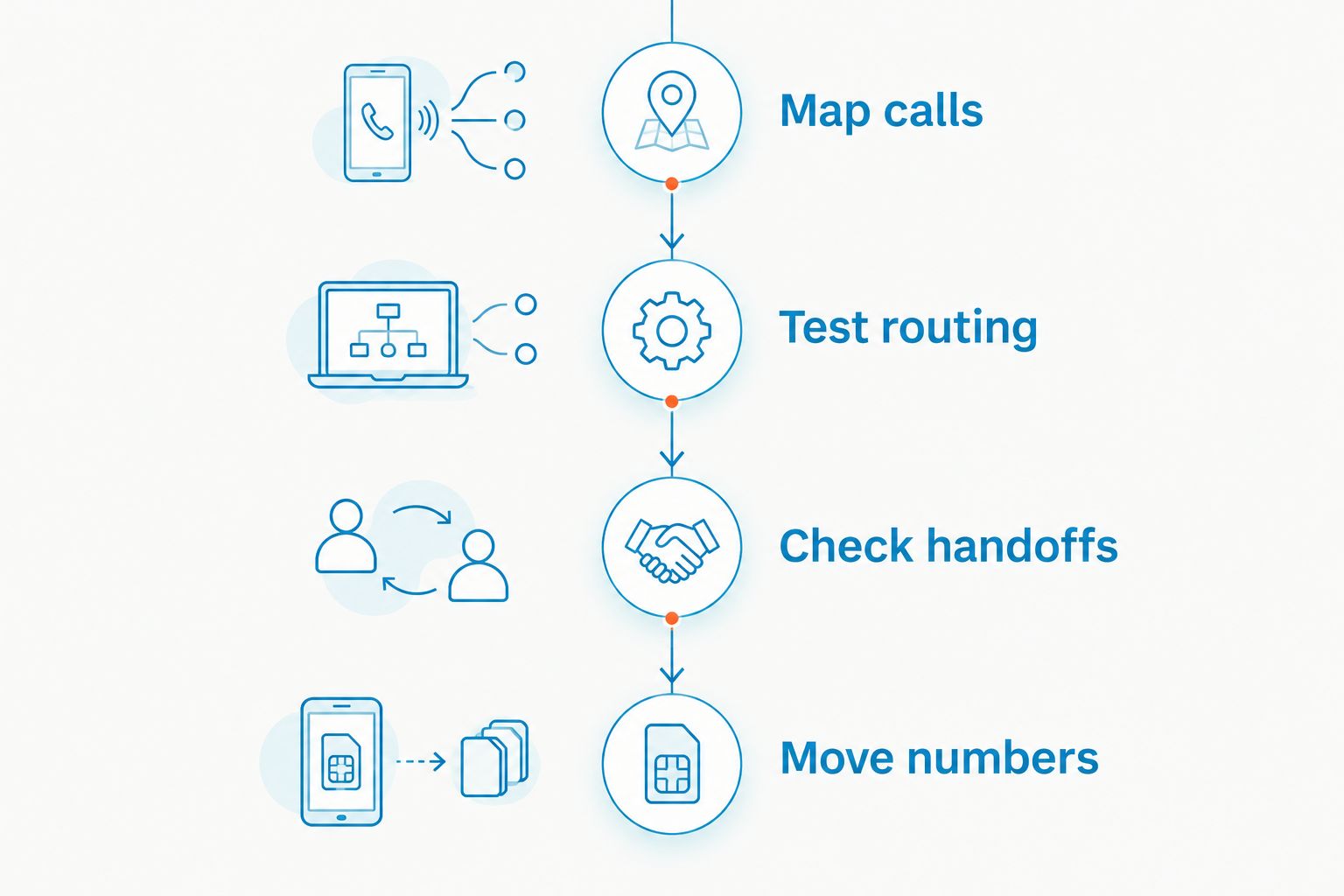
Keep the test practical. An unanswered call with no clear owner is a process problem, even when the application works exactly as configured. Fix that responsibility before treating migration as complete.
When staying with Zoom is the right call
Stay with Zoom when your meetings work, guests can join, and there is no unmet requirement behind the proposed change. Familiarity has operational value. Replacing a working meeting workflow creates training and scheduling work without automatically improving customer service.
If you use Zoom Phone, compare it against other phone services on your actual call flows. Do not treat a feature gap in Zoom Meetings as proof of a gap in Zoom Phone.
For 2026, separate the decisions: keep Zoom for meetings if it works, then address calling or customer messaging where the problem exists. A partial change is often the more precise recommendation.
FAQ
What's the best Zoom alternative for a small business in 2026?
VirtualPBX is the best fit here for small-business phone service, while Google Meet fits Google-centered video meetings. Choose according to whether you need customer calling, meetings, or messaging.
Is Microsoft Teams better than Zoom?
Microsoft Teams is the better fit when Microsoft-centered collaboration is your main requirement. Zoom remains a valid choice when its existing meeting workflow already serves your team and guests.
Can Google Meet replace Zoom Phone?
Google Meet is a video-meeting alternative, not a direct replacement for a business phone system. Evaluate calling, number transfers, and routing separately from video meetings.
Can I keep Zoom and change my business phone provider?
Yes, you can keep Zoom for meetings while evaluating a separate business phone service. Confirm your number-transfer sequence and test call routing before canceling an existing phone service.
Does Smarter Voice include AI FrontDesk automatically?
AI FrontDesk is optional, as is AI MessageDesk. Confirm which products are included in your proposed setup before making a decision.
Is VirtualText a Zoom Meetings replacement?
No, VirtualText handles customer messaging through SMS, webchat, a shared team inbox, and an AI agent. It serves a different purpose from live video meetings.
What should I test before switching from Zoom Phone?
Test answered calls, unanswered calls, and after-hours routing before switching. Also confirm staff access, number-transfer arrangements, and responsibility for follow-up.
One last thing
Ask a provider to demonstrate what happens when nobody answers. That test reveals the fallback path, the customer's next step, and the person responsible for follow-up.
Choose the system that handles the unanswered conversation, not just the successful one. A polished meeting demonstration is not proof that your next customer inquiry reaches the right person.