
A website inquiry needs a clear path to an appointment, not another inbox nobody checks. Best overall for chat-to-text follow-up: VirtualText; best for a staffed chat desk: LiveChat; best for CRM-centered service: HubSpot Service Hub; best for straightforward manual chat: tawk.to.
- VirtualText is the best website chat software for appointment-based businesses that need webchat, SMS, and a shared inbox.
- LiveChat fits a staffed chat desk; HubSpot Service Hub fits teams managing conversations alongside CRM records.
- tawk.to fits manual website conversations when employees can monitor incoming chats.
- Appointment requests are not confirmed bookings. Require a calendar demonstration before treating chat as scheduling software.
Why this matters
A customer asks about an appointment while your receptionist handles another call. Answering the question is only part of the job. Someone must collect the request, check availability, and tell the customer what happens next.
VirtualText by VirtualPBX is the best fit for small appointment-based teams that want website chat and text follow-up in one shared inbox. The platform combines SMS, webchat, a shared team inbox, and an AI agent at a flat rate of $89/month.
For your 2026 shortlist, start with that workflow rather than the widget's appearance. Define your intake questions, identify the employee responsible for replies, and demonstrate the handoff before publishing chat on your website.
What makes the best appointment-based website chat software
Use these criteria before comparing vendors. A useful chat system must support the work between an initial question and a confirmed appointment.
- Contact capture: Collect enough information to continue the conversation when a visitor leaves your website.
- Conversation ownership: Give your team a clear way to identify who handles each inquiry. Shared visibility alone does not establish responsibility.
- After-hours handling: Distinguish an automated acknowledgment from a useful intake conversation, and explain when a person will respond.
- Booking accuracy: Separate preferred appointment times from actual calendar availability. Never present an unverified request as a reservation.
- Human handoff: Give employees the context needed to continue without asking the customer to repeat everything.
- Operational fit: Check staffing needs, website installation, messaging permissions, and the systems your team already uses.
For a 2026 evaluation, give booking accuracy and ownership more weight than the number of automation features. A longer feature list does not resolve an unattended appointment request.
Website chat software at a glance
These recommendations cover different operating models. The ranking favors a small appointment-based business that needs to capture website inquiries and continue the conversation after the visitor leaves.
| Rank | Software | Best for | Standout capability | Key limitation to evaluate |
|---|---|---|---|---|
| 1 | VirtualText | Chat-to-text follow-up | Webchat, SMS, shared inbox, and AI agent together | Demonstrate calendar booking separately from lead capture |
| 2 | LiveChat | A staffed chat desk | Dedicated live website conversations | Your team needs a coverage and follow-up plan |
| 3 | HubSpot Service Hub | CRM-centered service | Customer service connected with CRM records | Broader service workflows require configuration |
| 4 | tawk.to | Straightforward manual chat | Website chat operated by your team | Manual conversations still need an appointment process |
The default recommendation is VirtualText when your appointment workflow depends on texting after the website visit. Choose a different operating model when staffed browser chat or an established CRM process matters more.
1. VirtualText: best for chat-to-text appointment follow-up
VirtualText combines webchat, SMS, a shared team inbox, and an AI agent for small-business service teams. It addresses the intake problem: capturing an inquiry and giving employees a shared place to respond.
That combination fits businesses where the appointment conversation continues after the customer closes the website. Your team still needs explicit rules for checking availability and confirming bookings.
VirtualText pros:
- Combines website chat and SMS in the same platform.
- Gives a service team a shared inbox rather than relying on separate personal conversations.
- Includes an AI agent for the customer-response workflow.
- Uses a flat-rate subscription model stated at $89/month.
VirtualText cons:
- Lead capture does not establish that your scheduling system supports direct booking; demonstrate that connection separately.
- A shared inbox still needs an owner and a follow-up routine. Software does not decide who is responsible for an unanswered request.
VirtualText pricing: The stated flat rate is $89/month; confirm the included scope against your intended workflow.
Best for: Insurance agencies, home-service businesses, and other small service teams that want webchat and SMS together.
Ask VirtualPBX to demonstrate a website inquiry, a subsequent text exchange, and the employee's view of that conversation. Then show how your team turns the request into a confirmed appointment.
Verdict: Buy VirtualText for shared chat-and-text intake once the demonstration matches your appointment workflow.
2. LiveChat: best for a staffed appointment inquiry desk
LiveChat is website live-chat software for conversations between visitors and your team. It fits an operating model where employees are available to answer questions while customers browse.
For appointment-based businesses, that makes the staffing plan central. A live conversation can clarify a request, but the employee still needs a reliable way to check availability and record the outcome.
LiveChat pros:
- Centers the customer experience on a live website conversation.
- Lets employees ask follow-up questions before directing the customer toward an appointment.
- Fits a dedicated receptionist or customer-service desk workflow.
LiveChat cons:
- A staffed chat model needs named coverage during the hours you advertise.
- Continuing by text and creating confirmed bookings are separate requirements to demonstrate, not assumptions to make from the live-chat label.
Best for: Businesses with employees assigned to incoming website conversations during operating hours.
Use a realistic test: a visitor asks for an appointment while the receptionist is already helping someone else. Decide who handles that chat and what the visitor sees while waiting.
Verdict: Buy LiveChat when a staffed website chat desk is your preferred service model.
3. HubSpot Service Hub: best for CRM-centered appointment service
HubSpot Service Hub connects customer-service work with HubSpot's CRM environment. It belongs on the shortlist when your appointment inquiry needs to remain connected with the wider customer record.
This is a different decision from buying a chat widget alone. Your team must define how a conversation relates to the contact, the service request, and the next employee action.
HubSpot Service Hub pros:
- Places customer-service activity in a CRM-centered environment.
- Fits teams that want appointment inquiries considered alongside an existing customer relationship.
- Supports a broader service-management approach than an isolated website conversation.
HubSpot Service Hub cons:
- Your team must configure record ownership and service workflows, not just install chat.
- A CRM record is not a calendar reservation; demonstrate the full booking path before treating the systems as interchangeable.
Best for: Appointment-based businesses already organizing customer service around HubSpot CRM.
For your 2026 evaluation, ask the demonstrator to find a returning customer's inquiry, identify the responsible employee, and show where the appointment outcome is recorded. Avoid evaluating chat in isolation from the records employees actually use.
Verdict: Buy HubSpot Service Hub when CRM-centered service is the main requirement; hold if you only need a simpler intake inbox.
4. tawk.to: best for straightforward manual website chat
tawk.to provides website live chat that employees can use to speak with visitors. It fits a manual intake process where a person answers questions and directs the customer to the next booking step.
Keep the initial workflow narrow. Use chat to clarify the requested service and establish a contact path, then move into your existing scheduling process.
tawk.to pros:
- Provides a direct website conversation with your team.
- Fits a human-led intake process without requiring automated booking as the starting point.
- Gives a small team a focused chat option to evaluate.
tawk.to cons:
- Manual intake depends on someone monitoring and responding to incoming conversations.
- Your team must establish how chat details reach the booking process and who confirms the appointment.
Best for: Businesses that want employees to handle website chats and already have a separate scheduling routine.
Do not call a visitor's preferred time a booking. Have the employee verify availability and send an explicit confirmation through your established process.
Verdict: Buy tawk.to for a deliberately manual chat workflow; skip it as a substitute for an untested scheduling connection.
Ranking criteria: why these options occupy different slots
The ranking puts combined webchat and text follow-up first because this guide targets appointment inquiries that need continued attention. VirtualText occupies that slot through its stated combination of webchat, SMS, a shared inbox, and an AI agent.
LiveChat takes the staffed-desk slot. HubSpot Service Hub takes the CRM-centered slot. tawk.to takes the straightforward manual-chat slot. These are workflow recommendations, not measured response-time or conversion rankings.
For your 2026 purchase decision, reorder the shortlist around your actual constraint. If your employees already work from a CRM service queue, that requirement deserves more weight than a standalone chat experience.
Test the appointment handoff before you choose
Run the same demonstration with every shortlisted option. Use 3 inquiry scenarios: a new appointment request, a request to reschedule, and an after-hours question. These are evaluation scenarios, not performance benchmarks.
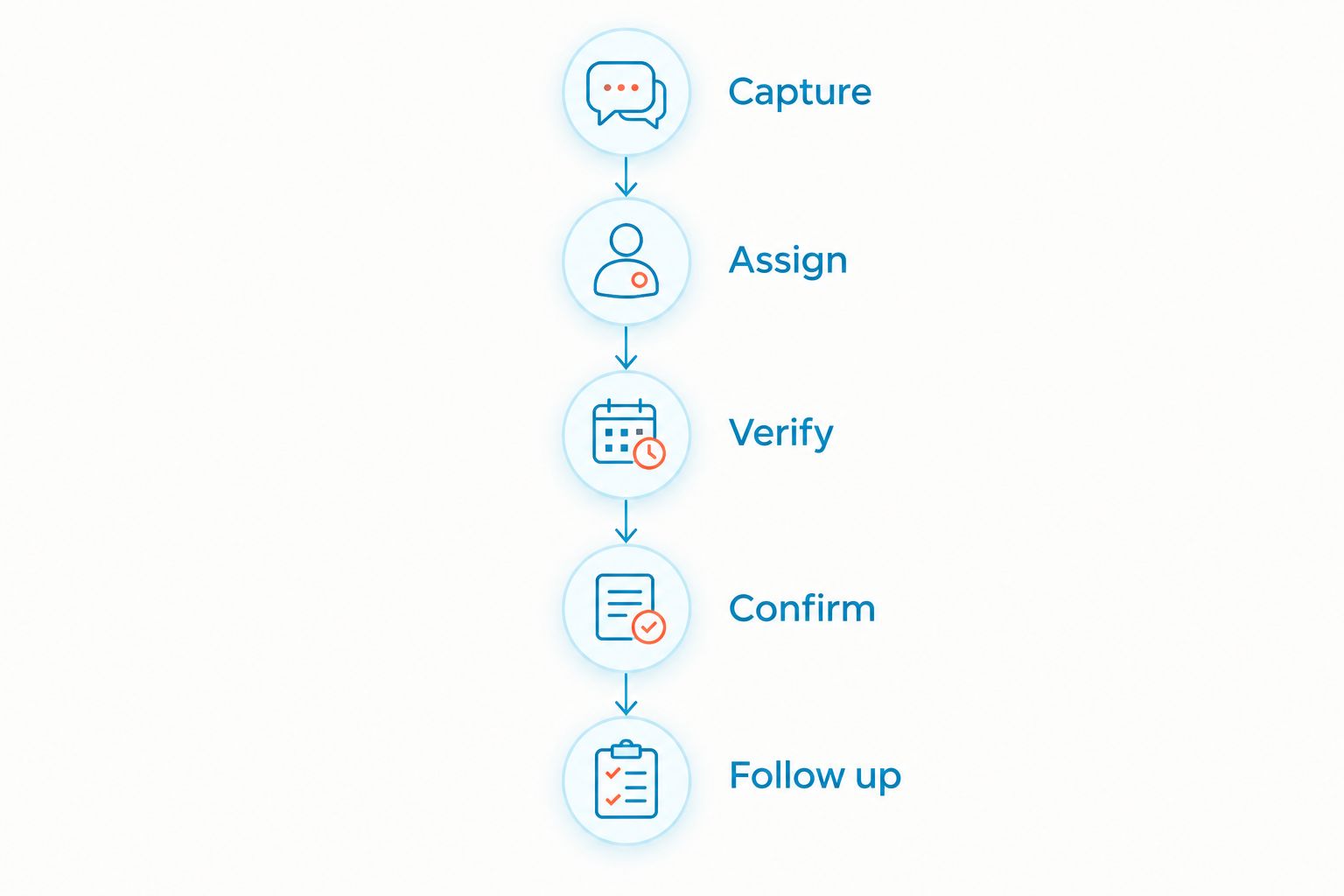
Follow this sequence for each conversation:
- Capture: Ask what service the visitor needs and collect an appropriate contact method.
- Assign: Identify the employee responsible for the next action.
- Verify: Check the actual schedule before offering a confirmed appointment.
- Confirm: Tell the customer whether the appointment is booked or still awaiting review.
- Follow up: Record the outcome and resolve any unanswered request.
The distinction between Verify and Confirm is essential. Capturing a preferred time proves intake works; it does not prove scheduling works.
Include a handoff between 2 employees in the demonstration. Have the second employee explain what the customer requested and what still needs to happen, without asking the customer to repeat the conversation.
For healthcare or other sensitive inquiries, use a non-sensitive test request. Confirm the required privacy, security, and contractual arrangements before collecting confidential details through any chat platform.
Ask VirtualPBX to demonstrate the same sequence rather than showing unrelated features. You can request a demo with your intake questions and appointment-confirmation requirements prepared.
Which website chat software should you choose?
Choose VirtualText if your main problem is capturing website inquiries and continuing them through SMS in a shared team inbox. The stated $89/month flat rate gives you a concrete starting point for evaluating that workflow.
Choose LiveChat when you want a staffed chat desk. Choose HubSpot Service Hub when service conversations must sit within your CRM process. Choose tawk.to when you want a manual website-chat approach alongside existing scheduling.
Before signing up in 2026, set a 1-business-day internal review checkpoint for unresolved appointment requests. This is a suggested operating rule, not a vendor response guarantee. Adjust it to the service expectations you actually communicate to customers.
The purchase decision is finished only when your team can explain who owns an inquiry, how availability is checked, and what the customer receives as confirmation.
FAQ
What's the best website chat software for appointment-based businesses?
VirtualText is the best fit for small appointment-based teams that need webchat, SMS, a shared inbox, and an AI agent together. Choose LiveChat for a staffed chat desk, HubSpot Service Hub for CRM-centered service, or tawk.to for manual website conversations.
Can website chat software book appointments automatically?
Automatic booking requires a working connection to the scheduling system and verified booking rules. Ask the vendor to demonstrate checking availability and creating a real appointment; collecting a preferred time is not enough.
Is live chat better than texting for appointment inquiries?
Live chat fits a conversation while someone is on your website; texting fits continued communication through SMS. Choose around the customer's next step and your team's ability to manage replies rather than treating either channel as universally better.
How much does VirtualText cost?
The stated VirtualText subscription is a flat rate of $89/month. Confirm the included scope against your website chat, texting, inbox, and customer-response requirements before purchasing.
What should website chat do after business hours?
After-hours chat should capture the request, explain the next step, and avoid promising an unverified appointment. If automation answers questions, establish clear boundaries and a route to human review.
What should a clinic check before adding website chat?
A clinic should verify the platform's suitability for its intended information and required privacy arrangements before collecting patient details. Start demonstrations with non-sensitive appointment questions and separately review access, data handling, and contractual requirements.
What should I ask during a website chat software demo?
Ask the vendor to show capture, assignment, availability checking, appointment confirmation, and follow-up using your own scenario. Include an after-hours inquiry and an employee handoff so you can inspect the complete process.
One last thing
Test the sentence your customer sees at the end of chat. An appointment request and a confirmed appointment need different wording. If your team cannot point to a verified calendar entry, tell the customer the request is awaiting confirmation—not that the appointment is booked.