
Yes—an AI agent can update CRM records without manual entry when it has an authorized connection to your CRM and rules for matching contacts and writing fields. The catch is that collecting an answer in a conversation does not automatically save it to the correct customer record. You still need to configure the connection, decide what the agent can change, and route uncertain updates to a person.
- Can an AI agent update CRM records without manual entry? Yes, with an authorized integration and field-level rules.
- CRM automation needs contact matching, data validation, and confirmation that each update succeeded.
- VirtualPBX serves small businesses that need business communications; verify CRM write access separately.
- Automate clear customer details first. Require review for conflicting information and consequential changes.
Why this matters
Your customer explains the problem in a text or website chat. If someone must copy that conversation into the CRM, the handoff still depends on manual work. A useful automation finishes the record update, not just the reply.
For your 2026 setup, separate conversation handling from CRM writing. The agent interprets the message; the integration submits an allowed change; the CRM accepts or rejects it. Start with the workflow in this guide to integrating business texting with your CRM, then confirm the exact actions your chosen connection supports.
A saved conversation is not the same as an updated CRM record. Check both before calling the workflow automated.
Can an AI agent update CRM records without manual entry?
Yes. An AI agent can turn customer statements into structured information and pass approved updates through a CRM connection. That connection needs permission to write—not merely search contacts or display information.
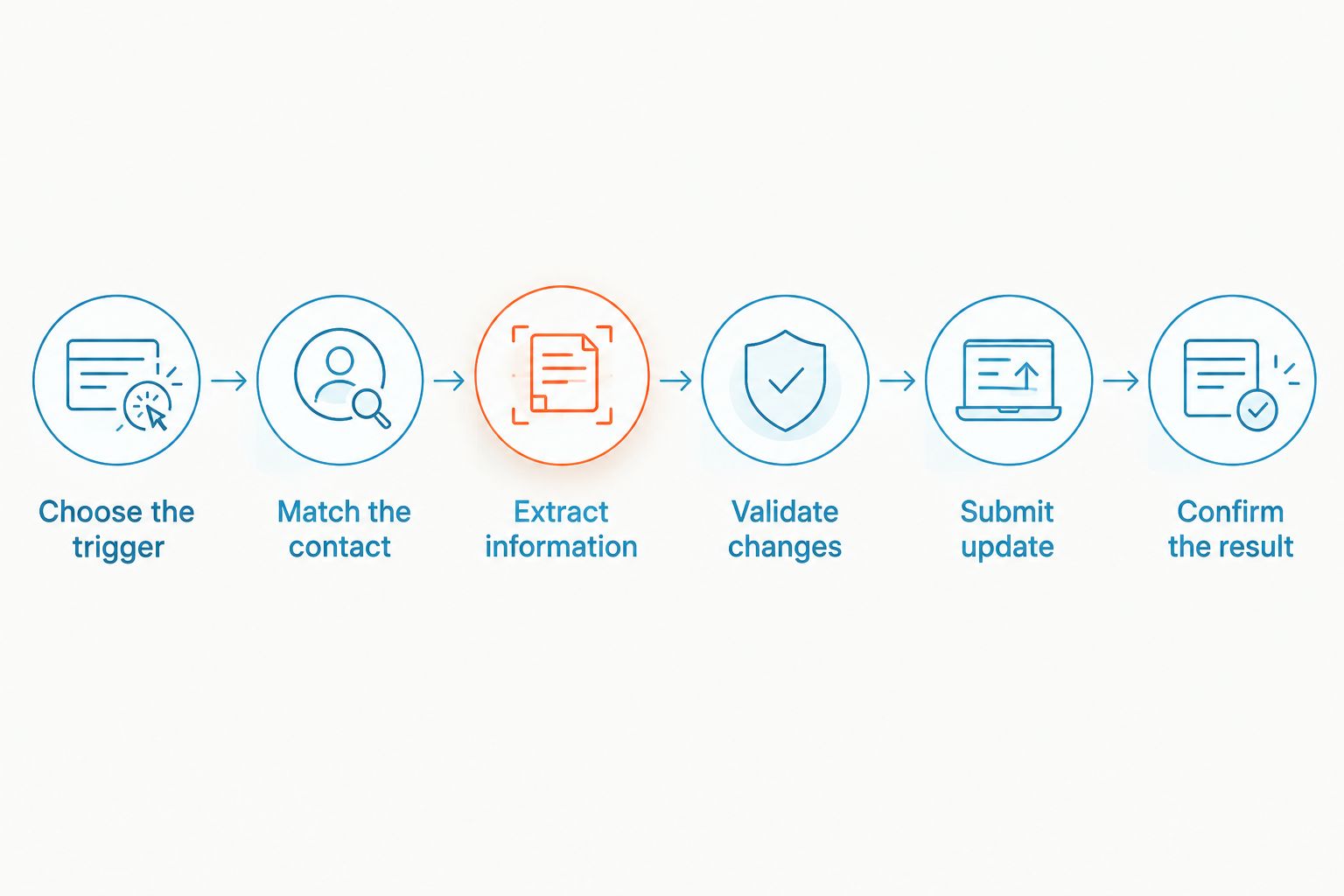
Use this setup sequence to make the process explicit:
- Choose the trigger. Decide when the update should happen: after a customer supplies a requested detail, after an intake conversation ends, or after a team member approves a proposed change. Avoid writing a new record after every fragment of a message.
- Match the contact. Use your CRM's record identifier when available. Otherwise, define how the workflow searches verified contact details and what happens when the search returns multiple matches. Do not let a similar name determine the record.
- Extract the intended information. Separate what the customer stated from what the agent inferred. A request for an appointment belongs in a request field; it is not proof that an appointment exists.
- Validate the proposed change. Check required fields, accepted formats, and allowed values before submitting the update. A CRM field that expects a predefined service category should receive an accepted category, not an unrestricted sentence.
- Submit an authorized update. Send only the permitted fields to the intended record. Configure the connection so it cannot change unrelated information simply because that information appeared in the conversation.
- Confirm the result. Check the CRM response and retain a traceable outcome. Send rejected writes, ambiguous matches, and conflicting details to a named team member instead of silently dropping them.
The endpoint matters. An agent saying it has recorded a request is not evidence that the CRM accepted the change. Treat the workflow as complete only after the destination confirms success.
Which connection should you use?
Choose the connection based on the actions it supports, not on whether a product page mentions integrations. Read access, contact creation, activity logging, and field updates are different capabilities. Your workflow needs the particular write action you intend to automate.
These are connection patterns, not claims about a specific provider's compatibility.
| Connection approach | Best for | Advantage | Limitation to check |
|---|---|---|---|
| Direct integration | Teams whose required CRM actions are supported directly | Keeps the workflow within a supported connection | Available fields and actions can restrict the workflow |
| Automation connector | Teams connecting separate conversation and CRM systems | Makes triggers and actions explicit | Each connected step needs its own configuration and error handling |
| Custom API connection | Teams with requirements that existing connectors do not meet | Allows purpose-built matching and validation rules | Requires development, security controls, and ongoing maintenance |
A direct connection is not automatically the right choice. If it only creates contacts, it does not satisfy a requirement to update existing records. An automation connector is not automatically enough either: inspect the available actions and test the exact field changes.
For a 2026 evaluation, ask for a demonstration using your intended CRM object. A contact update does not prove that the same connection can change a deal, service request, or appointment record.
What should an agent update automatically?
Start with information customers explicitly provide and changes you can inspect easily. Keep the permitted scope narrow. You can expand it after the initial workflow handles matching, validation, and failures correctly.
The following table is a proposed policy, not a list of features included in a particular product.
| Information | Recommended treatment | Guardrail |
|---|---|---|
| Stated service need | Save to a designated intake field | Preserve the customer's meaning; do not invent a diagnosis |
| Preferred callback window | Record as a preference | Do not convert a preference into a confirmed appointment |
| Conversation summary | Append as an activity or note | Distinguish customer statements from unresolved questions |
| Changed contact details | Verify before replacing existing details | Keep the old value traceable |
| Deal stage or booking status | Require the corresponding confirmed business event | A customer inquiry alone is not confirmation |
| Sensitive customer information | Restrict collection and storage to approved workflows | Review access, retention, and applicable obligations first |
For an initial rollout, choose 3 fields: service need, preferred callback window, and conversation summary. That is a suggested starting scope, not a performance benchmark. It keeps your first review focused on information the customer actually supplied.
Avoid using a free-form summary as a substitute for every structured field. Your dispatcher needs to find the service request without rereading the entire conversation. Your sales team needs a clear distinction between interest and commitment.
Why CRM automation reliability varies
An agent's ability to understand a message is only part of the workflow. The connection, record rules, and failure handling determine whether the right information reaches the right place.
- Connection permissions. A connection authorized to read customer records cannot necessarily modify them. Check the granted permissions and limit them to the required actions.
- Contact matching. Shared phone numbers, changed email addresses, and duplicate records complicate identification. Define when the workflow must stop and ask for help.
- Field requirements. Required values, restricted categories, and record relationships affect whether a write is valid. Match the CRM's schema rather than sending unrestricted text everywhere.
- Conflicting information. A new message can contradict an existing record. Decide which changes require verification instead of letting the latest message overwrite everything.
- Error handling. Rejected requests and interrupted connections need a visible recovery path. Assign responsibility for failed updates and distinguish retryable failures from requests that need correction.
- Operational ownership. Someone must maintain field mappings and permissions when your CRM configuration changes. Assign that responsibility before launch.
Use these factors as your 2026 acceptance criteria. A fluent conversation does not compensate for a duplicate customer record or an unnoticed failed update.
How do you test CRM updates before launch?
Build a test around observable results, not a polished conversation. Use a designated test record and inspect the CRM directly after each run. Keep real customer information out of exploratory tests.
Begin with 1 test contact and a straightforward request. Confirm that the intended fields change, unrelated fields stay untouched, and the recorded summary matches the conversation. Then test the exceptions separately.
Your test checklist should include:
- Existing contact: The workflow finds the intended record and updates only allowed fields.
- Unknown contact: The workflow follows your explicit rule for creating a record or requesting review.
- Ambiguous match: The workflow stops rather than choosing between similar records without sufficient evidence.
- Invalid value: The workflow rejects or corrects an unsupported field value before submission.
- Repeated event: Reprocessing the same conversation does not create duplicate activities or repeat a consequential action.
- Failed write: The team receives an actionable alert and can see which update did not complete.
These 6 test cases are a practical launch checklist, not a guarantee that every failure mode is covered. Add cases for the fields and business actions your workflow actually uses.
For your 2026 pilot, review successful writes as well as failures. A technically accepted update can still contain the wrong interpretation. Check meaning, destination, and permissions—not just whether the integration returned success.
Where does VirtualPBX fit?
VirtualPBX is best for small businesses that need business communications. Its separate VirtualText offer combines SMS, webchat, a shared team inbox, and an AI agent for small-business service teams. That makes the conversation side relevant to this workflow; CRM write access remains a separate capability to verify.
Use VirtualPBX as the starting point for discussing your communication needs. Bring the name of your CRM, the record type, the fields you want changed, and the exceptions that require a person. Ask for confirmation of the exact supported connection before treating automatic updates as part of your setup.
For VirtualPBX business communications, the practical benefit is handling customer conversations through the offered channels. The boundary is equally important: do not equate conversation handling with demonstrated support for your CRM's update actions. Approve the CRM workflow only after a successful end-to-end test.
Does an AI agent need full access to my CRM?
No. An agent needs access to the records and actions required for its assigned workflow, not unrestricted control over the CRM. Use the narrowest permissions your connection supports.
For example, an intake workflow should not gain permission to delete records merely because it needs to append a note. Review the permissions of the connection itself, not just instructions written for the agent.
Can an agent update records while keeping a person in control?
Yes. You can separate proposed changes from approved writes and require review for specified situations. Routine intake notes can follow an automatic path while conflicting contact details follow a review path.
Make the handoff useful. Give the reviewer the proposed change, the existing value, and the relevant customer statement. An unexplained alert simply moves the manual investigation elsewhere.
FAQ
Can an AI agent update CRM records without manual entry?
Yes, an AI agent can update CRM records through an authorized connection that supports the required write actions. Configure contact matching, field validation, permissions, and confirmation of successful updates.
Will connecting an AI agent to my CRM automatically enable updates?
No, a connection does not automatically enable every CRM action. Confirm whether it supports reading records, creating contacts, appending activities, or updating the specific fields you need.
Can an AI agent update an existing contact instead of creating a duplicate?
Yes, when the workflow can identify the existing contact and supports updating that record. Define a matching rule and send ambiguous matches to a person rather than creating another record automatically.
What happens if the CRM rejects an automatic update?
A rejected update needs a visible failure path. Configure logging, team notification, and an appropriate retry or review process instead of treating the conversation as proof that the change was saved.
Should an AI agent overwrite customer details whenever someone sends a correction?
No, replacement rules should depend on the field and the verification required. Preserve traceability and require review when a proposed correction conflicts with established customer information.
Can CRM automation confirm an appointment from a customer's preferred time?
No, a preferred time alone is not a confirmed appointment. Record it as a request unless a connected scheduling workflow confirms the booking.
How should a small team start testing CRM automation in 2026?
Start with a designated test contact and a narrow set of permitted fields. Check successful writes, ambiguous matches, invalid values, repeated events, and failed updates before enabling the workflow for customers.
One last thing
Test what the agent is forbidden to change. A successful update proves that a connection works; a blocked unauthorized change proves that a boundary works. Your 2026 launch checklist needs both.
Before expanding the workflow, ask a tester to supply conflicting information and request an unrelated record change. Confirm that the system preserves restricted fields and sends the exception to the right person. That is a more useful final check than another easy conversation.