
Yes, customers can reply to automated text messages when the sending number supports incoming SMS and the business has a system to receive those replies. Automation does not make a text one-way, but a successful delivery does not prove that anyone monitors the return conversation.
- Can customers reply to automated text messages? Yes, when the sending number and messaging system support two-way SMS.
- VirtualPBX offers business SMS; confirm the incoming-message workflow before choosing how your team will handle replies.
- Two-way texting needs a monitored inbox, clear ownership, and a handoff when automation cannot resolve the request.
- Test ordinary replies, unexpected questions, and opt-out requests before sending automated messages to customers.
Can customers reply to automated text messages?
Customers can reply when the sender accepts incoming texts and routes them somewhere your business can act on them. Check the entire conversation, not just whether the original message arrives.
Use this sequence to verify your setup:
- Check the sender. Ask your provider whether the exact sending number supports incoming SMS.
- Send a test. Trigger the same automated message a customer would receive.
- Reply naturally. Send a question rather than only the confirmation keyword your workflow expects.
- Find the reply. Confirm that it appears in the intended inbox with the original message attached to the conversation.
- Finish the exchange. Have a team member respond and verify that the answer reaches your test phone.
For small teams evaluating business SMS, VirtualPBX offers business texting alongside its phone system. Confirm how incoming texts reach your staff before making automated messages part of your customer-service process.
Why this matters
An automated reminder can start a conversation you did not plan. A customer might ask to change an appointment, clarify an address, or report that the original information is wrong.
If your message invites a reply, your business needs a way to receive and handle it. Otherwise, the customer sees a conversation while your team sees only an outbound notification.
For your 2026 texting setup, separate these questions: Can the customer send a reply? Can your system receive it? Will someone take responsibility for the next action? A useful workflow answers all of them.
Which automated texting setup fits your business?
Automated delivery and automated conversation are different capabilities. Choose the simplest workflow that handles the replies your customers actually send.
| Setup | Best for | Main benefit | Main limitation |
|---|---|---|---|
| One-way notification | Updates with a separate contact route | Keeps the outbound process simple | Does not provide a usable return conversation |
| Two-way SMS with staff replies | Scheduling changes and individual questions | Lets staff interpret context and resolve exceptions | Needs inbox coverage and clear ownership |
| Keyword-based automation | Narrow actions such as confirmation | Gives predictable responses to defined inputs | Unrecognized replies need another route |
| Conversational automation with staff handoff | Routine questions and initial intake | Handles more varied wording than fixed keywords | Needs approved information, testing, and an escalation path |
For customer-service conversations, choose two-way SMS with a clear human handoff. Keyword automation works for a narrow task, but a customer asking an unrelated question still needs help.
A one-way notification is not inherently wrong. It is wrong to present it as a monitored conversation when replies will not reach your team. State the alternative contact route plainly.
Two-way SMS: receive the reply and assign an owner
Two-way SMS lets customers respond in the same text thread. The operational requirement is straightforward: incoming messages must reach an inbox your team checks.
Best for: businesses handling appointment changes, service questions, and follow-up requests. Staff can read the customer's wording and decide what action is appropriate instead of forcing every request into a preset category.
The drawback is staffing. A reply-capable number does not create coverage, and a shared inbox does not automatically make someone responsible for every message. Define who checks new replies, who takes over during absences, and how staff mark a conversation complete.
For your 2026 inbox review, inspect unresolved conversations as well as new arrivals. An opened message can still contain an unanswered question or an unfinished scheduling change.
Keyword automation: handle defined actions, not every question
Keyword automation responds to a recognized input. An appointment workflow might accept YES as confirmation, while another defined response starts a rescheduling process.
Best for: simple, clearly stated actions with predictable outcomes. Customers understand the request, and your team can test each expected response before launch.
The limitation appears when customers add context. A reply containing YES and a question about parking should not be treated as a completed conversation merely because the confirmation succeeded.
Keep the instruction narrow. If a workflow only processes confirmation keywords, explain how customers should ask other questions. Do not promise open-ended help unless the system or your staff can provide it.
Conversational automation: handle routine questions with boundaries
Conversational automation interprets a customer's wording rather than requiring an exact keyword. Its useful role is answering approved routine questions or collecting information before a staff member takes over.
Best for: repeat questions and initial intake with defined boundaries. The benefit is a less rigid exchange. The drawback is that uncertain answers, unusual requests, and sensitive situations still need a reliable escalation route.
Ask the provider to demonstrate an unsupported question, a correction, and a request for a person. A polished greeting does not show how the system handles an exception.
Avoid giving automation authority it does not have. A message acknowledging a requested appointment change is not the same as confirmation that the appointment has changed.
Why reply handling varies
Whether an automated text becomes a useful conversation depends on more than the wording of the first message. Check these factors with your provider and your team:
- Sender capability. The sending number must support incoming messages for customers to reply successfully.
- Platform configuration. Incoming texts need a destination; outbound campaign delivery alone does not establish that route.
- Automation rules. A workflow that recognizes specific keywords is different from one that handles open-ended questions.
- Inbox ownership. Staff need to know who answers, who follows up, and who resolves exceptions.
- Coverage hours. After-hours replies need an honest acknowledgment and a defined next step.
- Opt-out handling. Requests to stop messages need a separate suppression process, not ordinary sales follow-up.
Make these checks part of your 2026 launch checklist. A working outbound test confirms only one part of the customer experience.
How do you set up a reply workflow your team can manage?
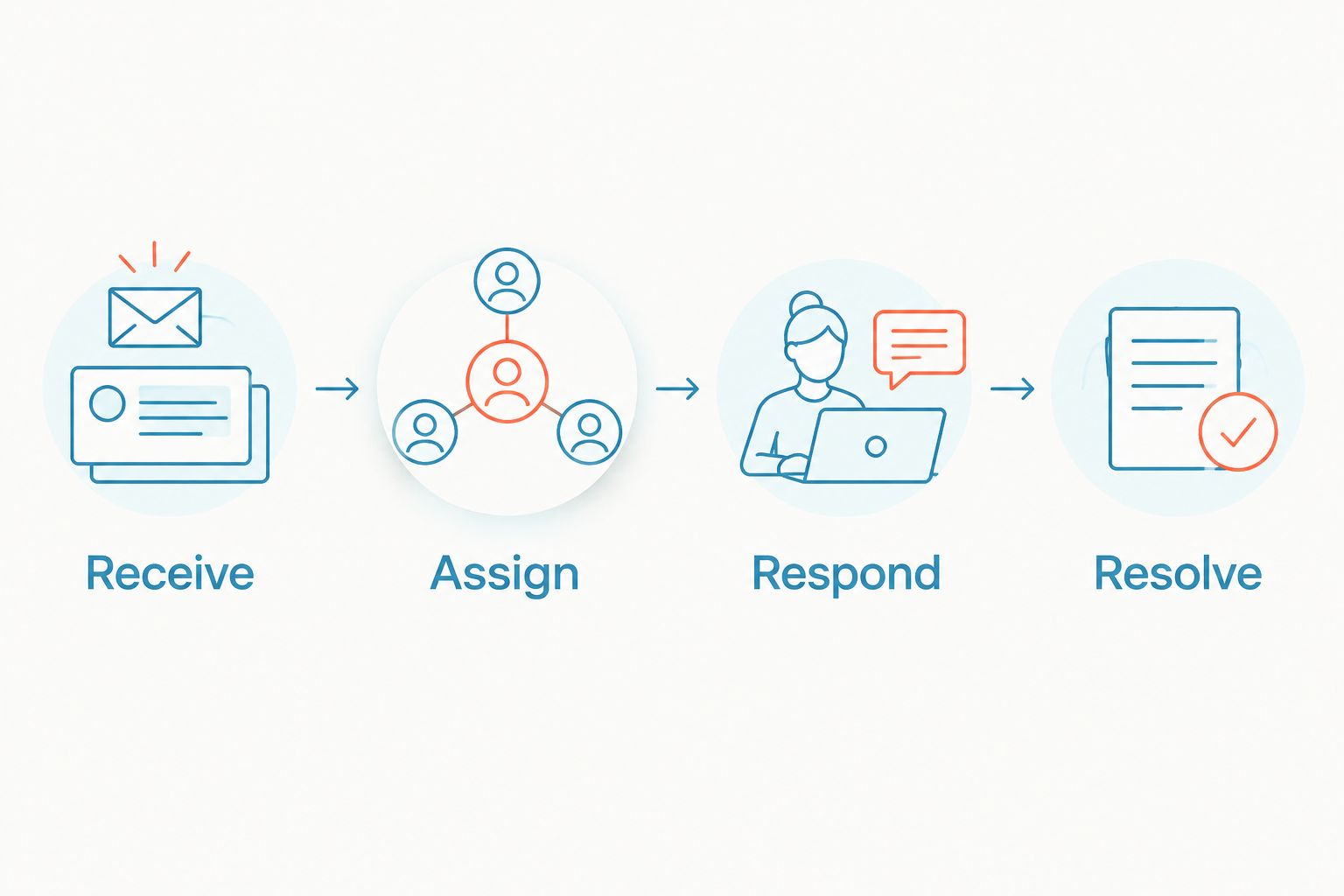
Start with the customer's next action, then build the inbox process around it. The basic sequence is Receive, Assign, Respond, Resolve.
Receive
Send incoming texts to a monitored destination. Keep the automated message visible in the conversation so staff can understand what prompted the reply.
Test from a phone outside your account. That exposes the experience your customer actually gets rather than only the view inside your messaging dashboard.
Assign
Choose an owner for each open conversation. If several people share responsibility, define how they claim a message and pass it to another person.
The goal is not simply visibility. It is preventing a situation where everyone can see the reply but nobody answers it.
Respond
Separate acknowledgment from resolution. Tell customers when a person needs to review the request, and do not describe an unconfirmed action as complete.
For a practical starting point, review how to build a shared team inbox for customer texts. Apply the same ownership rules whether the first message comes from a person or an automated workflow.
Resolve
Close the conversation only after the requested action is complete or the next step is clear. An automated acknowledgment alone should not count as resolution.
Preserve enough context for the next staff member to understand the outcome. That matters when a customer texts again about the same issue.
What should you test before sending automated texts?
Use a written acceptance checklist for your 2026 launch. Repeat it whenever you change the sending number, message template, routing rules, or inbox coverage.
- Ordinary reply: Does a straightforward question appear in the correct conversation?
- Unexpected reply: Does an unrecognized message reach a person instead of disappearing into a completed workflow?
- Mixed reply: Does a confirmation containing an additional question remain visible for follow-up?
- After-hours reply: Does the acknowledgment describe the actual next step without implying immediate staff attention?
- Staff handoff: Can the next person see what the customer and automation already said?
- Opt-out request: Does the system stop the relevant automated messaging and record the request?
Also test the length of your outbound message. Standard SMS allows 160 characters per segment with GSM-7 encoding; a multipart GSM-7 message typically uses 153 characters per segment. UCS-2 messages typically allow 70 characters per segment, or 67 characters per segment in multipart messages.
Those are message-format limits, not reply permissions. A longer text does not become one-way simply because it is split into segments. Confirm how your provider counts and displays multipart messages before approving a template.
Where does a combined texting and inbox service fit?
VirtualPBX is best for small teams that want business calling and SMS from a cloud phone provider. Its separate VirtualText offer combines SMS, webchat, a shared team inbox, and an automated agent for service teams handling website and after-hours leads.
The practical benefit is bringing customer conversations into a team workspace. The operational limitation remains: your business must set ownership, approved responses, and escalation rules. Software does not decide who is accountable for an unresolved request.
When evaluating VirtualPBX business SMS, ask for a demonstration using your actual reminder and a realistic customer reply. Confirm the specific capabilities you need rather than assuming that every texting workflow behaves the same way.
Will customers know their text is automated?
Customers do not need to identify the automation to send a reply. What matters is whether the message accurately explains what they can do next.
Identify your business and state the purpose of the text. If replies are monitored, explain what customers can ask; if the message only accepts a defined response, state that boundary. Never imply that a person has reviewed a request when only an automated acknowledgment has been sent.
Does replying mean the customer agreed to marketing texts?
A reply is not blanket permission for unrelated marketing. Keep the customer's service conversation separate from promotional messaging permissions.
Before adding promotional follow-up, verify the applicable consent requirements for that messaging program. Respect opt-out requests and avoid treating an appointment confirmation as permission to send every future campaign.
FAQ
Can I reply to an automated appointment reminder?
Yes, if the sending number and reminder system accept incoming texts. The business must also route your reply to staff or a workflow that can act on it.
Will a real person read my reply to an automated text?
Not necessarily; accepting incoming texts does not guarantee that a person monitors them. Check the message for instructions or use the business's stated contact route if you need help.
Can customers reply with something other than YES or NO?
Customers can type an open-ended reply, but the business's workflow determines how it is handled. Keyword-only automation needs a fallback for questions and unexpected wording.
Can a business receive replies after closing time?
Yes, a reply-capable messaging system can receive texts outside business hours. Receiving a message does not mean a staff member is available to resolve it immediately.
Does a delivered text prove that replies work?
No, delivery confirms the outbound message reached its destination, not that incoming replies reach a monitored inbox. Test the return conversation separately.
Can an automated text confirm a changed appointment?
Only if the workflow actually completes the scheduling change. An acknowledgment that a customer requested a new time is not confirmation of a new appointment.
What happens when a customer replies STOP?
STOP is commonly used to request that automated texts stop. Verify that your messaging provider processes opt-out requests and prevents the relevant further messaging.
One last thing
Your most useful test reply is an unexpected question. A confirmation keyword tests the path you designed; a question about an address, appointment change, or previous conversation tests whether customers can actually get help.
Before your next automated send in 2026, follow that unexpected reply through to resolution. If nobody owns the next action, fix the workflow before inviting more conversations.