
Yes—AI agents can handle routine appointment scheduling without human help when they can check current availability, apply your booking rules, and save a confirmed appointment. That does not mean an unattended business: people still need to configure the workflow, handle exceptions, and take over when the system cannot verify a booking.
- Can AI agents handle appointment scheduling without human help? Yes, for routine bookings with verified calendar access and clear rules.
- A captured appointment request is not a confirmed appointment; require a successful calendar record before sending confirmation.
- Use human handoffs for unclear requests, policy exceptions, and failed calendar actions.
- VirtualPBX offers small-business communications; verify scheduling requirements separately before treating any messaging agent as a booking system.
Can AI agents handle appointment scheduling without human help?
Yes, within a defined booking workflow—not across every request a customer can make. An agent needs more than a natural conversation. It needs permission to perform the calendar action and a reliable way to check the result.
For your 2026 evaluation, separate answering questions from completing transactions. An agent that collects a preferred date has captured a request; an agent that creates the appointment and verifies the saved details has completed a booking. The guide to booking appointments directly from text covers that specific workflow.
Use this sequence as your acceptance checklist:
- Identify the request. Establish whether the customer wants a new appointment, a change, or a cancellation.
- Check eligibility. Match the request to an approved service, location, and appointment type.
- Read availability. Query the scheduling system rather than suggesting times from conversational memory.
- Get agreement. Confirm the customer's chosen date, time zone, service, and contact details.
- Save and verify. Create the appointment, check the result, and send confirmation only after success.
Every step needs an explicit failure path. If the calendar cannot be reached, the correct outcome is a pending request with a human owner—not a confident confirmation.
Why this matters
A customer does not distinguish between a chatbot's promise and your business's promise. If the conversation says an appointment is booked, your staff needs to find that appointment in the schedule.
Automate the transaction, not just the conversation. For a small service team, the useful outcome is a valid booking with enough information to prepare for the visit. A friendly exchange that leaves staff to reconstruct the request is still manual intake.
In 2026, evaluate scheduling automation by checking the calendar record and the exception queue. A polished demonstration does not establish whether rescheduling, competing requests, or connection failures work correctly.
Which scheduling approach fits your business?
Choose the level of automation around the decisions required before booking. Start with the simplest appointment type that your staff already handles consistently.
| Approach | Best for | Practical advantage | Limitation |
|---|---|---|---|
| Automated booking | Standard appointments with explicit eligibility rules | Completes routine bookings without staff approval | Requires dependable calendar access and defined exception handling |
| Assisted booking | Requests that need staff review before acceptance | Collects details before a person makes the decision | The customer still waits for final confirmation |
| Human scheduling | Unusual requests or decisions requiring professional judgment | Lets staff resolve context and policy questions | Requires a person to complete each booking |
Recommend automated booking only for requests that pass your written rules. Use assisted booking when the agent can collect useful information but cannot safely make the final decision. Keep human scheduling for exceptions that depend on judgment rather than calendar availability.
These approaches can coexist. Your standard consultation can follow an automated path while an unusual service request goes to a person. Do not give every appointment type the same permissions merely because the software supports booking.
What must happen before an agent confirms a booking?
A booking should move through distinct states: request received, availability checked, customer approval, and booking confirmed. Add human review whenever a required check fails.
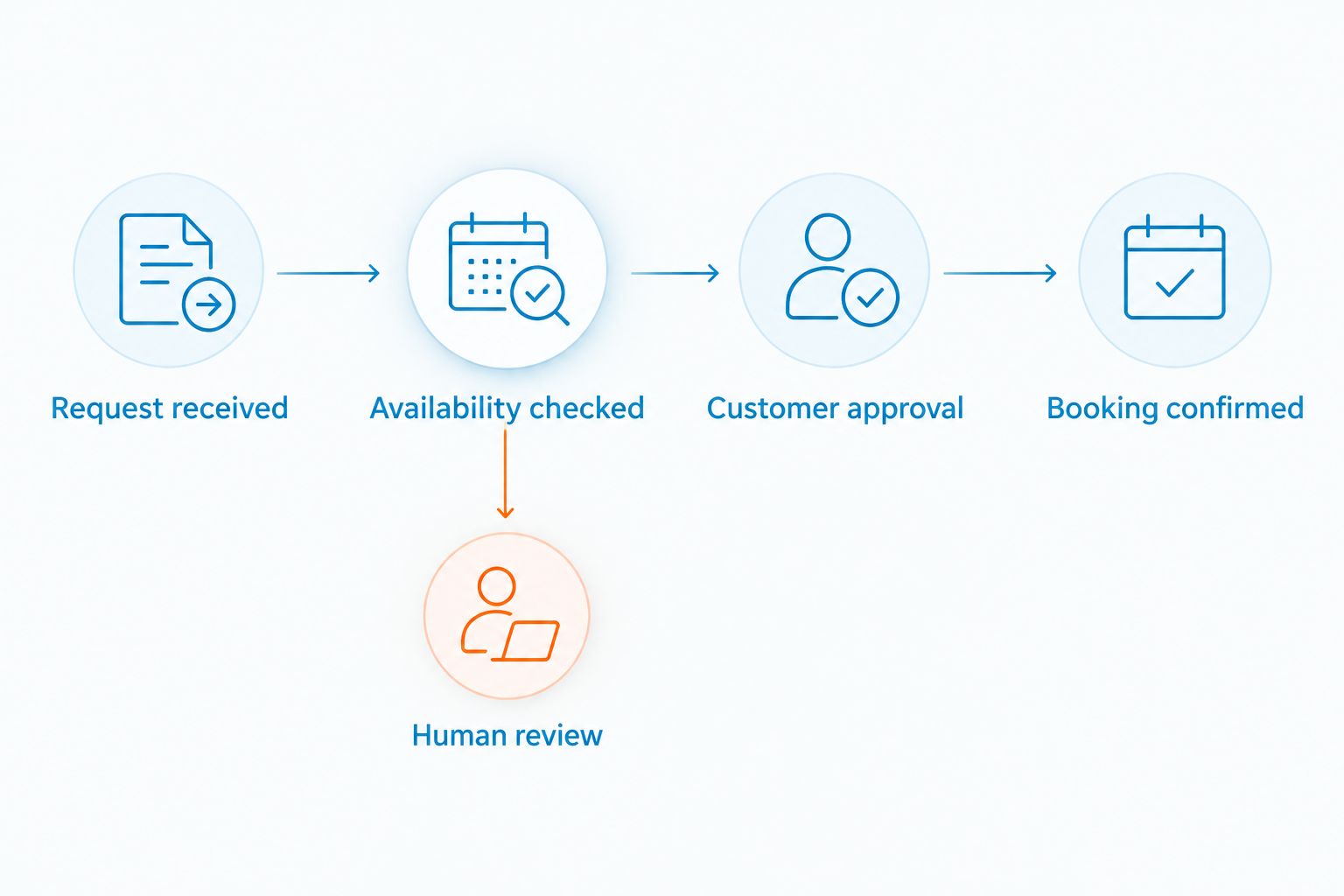
Calendar access must support the intended action
Read access lets a system inspect availability. Creating, changing, and canceling appointments require the corresponding permissions and supported actions. Ask the vendor to demonstrate each action your business needs.
Do not assume that a calendar connection includes every operation. A workflow that sends a booking link is different from an agent that completes the booking inside the conversation. Both can be useful, but they leave different work for the customer.
Booking rules must be explicit
Document appointment length, eligible staff, business hours, location, and any preparation requirements. If your team needs travel time or a gap between visits, include those constraints in the scheduling rules.
Write down what happens when information is missing. For example, an unknown service address should trigger a question or review—not an invented address or an unchecked service-area assumption.
Confirmation must follow a verified result
Require the agent to check whether the scheduling action succeeded before telling the customer the appointment is confirmed. The confirmation should match the saved service, date, time, time zone, and location.
Treat a timeout as an unresolved action. Before retrying, check whether the original request created an appointment; otherwise, a retry can create a duplicate. Ask how the system distinguishes a failed booking from an unknown result.
Why the need for human help varies
The need for staff involvement depends on the workflow you authorize. Use these factors to decide where automation ends:
- Service eligibility: A clearly defined appointment is easier to authorize than a request requiring diagnosis or a custom scope.
- Calendar permissions: An agent cannot complete actions that the scheduling connection does not permit.
- Resource requirements: Booking a room, technician, or piece of equipment adds constraints beyond an open time slot.
- Customer clarity: Missing details, conflicting instructions, and ambiguous dates require clarification before booking.
- Exception policies: Special accommodations and requests outside normal rules need an approved decision path.
- Connection failures: A calendar error needs a pending status and an assigned follow-up, not a guessed outcome.
For your 2026 rollout, define these boundaries before enabling autonomous booking. Each boundary should produce either a clear follow-up question or a handoff with an owner.
How should you set up appointment automation?
Start with 1 appointment type and 1 calendar. This is a recommended rollout scope, not a product limit. Choose a service with clear eligibility rules and a predictable booking process.
Define the booking boundary
List what the agent can book, what information it must collect, and what it must never decide. Keep the first workflow narrow enough that a staff member can review its rules without interpreting unwritten exceptions.
Separate scheduling from professional advice. A healthcare appointment request, an insurance question, or a repair inquiry can contain issues beyond choosing a time. Route those decisions to qualified staff rather than treating them as ordinary booking details.
Assign the exception owner
Name the person or team responsible for unresolved requests. Specify what information the handoff includes: customer details, requested service, proposed time, conversation summary, and the reason booking stopped.
An unassigned shared inbox is not a complete escalation process. Staff need to know who responds next, and the customer needs to know whether the appointment is confirmed or awaiting review.
Run a controlled booking test
Use a recommended minimum of 5 test bookings before accepting live requests: a normal booking, an unavailable slot, a reschedule, a cancellation, and a calendar failure. These are test cases, not a claimed performance benchmark.
For each test, inspect both the conversation and the scheduling system. Check that the saved record matches the customer's choice and that failed actions do not produce success messages. Include a repeated request to check how the workflow avoids duplicate appointments.
Expand only after reviewing outcomes
Review the first live bookings and every exception before adding more appointment types. Look for missing details, incorrect routing, and situations where staff had to repeat the customer's questions.
For a 2026 launch, keep a written record of rule changes. When you change appointment length or staff eligibility, update the scheduling rules and rerun the affected tests before broadening access.
Where does VirtualPBX fit?
VirtualPBX is best for small teams that need a cloud business phone system with optional AI call handling and real human support. Its core phone-system positioning is separate from VirtualText, the SMS, webchat, and shared-inbox offer.
That distinction matters when you evaluate appointment scheduling. VirtualPBX provides small-business communications, but a communications feature alone does not establish that an agent can write to your calendar or manage appointment changes. Ask for a demonstration using your actual booking requirements.
VirtualText combines messaging channels and a shared team inbox, which are relevant to collecting requests and coordinating follow-up. Do not treat those features as proof of autonomous scheduling. Verify the supported calendar actions, permissions, confirmation behavior, and handoff process separately.
The practical trade-off is clear: a communications platform can support customer conversations, but your booking workflow still needs validation. Keep your phone-system decision and your scheduling acceptance test connected without assuming they are the same decision.
Can an AI agent reschedule or cancel appointments?
Yes, when the scheduling connection supports those actions and the workflow verifies which appointment the customer means. Require a matching record and appropriate identity checks before allowing changes.
For a reschedule, verify the replacement appointment and the status of the original. For a cancellation, confirm the saved cancellation result rather than merely acknowledging the customer's request.
Can an AI agent book appointments after hours?
Yes, when the agent and scheduling connection operate after hours and your rules authorize the requested booking. An after-hours conversation is not proof that an appointment was saved.
In your 2026 acceptance test, check an after-hours request and a calendar outage separately. If confirmation is unavailable, have the agent collect the request, mark it pending, and route it for follow-up.
When should an AI agent hand scheduling to a person?
An agent should hand scheduling to a person when it cannot verify eligibility, identify the correct appointment, or complete the calendar action. The same rule applies when the customer asks for a person or requests an exception outside its authority.
A useful handoff preserves context and states the unresolved decision. Do not make the customer restart the conversation simply because the booking moved from automation to staff.
FAQ
Can AI agents handle appointment scheduling without human help?
Yes, for routine appointments when the agent can check availability, apply booking rules, and verify a saved appointment. People still need to configure the workflow and handle exceptions.
Does an AI chatbot need calendar access to book appointments?
Direct booking requires access to a supported scheduling system and permission to create appointments. Without that capability, a chatbot can collect a request or direct the customer to a booking page, but it has not completed the booking itself.
How do I stop an AI scheduling agent from double-booking?
Require the scheduling system to check conflicts when saving an appointment, and test competing requests. Also check how the workflow handles retries after an uncertain result so a repeated action does not create a duplicate.
Can an AI agent handle every appointment type?
Authorize only appointment types with rules the workflow can enforce. Requests involving unclear eligibility, unusual resources, or professional judgment need staff review.
Does VirtualPBX automatically include autonomous appointment scheduling?
Do not assume autonomous appointment scheduling from VirtualPBX's business phone or optional AI call-handling features. Confirm the calendar connection, supported actions, and verification process for your intended workflow.
What should I test before letting an agent book real customers?
Run 5 test bookings covering a normal booking, an unavailable slot, a reschedule, a cancellation, and a calendar failure. Inspect the calendar records as well as the messages before expanding the workflow.
One last thing
Test the failure message before celebrating the confirmation message. Ask the agent to book while its calendar connection is unavailable. The correct response distinguishes a pending request from a confirmed appointment and gives staff enough context to finish the job.
That test exposes the boundary that matters most: whether your automation knows when it has not completed the task.