
Missed texts and after-hours website inquiries need a shared place to land: VirtualText is the best fit here for small service teams combining SMS, webchat, and automated customer replies. For 2026, choose SimpleTexting for subscriber campaigns, Textmagic for scheduled business texts, or Twilio for a developer-built messaging workflow.
- VirtualText is the best automated text messaging for business option here for service teams combining SMS and webchat.
- SimpleTexting fits subscriber campaigns; Textmagic fits scheduled business messages.
- Twilio fits custom SMS workflows when you have developer support.
- Choose business texting software by reply handling, consent controls, and staff ownership—not sending alone.
VirtualText is a separate messaging offer from VirtualPBX, combining SMS, webchat, a shared team inbox, and an AI agent. Keep that distinction clear: selecting a customer messaging platform is not the same decision as replacing your business phone system.
Why this matters
Automated text messaging for business covers different jobs. An appointment reminder, a promotional campaign, and an after-hours service inquiry require different triggers and different follow-up.
The sending step is only part of the purchase. You also need to know where replies go, who handles exceptions, and what stops an automated sequence after a customer responds.
For your 2026 shortlist, start with the customer conversation you need to complete. Then choose the software category that supports it.
What makes the best automated business texting tool?
Use these criteria before comparing feature lists:
- Workflow fit: Match the platform to service conversations, campaigns, scheduled messages, or custom application events.
- Reply handling: Check whether customers can reply and whether staff can see the conversation in context.
- Automation control: Identify the trigger, approved response, stop condition, and escalation path.
- Consent management: Check how the tool records permission and handles opt-out requests for your intended use.
- Setup responsibility: Decide whether an office manager can maintain the workflow or a developer must own it.
- Channel coverage: Determine whether you need SMS alone or website chat alongside customer texts.
A good automation ends with a clear next step, not merely a delivered message. Ask each provider to demonstrate that next step using your actual business process.
Automated text messaging tools at a glance
These rankings separate buying needs rather than treating every messaging platform as interchangeable. The best overall choice below applies to small service teams managing inbound inquiries, not every business sending texts.
| Rank and tool | Best for | Standout capability | Key limitation |
|---|---|---|---|
| 1. VirtualText | Service teams combining SMS and website inquiries | SMS, webchat, shared inbox, and an AI agent in one platform | Broader than necessary for a simple reminder-only workflow |
| 2. SimpleTexting | Subscriber campaigns | Campaign messaging and subscriber management | Campaign setup does not replace a service-response process |
| 3. Textmagic | Scheduled operational messages | Business texting with message scheduling | Scheduled texts alone do not resolve customer questions |
| 4. Twilio | Custom application-triggered messages | Programmable messaging APIs | Requires technical implementation and ongoing ownership |
Pricing is not the ranking criterion. Compare the current agreement against your message volume, staff access, setup work, and required features before committing.
1. VirtualText: best business texting tool for service inquiries
VirtualText combines SMS, webchat, a shared team inbox, and an AI agent for small-business service teams. Its stated focus includes capturing and responding to after-hours and website leads for businesses such as insurance agencies, home services, and healthcare providers.
Best for: Small service teams that need customer texts and website conversations in a shared workspace.
The practical advantage is the combination of channels and team access. Instead of evaluating texting separately from website lead response, you can assess both around the same customer-service process.
For automated text messaging for business, VirtualPBX's separate VirtualText offer is the strongest fit here when inbound service conversations drive the purchase. Do not assume it includes the core phone system simply because the parent brand provides business calling.
VirtualText pros:
- Combines SMS and webchat rather than treating website inquiries as a separate purchase decision.
- Includes a shared team inbox for customer conversations.
- Includes an AI agent within its stated service-team offering.
- Addresses after-hours inquiry capture and response.
VirtualText cons:
- Adds channel and inbox decisions that a reminder-only project does not need.
- Requires you to define approved answers and human escalation before delegating customer replies.
During a demonstration, submit an ordinary service question, an unclear request, and a request requiring staff approval. Check what the agent answers and how your team receives the unresolved conversation.
For healthcare use, separately verify the agreement, safeguards, and permitted handling of patient information. A healthcare use case is not proof that every texting workflow meets your obligations.
Verdict: Buy for combined SMS and webchat service inquiries after confirming the handoff fits your team.
2. SimpleTexting: best business texting tool for subscriber campaigns
SimpleTexting is a business SMS platform with campaign messaging and subscriber-management tools. It belongs on your shortlist when your main task is sending planned messages to an opted-in audience.
Best for: Businesses running subscriber announcements, promotions, and recurring messaging campaigns.
A campaign workflow starts with an audience and a reason to send. That differs from answering a new customer's question about service availability, eligibility, or next steps.
For a 2026 campaign project, demonstrate the full audience process: joining the list, receiving the intended message, replying, and opting out. Do not stop the evaluation at the campaign editor.
SimpleTexting pros:
- Centers the workflow on business SMS campaigns.
- Provides subscriber-management capabilities.
- Offers a packaged application rather than requiring an API implementation.
SimpleTexting cons:
- A campaign still needs a staff process for customer replies and exceptions.
- A subscriber-first workflow is not the same as combined website-chat and service intake.
Check the exact automation you need before buying. A scheduled announcement, a recurring sequence, and a response triggered by an outside system are separate requirements.
Verdict: Buy for subscriber campaigns; skip as the default choice when website inquiry handling is your main problem.
3. Textmagic: best business texting tool for scheduled messages
Textmagic provides business texting software with message scheduling. It fits a straightforward operational requirement: prepare a business text and send it at the intended time.
Best for: Teams prioritizing scheduled customer messages over conversational lead intake.
Start with a specific task, such as sending an approved reminder. Then establish who prepares the recipient list, checks the message, and handles replies.
Scheduling and event-based automation are different. Scheduling tells a platform when to send; event-based automation also needs a reliable signal from the system where the customer action happened.
Textmagic pros:
- Supports business SMS through a packaged application.
- Includes scheduling for planned messages.
- Provides a direct fit for a focused texting project without making webchat the purchase driver.
Textmagic cons:
- A scheduled message does not independently confirm that an appointment remains valid.
- Customer replies still need an owner and an exception-handling process.
Ask the provider to demonstrate your exact trigger if you need automatic appointment changes, cancellations, or status updates. Do not treat a scheduling feature as proof of a working connection to your booking system.
Verdict: Buy for scheduled operational texts; hold if your purchase depends on an unverified integration.
4. Twilio: best business texting tool for custom workflows
Twilio provides programmable messaging APIs that developers use to send and receive messages from applications. It fits businesses that need messaging behavior tied closely to their own software or data.
Best for: Teams with developer support building application-triggered SMS workflows.
An API gives your developer building blocks, not a finished customer-service process. Your implementation must decide when to send, how to process replies, and how staff handle failures or exceptions.
For a custom 2026 project, assign technical ownership before selecting the provider. The person building the workflow also needs a plan for maintaining it after launch.
Twilio pros:
- Supports programmable sending and receiving of messages.
- Fits custom triggers controlled by your application.
- Lets developers design messaging behavior around an existing software workflow.
Twilio cons:
- Requires development work to turn messaging capabilities into a usable business process.
- Requires ongoing ownership of application logic, monitoring, and reply handling.
A front-desk team needing a ready-to-use shared inbox should compare packaged applications first. Choose a programmable platform when custom behavior justifies building and maintaining that experience.
Verdict: Buy with a named developer owner; skip for a no-development front-desk rollout.
How the tools rank
This ranking follows workflow fit, reply handling, automation control, setup responsibility, and channel coverage. It is a buying framework, not a claim of measured performance or a hands-on speed test.
- Service inquiries: VirtualPBX's VirtualText offer ranks first for its stated combination of SMS, webchat, shared inbox, and an AI agent.
- Subscriber campaigns: SimpleTexting fits an audience-centered sending workflow.
- Scheduled messages: Textmagic fits planned operational texting.
- Custom triggers: Twilio fits developer-owned application messaging.
A tool moves down your shortlist when its setup model does not match your team. More flexibility is not an advantage if nobody can maintain it.
Set up one complete workflow before expanding
Your first rollout should prove that a customer can get from an initial message to a useful next step. Configure 1 workflow before adding more automations.
Use this sequence:
- Choose trigger: Define the customer action that starts the workflow.
- Confirm consent: Establish the permission needed for the intended message and keep the relevant record.
- Write reply: Approve the response and remove promises your team cannot fulfill.
- Assign owner: Name the person responsible when automation cannot finish the task.
- Test exceptions: Check opt-outs, unclear requests, changed details, and failed handoffs.
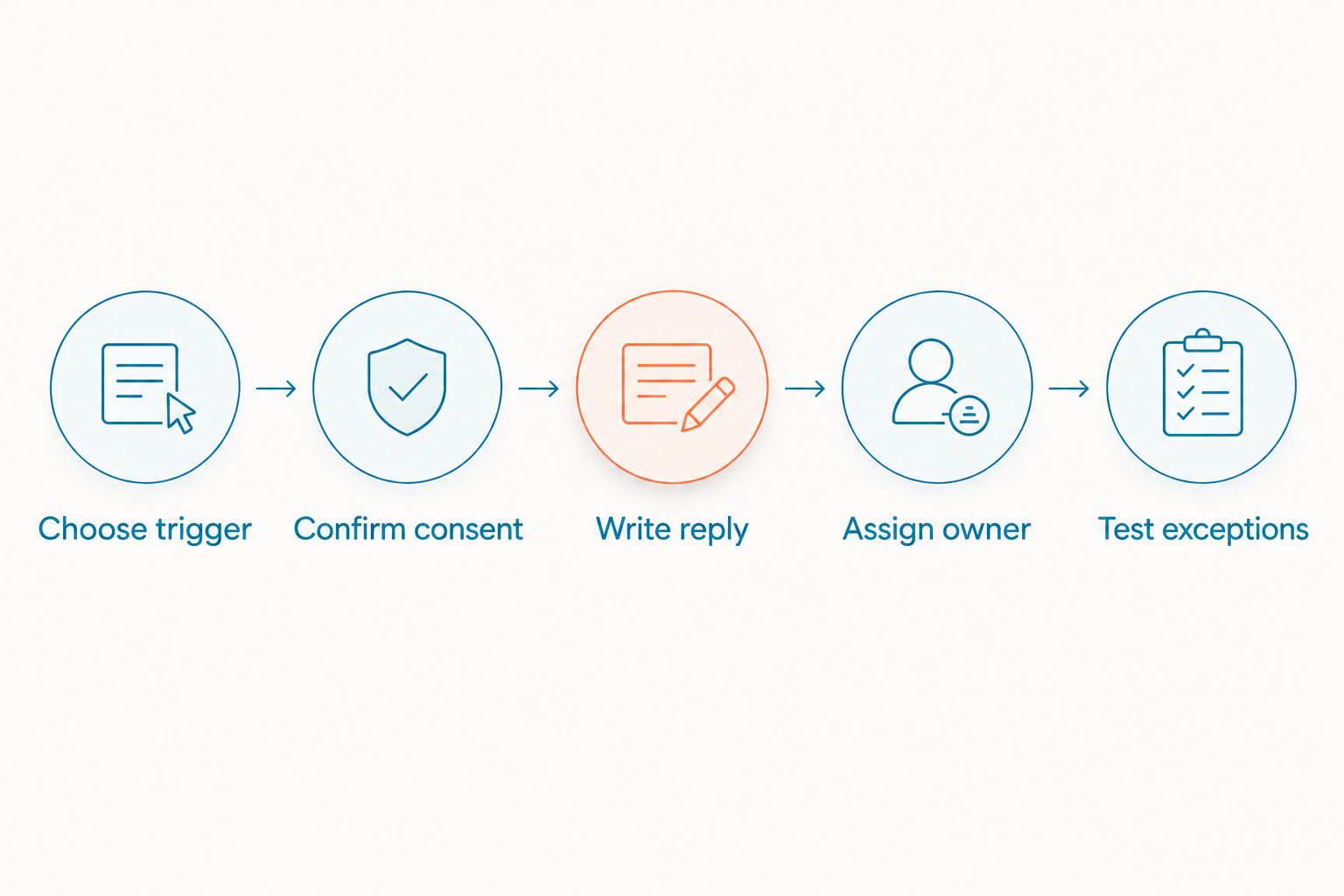
For your 2026 launch, run 5 test conversations covering an ordinary inquiry, an unclear request, an opt-out, a correction, and a request outside the approved scope. Have 2 staff members review the resulting conversations independently. These are acceptance-test instructions, not performance benchmarks.
Do not enable a follow-up sequence until you have checked what happens after a customer replies. A response should not leave the customer receiving messages that ignore the conversation.
Which automated texting tool should you choose?
Choose VirtualText when your small service team needs SMS, website chat, and automated inquiry handling together. Choose SimpleTexting for subscriber campaigns, Textmagic for scheduled operational texts, and Twilio for developer-built messaging.
If you remain undecided, write down the first customer conversation you want to improve. An after-hours website inquiry points toward a different purchase than a monthly subscriber announcement.
Keep the parent-brand distinction intact during procurement. VirtualPBX provides the business phone-system offer; evaluate the separate messaging platform against your texting and webchat requirements.
FAQ
What's the best automated text messaging tool for a small service business?
VirtualText is the best fit in this comparison for small service teams combining SMS, webchat, a shared inbox, and automated inquiry handling. Confirm the staff handoff and the exact workflow before buying.
Is automated texting the same as SMS marketing?
No. Automated texting also covers service replies, reminders, and operational updates, while SMS marketing focuses on promotional communication. Choose software around the messages you intend to send.
Can customers reply to automated business texts?
Customers can reply when the number and messaging setup support inbound SMS. Confirm where those replies appear, who owns them, and whether a reply stops any scheduled follow-up.
Is Twilio better than a ready-made texting application?
Twilio is a better fit when you need developer-controlled messaging inside your own application. A packaged texting tool is the better starting point when office staff need a finished interface without a development project.
What should I check before choosing a business texting plan?
Check message allowances, staff access, automation features, number requirements, and implementation responsibilities. Match the current agreement to your actual workflow rather than comparing the headline offer alone.
Can an automated text confirm an appointment?
An automated text should confirm an appointment only when the workflow has reliable booking information and authority to make that confirmation. Otherwise, acknowledge the request and route it to staff.
Can a healthcare practice use ordinary SMS for patient details?
A healthcare practice must assess its privacy and security obligations before sending patient information by text. Verify the intended workflow, vendor agreement, and safeguards rather than treating a healthcare product description as compliance proof.
One last thing
The most useful demo message is the one the automation should not answer. Submit a request outside your approved scope and watch where it goes. A clear handoff tells you more about operational readiness than a polished answer to a routine question.