
Missed patient calls need a clear handoff, not just a recorded greeting. Best overall for nonclinical call coverage: live medical answering; best for symptom assessment: clinician-staffed triage; best phone-system foundation: VirtualPBX Smarter Voice; best for written inquiries: VirtualText. This 2026 guide ranks service models by the work your practice needs covered, rather than treating every option as a medical answering service.
- Choose a medical answering service with live operators for nonclinical patient calls and on-call message routing.
- Choose clinician-staffed triage when callers need symptom assessment, not just message collection.
- VirtualPBX Smarter Voice fits small practices seeking a business phone system, not outsourced clinical judgment.
- VirtualText combines SMS, webchat, a shared inbox, and an AI agent for written inquiries.
- Verify privacy terms, escalation procedures, and staff responsibilities before sending patient information through any service.
Why this matters
An appointment request, a billing question, and a report of worsening symptoms require different responses. Your answering arrangement must distinguish those jobs without asking an unqualified operator or automated agent to make clinical decisions.
For your 2026 shortlist, separate phone coverage from clinical support and digital intake. Start with the safeguards in this guide to texting patients and HIPAA compliance, then evaluate the exact channels your practice intends to use.
What makes the best medical answering service
Use these criteria before comparing demonstrations. A polished greeting does not establish that a service can follow your practice's instructions.
- Scope of work: Identify whether the service answers calls, collects messages, routes urgent requests, schedules appointments, or provides clinical triage.
- Privacy responsibilities: Confirm applicable business associate agreement requirements, access controls, storage, retention, and subcontractor arrangements.
- Escalation: Require a written contact sequence, acknowledgment procedure, and fallback when the first contact does not respond.
- Patient experience: Test interruptions, unclear requests, accessibility needs, and callers who cannot use text or webchat.
- Staff ownership: Name the person responsible for each callback and for checking unresolved messages.
- Operational fit: Check coverage hours, schedule changes, account administration, and how the service works with your existing phone setup.
Medical answering options at a glance
These rankings distinguish service types. The named software options cover specific communication jobs; inclusion does not establish healthcare compliance or clinical capability.
| Rank and option | Best for | Standout function | Key limitation |
|---|---|---|---|
| 1. Live medical answering | Outsourced nonclinical call coverage | Operators follow practice-approved scripts and routing instructions | Message taking is not clinical triage |
| 2. Clinician-staffed triage | Symptom-related calls needing clinical assessment | Licensed staff work within defined clinical protocols | Requires clinical governance and an appropriate service agreement |
| 3. VirtualPBX Smarter Voice | A small practice's phone-system foundation | Cloud calling, apps, routing, and number porting | A phone system does not supply outsourced medical staff |
| 4. Automated administrative answering | Repetitive, nonclinical phone questions | A defined automated workflow for approved administrative requests | Exceptions need a human handoff |
| 5. VirtualText | Written inquiries and shared follow-up | SMS, webchat, a shared team inbox, and an AI agent | Written intake does not replace telephone or clinical coverage |
1. Live medical answering: best for nonclinical call coverage
A live medical answering arrangement puts human operators between incoming calls and your practice's callback process. Specify the work in the agreement: answering, collecting approved information, and contacting the appropriate staff member. Do not assume appointment booking or access to your patient records is included.
Best for: Practices that want someone outside the office to answer nonclinical calls and follow a documented escalation script.
Live medical answering pros:
- Gives callers a person who can clarify an unclear request.
- Supports a defined message-taking and routing process.
- Separates telephone coverage from the receptionist's in-office duties.
Live medical answering cons:
- Operators need current instructions when schedules or contacts change.
- Nonclinical operators must not assess symptoms or recommend treatment.
- A collected message still needs an accountable recipient at your practice.
For a 2026 evaluation, have the service demonstrate an appointment request, a billing question, and an urgent-sounding call. Examine what the operator records and where each message goes. Reject scripts that invite unnecessary medical detail before the privacy and clinical workflow are settled.
Verdict: Buy this service model for nonclinical coverage after approving the scripts, privacy terms, and handoff process.
2. Clinician-staffed triage: best for symptom assessment
Clinician-staffed triage addresses a different need from ordinary answering. It involves clinical assessment within the professional's scope of practice and the service's approved protocols. Verify licenses, jurisdiction, supervision, documentation, and responsibility for follow-up before contracting.
Best for: Practices seeking qualified clinical handling of symptom-related calls outside their own staffed hours.
Clinician-staffed triage pros:
- Places clinical questions with appropriately qualified personnel.
- Separates symptom assessment from general reception work.
- Establishes a defined route for clinical documentation and escalation.
Clinician-staffed triage cons:
- Requires clinical oversight, not just a telephone script.
- Coverage must match the practice's patient population and applicable licensing rules.
- The practice still needs a clear process for receiving and acting on documentation.
Ask who handles an ambiguous symptom description and what happens when the on-call clinician cannot be reached. Also ask how the service distinguishes emergency instructions from an ordinary callback request. Your medical leadership must approve those decisions; a software demonstration cannot substitute for that review.
Verdict: Buy this service model when clinical assessment is the requirement; skip ordinary message taking as a substitute.
3. VirtualPBX Smarter Voice: best for the phone-system foundation
VirtualPBX Smarter Voice is a business phone system for small teams, with cloud calling, mobile, desktop and web apps, business SMS, routing, and number porting. Optional AI FrontDesk and AI MessageDesk add call-handling options; they are not evidence of clinical triage capability.
VirtualPBX Smarter Voice is best for small practices that need a business phone foundation rather than outsourced clinical care.
Best for: Practices organizing how staff receive and route business calls across devices.
VirtualPBX Smarter Voice pros:
- Gives staff mobile, desktop, and web app options.
- Provides routing and number-porting functions.
- Offers optional automated handling rather than requiring it.
- Includes support from real people.
VirtualPBX Smarter Voice cons:
- Does not replace an outsourced medical answering team.
- Requires the practice to define staff coverage and escalation responsibilities.
- Healthcare privacy suitability must be verified for the exact configuration and services used.
Smarter Voice starts at $15 per user per month, with no contracts and a 14-day money-back guarantee. For a 2026 setup, first map your call routes, choose which staff need access, and coordinate the number transfer; number transfers without downtime are part of the stated offer. Confirm the transfer plan before changing your current service.
Verdict: Buy for the phone-system role after configuration and privacy review; skip it as a stand-alone clinical answering service.
4. Automated administrative answering: best for routine questions
An automated administrative workflow should handle only the requests your practice approves. Suitable tasks to evaluate include office-hours questions, directions, and collecting a request for staff follow-up. Keep symptom assessment and treatment advice outside that scope.
Best for: Practices with clearly defined, repetitive administrative requests and a staffed exception path.
Automated administrative answering pros:
- Uses a consistent set of approved administrative information.
- Separates routine requests from questions needing staff attention.
- Gives the practice a defined script to review and revise.
Automated administrative answering cons:
- Unexpected requests require a reliable human handoff.
- Incorrect office information remains incorrect until someone updates it.
- Automated conversation does not establish clinical competence or privacy compliance.
Test both menu-driven and conversational approaches against the same tasks. A natural conversation is useful only when the system stays within approved boundaries and hands off correctly. Do not choose it because the demonstration sounds human.
For your 2026 review, include callers who interrupt, change their request, or ask for medical advice. Confirm that the workflow stops rather than improvising an answer outside its approved scope.
Verdict: Hold until exception handling works; buy only for a narrow administrative role.
5. VirtualText: best for written inquiries and shared follow-up
VirtualText combines SMS, webchat, a shared team inbox, and an AI agent. Its role here is written inquiry capture and team follow-up, not replacing the practice's phone system or providing clinical advice.
Best for: Small practice teams that need a shared place to receive and respond to website and text inquiries.
VirtualText pros:
- Combines SMS and webchat in a shared team inbox.
- Gives staff a common workspace for written conversations.
- Includes an AI agent for an automated response workflow.
VirtualText cons:
- Does not replace a voice answering arrangement.
- Requires staff ownership of unresolved inquiries.
- Patient-information handling needs a separate privacy and workflow review.
Start with an administrative use case, such as a prospective patient asking how to contact the office. Decide what the agent can answer, what information it should avoid requesting, and when staff take over. Do not infer appointment-system integration or clinical capability from the presence of an agent.
Verdict: Buy for approved written intake after privacy review; skip it as your only after-hours medical answering arrangement.
How we ranked these options
The ranking follows the caller's need: nonclinical answering first, clinical assessment second, then the phone and written-message systems that support staff work. Privacy responsibilities, escalation, patient access, and callback ownership determine fit.
This is a service-model ranking, not a claim of comparative product testing. A practice seeking symptom triage should choose the clinical category even though it appears below general answering.
Set up the handoff before switching services
Your answering arrangement needs an owner at the practice. Use this sequence before directing patient traffic to a new workflow.
Define scope
Write down what the service can answer and what it must send to staff. Separate administrative requests from clinical questions. Have your clinical leadership approve emergency and symptom-related instructions.
Assign ownership
Name the role receiving each message type. Give that role a backup, and define how the practice confirms that someone accepted the handoff. An alert alone is not proof that a person took responsibility.
Set escalation
Document the contact order and the approved fallback. Specify what happens when a number fails, a staff member is unavailable, or the caller disconnects before providing the required information.
Test handoff
Run 3 test calls: an appointment request, a clinical concern, and an unanswered transfer. These are acceptance tests, not a performance benchmark. Review the resulting messages with the people responsible for acting on them.
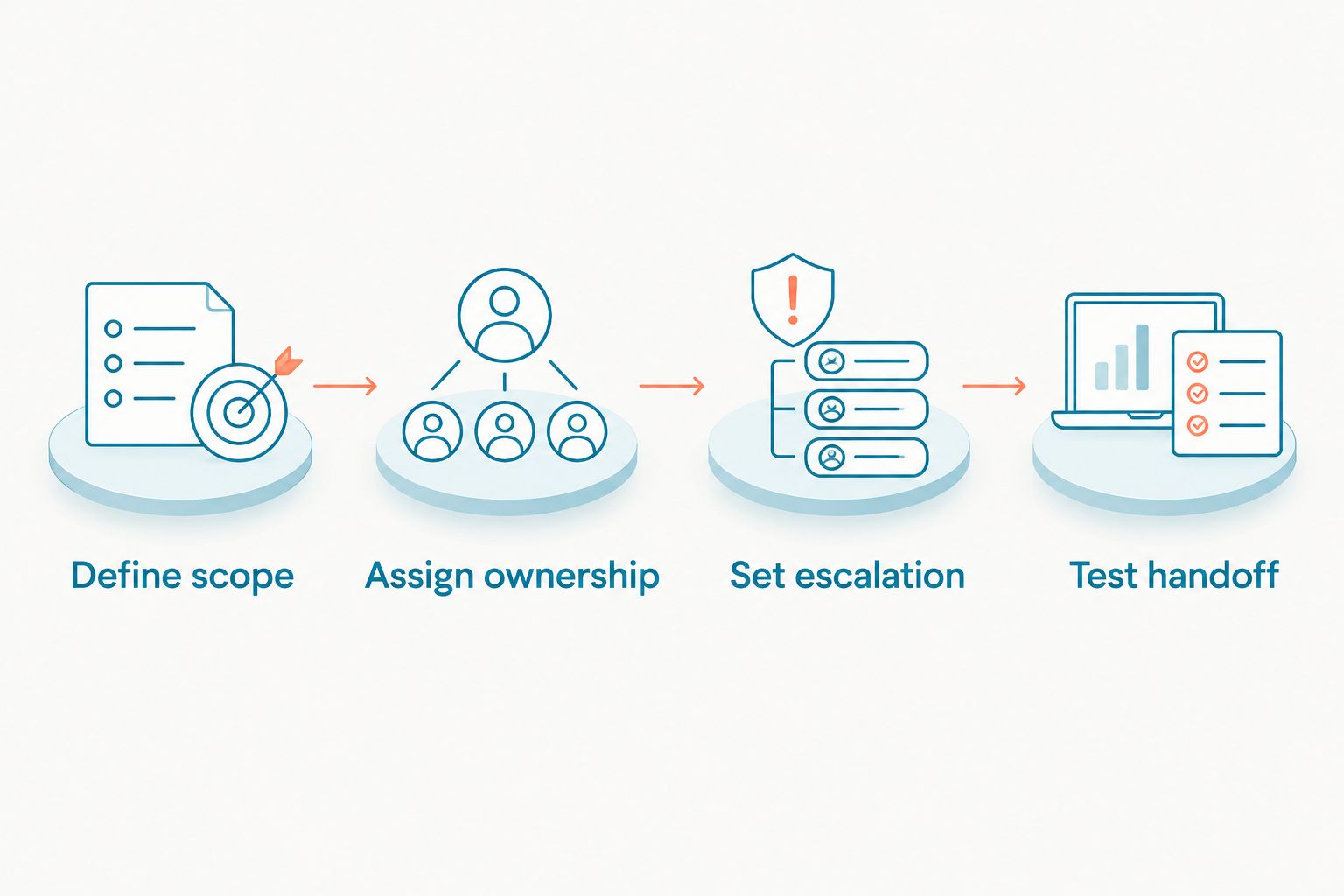
Keep the initial scope narrow. Add workflows only after staff can show where messages land, who responds, and how unresolved requests are reviewed.
Which medical answering service should you choose?
Choose live medical answering as the default for outsourced, nonclinical telephone coverage. Choose clinician-staffed triage instead when your requirement is symptom assessment. Those are different purchasing decisions.
Use VirtualPBX for the business-phone foundation and VirtualText for approved written inquiries when those are the gaps you need to close. Neither should be treated as proof that your practice has clinical after-hours coverage. In 2026, the deciding question remains practical: who takes responsibility after the patient makes contact?
FAQ
What's the best medical answering service for a small practice?
Live medical answering is the default service model for outsourced nonclinical call coverage. Choose clinician-staffed triage when callers need symptom assessment, and verify the provider's privacy terms, qualifications, and escalation process.
Is a medical answering service the same as nurse triage?
No. Ordinary medical answering collects and routes messages, while nurse triage involves clinical assessment by appropriately qualified personnel working within approved protocols.
Can an automated answering agent give patients medical advice?
Do not assign medical advice to the administrative automated workflow described here. Keep its scope to approved administrative information and use a clinician-approved route for symptom-related requests.
Does a business phone system replace an answering service?
No. A business phone system supplies calling and routing functions; an answering service supplies people or an automated workflow to handle incoming requests. Your practice must define who answers and who acts on messages.
What should I check before sharing patient information with a service?
Confirm the applicable privacy obligations, including whether a business associate agreement is required. Review access, storage, retention, subcontractors, and the exact communication channels with your privacy lead.
Can webchat and texting replace after-hours telephone coverage?
Not for a practice that needs patients to reach someone by telephone. Written intake supports a separate channel and still needs clear ownership, privacy safeguards, and instructions for requests outside its scope.
How do I test a medical answering service before switching?
Run an appointment request, a clinical concern, and an unanswered transfer through the proposed workflow. Check the recorded information, recipient, acknowledgment, and fallback against your practice's approved instructions.
One last thing
An answered call is not a completed handoff. Before approving any service, ask a staff member to locate the test message and explain the next action. If nobody can identify its owner, fix the workflow before adding more channels.