
Missed calls need a phone-answering solution, not just another chat window. Best for phone-first small teams: VirtualPBX Smarter Voice with optional AI FrontDesk; best for text and website inquiries: VirtualText; best for judgment-heavy conversations: Smarter Voice with your own staff answering. This 2026 guide separates those options so you buy for the customer contact you actually miss.
- VirtualPBX with AI FrontDesk is the best-fit AI receptionist for small business teams prioritizing phone calls.
- VirtualText combines SMS, webchat, a shared team inbox, and an AI agent for written inquiries.
- Smarter Voice with staff answering fits conversations that require human judgment rather than automated intake.
- Test call handling, unanswered-call behavior, and staff ownership before changing your business number.
Why this matters
An AI receptionist for small business should solve a specific coverage problem. If customers call while your team works, evaluate voice handling. If inquiries arrive through your website, evaluate chat and follow-up instead. Those are different buying decisions.
VirtualPBX provides a business phone system with optional AI call handling. Smarter Voice starts at $15 per user per month, and AI FrontDesk is presented as a $99 upgrade. Start by mapping your current calls, deciding who should answer, and checking the behavior you need in a demonstration.
For your 2026 shortlist, keep the distinction between phone service, automated answering, and written lead capture clear. A shared inbox does not by itself answer a ringing phone. Support from the provider also does not mean someone answers your customers' calls.
What makes the best AI receptionist for small business?
Use these criteria before comparing feature lists:
- Channel fit: Does the service handle phone calls, written inquiries, or both? Match the channel where your customers contact you.
- Conversation boundaries: Can you define which questions automation should answer and which require your staff?
- Human handoff: Ask what happens when a caller requests a person, gives an unclear answer, or raises an urgent issue.
- Team ownership: Decide who receives each inquiry and who checks that someone followed up.
- Phone continuity: Review number transfer, routing, and the experience customers receive during a change.
- Commercial clarity: Separate phone-system charges from optional AI upgrades, and inspect the cancellation and guarantee terms.
Choose the contact channel first and the automation second. Otherwise, you risk buying a capable tool that leaves your original coverage gap untouched.
Your options at a glance
These are three distinct operating choices, not three interchangeable AI receptionists. The ranking prioritizes phone-first coverage, then written intake, then staff-led handling.
| Option | Best for | Standout feature | Key limitation |
|---|---|---|---|
| Smarter Voice with AI FrontDesk | Small teams prioritizing incoming calls | Business phone system with optional AI call handling | AI FrontDesk is an additional upgrade; test your required call behavior |
| VirtualText | Service teams handling text and website inquiries | SMS, webchat, shared team inbox, and an AI agent | Written inquiry handling is not a substitute for voice answering |
| Smarter Voice with staff answering | Conversations requiring human judgment | Cloud calling, apps, and routing for your team | Your employees must be available to answer |
Do not interpret the order as a claim about measured accuracy or response speed. Use it to identify which setup deserves a closer look for your business.
1. AI FrontDesk: best for phone-first small teams
Smarter Voice provides the business phone foundation, including cloud calling, mobile, desktop, and web apps, business SMS, routing, and number porting. AI FrontDesk adds optional AI call handling. This is the most direct fit here when your problem begins with a ringing business number.
VirtualPBX with AI FrontDesk is best for small teams that want a business phone system with optional AI call handling. Keep the phone system and the answering workflow in the same buying conversation, rather than treating them as unrelated purchases.
AI FrontDesk pros
- Adds an AI call-handling option to the core phone service.
- Sits alongside calling apps and routing for your staff.
- Lets you evaluate phone service and AI handling together.
- Includes access to support from real people through the provider.
AI FrontDesk cons
- The AI capability is an upgrade, not the base phone offer.
- An AI answering option does not remove the need for staff escalation rules.
- Your required call flows still need a practical demonstration before purchase.
AI FrontDesk pricing: Smarter Voice starts at $15 per user per month; AI FrontDesk is presented as a $99 upgrade.
Ask the demonstration to cover an ordinary inquiry, an unclear request, and a caller asking for a person. Do not approve the workflow only because the greeting sounds natural. The useful result is a caller reaching the right next step without a promise your business cannot keep.
Best for: Small teams choosing phone service and automated call handling together in 2026.
Verdict: Buy for phone-first coverage after the required call flows pass your acceptance checks.
2. VirtualText: best for text and website inquiries
VirtualText combines SMS, webchat, a shared team inbox, and an AI agent. It serves small-business service teams, including insurance agencies, home services, and healthcare providers, capturing and responding to website and after-hours leads.
Choose this route when customers prefer to type or when website inquiries need a clear follow-up owner. Do not confuse a written conversation with a live telephone conversation. If unanswered calls are your main problem, evaluate voice handling separately.
VirtualText pros
- Combines SMS and webchat in the same platform.
- Provides a shared team inbox for written conversations.
- Includes an AI agent for inquiry handling.
- Offers a flat-rate platform structure.
VirtualText cons
- The described offer focuses on written channels, not live voice reception.
- A captured inquiry still needs an accountable staff member for follow-up.
- Sensitive or unusual requests need clear boundaries for automated replies.
VirtualText pricing: The platform is described at a flat rate of $89/month.
For a useful demonstration, submit an ordinary service inquiry and then ask a question that requires staff review. Check how your team sees the conversation and decides who should respond next. Treat booking, record updates, and other connected actions as separate requirements to verify, not automatic consequences of having an AI agent.
Best for: Service teams whose reception gap is SMS and website lead handling rather than telephone answering.
Verdict: Buy for written intake; skip as a stand-alone answer to missed voice calls.
3. Smarter Voice: best for staff-led customer conversations
Smarter Voice also fits businesses that want their own employees to answer customer calls. Its cloud calling, mobile, desktop, and web apps, and routing support that operating model without making optional AI handling the starting point.
This choice matters when a conversation requires interpretation, negotiation, or an authorized decision. Keep a person responsible for those moments. A provider's support team helps with the phone service; your staff remain responsible for the customer conversation.
Staff-led Smarter Voice pros
- Gives staff business calling across the listed app types.
- Includes routing for your phone workflow.
- Keeps discretionary customer decisions with your employees.
- Leaves AI handling optional rather than making it mandatory.
Staff-led Smarter Voice cons
- Coverage depends on your employees being available.
- Routing does not create an additional person to answer.
- After-hours and overflow calls still need an explicit plan.
Smarter Voice pricing: The phone service starts at $15 per user per month, without making an AI upgrade part of this recommendation.
For your 2026 decision, separate the need for a better phone system from the need for automated answering. You can need one without needing the other. Write down who answers during working hours, who covers absences, and what happens when nobody picks up.
Best for: Small businesses that prioritize staff judgment and can assign people to call coverage.
Verdict: Buy for staff-led calling; hold the AI upgrade until you identify a specific coverage gap.
How these options rank
The ranking follows channel fit, conversation boundaries, human handoff, team ownership, phone continuity, and commercial clarity. Phone-first teams get the closest fit from Smarter Voice with AI FrontDesk. Written-inquiry teams get the closer fit from VirtualText.
Staff-led calling remains a separate recommendation because automation is not the objective by itself. The right reception setup gets the customer to an accountable next step. A natural greeting is useful, but it is not proof that the entire workflow works.
Set up the workflow before changing your number
For a 2026 rollout, use a short acceptance plan. Test the customer experience before you depend on it for daily reception.
Map inquiries
List why customers contact you and where those inquiries arrive. Separate calls from texts and website conversations. Identify requests your team can answer from approved business information and requests requiring a person.
Define boundaries
Write down what the system must not promise. Examples include confirming an unverified appointment, authorizing a refund, or giving a binding answer outside approved guidance. Choose these boundaries for your business; do not assume a generic script covers them.
Assign ownership
Name the employee or role responsible for each handoff. State what that person does when unavailable. For written conversations, define how staff identify an inquiry that still needs attention.
Test exceptions
Include a caller who changes the subject, a customer who asks for a person, and a request outside your normal service area. Check the result, not just the wording. An acceptable outcome includes a clear limitation and an appropriate next step.
Confirm continuity
VirtualPBX states that number transfers happen without downtime. Confirm the transfer arrangements for your number and agree on responsibilities before the change. Keep the old service active until the transfer process permits cancellation.
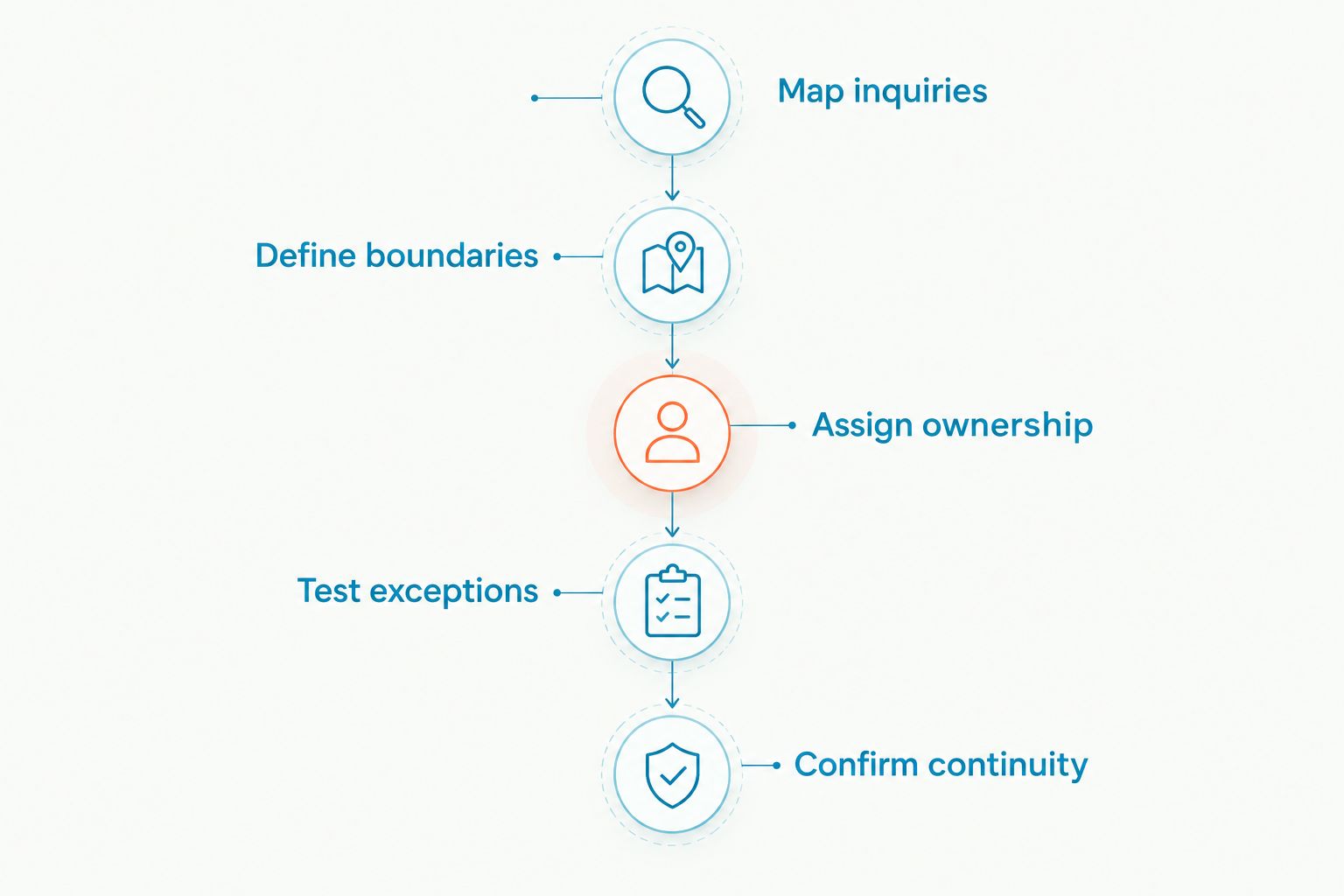
Keep your acceptance checklist beside the demonstration. Mark each requirement as passed or needing a change, and repeat the failed scenarios after adjustments. That gives your team a concrete basis for approving the setup.
Check terms as carefully as features
VirtualPBX states no contracts and a 14-day money-back guarantee. Read the applicable terms and confirm which services and charges the guarantee covers before signing up. Keep that review separate from the technical demonstration.
The practical comparison is the complete setup your team needs, including phone users and optional AI handling. Ask for the billing basis of each component in writing. Do not infer an upgrade's billing period from the billing period of the base phone service.
Review your phone coverage
Explore the phone system and optional AI handling, then confirm the workflow your team needs.
Which reception setup should you choose?
Choose Smarter Voice with AI FrontDesk if your main problem is incoming phone calls and you want optional automated handling. That is the default recommendation for a phone-first small-business shortlist in 2026.
Choose VirtualText when the missed opportunity is a website inquiry or customer text. Choose staff-led Smarter Voice when your employees need to make the decisions during the conversation and can provide coverage.
Do not buy all three approaches just to cover every possibility. Start with the channel where inquiries currently go unanswered, assign follow-up responsibility, and expand only when another documented gap remains.
FAQ
What's the best AI receptionist for small business phone calls?
VirtualPBX Smarter Voice with optional AI FrontDesk is the best-fit option here for phone-first small teams. Confirm the call handling and staff handoff you require in a demonstration before purchase.
Is an AI receptionist the same as an automated phone menu?
No. A menu-driven attendant routes callers through predefined choices, while conversational AI handles spoken requests. Test how a proposed service responds when a caller changes the subject or requests a person.
Can VirtualText replace a telephone receptionist?
VirtualText is described as an SMS, webchat, shared-inbox, and AI-agent platform, not a live voice-answering replacement. Evaluate it for written inquiries and assess telephone answering separately.
Do I need to replace my business phone number?
Number porting is included in the described Smarter Voice offer, so replacing your number is not the starting assumption. Confirm eligibility and transfer arrangements for your specific number before canceling existing service.
Can an AI receptionist replace every front-desk task?
Do not treat an AI receptionist as a replacement for every front-desk responsibility. Keep staff accountable for exceptions, sensitive requests, and decisions outside the approved answering workflow.
How should I test an AI receptionist before buying?
Test ordinary inquiries, unclear requests, and requests for a person. Approve the setup only when each scenario reaches an acceptable next step and your team knows who owns the follow-up.
Does support from real people mean they answer my customer calls?
No. Provider support helps with the service; it is different from staffing your customer reception desk. Confirm separately who or what answers incoming customer calls.
One last thing
Test the answer your system should refuse to give. Ask it to promise an appointment that staff have not confirmed or approve an exception outside its authority. A reception workflow should know when to stop, explain the limit, and hand the request to your team. A clear boundary is more useful than a confident but unauthorized promise.