

When missed calls and unanswered messages compete for your attention, choose VirtualPBX for a straightforward small-business phone system with optional call handling; choose Dialpad when call transcription and conversation review are central to your team's work. This 2026 comparison separates phone-system needs from website chat and shared-inbox needs so you buy the right service, not just the longer feature list.
- VirtualPBX vs Dialpad comes down to straightforward business calling versus call intelligence and conversation review.
- Dialpad is the better fit when your team needs transcription and summaries as part of daily work.
- VirtualText is a separate SMS, webchat, and shared team inbox offer—not the core phone system.
- Compare complete subscription scope, support, and customer handoffs before choosing either provider.
Why this matters
A customer does not care which phone platform you use. They care whether someone answers, understands the request, and follows through. Your software decision should start there.
For a small service business, the urgent problem might be a ringing phone while everyone is with customers. For a sales manager, it might be reviewing conversations without replaying entire calls. Those are different jobs, and they deserve different buying criteria.
VirtualPBX is best for small businesses that want straightforward cloud calling with optional call handling and real human support. Dialpad is the stronger choice when searchable call records and conversation summaries drive the team's daily workflow.
For your 2026 shortlist, separate essential tasks from attractive extras. A feature earns its place only when someone will use it to answer a customer, complete a handoff, or improve a conversation.
At a glance
| Dimension | VirtualPBX | Dialpad |
|---|---|---|
| Best for | Small businesses prioritizing straightforward calling and optional call handling | Teams prioritizing calling plus conversation intelligence |
| Standout feature | Optional AI FrontDesk and AI MessageDesk alongside the core phone system | Call transcription and summaries |
| Everyday calling | Cloud calling with mobile, desktop, and web apps | Cloud calling through business communication apps |
| Call review | Evaluate call-handling needs separately from conversation-analysis needs | Stronger fit for reviewing transcripts and summaries |
| Website leads | Separate VirtualText offer combines webchat, SMS, a shared inbox, and an AI agent | Evaluate website intake separately from phone-system features |
| Business SMS | Business SMS in the phone offer; shared text workflows through separate VirtualText | Business messaging; confirm the workflow and plan scope you need |
| Human support | Real U.S.-based support | Evaluate the support channels and terms for your selected plan |
| Pricing model | Per-user phone subscription, optional upgrades, and a separate flat-rate VirtualText subscription | Per-user subscriptions across different product offerings |
The table identifies the buying axis, not a promise that every feature appears in every subscription. Keep the product name and subscription scope attached to each requirement during your evaluation.
Straightforward phone operations favor VirtualPBX
Choose the simpler phone-first approach when your main job is answering and routing business calls. Smarter Voice is the core phone-system offer. It includes cloud calling, business SMS, routing, number porting, and mobile, desktop, and web apps.
That makes it a clear starting point for an owner who needs a business number and a practical way for staff to answer it. Optional AI FrontDesk and AI MessageDesk address additional call-handling needs without replacing the core phone offer.
The tradeoff is scope. A phone system, an optional voice upgrade, and a separate customer-messaging service are different buying decisions. Do not treat them as one package simply because they share a parent brand.
Dialpad fits a different buyer: a team that wants calling alongside tools for understanding what happened during conversations. Its transcription and summary features matter when call records become working material for managers or customer-facing staff.
Before choosing, write down the actual failure you want to fix:
- Missed calls: assess answering and routing.
- Lost conversation details: assess transcription and summaries.
- Unanswered website enquiries: assess webchat and message ownership.
A provider that solves the wrong problem is still the wrong purchase.
Dialpad wins when transcription is part of the job
Dialpad is the better fit for teams that need call transcription and summaries in their everyday workflow. These tools turn spoken conversations into records that staff can review without relying entirely on memory or handwritten notes.
That is a genuine advantage for a sales lead reviewing customer objections or a service manager checking what a caller requested. The useful output is not the presence of an automated feature. It is a record the next person can understand and use.
The limitation is accuracy and context. Automated transcripts and summaries still need human review when a name, instruction, or commitment matters. A summary does not replace checking the conversation before acting on a disputed detail.
Optional call handling solves a different problem. Answering an incoming caller and reviewing a completed conversation are separate tasks. Do not compare those features as if they were interchangeable.
For a 2026 demonstration, bring a realistic customer conversation. Include a service name, a correction, and a follow-up request. Check whether the resulting record preserves the details your staff actually need.
Both cover the basics of cloud business calling
Everyday calling is not the deciding difference between these providers. Both offer cloud business communications rather than requiring your staff to rely solely on personal phones.
Your evaluation should focus on the route a customer takes. Who answers first? What happens when that person is busy? Where does the caller go outside business hours?
Use a buyer-defined test of 3 call scenarios: an answered call, an unanswered call, and an after-hours call. These are evaluation steps, not performance claims about either provider. Run the same scenarios during each demonstration so the comparison stays fair.
Check the employee side as well. Ask a staff member to answer through the device they will actually use, rather than watching an administrator demonstrate everything from a desktop.
The practical limitation for both options is that software does not decide your operating rules. You still need business hours, routing choices, and a person responsible for updating them.
For an existing business number, ask for the transfer sequence and responsibility for each step. The client's stated number-transfer process is designed to avoid downtime; make the implementation plan explicit before scheduling the change.
Dialpad wins for transcript-led conversation review
Dialpad is the stronger choice when reviewing calls is a recurring management task. Transcripts and summaries give managers a starting point for checking what happened and deciding which conversations need closer attention.
This matters most when your team has a named review process. A manager might inspect unclear customer commitments, check the explanation of a service, or prepare a follow-up after a complex discussion.
The advantage disappears if nobody owns the review. Collecting more conversation records does not, by itself, improve customer service. Assign the task before selecting software around it.
Use 2 review tasks in your evaluation: find the customer's main request and identify the promised next action. Ask the intended user to complete both tasks using the demonstrated output.
The phone-first alternative remains appropriate when your priority is answering calls reliably and giving customers a clear route to staff. Do not purchase a conversation-review workflow simply because it looks impressive in a presentation.
In 2026, the right call-review feature is the one your manager will use—not the one with the most terminology attached to it.
VirtualText is the better fit for the stated website-lead workflow
For small service teams combining website enquiries and customer texts, VirtualText matches the stated workflow directly. It is a separate offer from the core phone system, combining SMS, webchat, a shared team inbox, and an AI agent.
That distinction matters for insurance agencies, home services, and healthcare providers handling website and after-hours leads. A phone-system comparison alone does not answer whether staff can manage those messages together.
Dialpad's strengths in calling and conversation review do not establish that a selected phone subscription replaces website intake. Evaluate the required website and inbox workflow separately, rather than inferring it from business messaging features.
The limitation of the separate-offer approach is another product scope to manage. Confirm who administers it, which staff use it, and how enquiries move from a message to a phone conversation.
Start with the operating process in combining SMS and webchat into one team inbox. Then evaluate the software against that process.
Use these stages when checking the customer journey:
- Website intake: the visitor submits a request.
- Shared inbox: staff can see the conversation.
- Named owner: someone takes responsibility.
- Human follow-up: a person handles the next action.
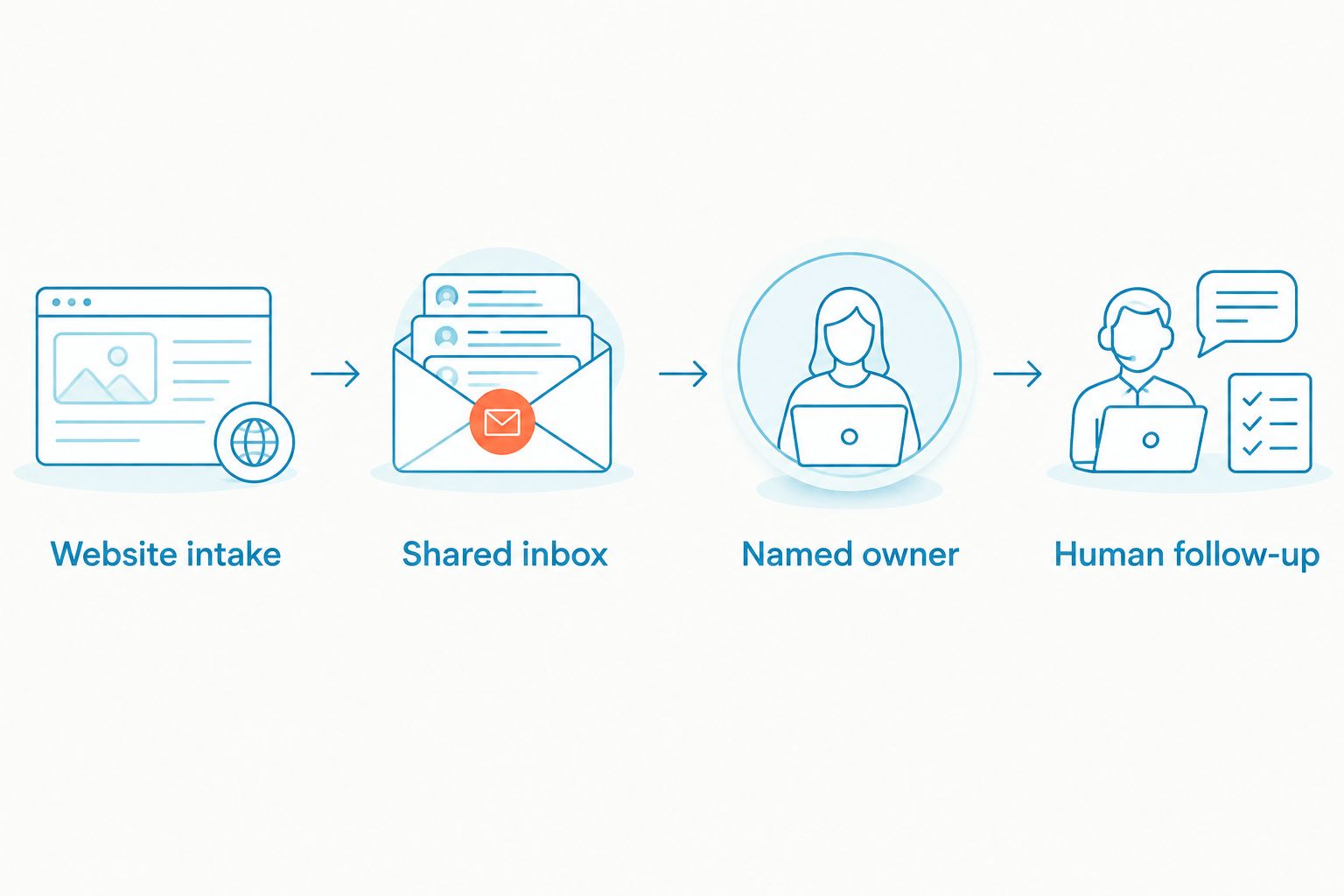
A captured enquiry is not a completed handoff. Require a demonstration of the next action, not just the arrival of a message.
Business SMS is a tie until you define ownership
Both providers belong on a business-SMS shortlist; message ownership determines the useful fit. Sending a text is only the beginning of a customer-service workflow.
Ask what happens when the employee who sent the message is away. Can the appropriate colleague understand the context and continue the conversation through the selected product? Demonstrate that exact task rather than accepting a general messaging overview.
On the client side, distinguish business SMS in the phone offer from VirtualText's separate shared-inbox workflow. They address related needs, but the separate offer must remain a separate line in your requirements.
For Dialpad, confirm the messaging experience in the specific product and subscription under consideration. Do not assume all products share the same workflow.
The practical drawback on either side is organizational: an inbox without ownership creates uncertainty. Decide who handles new messages, who covers absences, and who closes completed requests before rollout.
A fair comparison tests the same customer exchange on both sides. Start a request, hand it to another employee, and check whether the second person knows what to do.
Human support needs a real setup question
Support should be judged on your setup problem, not a generic service label. VirtualPBX states that support comes from real U.S.-based people. That is a relevant benefit for owners who want help from a person when configuring their business phone system.
For Dialpad, assess the channels, access conditions, and support terms attached to your selected subscription. A broad platform description is not enough to settle that decision.
Ask both providers the same practical question: how should calls route when the office is closed but an employee is still working? Look for an answer that explains the configuration and the employee's responsibility.
Neither product removes the need for an internal owner. Someone at your business must approve routing changes, maintain hours, and explain the setup to new staff.
Treat support as a selection criterion, not an assumed tie in service quality. A clear answer to your own setup question is more useful than an unsupported claim that one provider has better support.
Pricing: compare the model and complete scope
Compare subscription structure, not isolated headline figures. The client's phone offer uses a per-user model, with optional voice upgrades. VirtualText uses a separate flat-rate subscription for its messaging platform.
Dialpad uses per-user subscriptions across different offerings. Select the product that matches your needs before comparing its billing structure with a phone-first service or a separate messaging platform.
Per-user billing connects the subscription to licensed staff. A flat-rate model gives you a different budgeting structure, but you still need to confirm the included scope and relevant terms. Neither model automatically wins without a defined requirement.
For your 2026 decision, put these items in writing:
- The selected phone product and licensed users.
- Any optional call-handling upgrades.
- The website chat and shared-inbox requirement.
- Billing terms, renewal conditions, and cancellation rules.
- Implementation responsibilities and number-transfer steps.
The client states no contracts and a 14-day money-back guarantee. Review the applicable terms before purchasing. Evaluate Dialpad's selected subscription on its own terms rather than assuming an identical commitment.
Final verdict: choose by the work your team does
Choose VirtualPBX if you run a small, phone-first service team
Your priority is straightforward business calling, routing, optional call handling, and access to real human support. Choose Smarter Voice as the core phone offer; evaluate optional voice products only when you have a defined need.
If website enquiries and customer texts also need shared ownership, evaluate VirtualText separately. The winning profile is an owner who wants a practical phone setup without making conversation analysis the center of daily work.
Choose Dialpad if you manage a conversation-led team
Your staff or managers need transcription and summaries to review calls and prepare follow-up. You have a person responsible for using those records, not merely collecting them.
The winning profile is a sales or service manager whose work includes regular conversation review. Keep website intake as its own requirement and confirm the selected product's scope before committing.
| Dimension | Winner |
|---|---|
| Straightforward small-business phone focus | VirtualPBX |
| Transcription as a daily tool | Dialpad |
| Everyday cloud calling | Tie on the core requirement |
| Transcript-led conversation review | Dialpad |
| Stated website-lead and shared-inbox workflow | VirtualText, evaluated separately |
| Business SMS | Tie until ownership requirements are tested |
| Human support | Decide through a practical setup evaluation |
| Pricing model | Decide from complete subscription scope |
FAQ
Is VirtualPBX or Dialpad better for a small business in 2026?
VirtualPBX is the better fit for straightforward small-business calling with optional call handling and real human support. Dialpad is the better fit when transcription and conversation review are central to the team's work.
Which provider should I choose if I need call transcripts?
Dialpad is the stronger fit for a transcript-led workflow. Test a realistic conversation and review the transcript and summary before choosing the subscription.
Is VirtualText the same as Smarter Voice?
No. Smarter Voice is the core phone-system offer, while VirtualText is a separate platform combining SMS, webchat, a shared team inbox, and an AI agent.
Do I need optional automated call handling?
Choose optional call handling only when it addresses a defined answering problem. Map unanswered and after-hours calls first, then evaluate the handoff to a person.
Which option is better for website enquiries?
VirtualText directly matches the stated website-enquiry workflow through webchat and a shared team inbox. Evaluate it separately from the phone system, and demonstrate how a staff member takes ownership of the enquiry.
How should I compare subscription costs?
Compare the complete product scope and billing model. Include licensed users, optional voice upgrades, any separate messaging subscription, and the applicable commitment terms.
What should I test before switching phone providers?
Test answered, unanswered, and after-hours calls using your intended routing rules. Also check the number-transfer plan, employee devices, and responsibility for setup changes.
One last thing
The revealing test is an unfinished customer request. Leave a call or message unresolved, then ask another employee to continue it.
If that employee cannot identify the owner and next action, another feature will not fix the process. For your 2026 rollout, define the handoff first and buy the software that supports it.


