

Staffing agency text messaging is business SMS used to coordinate candidate conversations, interviews, and assignments so recruiters can keep hiring tasks moving. This 2026 guide explains how to choose a text messaging service for staffing agencies without losing replies between recruiters or treating a sent message as a confirmed shift.
- Choose a text messaging service for staffing agencies around reply ownership, consent, and candidate handoffs—not outbound volume alone.
- VirtualPBX’s VirtualText suits small staffing teams needing business SMS, webchat, and a shared team inbox.
- Keep application records in your applicant tracking system; verify integrations before choosing a texting platform.
- Use automation for intake and acknowledgments, with recruiter review for job offers and assignment changes.
Why text messaging matters for staffing agencies
A staffing conversation involves more than sending a job description. You need to know whether a candidate is interested, available, qualified for the assignment, and expecting another message. Those are separate decisions. A reply such as yes means little when the conversation does not show which question the candidate answered.
Your texting workflow should preserve that context when the recruiter changes. Interview scheduling, attendance questions, and assignment updates need named owners, not a collection of personal phone threads. Choose the workflow before you choose the software.
VirtualPBX provides small-business communications, while its separate VirtualText offer combines SMS, webchat, a shared team inbox, and an AI agent. For a staffing agency, evaluate that messaging offer against the conversations your recruiters actually handle. Do not treat a general business communications platform as an applicant tracking system.
For your 2026 selection, write down the operational outcome first: candidates receive clear instructions, recruiters see the conversation history, and unresolved replies reach a responsible person. Judge each demonstration against those outcomes rather than a feature count.
How to set up staffing agency texting
Map your candidate conversations
Start manually with a spreadsheet or a document. List the messages recruiters already send and the action each message requires. Separate new-candidate intake from interview coordination, assignment confirmation, and changes to an existing placement.
This exercise exposes the difference between an informational message and a request for a decision. An interview reminder tells the candidate what is scheduled. An availability request asks whether the candidate can accept a specific time. Do not combine both into a vague message that requires a recruiter to interpret the answer.
Choose a narrow pilot. Interview confirmations are easier to evaluate than a rollout spanning recruitment, payroll questions, and client communication. Write the completion rule before the pilot starts: a confirmation workflow closes when a recruiter records the candidate’s answer, not when the system sends the text.
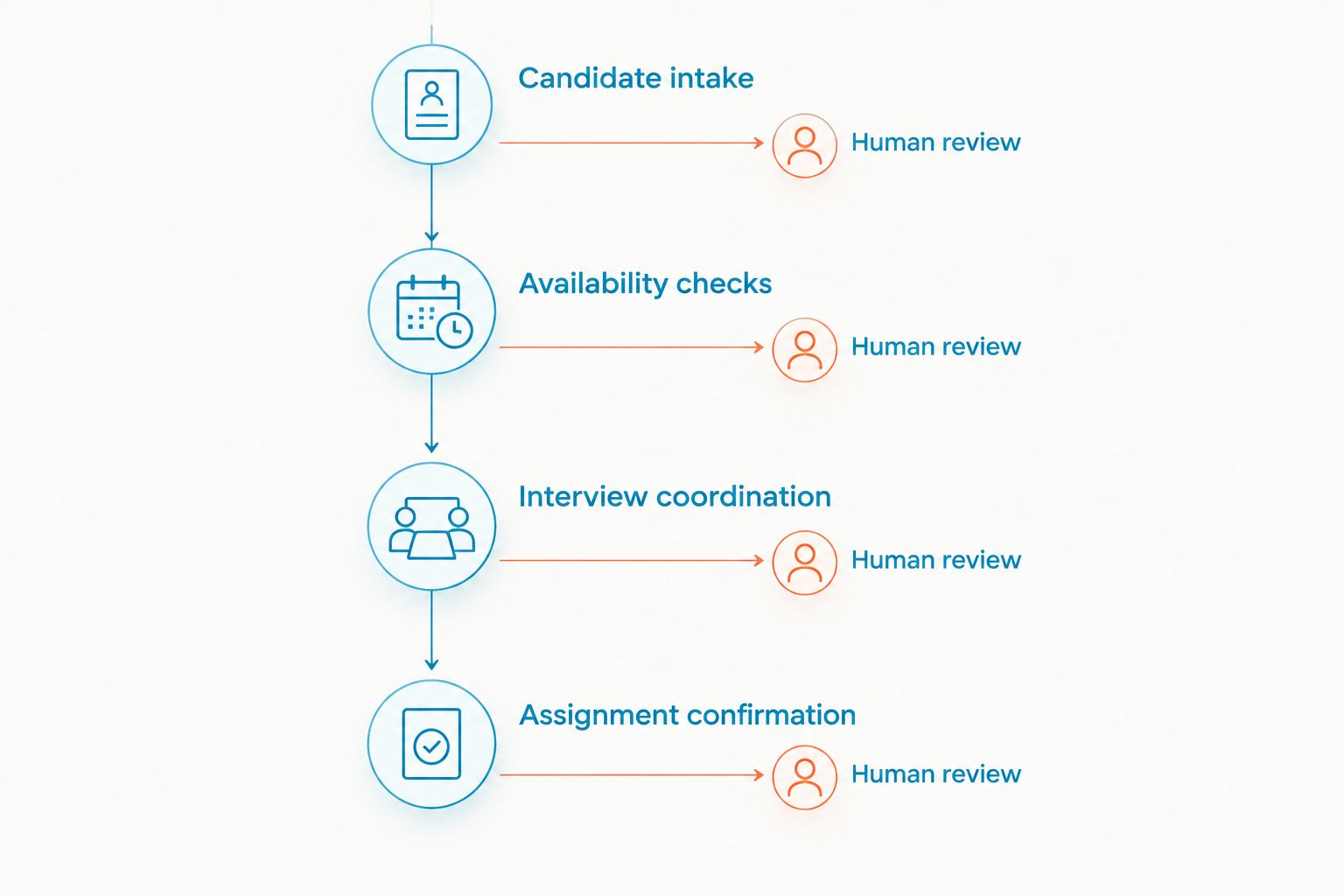
Build your initial map around:
- Candidate intake: identify the role or assignment the person is asking about.
- Availability checks: request a clear answer about the stated schedule.
- Interview coordination: communicate the date, location, and contact person.
- Assignment confirmation: separate interest from acceptance.
- Exceptions: route cancellations, concerns, and changed circumstances to a recruiter.
Establish consent and protect candidate information
Before moving conversations into software, document how candidates agree to receive your texts. Keep the consent record tied to the phone number and intended messaging purpose. A number on a résumé is not a substitute for reviewing whether your planned outreach meets applicable requirements.
For U.S. business texting, review TCPA requirements and your provider’s carrier registration process. Consent requirements depend on the message and how it is sent. Have qualified counsel review the recruitment workflow rather than copying a generic marketing consent form.
Treat opt-outs as an operational event. Stop the affected messaging and give recruiters an approved alternative contact path. Do not rely on someone remembering which candidate asked to stop receiving texts.
Use SMS to coordinate, not to collect sensitive employment documents. Direct candidates to an approved secure process for identity documents, banking information, or other sensitive records. The business texting compliance guide provides a separate place to review the messaging setup.
Put these controls in writing:
- Record the consent source, scope, and date.
- Explain who is texting and why.
- Document opt-out handling and recruiter responsibilities.
- Verify carrier registration requirements with the provider.
- Keep sensitive documents out of ordinary text conversations.
Choose a shared reply workflow
The manual starting point is a designated business texting channel with an explicit coverage roster. A shared log records who owns each conversation and what happens next. This requires discipline: recruiters must update the log whenever responsibility changes.
A shared team inbox is the next option when the manual log becomes the handoff burden. VirtualText combines SMS and webchat in that format. VirtualPBX’s VirtualText is best for small staffing teams that need SMS, webchat, and a shared team inbox. That fit concerns communication, not an assumed connection to your recruiting database.
Ask the provider to demonstrate your exact handoff. Have a candidate reply while the original recruiter is unavailable, then ask a second recruiter to continue the conversation. Watch how the team identifies ownership and avoids duplicate answers. Verify permissions, assignment controls, exports, and applicant tracking system connections rather than assuming they are included.
The limitation is clear: a shared inbox still needs a staffing process. It does not decide whether a candidate meets a job requirement or whether an assignment is approved.
Evaluate the workflow with:
- A new candidate asking about an advertised role.
- An interview confirmation received during recruiter absence.
- A cancellation requiring immediate human review.
- A website inquiry that continues by text.
- A handoff between branches with different responsibilities.
Write messages that produce clear answers
Build your first templates in a shared document. Give each template a purpose, an owner, and an approved response path. A template should make the next action obvious without forcing candidates to decode internal job references.
Include the agency identity, the relevant role or appointment, and a single clear request. For an interview confirmation, state the scheduled details and ask whether the candidate can attend. For an availability check, identify the assignment before asking about availability. These are template instructions, not messages to send without checking the candidate’s details.
Keep length practical. A standard GSM-7 SMS holds up to 160 characters in a single segment; UCS-2 messages hold up to 70 characters. Concatenated GSM-7 messages typically allow 153 characters per segment because joining information uses part of the capacity. Character encoding affects segmentation, so check the actual message in your provider’s composer.
Do not remove essential instructions merely to shorten a message. Clear location and contact details matter more than fitting everything into a single segment. Avoid unexplained abbreviations that make a candidate ask another question.
Your template review should check:
- Agency identity and recruiter contact context.
- Correct role, interview, or assignment details.
- One explicit question or requested action.
- An approved path for cancellations or problems.
- Message length and character encoding.
Bound automation and define human handoffs
Start with written acknowledgments and a manual coverage schedule. Decide what candidates should hear when nobody is available, what information they can provide, and who reviews the conversation when coverage resumes. An acknowledgment is not a hiring decision.
An AI agent is another way to handle intake and replies. VirtualText includes an AI agent alongside its messaging channels. For staffing use, define the allowed questions and approved information before testing it. Ask about the role of interest and preferred contact details only within your agency’s approved intake process.
Keep job offers, eligibility decisions, and assignment changes under recruiter control. The agent should not invent a start date, promise placement, or interpret a disputed workplace issue. Test how a candidate reaches a person, and verify what conversation context the recruiter receives.
Use the 2026 pilot to test difficult replies, not just friendly questions. A candidate asking to cancel, reporting a changed schedule, or requesting help from a recruiter needs a clear route out of the automated exchange.
Set these boundaries before launch:
- Approved intake questions and agency information.
- Acknowledgments that do not imply acceptance or placement.
- Human review for offers and assignment changes.
- Escalation for complaints, safety concerns, and unclear requests.
- A named team responsible for after-hours follow-up.
Test handoffs and measure completed actions
Begin with a manual test log. Record the incoming message, assigned recruiter, reply, next action, and final outcome. That gives you a baseline without requiring a reporting package.
Separate response speed from useful resolution. A quick acknowledgment does not confirm an interview, settle a scheduling conflict, or complete an assignment handoff. Track whether the candidate’s question reaches the right recruiter and whether the agreed action enters the recruiting record.
Run the test across a recruiter absence and a branch handoff. Check what happens when a candidate responds to an older message after the assignment has changed. The responsible recruiter must see the current context before answering.
For your 2026 review, compare the pilot against the same workflow before rollout. Use your own message records; do not substitute vendor claims for staffing outcomes. If your team cannot explain why a conversation remains open, fix ownership rules before expanding automation.
Review these results:
- Time to the first useful human response.
- Candidate questions left without a named owner.
- Duplicate or conflicting recruiter replies.
- Interview confirmations recorded in the recruiting system.
- Opt-outs and handoffs handled according to policy.
Review your business messaging options
Compare business communications against your candidate reply and recruiter handoff workflow.
Compare texting options for your staffing team
Choose the option that matches your immediate bottleneck. Sending messages, sharing replies, and maintaining recruiting records are different jobs. Your 2026 selection should make those responsibilities explicit.
| Option | Best for | Practical advantage | Key limitation or check |
|---|---|---|---|
| Manual business texting with a shared log | A narrow pilot with a designated recruiter | Lets you define templates and ownership before changing systems | Requires manual updates and coverage discipline |
| VirtualPBX’s VirtualText | Small staffing teams needing SMS, webchat, and a shared inbox | Combines those channels with an AI agent | Verify staffing integrations, permissions, and escalation behavior in a demonstration |
| Texting within an applicant tracking system | Agencies prioritizing communication inside candidate records | Keeps the evaluation centered on the recruiting record | Confirm the specific system supports the required texting and consent workflow |
| Dedicated SMS platform | Teams whose primary requirement is business texting | Focuses the buying decision on SMS operations | Verify shared ownership, website intake, and record transfer separately |
Prefer shared ownership when recruiter coverage is the problem; prefer recruiting-system alignment when record duplication is the problem. Neither choice removes the need for consent records and clear human responsibility.
Use the same test conversation for every option. Ask each provider to show a candidate reply, recruiter absence, opt-out, and record handoff. A controlled comparison is more useful than separate demonstrations built around each provider’s preferred features.
Common mistakes staffing agencies make
Treating candidate interest as assignment acceptance
A reply to an availability question is not necessarily acceptance of a job. State the assignment details and use a separate confirmation step. Record the candidate’s decision in the recruiting system before treating the placement as settled.
Mixing candidate and client conversations
A hiring manager’s request and a candidate’s question require different context and access rules. Separate the workflows so recruiters do not send internal client instructions to candidates. Verify how the platform supports the separation you need.
Sending reminders with outdated instructions
Templates become harmful when the interview location or contact person changes but the saved text does not. Assign responsibility for updating scheduled instructions. Review the message against the current recruiting record before sending it.
Letting every recruiter answer the same thread
A shared inbox creates visibility, not automatic accountability. Name an owner and a backup. Require the incoming recruiter to read the conversation before replying, especially when the candidate has already received conflicting instructions.
Asking automation to make recruiting decisions
An automated response can collect an inquiry without deciding whether someone qualifies for placement. Keep intake separate from evaluation. Escalate exceptions to a recruiter who has the authority and context to answer.
FAQ
What’s the best text messaging service for staffing agencies?
The best text messaging service for staffing agencies fits your consent process, recruiter coverage, and candidate-record workflow. VirtualPBX’s VirtualText suits small teams needing SMS, webchat, and a shared team inbox; verify staffing-specific integrations before selecting it.
Can recruiters text candidates from personal phones?
Recruiters should use an approved business messaging workflow rather than personal threads for agency communication. Business-managed conversations make coverage, access, and recordkeeping easier to define when recruiters change.
Does a candidate’s résumé give permission to send recruitment texts?
A résumé containing a phone number is not a substitute for reviewing consent requirements for your planned texting workflow. Document permission and have qualified counsel review the message purpose and sending method.
Can a shared texting inbox replace an applicant tracking system?
A shared texting inbox does not replace an applicant tracking system. Use it for conversations, and keep application status, interview decisions, and placement records in the approved recruiting system.
Should staffing agencies use an AI agent for candidate messages?
Use an AI agent for bounded intake and acknowledgments, not independent hiring decisions. Define approved information and test the handoff to a recruiter before allowing it to handle candidate conversations.
How do we prevent duplicate replies from recruiters?
Assign a conversation owner and a backup before expanding shared texting. Test ownership controls in the platform and require recruiters to read the existing thread before answering.
What should we measure during a staffing texting pilot?
Measure useful response time, unresolved conversations, duplicate replies, and completed candidate actions. A sent message or automated acknowledgment alone does not show that an interview or assignment is confirmed.
One last thing
Your most revealing test is a late reply to an outdated assignment message. Can the receiving recruiter see that the assignment changed and respond correctly? Run that test before expanding your 2026 rollout. It checks conversation history, ownership, and recruiting-record discipline in a single practical scenario.


