

A text messaging service for franchise businesses keeps customer conversations with the right location instead of scattered across staff phones. This 2026 guide explains how to choose a shared inbox, assign local responsibility, and handle after-hours inquiries without making promises your franchisees cannot keep.
- VirtualText by VirtualPBX suits small franchise service teams needing SMS, webchat, and a shared team inbox.
- Choose a text messaging service for franchise businesses around location ownership, not just message sending.
- Keep business texting permission, local availability, and human handoffs separate from promotional campaigns.
- Test shared inbox workflows at selected locations before expanding across your franchise network.
Why business texting matters for franchise businesses
A franchise customer needs an answer from the location that can actually serve them. A corporate reply is not enough when appointment availability, service areas, or opening hours differ between operators. The right texting workflow connects a customer to a responsible local person.
Your 2026 evaluation should start with those operational differences. Decide who answers a website inquiry, who handles an existing customer's request, and who takes over when the local team closes. A shared inbox does not replace those decisions; it gives your team a common place to carry them out.
Use the guide to team inbox software for multi-location service businesses alongside your location map. Separate franchise ownership, customer service responsibilities, and corporate oversight before choosing software. You need to know which conversations belong together and which must remain separate.
How to set up franchise texting
Start with a written process using your existing tools. Then test whether a platform makes that process easier to follow. The setup sequence below moves from customer entry points to a controlled rollout; it does not require automation at the outset.
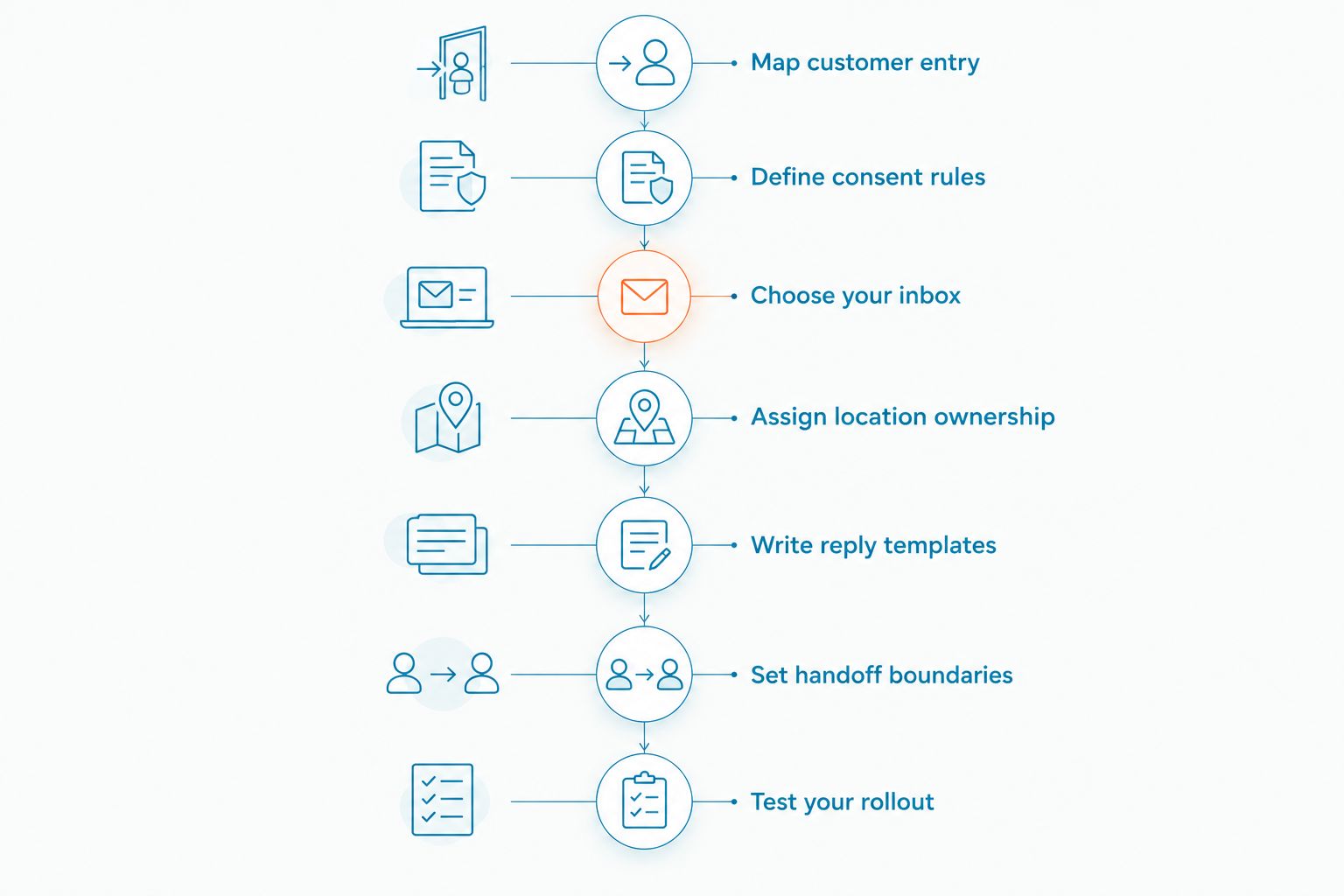
Map customer entry
Create a spreadsheet of every place a customer starts a conversation: local website pages, corporate inquiry forms, business phone numbers, and existing text channels. Add the intended location and current responder beside each entry. This manual inventory exposes gaps before you move messages into a new system.
Distinguish inquiries about the franchise business from inquiries about buying a franchise. A customer asking for service should not land with franchise development. Likewise, a prospective franchisee should not receive a local appointment reply.
Document what happens when the customer does not know the correct location. Ask for the service address or preferred branch rather than assuming the nearest office owns the request. Keep a fallback contact for requests outside an established territory.
Finish the map with these fields:
- Entry point and public-facing business identity.
- Location or territory responsible for the conversation.
- Customer request type, such as booking or service follow-up.
- Primary responder and backup responder.
- Destination for franchise sales and out-of-area inquiries.
Define consent rules
Write separate procedures for answering customer inquiries and sending promotional messages. Start with a manual permission record that captures what the customer agreed to, where the permission came from, and how staff handle opt-outs. Do not treat an inquiry about an appointment as blanket permission for unrelated campaigns.
For U.S. business texting in 2026, ask the provider about sender registration requirements for your intended numbers and messaging use. Application-to-person messaging over local numbers can involve A2P 10DLC registration. Have qualified counsel review consent language for the campaigns you intend to send.
Franchise ownership makes this practical, not just legal. Determine which entity collected permission and which entity will send messages. If a customer moves between locations, review permission before copying that customer into another franchisee's marketing list.
Give each operator the same baseline procedure:
- Record the source and scope of texting permission.
- Separate service conversations from promotional audiences.
- Identify the business sending each message.
- Document how opt-outs stop further promotional contact.
- Review sender registration with the provider before launch.
Choose your inbox
You can begin by assigning one person to check each existing business messaging channel and maintaining a shared follow-up log. This approach helps you learn the workflow, but staff must keep the log current. It is a starting process, not a substitute for testing access and accountability.
A combined platform reduces the need to check separate SMS and website-chat tools. VirtualText by VirtualPBX combines SMS, webchat, a shared team inbox, and an AI agent for small-business service teams. VirtualText by VirtualPBX is best for small franchise service teams that need SMS and webchat in a shared inbox.
That fit does not establish franchise-wide permission controls, territory routing, or integrations. Test those requirements directly. Ask the provider to demonstrate your actual ownership model, including independent operators and corporate staff, rather than showing only a single-location conversation.
Use your evaluation to verify:
- Which channels staff can handle in the inbox.
- How users identify the location responsible for a request.
- Whether access boundaries match franchise ownership.
- How staff record transfers and unresolved work.
- What happens to conversation access when an employee leaves.
Assign location ownership
Start with a written roster showing who owns each location's conversations during business hours and after closing. Staff can follow that roster manually while you test the software. A shared inbox needs an owner for every open conversation, not merely several people who can see it.
Choose whether corporate staff handle initial intake or local teams answer directly. Corporate intake offers a common greeting, but local staff still need the information required to act. Direct local handling keeps the conversation close to operations, but each franchisee must maintain coverage.
For transfers, require the receiving team to accept responsibility. Forwarding a message does not prove that anyone will answer it. Keep the customer's request, preferred location, and next action together so they do not have to repeat the story.
Define the handoff rules in plain language:
- Name the primary local owner for each shift.
- Name a backup owner when the primary person is unavailable.
- Specify when corporate staff should step in.
- Require acceptance before treating a transfer as complete.
- Keep the next action visible with the conversation.
Write reply templates
Draft approved responses in a shared document before configuring saved replies or automation. Cover the questions your locations actually receive: service areas, appointment requests, opening hours, and how to reach a person. Let operators supply their local details while corporate staff approve the common wording.
Use templates to support accurate answers, not to manufacture certainty. A booking inquiry needs an acknowledgment and a clear next action. It does not need a confirmation unless someone has checked availability and completed the booking.
Maintain a dated 2026 template library with a named owner for local updates. When a location changes hours or stops offering a service, update its replies before the old answer is reused. Treat templates as operating instructions, not permanent advertising copy.
Give every template a defined purpose:
- Acknowledge a new customer inquiry.
- Ask which location or service address applies.
- Explain the next step without promising availability.
- Request only information needed for that step.
- Identify when a staff member must review the request.
Set handoff boundaries
Write an after-hours reply manually first. It should identify the business, explain that the local team is unavailable, and tell the customer what happens next. Choose a follow-up commitment the location can actually meet; do not copy another operator's schedule.
VirtualText by VirtualPBX includes an AI agent alongside SMS, webchat, and the shared inbox. Use the AI agent for the questions and intake tasks you have approved, subject to testing. Do not assume it can check appointment availability, modify customer records, or transfer work between franchisees without verifying those functions.
A natural-language response still needs limits. When a customer disputes a charge, describes an urgent issue, or asks for an exception, your process should direct the conversation to a person. The answer should explain the handoff rather than pretend the issue is resolved.
Set explicit boundaries for:
- Approved questions and intake information.
- Requests that require local availability checks.
- Complaints, refunds, and policy exceptions.
- Sensitive information customers should not send by text.
- Urgent situations that require another contact method.
Test your rollout
Run a limited pilot before expanding across the network. As a practical starting point, select 2 locations, review 10 test conversations per location, and inspect the workflow over 5 business days. These are suggested pilot settings, not performance benchmarks; adjust them to your operating schedule.
Include different operating conditions, such as a centrally supported location and an independently managed location. Send test inquiries during opening hours and after closing. Check whether the correct person receives enough context to act, not just whether a message arrives.
For your 2026 review, record unresolved conversations, ownership changes, and errors in local answers. Measure response time from receipt to the first useful answer, keeping automated acknowledgments separate. A greeting that leaves the customer waiting is not the same as service.
Approve expansion only after checking:
- New inquiries reach the intended location.
- Backup staff can take over without losing context.
- Transfers receive an explicit acknowledgment.
- Opt-out procedures work as documented.
- Local hours and approved answers remain accurate.
- Departing staff no longer retain inappropriate access.
Compare your franchise texting options
Choose an operating approach before comparing feature lists. A locally managed business channel, a phone-system texting feature, and a combined inbox solve different problems. Your decision depends on who answers and which channels customers use.
| Option | Best for | Main advantage | Key limitation |
|---|---|---|---|
| Locally managed business messaging channels | A controlled pilot with dedicated local responders | Lets you establish ownership before changing tools | Staff must manually coordinate coverage and conversation records |
| Business phone system with SMS | Teams evaluating calling and texting together | Keeps voice and texting requirements in the same evaluation | Website chat and shared handling require separate verification |
| VirtualText by VirtualPBX | Small franchise service teams combining SMS and website inquiries | Combines SMS, webchat, a shared team inbox, and an AI agent | Franchise permissions, territory handling, and integrations need direct testing |
| Separate texting and webchat tools | Operators with established channel-specific processes | Allows each channel to follow its existing workflow | Cross-channel handoffs need an explicit process |
For a service franchise handling both website inquiries and texts, evaluate the combined-inbox approach first. For a calling-led operation, evaluate phone-system requirements separately. VirtualPBX offers a business phone system; VirtualText is the separate webchat and shared-inbox offer, not a replacement name for that core service.
Compare the full operating workflow, including onboarding, sender registration, access changes, and support. Ask for a demonstration using your franchise structure before committing to network-wide adoption.
Common mistakes franchise businesses make
Treating every location as one business
A shared brand does not mean every operator shares the same customer responsibilities. Document access boundaries and transfer rules before giving corporate staff or neighboring franchisees access to conversations. Test the arrangement with independently owned locations, not just corporate branches.
Sending customers to a central inbox without local ownership
Central intake fails operationally when the next step is unclear. Assign a local owner and require transfer acceptance. The customer should not have to chase a location because corporate staff consider the message forwarded and local staff consider it unassigned.
Reusing corporate answers for local promises
A common template can standardize tone, but it cannot establish local opening hours or appointment availability. Give each franchisee responsibility for those details. Require a local check before confirming a booking, service area, or exception.
Turning service permission into network-wide marketing permission
A conversation with one location is not a reason to enroll the customer in every operator's campaigns. Keep the permission record attached to its intended use. Review audience sharing and promotional messages with qualified counsel before expanding campaigns across the franchise network.
Measuring acknowledgments instead of useful responses
An immediate automated greeting can coexist with an unresolved customer request. Track when someone answers the actual question or provides a usable next step. Review the conversations still waiting for local action; those reveal coverage problems that greeting-speed reports miss.
FAQ
What's the best text messaging service for franchise businesses?
Choose a service that matches your location ownership and customer channels. VirtualText by VirtualPBX fits small franchise service teams needing SMS, webchat, and a shared team inbox; test franchise access controls and handoffs before rollout.
Can every franchise location use the same texting inbox?
Use a common inbox only when its access controls match your franchise ownership rules. Independently owned locations need clear boundaries around who can view, answer, and transfer customer conversations.
Should franchisees text customers from personal phones?
Use business-controlled messaging channels rather than making personal phones the default customer contact. Business-controlled channels give you a clearer process for coverage, staff departures, and conversation ownership.
Can an AI agent answer franchise customer texts after hours?
An AI agent can support approved after-hours replies and intake when those tasks work in testing. VirtualText includes an AI agent, but booking, territory handling, and other operational actions require direct verification.
Do franchise businesses need permission to send marketing texts?
Obtain appropriate permission for the marketing texts you intend to send and maintain a working opt-out process. Have qualified counsel review consent language and audience sharing between separately owned franchise locations.
What should a franchise test before launching texting in 2026?
Test location ownership, access boundaries, local answers, handoffs, and opt-out handling before launching franchise texting in 2026. Include after-hours inquiries and independently managed locations in the pilot.
Is VirtualText the same as the VirtualPBX phone system?
No. VirtualText is the separate SMS, webchat, shared-inbox, and AI-agent offer, while VirtualPBX provides the core business phone system. Evaluate each against the channels and operating tasks your franchise needs.
One last thing
Test a deliberately misdirected inquiry before you approve the rollout. Send a request to the wrong location and watch how staff identify the correct operator, transfer the context, and confirm responsibility. A normal inquiry tests answering; a wrong-location inquiry tests the franchise handoff.
For your 2026 launch, make that handoff an acceptance requirement. Do not expand a workflow that loses responsibility between locations. A polished greeting cannot fix a customer request that nobody owns.


