
There is no universal number of texts a small business can send before being flagged as spam in 2026. Carrier filtering depends on permission, sender registration, message content, recipient feedback, and sending patterns—not just your daily total. Your provider's sending allowance is a technical limit, not a guarantee that messages will reach customers.
- How many texts can a small business send before flagged as spam? No universal safe count exists.
- Carrier throughput limits control sending speed; they do not guarantee SMS delivery or customer permission.
- VirtualPBX business texting is best for small teams that need customer conversations alongside a business phone system.
- Before increasing volume, verify consent, registration, opt-out handling, and delivery reports with your messaging provider.
How many texts can a small business send before it's flagged as spam?
No daily text count makes business messaging automatically safe. A small batch of unwanted messages can create problems, while a properly registered program still needs permission, appropriate content, and working unsubscribe handling.
Start by separating these different controls:
| Control | What it measures | What it does not establish |
|---|---|---|
| Sending allowance | Messages or segments included in your service | Permission to contact recipients |
| Throughput | How quickly your sender can submit messages | A safe daily spam threshold |
| Carrier filtering | Whether traffic meets network acceptance criteria | Whether every accepted message gets read |
| Consent | What the recipient agreed to receive | Unlimited permission for unrelated messages |
For small teams using VirtualPBX, business texting belongs in the same operating plan as customer calls: identify the sender, define the purpose, and assign someone to handle replies. Buying messaging software does not replace those decisions.
When planning your 2026 texting program, ask your provider for the limits attached to your actual number and messaging use case. Do not borrow a daily cap from another business or an online discussion.
Why this matters
If you treat a sending allowance as permission to contact everyone in your database, you solve the wrong problem. The useful question is whether each recipient expects this message from your business.
An appointment reminder, a reply to an incoming question, and a promotional campaign have different purposes. Permission to discuss an appointment does not automatically establish permission for recurring marketing.
There are also separate consequences to consider. A message can face carrier filtering, prompt an unsubscribe, or raise a consent issue; those are not interchangeable outcomes.
Build your 2026 workflow around permission and relevance before volume. Then confirm the technical sending limits that apply to that workflow.
Customer replies versus promotional campaigns
Choose the messaging approach that matches the customer's request. Neither approach provides an exemption from carrier rules or applicable law.
| Approach | Best for | Practical advantage | Limitation |
|---|---|---|---|
| Customer-initiated conversation | Answering a specific service question | Gives your team clear context for a relevant reply | Does not establish blanket marketing permission |
| Appointment notification | Sending expected scheduling information | Keeps the message tied to an existing appointment | Requires accurate records and appropriate permission |
| Promotional campaign | Reaching recipients who agreed to marketing | Supports a defined offer and audience | Needs marketing-specific consent and opt-out controls |
Customer replies: stay within the request
If someone texts about a repair appointment, answer the appointment question. Identify your business when the context is not obvious, and stop when the conversation is complete.
Do not turn a service inquiry into an unrelated sales sequence. Customer initiation gives you context, not unrestricted permission.
Appointment notifications: keep them operational
An appointment reminder should help the customer confirm, change, or attend the appointment. Keep promotional content out unless you have the appropriate permission for that separate purpose.
For message planning, use the guide to sending appointment reminder texts. The operational test is simple: would the recipient recognize why this business is texting now?
Promotional campaigns: verify the audience first
Before sending marketing, inspect how recipients joined the list and what they agreed to receive. A stored phone number alone does not prove marketing consent.
Exclude recipients whose permission you cannot establish. Reducing the batch size does not fix a permission problem.
Why spam filtering varies
Carrier spam filters do not operate as a public counter that permits every message below a single daily total. These factors explain why the same sending volume can produce different results.
- Recipient permission: Keep evidence of how people agreed to receive the specific type of message. Purchased or unexplained contact lists do not provide reliable proof of that agreement.
- Sender registration: U.S. application-to-person messaging over local numbers commonly uses 10DLC registration. Toll-free messaging has a separate verification process; ask your provider which applies.
- Message purpose: Your actual traffic should match the use case described during registration. Do not register appointment notifications and then send unrelated promotions.
- Recipient feedback: Spam complaints and unsubscribe requests signal that recipients do not want the traffic. Investigate the source and purpose of the messages rather than simply slowing them down.
- Content and identity: Identify your business and use clear, relevant language. Misleading claims, suspicious links, and prohibited content can create filtering problems independently of volume.
- Sending pattern: Sudden bulk activity and repeated messages deserve review against your approved program and provider limits. Spreading unwanted traffic over more time does not make it acceptable.
For a 2026 program, confirm current requirements directly with your provider. Carrier policies, registration requirements, and account-specific limits are more useful than an unsupported rule about how many texts are safe.
How do you establish a responsible sending limit?
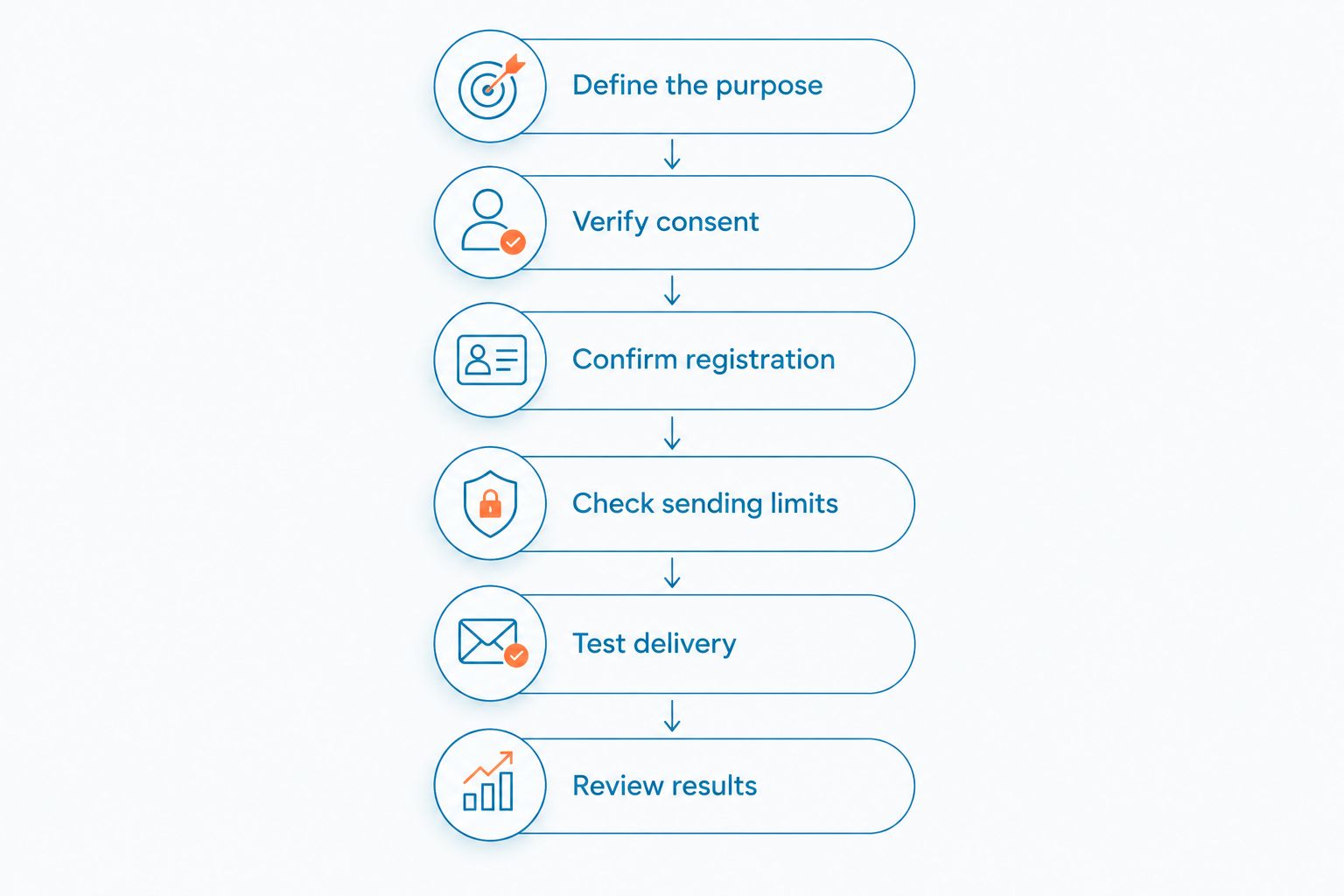
Start with the audience and purpose, then ask your provider for the technical ceiling. Use this setup sequence before increasing outbound traffic.
- Define the purpose. Write down whether you are answering inquiries, sending appointment updates, or running marketing. Keep those workflows distinct.
- Verify consent. Record the recipient's agreement, its source, and the message categories it covers. Remove contacts whose permission you cannot establish.
- Confirm registration. Ask whether your number and use case have completed the registration or verification your provider requires. Do not assume an active phone number is ready for application-based texting.
- Check sending limits. Get the applicable throughput, daily restrictions, and segment accounting from your provider. Ask how queued messages and rejected submissions appear in reports.
- Test delivery. Use consenting test recipients to check sender identity, message formatting, replies, and unsubscribe handling. A successful test does not guarantee delivery to every carrier or recipient.
- Review results. Inspect delivery failures, opt-outs, complaints, and customer replies. Investigate problems before expanding the audience.
Keep the resulting rules in a short operating document your whole team can follow. Include who approves campaigns, who answers replies, and who contacts the provider when delivery fails.
A responsible sending limit is the smaller of your operational need and your provider's permitted capacity—not an invented spam allowance. If you do not need to send a message, available capacity is not a reason to send it.
Does message length affect your sending limit?
Message length affects SMS segment accounting, which is different from spam filtering. A single SMS segment supports up to 160 characters with GSM-7 encoding, while a concatenated GSM-7 message generally allows 153 characters per segment.
For messages using UCS-2 encoding, the corresponding limits are 70 characters for a single segment and generally 67 characters per segment for concatenated messages. Some characters consume more space than others, so use your provider's segment preview rather than counting visible characters alone.
These standard SMS encoding limits are not recommended marketing lengths or safe daily volumes. A message that appears as a single conversation bubble can consume multiple segments.
Ask whether your provider measures throughput and allowances in messages or segments. That distinction matters when you compare a campaign's recipient count with its actual sending capacity.
What should you do when texts stop delivering?
Pause the affected outbound workflow and inspect the failure details. Repeatedly resending the same rejected content does not identify the cause.
First, separate a carrier rejection from an invalid destination, an opted-out recipient, or a queued message. Those conditions require different fixes, and a missing reply alone does not prove that a text was blocked.
Next, collect the sender, destination, timestamp, message content, and delivery error for your provider. Use secure support channels when sharing customer information.
Then review the registration, consent source, message purpose, and recent changes. If the issue began after importing contacts or launching an automation, inspect that change before restarting the workflow.
Do not rotate through new numbers to bypass filtering. Fix the underlying registration, permission, or content problem and follow your provider's instructions for resuming traffic.
What should a small service team look for in texting software?
VirtualPBX business texting is best for small teams that need customer conversations alongside a business phone system. That fit does not make software a substitute for consent management or carrier approval.
VirtualPBX also offers VirtualText, a separate SMS, webchat, shared-inbox, and automated-response offer for small-business service teams. A shared inbox addresses a practical problem: several employees need context before replying to the same customer.
The limitation is equally important. Shared access does not determine whether a recipient agreed to marketing, and automated responses still need clear boundaries. Assign ownership for campaign approval, opt-outs, and conversations that require a person.
Before selecting a workflow, ask the provider to demonstrate registration status, delivery reporting, unsubscribe handling, and team responsibilities. Keep phone-system selection separate from approval to send a particular campaign.
Can slowing down a campaign prevent spam flags?
Slowing down can address a throughput constraint, but it does not repair missing consent or prohibited content. Ask your provider whether failures reflect rate limits, filtering, or another delivery condition.
Do not adopt a supposedly safe gap between messages without understanding the actual limit. Queue settings should follow your provider's documented requirements, not a guess.
Does registration guarantee that texts will arrive?
Registration does not guarantee delivery. It establishes information about the sender and messaging program, while carriers still apply filtering and recipients retain control over unwanted messages.
Keep registration accurate when your purpose or workflow changes. A 2026 review should compare the registered use case with the messages your team actually sends.
Can you text everyone who has bought from you?
A purchase alone does not establish permission for every type of text. Check the consent you obtained and distinguish service communications from marketing.
If you cannot demonstrate permission for the planned campaign, exclude the contact until you establish an appropriate basis. Do not ask a smaller batch size to solve a consent problem.
FAQ
How many texts can my small business send per day without being flagged?
There is no universal safe daily count. Confirm your provider's account-specific limits, then separately verify permission, registration, content, and opt-out handling.
Is a small batch of business texts automatically safe?
A small batch is not automatically safe. Unwanted messages or traffic that violates carrier rules can create problems even when your total volume is low.
Does unlimited texting mean I can send unlimited marketing messages?
Unlimited texting does not mean unrestricted marketing permission. Service allowances remain separate from recipient consent, carrier policies, registration, and throughput limits.
Do I need registration if an employee types each text?
Typing each message manually does not, by itself, determine whether registration applies. Ask your provider how messages sent through its business application are classified and what your number requires.
Can I send promotions to customers who requested appointment reminders?
Permission for appointment reminders does not automatically establish permission for promotions. Match each campaign to the agreement the recipient actually made.
Should I resend a message when delivery fails?
Check the delivery status and error before resending. A rejected message, an opted-out recipient, and a temporary queue require different responses.
Does a delivered status mean the customer read my text?
A delivered status does not establish that the customer read the message. Use delivery reporting to diagnose transport issues, not to assume attention or agreement.
One last thing
The most useful question is not how many texts you can squeeze through. It is whether your team can explain why each recipient should expect each message.
Before your next 2026 campaign, choose a contact from the audience and trace the permission record, message purpose, unsubscribe process, and reply owner. If any part is unclear, fix the workflow before expanding it.