
Yes, you can text customers from your existing business landline number when a business texting provider confirms the number is eligible and enables SMS on it. Your desk phone does not send the messages: you use a business messaging app, and you must confirm whether activation preserves your current calling service or requires a number transfer.
- Can you text customers from your business landline number? Yes, if the number qualifies for business SMS activation.
- SMS activation and voice number transfers are different processes; confirm which one your provider proposes.
- VirtualPBX serves small teams that need business calling and SMS; existing-number eligibility requires confirmation.
- Customer consent, carrier registration, and a monitored team inbox belong in your setup plan.
Can you text customers from your existing business landline number?
Yes—but eligibility comes before installation. A provider must check the exact number, establish your authority to use it, and explain how incoming and outgoing texts will work. An existing voice account does not establish that the number already supports business messaging.
If you are considering VirtualPBX, ask support to check your current number before changing your phone service. Have your carrier name, account details, and intended texting use ready. Describe whether you want customer replies, appointment messages, or promotional campaigns; those are different messaging purposes.
Use this setup sequence in 2026:
- Check eligibility. Give the provider your existing business number and ask whether it supports SMS activation.
- Confirm voice handling. Establish whether calls stay with your current carrier or move to another phone service.
- Authorize the number. Supply the ownership or account documents the provider requests.
- Complete registration. Follow the applicable business messaging registration and verification process.
- Prepare the inbox. Assign staff, define coverage, and set rules for consent and opt-outs.
- Test both channels. Send and receive texts, then test calls before telling customers the number accepts messages.
Do not cancel the existing voice account as a shortcut. If the proposed setup involves porting, coordinate the transfer with the receiving provider first. Losing access to a published number is a much larger problem than waiting to activate texting.
Why this matters
A customer who knows your business number should not have to learn an employee's personal mobile number just to send a question. Business texting gives you a separate place to handle those conversations. It also creates a new responsibility: someone must monitor the replies.
For your 2026 setup, separate the technical decision from the staffing decision. Number activation determines whether messages reach the business. Inbox ownership determines whether customers get an answer.
Keep the familiar number when it qualifies, but do not advertise texting until incoming messages reach an inbox your team actually checks. A successful outbound test alone does not prove that replies, opt-outs, or after-hours messages reach the right person.
Keep your voice service or move the number?
There are different ways to add texting, and they do not all require the same changes. Ask the provider to identify the proposed route in plain language. A promise to “keep your number” does not explain where calls will go.
| Setup option | Best for | Practical advantage | Limitation to check |
|---|---|---|---|
| SMS activation alongside existing voice service | Businesses keeping their current calling setup | Uses the familiar number without necessarily moving calls | Number and carrier arrangements must support this setup |
| Transfer to a business phone service with SMS | Teams replacing their calling system | Places calling and texting within the new service arrangement | Requires a coordinated transfer and confirmation of SMS support |
| Separate business texting number | Businesses whose existing number cannot be enabled | Gives the team a dedicated messaging channel | Customers must learn another number |
Keep calls with the existing carrier
Best for: a business that wants texting but is satisfied with its calling service. Some arrangements enable messaging on a number while voice remains with the existing carrier. This is often called hosted messaging or hosted SMS.
Ask whether that arrangement is supported for your exact number. Also ask who handles messaging support if texts fail while calls still work. Separate providers mean you need a clear boundary between voice issues and SMS issues.
Transfer the number to a new phone service
Best for: a team that wants to replace its calling system as well as add texting. Porting moves the number's service arrangement; it is not simply a switch that turns on SMS. Confirm calling features, message access, and the activation sequence before authorizing the move.
Keep the current account active until the receiving provider confirms the transfer is complete. Test your published number afterward. Check inbound calls, outbound caller identification, incoming texts, and customer replies independently.
Use a separate texting number
Best for: a business that cannot enable its existing number or deliberately wants separate channels. A dedicated business texting number keeps customer conversations away from personal phones. The trade-off is communication: your website, staff, and customers must distinguish the calling number from the texting number.
Do not describe this as texting from your existing landline. It solves a related problem, but it does not preserve the same customer-facing number for both channels.
Why business landline texting setup varies
The provider needs more than a phone number to give you an accurate setup path. These factors determine what must happen before you send customer messages:
- Number eligibility. The number's existing service arrangement determines whether the proposed messaging setup is supported.
- Account authority. The provider needs to establish that your business can authorize messaging or a transfer.
- Voice changes. Leaving calls in place and moving the phone service are different projects.
- Number type. U.S. local business messaging and toll-free messaging have different registration or verification processes.
- Message purpose. Customer support, appointment coordination, and marketing require different consent and operational planning.
- Team coverage. A shared inbox needs an owner, backup coverage, and a process for unresolved conversations.
For U.S. business texting in 2026, ask specifically about A2P 10DLC if you will use a local number. A2P means application-to-person messaging; 10DLC refers to a 10-digit long code. Carrier registration is a messaging requirement, not permission from a customer to receive your texts.
Toll-free messaging uses a separate verification process. Ask the provider which process applies rather than assuming every business number follows the same instructions.
What should you prepare before activation?
Collect the information that connects your business, your number, and your intended messages. This avoids treating a technical activation request as if it were the entire launch plan.
Prepare these items before submitting the request:
- Your business's legal name and relevant contact details.
- The current phone number and carrier account information.
- The person authorized to approve account changes.
- A description of the messages you intend to send.
- Your customer opt-in method and consent records.
- Sample messages that identify your business.
- A process for handling opt-outs and help requests.
Use accurate business details and describe the real messaging purpose. Do not register a support workflow and then use it as an unrelated promotional campaign. Ask the provider how to update the registration when your use changes.
There is no universal activation deadline to promise customers. Ownership checks, carrier processes, and number transfers are separate dependencies. Publish a texting announcement only after the provider confirms activation and your team completes its tests.
How should your team handle incoming texts?
A text-enabled number is useful only when replies have somewhere to go. Decide who takes each conversation, who covers an absence, and which questions require a phone call. Start with a simple workflow before adding automated responses.
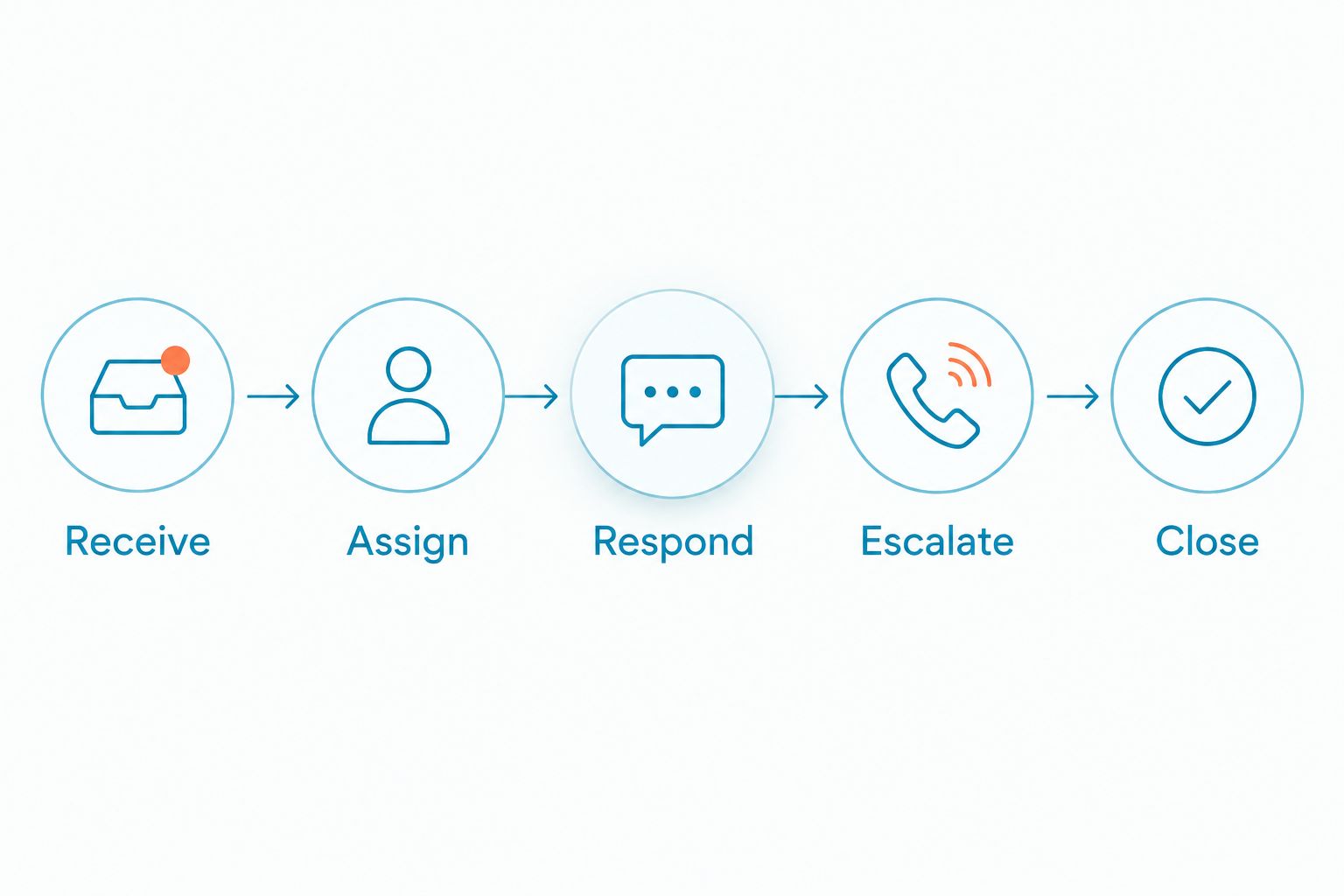
Use these stages:
- Receive. Confirm the message appears in the business inbox, not an employee's personal account.
- Assign. Give the conversation a clear owner so staff do not send conflicting replies.
- Respond. Answer the customer's question or ask for the information needed to proceed.
- Escalate. Move sensitive, urgent, or complicated issues to the appropriate person or channel.
- Close. Record the outcome and make unresolved work visible to the next shift.
The goal is ownership, not extra administration. A customer should not have to repeat a request because the employee who first answered is away.
For after-hours coverage, say when a person will respond instead of implying that someone is immediately available. An automated acknowledgment is not a completed appointment, accepted job, or resolved complaint. Keep those outcomes distinct in your messages.
Where does VirtualPBX fit?
VirtualPBX is best for small teams that need a business phone system with SMS and real human support. Its core phone offering is Smarter Voice. That makes the provider relevant when your texting decision also involves business calling, routing, or number porting.
For a task centered on text conversations and website leads, VirtualText by VirtualPBX is the separate offer combining SMS, webchat, a shared team inbox, and an AI agent. The distinction matters: adding a messaging workspace and replacing your phone system are not the same purchase decision.
The practical advantage is a business-focused alternative to customer conversations scattered across personal phones. The limitation is that a feature list does not establish eligibility for your particular landline number. Ask for confirmation of the number, voice arrangement, messaging registration, and inbox workflow before choosing a setup.
What texting rules should you build into the workflow?
Enabling SMS does not give you unrestricted permission to contact customers. Establish the appropriate consent for the messages you plan to send, identify your business, and provide a working opt-out process. Promotional texting needs particular care; a phone number on an invoice is not a blanket marketing opt-in.
Use these rules for your 2026 messaging workflow:
- Keep a record of how and when the customer agreed to receive the relevant messages.
- Make the sender clear, especially in the first message of a conversation.
- Separate service communications from promotional campaigns.
- Honor opt-outs and prevent later messages from conflicting workflows.
- Avoid asking customers to send sensitive information through ordinary SMS.
- Obtain legal guidance for regulated communications or uncertain consent practices.
Healthcare, insurance, and financial-service teams need additional review of message content and data handling. Do not assume that a business texting tool makes every conversation appropriate for SMS. Direct sensitive exchanges to an approved channel.
Carrier registration, customer consent, and information security solve different problems. Completing one does not replace the others.
Will a long message arrive as a single text?
A standard SMS segment supports up to 160 GSM-7 characters. Messages using Unicode encoding generally support up to 70 characters in a single segment. Longer messages use concatenation, with fewer characters available in each segment because part of the space supports reassembly.
These limits describe SMS formatting, not a provider's plan allowance. Ask how the service measures usage and handles long messages. Do not assume that one message bubble equals one SMS segment.
Write the business name, reason for contact, and requested action first. Keep appointment details concise and remove unnecessary background. Test your actual templates because punctuation and non-Latin characters can change the encoding.
Can customers reply to the same business number?
Yes, customers can reply to the same number when two-way SMS is active and incoming messages are correctly routed. Confirm two-way messaging explicitly; the ability to send a message is not a substitute for testing receipt.
Send a text to an external mobile phone, reply from that phone, and check the business inbox. Then have another authorized employee open the conversation. This tests both delivery and team access.
Can you text customers without using your personal phone number?
Yes, a business messaging app can send from your enabled business number rather than your personal mobile number. Your staff can use the approved workspace to handle customer conversations.
That separation does not remove the need for access controls. Give staff individual access where supported, review permissions, and remove access when someone leaves the team.
Does business texting automatically reply to missed calls?
No, SMS activation alone does not establish a missed-call text-back workflow. That requires a supported connection between call events and messaging, plus an appropriate consent and response process.
For your 2026 launch, treat missed-call automation as a separate feature to verify. Ask what triggers a message, which number sends it, and where customer replies appear.
FAQ
Can you text customers from your business landline number?
Yes, if a business texting provider confirms eligibility and enables SMS on the number. You send and receive messages through a messaging app rather than through the landline handset.
Do I have to change phone carriers to add business texting?
Not necessarily; some setups support messaging while your existing voice service stays in place. Ask the provider to confirm that arrangement for your specific number before authorizing changes.
Will enabling texting stop my business calls?
Voice service and messaging can coexist, but the effect depends on the setup. Confirm whether calls remain with the current carrier or move through a coordinated number transfer, then test both channels.
Do customers need a special app to text my business?
Customers generally use their phone's ordinary texting app to message an SMS-enabled business number. Your employees use the business messaging workspace to handle those conversations.
Can every employee reply from the same business number?
A shared business inbox can give authorized employees access to conversations from the same number. Confirm user access, assignment tools, and permissions with the provider.
Does registering my number mean I can send marketing texts?
No, carrier registration does not replace customer consent. Establish the consent appropriate to your messages and maintain a working opt-out process.
Can VirtualPBX confirm whether my existing number supports texting?
Ask VirtualPBX support to review your existing number and proposed business SMS setup. Confirm eligibility, voice handling, registration requirements, and where incoming replies will appear before changing service.
Can I promise customers immediate replies after enabling texting?
Only promise a response standard your team can actually meet. Number activation does not provide staff coverage, and an automated acknowledgment is not the same as resolving a request.
One last thing
Test the reply, not just the send. Before publishing that customers can text your business number, have someone outside the business send a fresh message without responding to an earlier outbound text. Confirm that it reaches the right inbox and that your team can answer it.
That final check matches the customer experience you are about to advertise. Keep calling available, give texts a clear owner, and add automation only after the basic conversation works.