
An AI agent’s text response time depends on when the message reaches the platform, how the reply is generated, and when the messaging network delivers it. There is no single response time that applies to every AI texting service in 2026. Measure the customer-visible reply, not just how quickly the agent finishes writing; a fast acknowledgment also does not mean the customer’s question has been answered.
- How long does it take an AI agent to respond to a text? Measure receipt, generation, and delivery separately.
- VirtualPBX offers business communications for small teams; evaluate text response speed separately from phone-system features.
- An automated acknowledgment confirms receipt; a useful AI response answers the question or requests the next necessary detail.
- Test business SMS and webchat separately, and assign a person to conversations that need human judgment.
How long does it take an AI agent to respond to a text message?
The useful answer is the elapsed time between the customer sending a message and receiving a meaningful reply. An agent’s processing time measures only part of that journey. A message can leave the agent without having reached the customer’s phone.
For a 2026 evaluation, record 3 timestamps: customer sent, platform received, and customer received the reply. Add the agent’s completion timestamp when your platform exposes it. These records let you distinguish an intake delay from a reply-generation or outbound-delivery delay.
| Measurement | Start and finish | What it tells you | What it leaves out |
|---|---|---|---|
| Inbound delivery | Customer sends to platform receives | How long the incoming message takes to arrive | Time spent preparing the answer |
| Reply preparation | Platform receives to reply is ready | How long the system takes to process and compose | Outbound delivery to the customer |
| Outbound delivery | Reply is submitted to customer receives | How long the return message takes to arrive | Whether the answer is useful |
| Customer-visible response | Customer sends to customer receives | The waiting time the customer experiences | Whether the request is resolved |
Ask for a clearly defined response-time measurement before comparing services. A processing-time claim and an end-to-end delivery claim describe different things, even when both are labeled response time.
If website inquiries are part of your workload, use the same measurement discipline when you reduce response time to website chat leads. Keep the SMS results separate from the webchat results.
Why this matters
A customer texting your business needs an answer, a next step, or a clear explanation of when someone will help. An automated receipt provides acknowledgment. It does not confirm an appointment, establish service coverage, or resolve a billing question.
Your 2026 response-time target should therefore describe both speed and purpose. Decide whether you are measuring the first acknowledgment, the first useful answer, or the completed request. Do not let a quick greeting stand in for all three.
For a small service team, this distinction changes the setup. Routine questions need approved answers. New inquiries need a clear intake path. Exceptions need an assigned person rather than another automated message.
What counts as a useful text response?
A useful response moves the customer’s request forward without making an unsupported promise. It answers an approved question, asks for a missing detail, or explains the next action. The customer should understand what happens next.
Consider an inquiry about whether your business serves a particular address. A receipt alone leaves the question open. Asking for the service address moves the conversation forward; confirming coverage requires an approved source for that answer.
The same rule applies to scheduling. Collecting a preferred appointment time is not the same as confirming a booking. Treat a request as confirmed only after the relevant system or authorized team member confirms it.
When you review transcripts, mark the first message that actually advances the request. That gives you a useful-answer measurement alongside the first-reply measurement. Keep both rather than choosing whichever looks faster.
Automatic acknowledgment, AI answer, or human reply?
These response methods serve different purposes. Choose the method by the task, not by the shortest possible delay. A fixed receipt is appropriate for acknowledgment; a question requiring judgment needs a different path.
| Response method | Best for | Advantage | Limitation | Recommended use |
|---|---|---|---|---|
| Fixed automatic reply | Confirming receipt or stating approved office hours | Predictable wording | Does not interpret the customer’s request | Use for acknowledgment, not resolution |
| AI-generated reply | Routine questions and structured intake | Can respond to the message’s content | Needs approved information and clear boundaries | Use within a defined scope |
| Human reply | Exceptions, disputes, and decisions requiring authority | Adds judgment and accountability | Depends on someone being available | Assign an owner and a fallback |
An AI-generated reply should not invent an answer to avoid handing off the conversation. A human reply should not require the customer to repeat information already collected. Both failures make a quick first response less useful.
For your 2026 setup, write down which requests belong in each row. Give staff the same rules the automated workflow follows. That prevents a customer from receiving conflicting answers when a person takes over.
Why AI text response time varies
Response time depends on the complete messaging workflow, not just the agent. Check these factors when a reply takes longer than expected:
- Message arrival: The agent cannot process a text before the platform receives it. Compare the sender’s timestamp with the platform’s intake record.
- Answer preparation: Reading the conversation and preparing a relevant answer are separate from acknowledging receipt. Examine the processing interval where logs expose it.
- Information lookup: A workflow that checks another system includes that system’s response. Confirm whether a lookup actually happens before treating it as part of the timing.
- Outbound delivery: Submission to a messaging service is not the same event as receipt on a customer’s device. Use delivery evidence where available.
- Human handoff: A request outside the agent’s scope adds a separate staff-response interval. Track it rather than hiding it inside an automated-reply result.
Fix the stage that causes the delay. Changing the agent’s instructions will not explain a message that has not arrived. Shortening a greeting will not solve an unassigned handoff.
Keep a brief incident note with the affected message and its timestamps. Describe the observed problem rather than assigning a cause without evidence. That makes the next troubleshooting step specific.
How do you test an AI agent’s text response time?
Use a repeatable test that checks speed and answer quality together. Run it through the same channels your customers use, with approved test content rather than real confidential customer information.
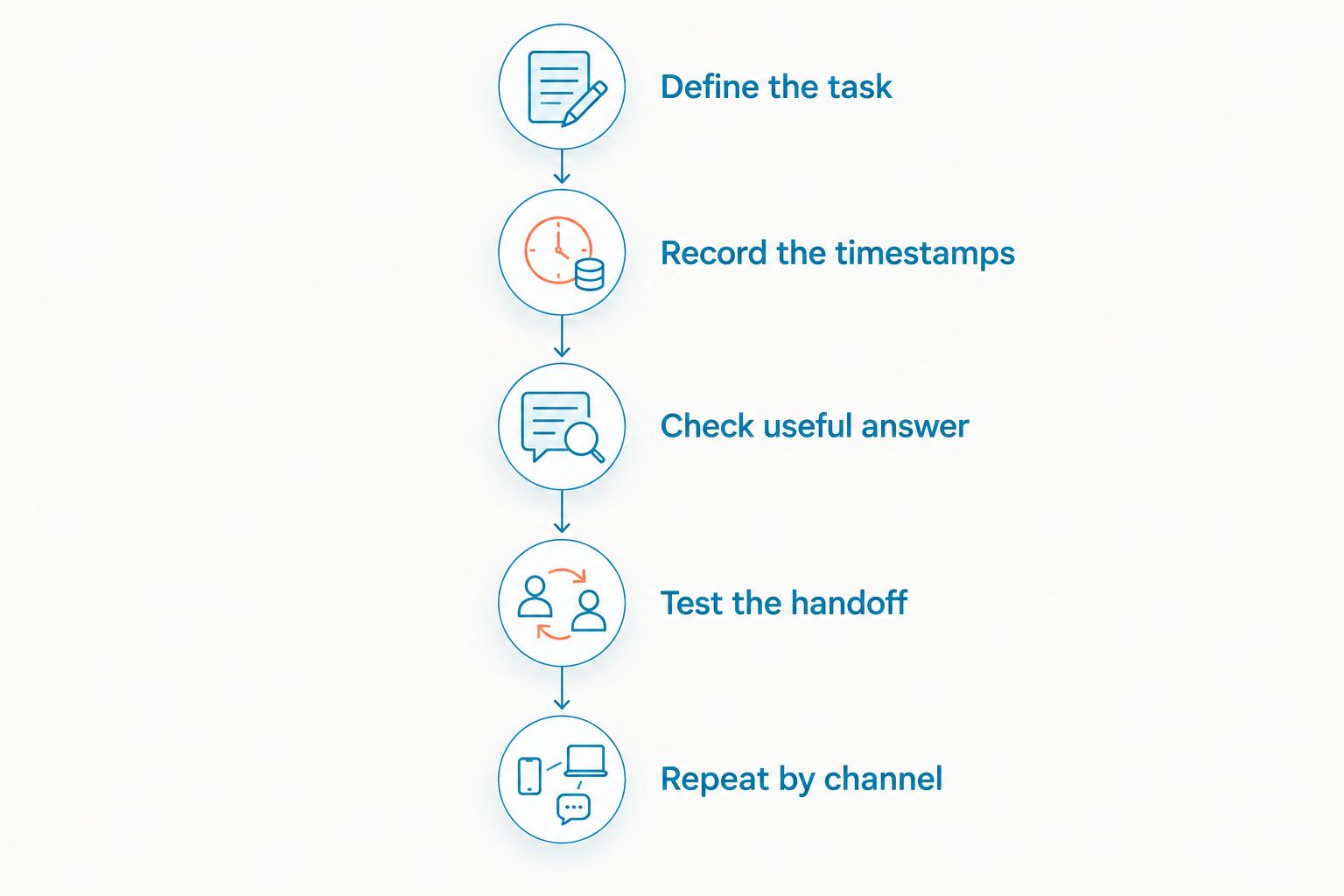
1. Define the task
Start with a routine question, a new inquiry, and a request that requires a person. Write down what a successful answer should do before sending the message. Do not change the success criteria after seeing the reply.
For routine questions, check factual accuracy. For intake, check whether the agent asks for the necessary detail. For exceptions, check whether the handoff is clear and assigned.
2. Record the timestamps
Capture the customer-sent, platform-received, and customer-received timestamps. Use the same clock basis throughout the record. When logs provide additional events, preserve their original labels so you do not confuse submission with delivery.
Record elapsed time in seconds or minutes according to what you observe. Do not fill an empty timing field with an assumed value. An incomplete record should remain distinguishable from a measured result.
3. Check the useful answer
Read the entire response, not just its arrival time. Confirm that it addresses the actual message and does not promise an action the workflow cannot complete. A fast wrong answer fails the test.
Also check whether the customer can respond naturally. If the agent asks for a detail already supplied, review the conversation context and instructions. Unnecessary repetition adds work even when each individual reply arrives promptly.
4. Test the handoff
Send a request outside the approved scope. Check what the customer receives, where the conversation goes, and who is responsible for it. The handoff should leave a visible next action rather than an unattended conversation.
Assign 1 owner per escalated conversation as an operating rule. Other staff can help, but the team should know who must respond. Ownership is a workflow decision, not a response-speed guarantee.
5. Repeat by channel
If you use SMS and webchat, maintain separate results for those 2 channels. Test during staffed hours and during the periods when your team is unavailable. Record the actual behavior rather than assuming that the configuration works identically everywhere.
Repeat this process after changing instructions or routing. Keep the old and new records so you can see what changed. Use your measured results to set expectations for customers.
How do you make replies more useful without inventing answers?
Give the agent a bounded job. Start with approved business information and a clear rule for questions it cannot answer. Faster wording is not a substitute for accurate source material.
Keep the first response focused on the customer’s request. Ask for the next necessary detail rather than sending a long intake questionnaire immediately. Do not ask for sensitive information merely because collecting it is technically possible.
Review the messages that trigger repeated clarification. Rewrite unclear instructions and remove conflicting answers. If a request requires a person’s approval, state that boundary instead of instructing the agent to sound more confident.
For your 2026 review, separate configuration changes from measured improvements. A shorter response is a change you can observe. A faster customer-visible response requires a timing record.
Where VirtualPBX fits for a small service team
VirtualPBX provides cloud business communications for small teams. For this texting use case, VirtualText by VirtualPBX combines SMS, webchat, a shared team inbox, and an AI agent for small-business service teams.
VirtualPBX is a fit for small service teams that need business communications with a shared SMS and webchat workflow. The relevant benefit is keeping automated replies and team follow-up in a coordinated process. That feature set does not establish a specific text-response time.
Evaluate the workflow against your own inquiries before relying on it. Check routine answers, after-hours intake, and the transition to a person. Confirm the current terms and implementation requirements with the provider rather than treating a feature list as a performance guarantee.
What should an after-hours response tell the customer?
An after-hours reply should state what the system can do now and what requires staff follow-up. Keep the distinction explicit. Collecting a request is not the same as dispatching a technician or confirming an appointment.
Use your real staffing schedule when describing the next human response. Do not promise a callback window your team has not agreed to meet. If the agent does not know the answer, direct the conversation to the appropriate person without inventing details.
Review unresolved after-hours conversations when staff return. Assign ownership before sending further messages so customers do not receive conflicting replies. The morning follow-up is part of the service workflow, even though it is separate from the automated response.
FAQ
How long does it take an AI agent to respond to a text?
An AI agent’s text response time depends on message arrival, answer preparation, and outbound delivery. Measure from the customer’s sent message to the customer’s received reply rather than assuming a universal number.
Does an AI agent reply to text messages instantly?
An instant reply is not a universal guarantee. Check whether a timing claim measures answer generation, message submission, or delivery to the customer’s phone.
Is an automatic text reply the same as an AI response?
A fixed automatic text reply sends predefined wording; an AI response is generated in response to the conversation. A receipt confirms arrival but does not necessarily answer the customer’s question.
Why did the AI finish its answer before I received the text?
Answer completion and text delivery are separate events. Compare the platform’s completion or submission record with the message’s delivery record to locate the interval.
Should I measure SMS and website chat together?
Measure SMS and website chat separately. Their delivery paths differ, so a combined result hides which channel produced the delay.
What happens when an AI texting agent cannot answer?
A well-defined workflow hands the conversation to an assigned person or explains the next approved step. Test that behavior with a request outside the agent’s scope before using it with customers.
Can VirtualPBX help a team manage customer texts?
VirtualPBX’s VirtualText offer combines SMS, webchat, a shared team inbox, and an AI agent for small-business service teams. Evaluate the actual reply and handoff workflow separately from any response-time claim.
One last thing
The quickest message is not always the quickest path to an answer. A generic acknowledgment followed by repeated questions can leave the customer doing more work than a focused reply that requests the right detail.
For your next 2026 review, inspect the first useful response and the final handoff together. Keep the timing records, check the answer, and assign the follow-up. That is a better acceptance test than watching an agent produce text on a screen.