
Business texting software has no universal setup time: your launch date depends on number readiness, messaging approval where required, and whether your team can handle replies. Opening an account is not the same as being ready to text customers. For a 2026 rollout, use a tested send-and-reply workflow—not a signup confirmation—as your finish line.
- How long does it take to set up business texting software? Number readiness and tested replies determine the launch date.
- VirtualPBX suits small service teams that want business texting and webchat in a shared team inbox.
- Separate account configuration, messaging readiness, and team readiness before committing to a customer-facing launch.
- Start with customer replies; add automated messaging only after ownership and escalation rules are clear.
Why this matters
A customer does not care whether your account is active. They care whether their message reaches someone who can answer. A working login proves access, not a working customer service process.
The practical solution is to launch a narrow, tested workflow first. Establish who answers incoming texts, what happens after hours, and how a teammate takes over. The guide to building a shared team inbox for customer texts covers the inbox side of that preparation.
For your 2026 setup plan, separate work your team controls from work that requires provider confirmation. You control staff access, response wording, and inbox ownership. Ask the provider to confirm number eligibility, messaging requirements, and the point at which you can send production messages.
How long does it take to set up business texting software?
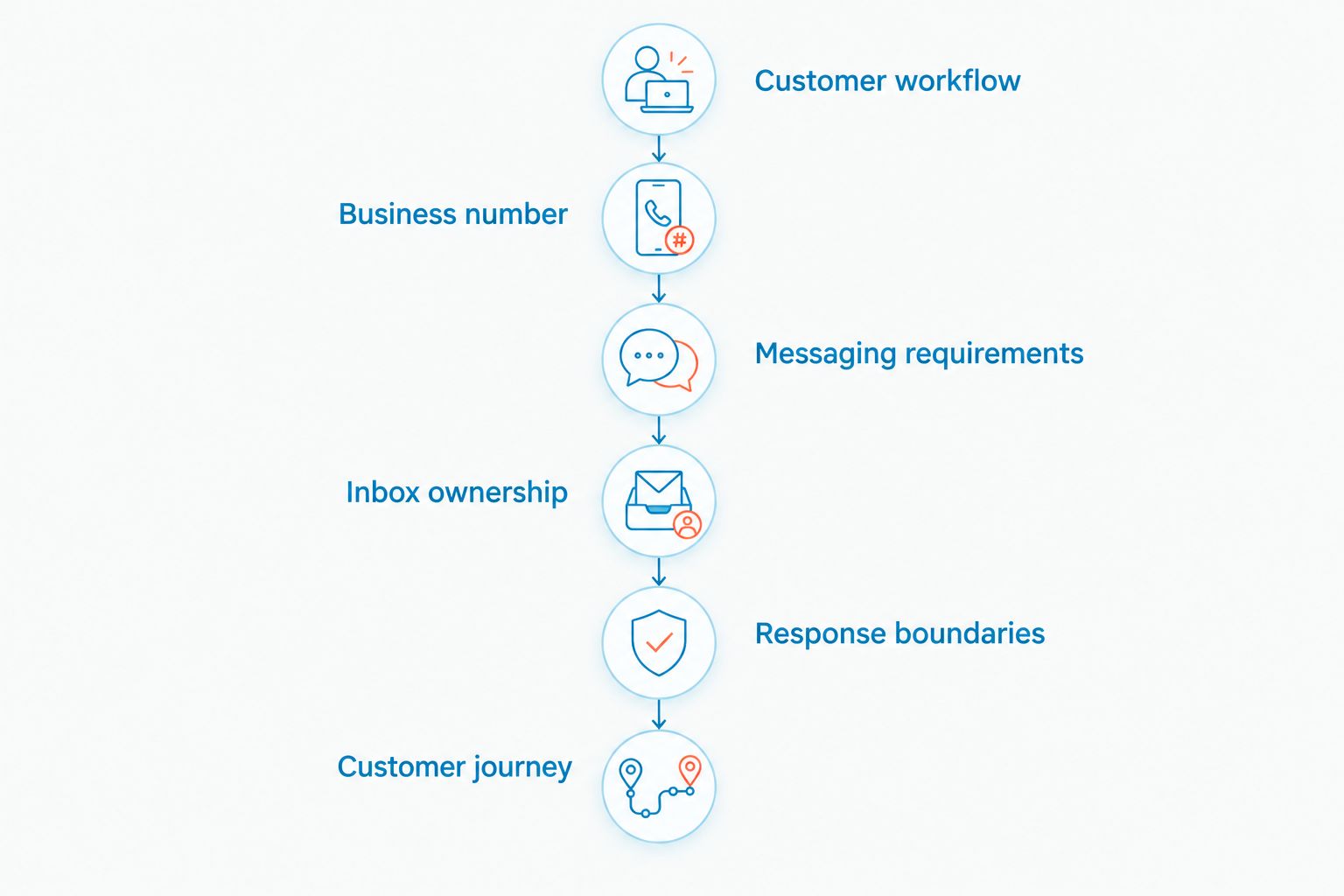
The reliable answer is a milestone-based schedule, not a blanket promise of minutes or days. Build your setup plan around 3 readiness stages: account configuration, messaging readiness, and operational readiness. Your launch date is the point when all three are complete.
Use these 6 setup steps to identify unfinished work. They are a recommended sequence, not a claim about a provider's installation process or turnaround time.
1. Choose the first customer workflow
Write down what customers will use texting for at launch. Keep that scope specific: asking about a service, replying to an existing conversation, or requesting a callback. Do not start with an undefined goal such as making all communications automatic.
Name the person responsible for that workflow. Also name the backup. A shared inbox gives people access to conversations; your operating rules determine who must answer them.
Your finish line for this step is a written explanation of the customer action, the staff response, and the next step. If two employees interpret the workflow differently, settle that disagreement before configuring automation.
2. Confirm the business number
Decide whether customers should text an existing business number or a new number. Then ask the provider to verify what is possible for that number. Do not assume that a number used for voice calls is already ready for business messaging.
If you want to keep your existing number, distinguish voice service from texting capability in the conversation with support. Ask what changes, what remains in place, and whether any authorization or transfer work is necessary.
Finish this step with a confirmed number plan. Record who owns the number, who can authorize changes, and which provider action remains open. Do not print the texting number on customer materials before verifying it works.
3. Complete messaging requirements
Ask which registration and consent requirements apply to your number type and intended messages. For U.S. business texting, application-to-person messaging over local numbers commonly involves carrier registration. Requirements differ by sending route and use case.
Prepare accurate business information and a clear description of the messages you intend to send. Explain how customers agree to receive those messages and how they can stop them. Do not treat an existing contact list as blanket permission for every texting campaign.
The finish line is provider confirmation that the intended messaging use is ready. Keep registration status separate from account status so your team does not mistake an available inbox for approved outbound messaging.
4. Set up inbox ownership
Give staff the access they need to handle the launch workflow. Decide who monitors new messages, who handles unresolved conversations, and who covers absences. Use the permissions and assignment controls your selected platform provides.
Write a handoff rule in plain language. It should tell an employee what to do when they cannot answer a customer, rather than leaving the conversation in an inbox for someone else to discover.
Finish this step by having a second employee take over a sample conversation. The customer should receive a coherent response without having to repeat the request. Check the available conversation history before approving the handoff process.
5. Set response boundaries
Prepare the information staff need to answer routine questions: service scope, business hours, and the next action a customer can take. Use approved business facts. Do not put an estimate, booking promise, or policy into a reply unless your business has authorized it.
For after-hours replies, distinguish acknowledgment from completion. A message that confirms receipt must not imply that a job is scheduled or an urgent request has been handled.
If you add automated assistance, define the questions it can answer and the situations that need a person. Keep sensitive information and business commitments outside an untested automated workflow.
6. Test the customer journey
Send a message from outside the business account and follow the conversation through to a useful response. Check both directions. A successful outbound message alone does not prove that customer replies reach the right employee.
Repeat the test with another team member handling the reply. If you use webchat or after-hours assistance, test those entry points separately rather than assuming they behave like a daytime text conversation.
Your finish line is a complete journey: customer message, visible conversation, assigned response, and clear next action. Record failures and retest them before publishing the channel.
The setup sequence keeps the customer workflow ahead of optional features. Each step produces a concrete decision or a working behavior that you can verify.
Compare setup milestones, not signup speed
A 2026 software evaluation should distinguish what each milestone actually proves. Use the table below to compare readiness without confusing an early configuration task with a completed launch.
| Readiness stage | What it proves | What it does not prove | Best for |
|---|---|---|---|
| Account configuration | Your team can access the account and configure available settings | The intended number can send and receive production messages | Preparing staff access and response settings |
| Messaging readiness | The provider has confirmed the number and applicable messaging requirements | Employees know who owns each customer reply | Establishing the customer-facing texting channel |
| Operational readiness | Your team has completed the customer journey and handoff tests | Every future automation or integration is ready | Deciding whether the initial workflow can launch |
Account configuration lets you prepare the inbox while other requirements are being resolved. Its limitation is straightforward: access does not establish message delivery. Treat it as preparation, not customer availability.
Messaging readiness establishes the channel, but it does not establish coverage. A customer can reach a working number and still wait without a response if nobody owns the conversation.
Operational readiness is the strongest launch criterion because it includes the people doing the work. Its trade-off is scope: a tested reply workflow does not certify a later campaign, integration, or automated booking process.
Ask for a launch estimate tied to named milestones. A provider's answer should distinguish account access, number readiness, and any outstanding approvals. Your internal plan should distinguish those milestones from staff training and testing.
Why business texting setup time varies
Setup scope changes when you add channels, people, or automated decisions. These factors matter because each adds something your business must configure or verify—not because every platform has the same implementation schedule.
- SMS readiness: Confirm the intended business number, messaging use, and applicable provider requirements. Keep unresolved number work visible in the launch plan.
- Webchat access: Adding website conversations creates another customer entry point. Decide who can make website changes and test the conversation from the published site.
- Shared inbox coverage: More participating employees create more access and handoff decisions. Establish ownership before inviting everyone to respond.
- After-hours handling: Define what customers receive when staff are unavailable. Separate an acknowledgment from an actual service commitment.
- Automated assistance: An agent needs approved information and boundaries. Test escalation before allowing it to handle customer questions without immediate staff involvement.
- Service-team requirements: Insurance agencies, home services, and healthcare teams handle different requests. Choose intake questions that fit the work and avoid collecting information you do not need.
For a 2026 rollout, do not make every optional feature a launch requirement. Start with the customer journey your staff can support. Add another channel or automated task only after defining its owner and testing its failure cases.
This approach reduces unfinished scope. It does not bypass provider requirements or turn an unconfirmed number into a ready texting channel.
Is setting up the account the same as launching business texting?
No. Account setup establishes access; launch readiness establishes a working customer communication process. A login, an invited teammate, and a drafted reply are useful preparation, but none proves that an external customer can complete a conversation.
Before launching, run 4 acceptance tests: an inbound text, an outbound reply, a teammate handoff, and an after-hours response. These are recommended checks, not a published performance benchmark. Adapt the after-hours test to the behavior you actually intend to offer.
Use a simple pass-or-fail record. Note what the customer sent, where the message appeared, who answered, and whether the next action was correct. A delivery problem and an ownership problem need different fixes.
Can you launch texting before adding webchat or automated replies?
Yes—make texting your first launch scope if the selected platform supports that approach and the channel is ready. You do not need to treat every available feature as part of the initial customer workflow. Confirm any product-specific dependencies with the provider.
A narrower launch is easier to evaluate because you know what you are testing. Its limitation is coverage: customers using the website still need an existing contact route until webchat is ready.
VirtualText, by VirtualPBX, combines SMS, webchat, a shared team inbox, and an agent for small-business service teams. That combination fits teams handling website and after-hours leads. It also means you should test each entry point and its handoff rather than treating the combined platform as a single completed setup task.
VirtualPBX is best for small service teams that want business texting and webchat in a shared inbox. Evaluate that fit against your actual launch workflow; the feature combination alone does not establish your setup deadline.
How do you get a useful setup estimate from a provider?
Give the provider your intended number, message use, team structure, and launch scope. Ask for an estimate that identifies dependencies rather than only quoting time to create an account.
Use direct questions:
- Is this number eligible for the texting use we described?
- What information or authorization must we provide?
- Which requirements remain outside our team's control?
- What confirms that production messaging is ready?
- What can our staff configure while those requirements are pending?
- Who helps resolve a failed send-and-reply test?
For your 2026 decision, request confirmation of the current plan terms and implementation responsibilities before purchasing. Separate the subscription decision from the launch commitment. Agreeing to buy software does not prove that your number or operating process is ready.
FAQ
How long does it take to set up business texting software?
Business texting setup has no universal duration; number readiness, applicable messaging requirements, and team testing determine the launch date. Ask the provider for a milestone-based estimate for your intended number and message use.
Can I start texting customers as soon as I create an account?
Do not start production messaging solely because your account is active. Confirm that the number and intended messaging use are ready, then test an external customer's send-and-reply journey.
Can I use my existing business phone number for texting?
Ask the provider to verify texting eligibility for your existing number. Confirm whether authorization, transfer work, or separate messaging activation is required before publishing that number as a texting channel.
Does every employee need to finish training before we launch?
Every employee responsible for the launch workflow needs to understand ownership, replies, and handoffs. Other employees can join later, provided the initial team can cover the customer channel.
Should I set up automated replies before launching business SMS?
Set up only the automated replies required by your initial workflow. Test their wording and escalation behavior, and do not let an acknowledgment imply that a service request is completed.
What should I test before publishing our texting number?
Test an inbound text, an outbound reply, a teammate handoff, and the intended after-hours response. Use an external customer device so the test covers the actual entry point.
Is VirtualPBX relevant if I need texting and website chat together?
VirtualPBX offers VirtualText as a separate webchat and shared-inbox offering combining SMS, webchat, and an agent. Evaluate each channel against your service team's response and handoff needs.
One last thing
The final setup test should be an unanswered customer message. Have the usual responder step away, then check whether the backup notices the conversation and knows what to do. This exposes the difference between a configured inbox and a dependable service process.
Do not solve that test by having everyone watch every message. Assign ownership and a backup route. Then repeat the test using your written rule rather than a verbal reminder.
A business texting launch is ready when the intended customer journey works without the setup owner directing every move. Use that standard for your 2026 sign-off, and keep later channels and automation on their own test plans.