When customer texts sit on an employee’s phone or website inquiries wait until morning, business texting software is worth it for small businesses that need shared responsibility for customer replies. In 2026, the practical solution is a shared inbox with clear ownership, approved answers, and a human handoff; VirtualText’s stated flat rate is $89 per month. The subscription does not replace the work of answering customers, maintaining accurate information, or handling sensitive requests.
- Is business texting software worth it for small businesses? Yes, when customer conversations need shared ownership and reliable follow-up.
- VirtualText combines business SMS, webchat, a shared team inbox, and an AI agent for small-business service teams.
- Start with unanswered inquiries and handoff problems, not a list of software features.
- Keep your current process when customer messages already receive consistent replies without duplicate work.
Is business texting software worth it for small businesses in 2026?
Yes, when it fixes a specific response or handoff problem. No, when it adds another inbox without changing who answers customers. The decision depends on your existing workflow, not simply whether texting is available.
Use this comparison to choose the smallest change that solves your problem. These are operating approaches, not claims that every software package includes the same features.
| Approach | Best for | Practical advantage | Limitation | Recommendation |
|---|---|---|---|---|
| Existing customer-message process | An owner who consistently handles inquiries alone | No new workflow to maintain | Responsibility stays concentrated with that person | Keep it while replies remain dependable |
| Shared business texting inbox | Service teams sharing customer follow-up | Conversations have a common place for staff to review | A shared inbox still needs an assigned responder | Choose it when handoffs are breaking down |
| Combined SMS and webchat | Teams answering texts and website inquiries | Both channels can be managed through a shared process | Staff must distinguish new inquiries from ongoing service requests | Choose it when both channels need attention |
| Shared inbox with an AI agent | Teams needing after-hours intake and routine answers | Automation can handle approved intake while people are unavailable | Exceptions and sensitive questions still require people | Add it only after defining the handoff |
If your main problem is fragmented conversations, start with how to combine SMS and webchat into one team inbox. Adding automation before fixing ownership leaves the underlying problem in place.
Why this matters
A customer conversation is unfinished until somebody takes the next action. A delivered text, an automated acknowledgment, and a booked appointment are different outcomes. Treating them as interchangeable makes software look more useful than it is.
For a small service business, the useful question is operational: can the next available employee understand the request and continue it without asking the customer to start again? A shared inbox gives your team a place to work. Your response process determines whether that place stays organized.
In 2026, evaluate business texting against completed follow-ups, staff effort, and customer outcomes. Message volume alone does not show whether the purchase was worthwhile.
When business texting earns its place
Customer inquiries need shared ownership
Business texting becomes useful when the person receiving a message is not always the person able to answer it. An office employee might collect a service request while a technician determines the next step. An insurance team might receive a status question that needs the account owner’s attention.
The advantage is continuity. The limitation is that visibility does not create accountability: everyone can see a conversation and still assume someone else will answer it.
Give each open conversation an owner and a next action. Keep that rule even when several employees have access to the inbox. If the software supports assignment controls, demonstrate them before committing; otherwise, establish an explicit staff procedure.
Website inquiries arrive while your team is unavailable
After-hours capture is useful when visitors have questions outside your staffed hours. The immediate task is to collect enough information for a useful follow-up, not to pretend the business is open or that a booking is confirmed.
Ask for the service needed, the preferred contact method, and the information your team actually uses to respond. Keep the intake narrow. A long questionnaire can turn a straightforward inquiry into extra work for the customer.
The advantage is a clearer starting point for the next staffed shift. The limitation is unchanged: someone must review the request and make the promised contact. Do not promise an arrival time, appointment, or service decision that your team has not confirmed.
Routine questions interrupt customer-facing work
Texting can be a practical way to handle simple questions without requiring a live phone conversation. Suitable topics include business hours, how to request service, and what information to provide for an inquiry.
The advantage is an answer the customer can read when convenient. The limitation is ambiguity: a short text often lacks the detail needed to resolve a complicated request. Keep a clear route to a person or a call when the exchange stops being straightforward.
Approved answers also need maintenance. Assign responsibility for correcting them when your hours, service area, or process changes.
When business texting is not worth the added work
Keep your current process if it already produces dependable replies and clean handoffs. A new subscription is not evidence of a better customer experience. First identify the failure that the software must fix.
A shared inbox is a weak purchase when nobody has time to monitor it. Automation does not remove that constraint; it changes the work from answering every initial question to reviewing conversations and handling exceptions.
It is also a poor fit when your intended conversations require information you have not approved for that channel. Healthcare providers, insurance agencies, and other service teams should review their privacy and recordkeeping obligations before moving sensitive discussions into ordinary texts.
Avoid introducing SMS, website chat, and automated replies simultaneously if your team cannot explain the workflow. Start with a defined use case. Expand only after employees can handle it consistently.
Why the value of business texting varies
The same software serves different purposes depending on how your business responds to customers. These factors determine whether the subscription addresses real work:
- Channel mix: A combined SMS and webchat platform is relevant when both channels receive inquiries. Unused channels do not strengthen the business case.
- Team handoffs: Shared visibility matters when staff cover for one another or pass requests between roles. A solo responder has a different need.
- After-hours demand: After-hours intake matters when customers contact you outside staffed hours. Review actual inquiries before making it the centerpiece of the purchase.
- Question complexity: Approved answers suit repeatable questions. Requests requiring judgment need a clear human handoff.
- Information sensitivity: Your intake process must match the information you are permitted to collect and share through the channel.
- Follow-up discipline: A captured inquiry only becomes useful when someone reviews it, responds, and records the outcome.
For your 2026 decision, prioritize the factor causing the most unfinished work. Buying features for every possible future use makes the first setup harder to judge.
How do you decide whether the subscription pays off?
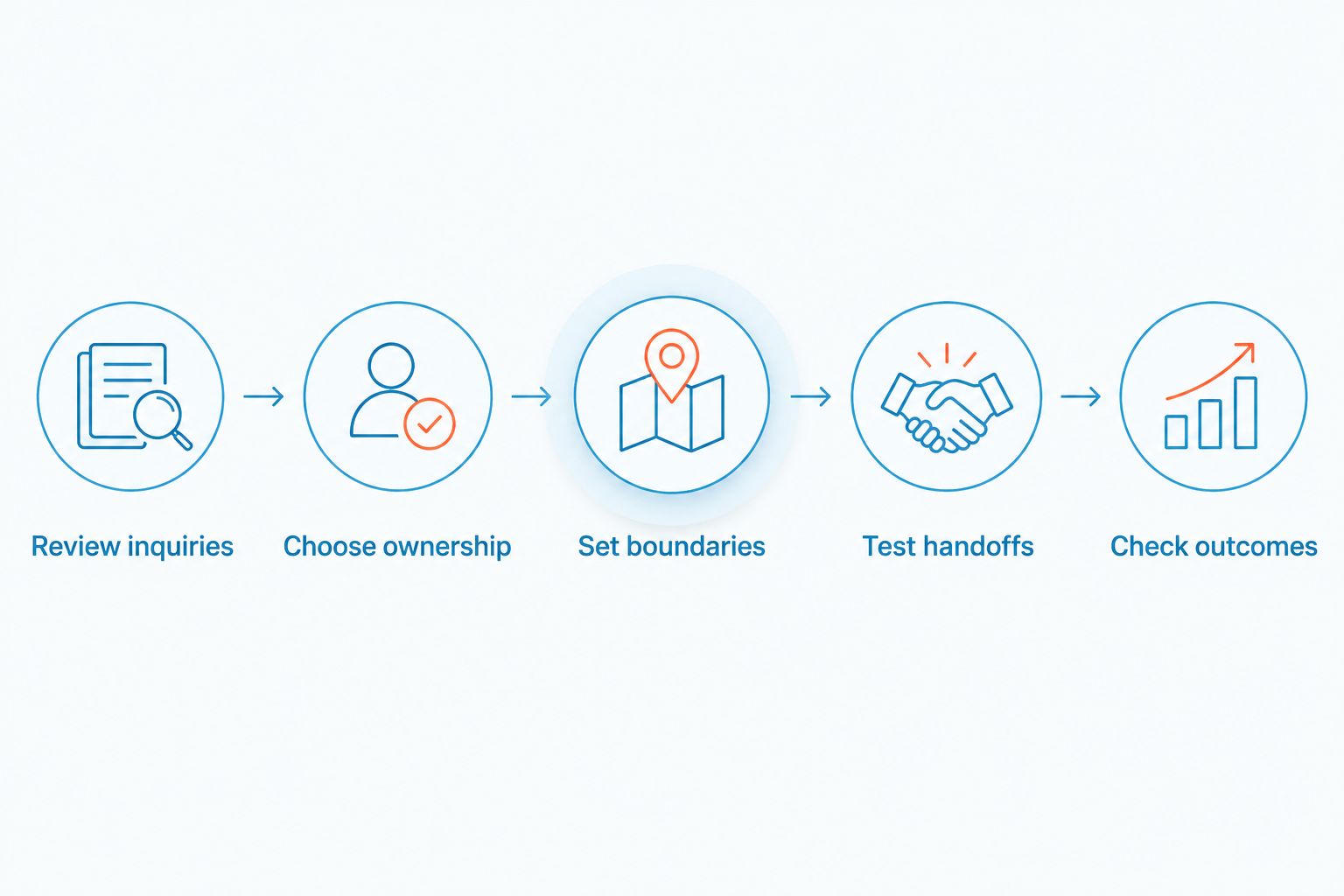
Use a 7-day workflow review before choosing software, then a 30-day evaluation after setup. These are recommended review periods, not promised timelines for results. Compare similar operating conditions and account for changes in staffing or inquiry volume.
- Review inquiries. Record incoming customer texts and website requests. Mark unanswered messages, repeat questions, and conversations that needed another employee.
- Choose ownership. Identify who handles new inquiries, who provides backup, and who takes exceptions. Write down the next action for each type of request.
- Set boundaries. Approve the information collected, the answers given, and the situations requiring a person. State what the system must not promise.
- Test handoffs. Run realistic conversations before inviting customers into the workflow. Include an unclear request, an after-hours inquiry, and a customer asking for a person.
- Check outcomes. Compare response handling, completed follow-ups, and staff effort with your initial review. Separate routine inquiries from complex cases.
Your setup should follow this sequence because automation depends on the rules you establish. Define the responder before writing the automated reply. A polished acknowledgment with no responsible employee is still an unfinished conversation.
Measure outcomes without inventing a return
Record your actual subscription expense and the staff time needed to run the process. For completed jobs or appointments, use the contribution your business retains after the direct costs of providing the service—not the headline sales value.
Then examine the conversations behind those outcomes. A customer who already intended to book is not automatically a new sale created by texting. Attribute an improvement only when your records support the connection.
For the 2026 evaluation, retain a short explanation of each claimed benefit: an inquiry recovered, a handoff completed, or a repeated task removed. If the explanation is only that more messages were sent, the return is not established.
Where VirtualText fits
VirtualPBX business texting through VirtualText is best for small service teams that need SMS and website chat in a shared inbox. VirtualText combines SMS, webchat, a shared team inbox, and an AI agent. Its stated flat-rate subscription is $89 per month.
VirtualText is the webchat and shared-inbox offer from VirtualPBX, not a substitute name for the parent brand’s business phone system. Keep those requirements separate: answering customer messages and managing business calls are related tasks, but they are not identical purchases.
The practical advantage is the combination of channels for service-team intake. The limitation is operational: your team still needs approved answers, a monitoring schedule, and someone responsible for exceptions. Do not assume that a shared inbox includes a particular integration, booking connection, or compliance capability without confirming it.
For a VirtualPBX business texting evaluation, demonstrate your own workflow rather than accepting a generic feature tour. Have a colleague submit a website inquiry, continue the discussion by text where supported, and ask a question requiring a human response. Check what staff can see and what they must do next.
Review your business communication needs
Separate phone-system needs from customer texting, website chat, and shared-inbox requirements.
Can I use my personal phone instead?
A personal phone is workable when you alone handle customer messages and maintain consistent follow-up. Its limitation appears when another employee needs to continue the conversation or cover your absence.
Choose a business-managed process when customer conversations need continuity beyond one person. Before changing tools, confirm how you will handle the existing number, conversation records, staff access, and customer expectations.
Do I need an AI agent to make texting worthwhile?
An AI agent is not required to make business texting worthwhile. Shared ownership and dependable human replies can solve the central problem without automation.
Add an agent when you have a defined need for routine intake or approved answers while staff are unavailable. Keep the handoff explicit, and test requests that fall outside those approved topics.
Is texting better than calling customers?
Texting is better suited to short exchanges that do not require a live discussion. Calling is the better choice when you need to clarify a complicated request or resolve misunderstanding quickly.
Use the channel that completes the task. Do not force a long conversation into texts simply because the software supports messaging.
FAQ
Is business texting software worth it for a small business in 2026?
Business texting software is worth it when it fixes unanswered inquiries, fragmented conversations, or unclear follow-up ownership. Keep your existing process if it already handles those tasks reliably.
What should I look for in small-business texting software?
Look for a workflow that matches your customer channels and staff handoffs. Demonstrate shared visibility, human follow-up, and any required capabilities before purchasing.
Is VirtualText the same as the VirtualPBX phone system?
VirtualText is the SMS, webchat, shared-inbox, and AI-agent offer from VirtualPBX. Evaluate it separately from the parent brand’s business phone-system requirements.
Can business texting handle after-hours inquiries?
Business texting can support after-hours intake when the workflow collects useful information and establishes a follow-up owner. An acknowledgment does not confirm an appointment or guarantee that a request is resolved.
Do I need an AI agent for customer texting?
You do not need an AI agent to benefit from shared customer texting. Add automation only when approved answers, intake boundaries, and a human handoff are defined.
Can a healthcare provider send sensitive information by text?
A healthcare provider should approve the channel and workflow before sending sensitive information. Review applicable privacy requirements and verify the platform’s relevant capabilities rather than assuming ordinary SMS is suitable.
How do I measure whether business texting is working?
Measure completed follow-ups, response handling, and staff effort against your previous process. Use actual business records to connect customer conversations with outcomes instead of treating message volume as proof of value.
One last thing
Test the exception, not just the greeting. Ask something outside your approved answers, request a person, or submit an inquiry when the assigned responder is unavailable. Those cases reveal whether your process has a real handoff.
Before your 2026 rollout, make every unfinished conversation someone’s responsibility. That rule matters more than an instant acknowledgment. Software earns its place when it helps your team complete the next action—not merely send the next message.