
Yes, a webchat widget can slow down a website by adding downloads, JavaScript execution, and extra page elements. The impact depends on how the widget loads and behaves; delaying it can protect the initial page load but still leave visitors waiting when they open chat.
- Can a webchat widget slow down a website? Yes; test page speed and responsiveness before and after installation.
- Asynchronous loading avoids parser blocking, but chat scripts still consume browser resources.
- Check mobile performance, layout shifts, and the first chat interaction—not just the homepage score.
- VirtualPBX offers VirtualText for service teams combining webchat, SMS, and a shared inbox; measure its impact on your site.
Can a webchat widget slow down a website?
A webchat widget adds work to the browser. Whether that work causes a noticeable slowdown depends on its implementation and your website. A small launcher can load additional scripts, styles, fonts, and network connections behind the scenes.
Use a controlled comparison rather than judging the widget by appearance. This webchat widget setup guide provides a starting point for planning the installation; performance checks belong alongside routing and message delivery checks.
- Record the baseline. Test an important page without the widget under consistent browser, device, and network conditions.
- Enable the widget. Test the same page with the intended production configuration, including greetings and integrations.
- Compare loading. Check when the main content appears and whether elements move unexpectedly.
- Test interactions. Open chat, type a message, close it, and use your page's navigation and forms.
- Repeat the comparison. Look for a recurring difference, not an isolated score change.
A slower result with chat enabled is a reason to investigate, not automatic proof that every difference comes from chat. Network variation, caching, and unrelated scripts also affect individual runs.
Why this matters
For a service business, the website must let visitors understand the service and contact the team. A chat launcher helps only if it does not obstruct that path. A visitor should still be able to read service details, tap the phone number, or submit a request without fighting the interface.
The practical goal in 2026 is not a perfect score at the expense of useful contact options. It is a page that loads promptly, responds to input, and offers a working conversation channel.
Separate website performance from reply performance. A widget can open quickly while messages sit unanswered, or deliver fast replies while making the surrounding page sluggish. Test both, but do not treat them as the same problem.
Which widget-loading method should you use?
There is no loading method that removes every trade-off. Choose when the chat code should run based on the importance of immediate chat access and the behavior you measure.
| Loading approach | Best for | Advantage | Limitation |
|---|---|---|---|
| Synchronous loading | Reviewing an existing installation for blocking behavior | Makes script order explicit | A parser-blocking script can delay HTML parsing while it loads and executes |
| Asynchronous loading | Making chat available without a parser-blocking download | Allows HTML parsing to continue during the download | Script execution can still interrupt other browser work |
| Deferred loading | Scripts that should execute after HTML parsing | Avoids execution during HTML parsing | Does not remove execution cost or guarantee fast interaction |
| Interaction-triggered loading | Sites prioritizing initial page performance | Defers full chat loading until a visitor requests it | The first chat opening includes initialization time |
For classic external scripts, async and defer describe different execution behavior. They are not interchangeable performance guarantees. The provider's installation instructions and the script's dependencies determine which method is appropriate.
Prefer a supported nonblocking installation, then test its actual behavior. Do not rewrite the embed code blindly: changing execution order can break initialization, visitor context, or message delivery.
Does loading chat after a click solve the problem?
Interaction-triggered loading moves work away from the initial visit, but it does not eliminate that work. The visitor who opens chat still waits for the necessary code and connections.
If you use this approach, show immediate feedback after activation. Keep the launcher usable with a keyboard, and verify that focus moves into the conversation appropriately once it opens.
Does a fixed delay make chat faster?
A fixed delay changes when chat loads, not how much work it requires. It can move script execution into the moment a visitor starts scrolling or completing a form.
A delay also means chat is not ready during that interval. Judge the whole visit rather than choosing a delay solely because it improves an initial loading score.
What should you measure in 2026?
Google's published Core Web Vitals guidance provides useful reference points. In 2026, the good-experience thresholds are Largest Contentful Paint at 2.5 seconds or less, Interaction to Next Paint at 200 milliseconds or less, and Cumulative Layout Shift at 0.1 or less. Google's field assessment applies these thresholds at the 75th percentile of page visits, evaluated separately for mobile and desktop.
These are page-experience thresholds, not a separate allowance for chat. A widget does not receive its own budget outside the page's total workload.
| Metric | What it measures | What to investigate after adding chat |
|---|---|---|
| Largest Contentful Paint, or LCP | When the largest visible content element renders | New downloads or script work delaying the main content |
| Interaction to Next Paint, or INP | Responsiveness to user interactions | Script execution interrupting taps, clicks, or typing |
| Cumulative Layout Shift, or CLS | Unexpected movement of visible elements | Chat elements pushing existing content into new positions |
A launcher that floats over the page might not shift content but can still cover a button. That is a usability problem even when CLS stays unchanged.
Use laboratory tests and real-visitor data differently
A laboratory test gives you a controlled environment for diagnosis. Inspect the network waterfall and performance trace to see when chat resources arrive and when their scripts execute.
Real-visitor measurements show how the page behaves across actual devices and connections. PageSpeed Insights can display field data where available, but its historical reporting does not isolate a deployment immediately. Use controlled tests for immediate comparisons, then check field measurements after the change has accumulated observations.
Also distinguish Total Blocking Time from INP. Total Blocking Time helps diagnose main-thread blocking in laboratory tests; it is not a replacement for measuring real interactions.
Why webchat performance varies
The same installation can affect different pages differently. A lightweight service page and a page already running several third-party tools do not start with the same workload.
The main factors are:
- Download weight. Scripts, styles, images, and fonts add data to transfer. Inspect what the browser actually requests, including resources loaded after the launcher appears.
- Execution work. JavaScript must run after it downloads. Initialization, event handlers, and repeated background tasks can keep the browser busy.
- Loading timing. Work scheduled during initial rendering or an important interaction competes with the visitor's immediate task.
- Page changes. Greetings, banners, and expanding panels can shift content or cover controls. Check their behavior on narrow screens.
- Other integrations. Analytics, tag managers, forms, and advertising scripts share browser resources with chat. Look at the combined workload.
- Device and connection conditions. Processing power, available bandwidth, and connection latency affect how quickly the browser completes the work.
These factors explain why a provider-wide speed claim cannot replace testing your own pages. They also explain why a desktop-only check leaves an important gap.
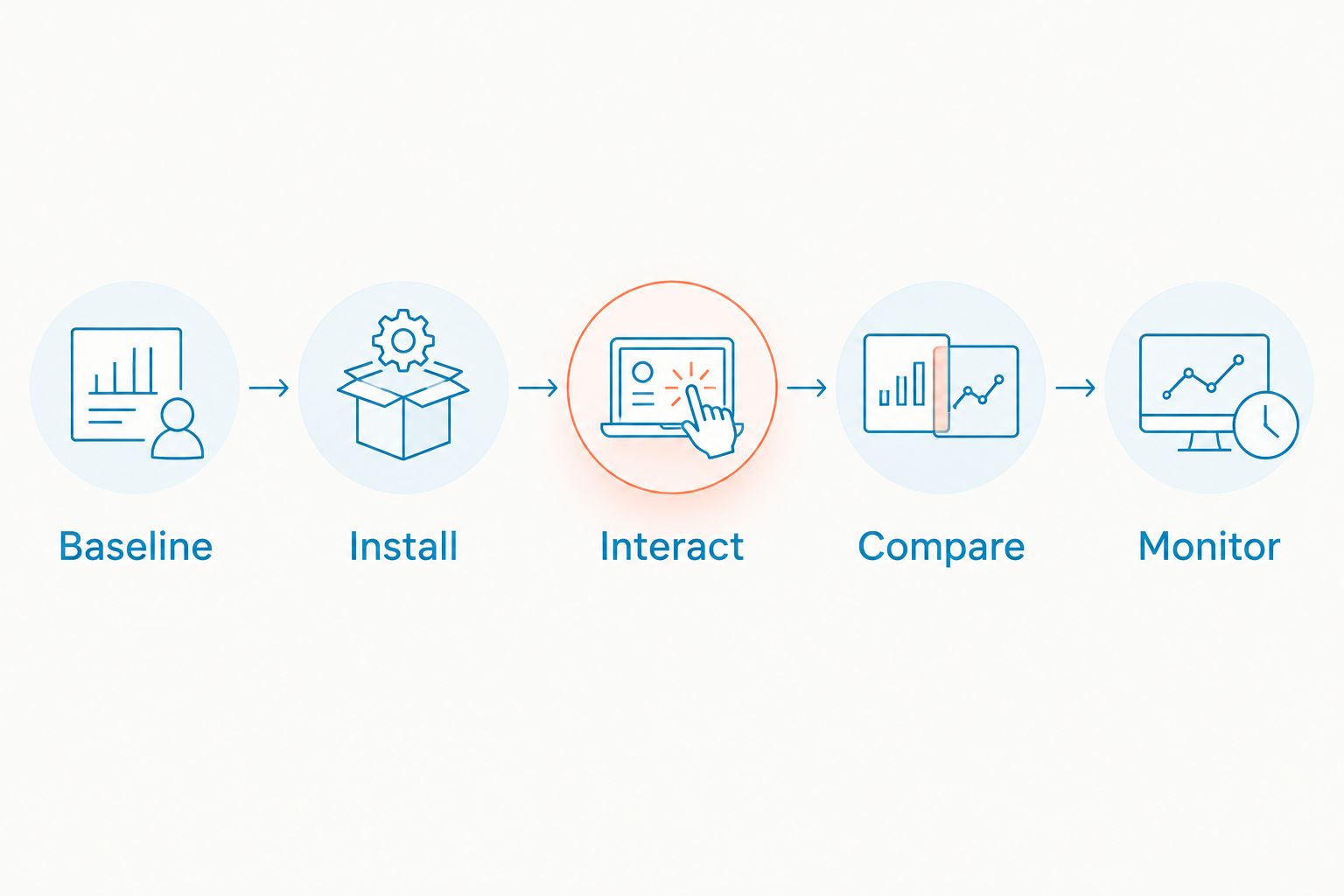
How do you test a webchat widget before publishing?
Use this sequence for a 2026 installation or a replacement widget. Save the existing configuration first so you can restore it if the change breaks contact options.
- Baseline. Select pages that represent real customer tasks, such as a service page and a request form. Record the device settings, network settings, cache state, and whether consent has been granted.
- Install. Add the supported embed once. Check your website theme, plugins, and tag manager for duplicate installations before publishing.
- Interact. Open chat, send a test message, navigate between pages, and submit the existing form. Confirm that the intended inbox receives the message.
- Compare. Repeat the same tasks without the widget. Compare loading, responsiveness, layout movement, and visible interference under matching conditions.
- Monitor. After release, review real-visitor performance and message delivery. Recheck after changes to the widget configuration or website template.
The sequence keeps technical testing tied to the customer task. A faster page with a broken contact route is not a successful deployment.
Check first visits and return visits
A returning visitor can have cached resources that a first-time visitor must download. Test both situations, and keep the cache conditions consistent within each comparison.
Consent settings can also change which resources load. Where your configuration requires consent before chat initializes, test the page before consent and after acceptance. Do not bypass those controls to improve a score.
Check the open conversation, not just the launcher
The closed launcher is only the starting state. Opening a conversation can trigger additional downloads, connection setup, rendering, or authentication work.
Type while the panel opens and check the surrounding page afterward. Confirm that closing chat restores access to content and does not leave an invisible overlay blocking taps.
What should you change if chat slows the page?
Fix the measured cause rather than adding a generic optimization plugin. Start with the performance trace and identify the resource or task associated with the regression.
- Remove duplicate embeds if the same installation appears in multiple places.
- Use the provider's supported asynchronous or deferred integration where appropriate.
- Disable optional animations, greetings, or tracking features if testing links them to the problem.
- Limit the installation to relevant pages when your platform supports that configuration.
- Consider interaction-triggered loading if immediate chat readiness is less important than initial rendering.
- Ask the provider for help when its script dominates execution or fails to initialize reliably.
Change one setting at a time. Retest message delivery after each change, because a faster launcher is useless if conversations never reach the team.
Avoid blanket script-delay settings without exclusions and testing. They can change dependency order or postpone chat beyond the point when the visitor needs it.
Where does VirtualText fit for service teams?
VirtualPBX's VirtualText is best for small service teams that want webchat, SMS, and a shared inbox together. The supplied offer is a flat-rate $89 per month and includes an AI agent for website and after-hours lead handling.
That combination addresses conversation management, not proof of website speed. You still need to test the embed on your own pages; the product description does not establish its script weight, loading method, or Core Web Vitals impact.
For your 2026 decision, keep the advantage and limitation separate: a shared inbox brings website and text conversations into one place, while the website installation still adds third-party code that requires measurement. Start with a representative page, confirm message routing, and expand only after the customer tasks work properly.
Can a webchat widget hurt SEO?
A webchat widget can affect page-experience metrics when its code delays content, interactions, or visual stability. That does not establish a predictable ranking loss, and there is no universal SEO penalty for installing chat.
Google uses Core Web Vitals in its ranking systems, but good scores do not guarantee rankings. Keep useful content, crawlability, and the customer experience in view rather than treating chat removal as an SEO strategy by itself.
Is asynchronous webchat enough to prevent slowdowns?
Asynchronous webchat avoids blocking HTML parsing during the script download, but execution still uses browser resources. It does not guarantee a fast page or responsive chat.
Inspect what happens when the script runs and when the visitor opens the panel. Those moments reveal costs that an installation label cannot.
Should you remove chat if the performance score drops?
Remove or reconfigure chat when repeated testing identifies a meaningful regression that you cannot resolve. Do not remove a useful contact channel solely because an isolated synthetic score changes.
Check whether visitors can complete the page's main tasks and whether chat reaches the team. The decision needs both performance evidence and a working contact experience.
FAQ
Can a webchat widget slow down a website on mobile?
Yes, a webchat widget can slow down a mobile website through downloads and JavaScript execution. Test on mobile conditions and check whether the open panel covers forms, navigation, or phone links.
What is a good loading target after adding webchat?
Google's good Largest Contentful Paint threshold is 2.5 seconds or less at the 75th percentile of visits. Evaluate responsiveness and layout stability too; loading speed alone does not describe the whole experience.
Does lazy-loading chat eliminate its performance impact?
No, lazy-loading chat postpones its performance cost rather than eliminating it. Test how long the first conversation takes to become usable after the visitor activates the launcher.
Will a chat iframe keep my website fast?
An iframe does not guarantee a fast website. Its content still requires network and browser resources, so measure the complete page and the chat interaction.
Should I put webchat on every page?
Put webchat where it supports a customer task, then test those pages. Check that the launcher does not obstruct booking, checkout, accessibility controls, or existing contact methods.
Is VirtualPBX's VirtualText guaranteed not to slow down my site?
Do not treat VirtualPBX's VirtualText as a website-speed guarantee. Test its webchat installation on your pages and verify performance alongside message delivery.
Can I test webchat without making it public?
Yes, test webchat in a staging environment before release. Match production settings closely, then confirm behavior on the live site because caching, consent, and other scripts can differ.
One last thing
A widget can pass a loading check and still fail the visitor. The important extra test is opening chat while the rest of the page remains usable.
Before approving a 2026 installation, ask someone to complete the main customer task on a phone, open chat midway through it, and return to the task. Watch for covered buttons, lost form entries, trapped keyboard focus, and missing messages. That check catches problems a loading score does not describe.