

Commercial cleaners' business texting is a shared way to manage customer messages, with the aim of keeping cleaning visits, walkthroughs, and service requests on track. When access changes sit on one person's phone, your crew lacks instructions; a business text messaging service for commercial cleaning companies gives the office a common place to respond and hand off work.
- VirtualPBX business texting suits commercial cleaners who need a business-owned alternative to personal-phone messaging.
- Choose a business text messaging service for commercial cleaning companies around shared inbox ownership, not broadcast volume.
- Keep building access details out of ordinary customer texts; route sensitive information through your approved process.
- VirtualText combines SMS, webchat, a shared team inbox, and an AI agent; staff still own approvals and exceptions.
Why business texting matters for commercial cleaners
Commercial cleaning communication involves more than booking a visit. Your office needs to distinguish the facility contact, the person who approves work, and the person who can resolve access problems. Those roles are not interchangeable.
A property manager's request to add floor care is different from a receptionist's report of an overflowing bin. Texting gives you a written request, but it does not establish purchasing authority. Record who can approve changes before treating a message as authorization.
For your 2026 setup, separate customer communication from internal crew instructions. A customer thread should explain what happens next. Your internal work record should explain who does the work, where, and under which approved scope.
The broader small-business texting guide for cleaning companies covers the messaging foundation. Commercial accounts need an additional layer: site identity, authorized contacts, and clear handoffs between sales, scheduling, and operations.
Choose shared visibility when more than one employee answers customers. A common inbox helps the next person see the conversation, but somebody must still own the next action.
Set up business texting around your cleaning workflow
Define the messages your office will handle
Start manually. Review recent customer conversations and write down what each person needed: a walkthrough, a schedule change, an access resolution, a service correction, or an invoice explanation. Use a spreadsheet before you buy software.
Separate sales requests from active-account requests. A prospective customer needs qualification and a walkthrough; an existing customer reporting a missed restroom needs an operations response. Sending both through the same generic sales script creates unnecessary questions.
For a 2026 pilot, review 10 customer conversations as a starting sample, not an industry benchmark. Include different buildings and different request types. The point is to find gaps in ownership before adding automation.
Build a simple message map with these fields:
- Request type: walkthrough, scheduling, access, service issue, or billing.
- Site name: the building affected, not just the customer company.
- Authorized contact: who can request and approve changes.
- Owner: the office role responsible for the next action.
- Completion condition: what must happen before the request closes.
Establish consent and protect site information
Start with a written process for collecting permission to text. Record the contact, the purpose of the messages, and how permission was obtained. Keep operational updates separate from promotional outreach; a customer relationship alone is not a blanket invitation to send marketing texts.
Ask your messaging provider which business registration and verification steps apply to your number and use case. Complete those steps before advertising the number. Have qualified counsel review legal questions rather than treating a software setting as legal advice.
Commercial cleaning messages also need a security boundary. Do not ask customers to place alarm codes, key-box combinations, or sensitive tenant information into ordinary text conversations. Use your approved access-management process instead.
Set these rules before the first customer message:
- Identify your business clearly when starting a conversation.
- Explain which kinds of updates the customer is agreeing to receive.
- Record permission and honor requests to stop messaging.
- Keep promotional outreach separate from service coordination.
- Redirect access credentials and sensitive documents to approved channels.
Choose a business-owned channel and shared inbox
The manual starting point is a company-controlled phone with a named office owner. That arrangement gives a small operation a defined contact channel, but coverage depends on whoever holds the device. Write down who takes over during breaks, leave, and shift changes.
When several employees need to respond, assess a shared inbox instead. Test whether the next responder can understand the request without calling the employee who handled it earlier. A shared screen is useful only when the conversation and its next action remain clear.
VirtualPBX business texting is best for commercial cleaners who need a business-owned alternative to personal-phone messaging. VirtualPBX is the parent business phone provider; its separate VirtualText offer combines SMS, webchat, a shared team inbox, and an AI agent. This texting-focused guide concerns that separate offer, not a replacement for the core phone system.
Test the workflow before rollout:
- Send an inbound customer text and find it from another staff account.
- Reply from the business channel rather than an employee's personal number.
- Confirm how staff mark ownership and unfinished work.
- Ask how your existing number can be used for texting.
- Review account access, staff removal, and conversation retention controls.
Assign every request to a responsible person
Start with a shared tracking sheet if you do not have assignment tools. Record the site, request, owner, and next action. Review open requests at each office handoff. This is slower than working in one system, but it makes responsibility visible.
Use a consistent request sequence: Site check, Owner assigned, Scope approved, Customer updated, Request closed. An access question does not close when somebody reads it. It closes when the crew receives approved instructions and the customer knows the outcome.
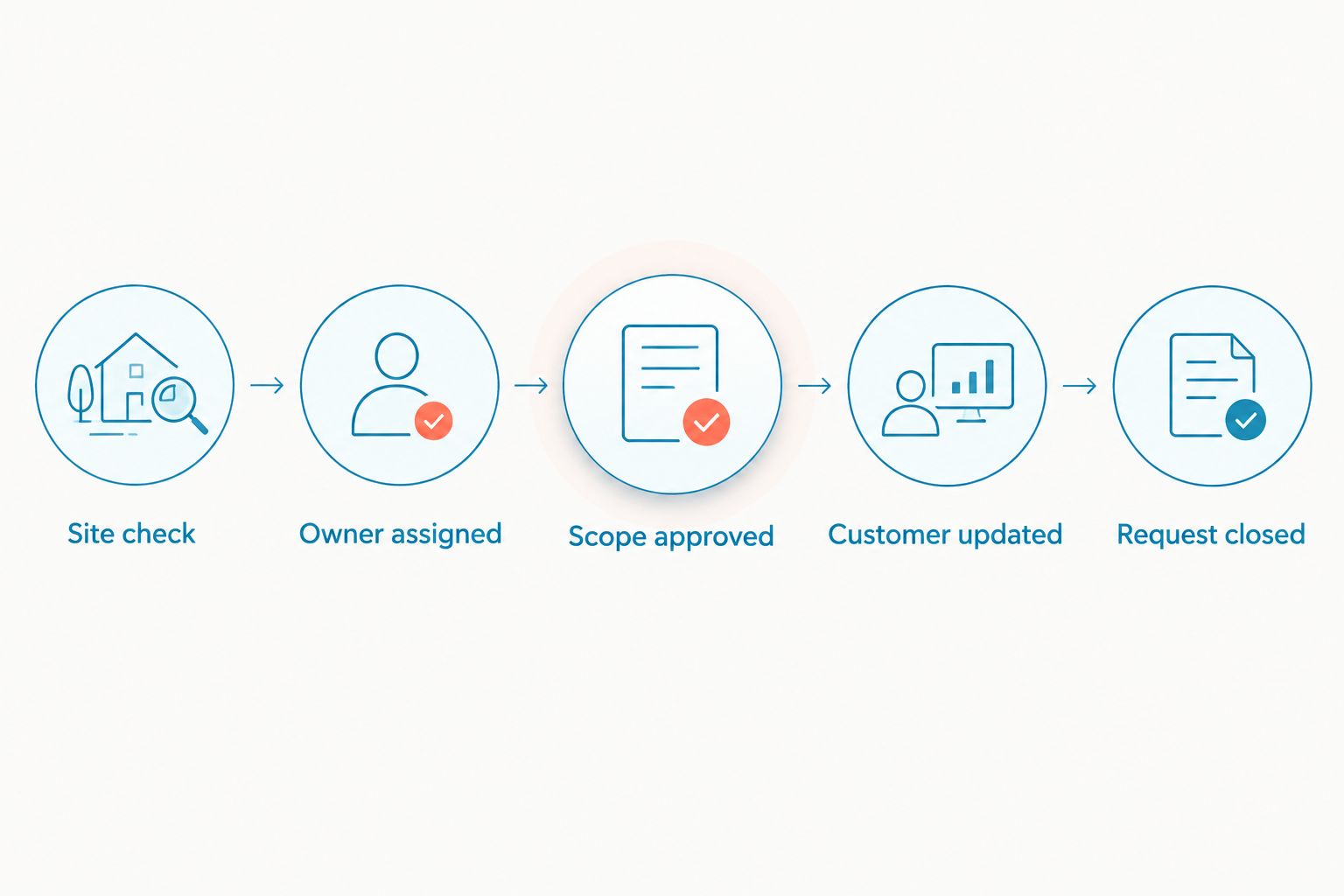
For your 2026 operating plan, choose an internal 15-minute review interval during staffed dispatch periods as a pilot target. Adjust it to actual coverage; do not advertise it as a customer guarantee. Measure missed handoffs as well as reply speed.
Make these decisions explicit:
- Assign sales staff to walkthrough and proposal requests.
- Assign operations staff to access and service-quality issues.
- Require authorized approval for extra work or schedule changes.
- Name a backup for each active request owner.
- Close the thread only after recording the outcome and updating the customer.
Write short templates and bound after-hours replies
Draft messages manually first. Use plain language and leave placeholders for the site, date, contact, and next action. Read every draft as the facility manager: does it explain what you need and what happens next?
A walkthrough reply can ask for the building address, cleaning needs, and a suitable contact time. A service-issue reply should acknowledge the affected area and explain who is reviewing it. Neither message should approve work outside the contract.
Use an after-hours acknowledgement to explain when a person will review the request. Do not promise immediate dispatch unless your operation actually provides it. VirtualText's AI agent is a faster path for after-hours intake, but set boundaries around the information collected and the decisions reserved for staff.
Prepare templates for these situations:
- Walkthrough intake: request the site address and a contact person.
- Schedule change: confirm the affected visit before accepting a change.
- Access problem: request a callback, not an alarm code by text.
- Service issue: identify the affected area and assign an operations review.
- After-hours intake: acknowledge the message and state the staffed review window.
- Extra work: explain that approval is required before scheduling.
Test the handoff and measure completed work
Run the process manually with staff before enabling automated replies. Have one person act as a facility contact and another take over the conversation halfway through. The second employee should identify the building, request, owner, and next action without a separate briefing.
Use a 7-day pilot as a proposed test period for your 2026 rollout. Include both staffed and unstaffed periods. These are test settings, not claims about setup speed or expected results.
Measure first human response separately from automated acknowledgement. An instant acknowledgement does not mean a walkthrough is booked or an access problem is resolved. VirtualPBX provides the phone-system context; your texting workflow still needs accountable staff.
Track these outcomes in a spreadsheet or your existing reporting system:
- Time from the inbound message to the first human response.
- Requests left without a named owner at shift change.
- Duplicate replies or conflicting instructions.
- Walkthrough requests that reach a confirmed appointment.
- Service issues that receive a documented resolution.
- Stop requests and messages sent after a stop request.
Compare your commercial cleaning texting options
Choose the option that matches your coverage problem. A dedicated phone addresses business ownership. A shared inbox addresses team visibility. After-hours intake addresses collection of requests outside staffed periods. None of these automatically authorizes additional work.
Use the comparison below for your 2026 shortlist. Test the actual handoff, not just the ability to send a message. Keep software subscriptions separate from the staff time needed to review conversations and resolve issues.
| Option | Best for | Practical advantage | Key limitation |
|---|---|---|---|
| Company-controlled phone with manual tracking | Owner-operated cleaners with one responder | Establishes a business-owned customer channel | Coverage and handoffs depend on the device owner |
| Shared SMS inbox with staff replies | Cleaning offices with several customer-facing employees | Gives responders a common place to handle texts | Requires staffed coverage and clear ownership rules |
| VirtualText by VirtualPBX | Small cleaning teams handling texts, website enquiries, and after-hours intake | Combines SMS, webchat, a shared team inbox, and an AI agent | Staff must define boundaries and handle approvals and exceptions |
| Existing scheduling software with messaging | Teams prioritizing messages tied to scheduled visits | Keeps communication close to the work schedule when supported | Verify two-way replies, shared access, and after-hours handling before relying on it |
For a single responder, a manual workflow is a reasonable starting point. Its advantage is simplicity; its weakness is continuity when that person is unavailable. Write the backup process before expanding customer use.
For multiple responders, a shared inbox is the better operational fit. Its advantage is visibility; its weakness is the false assumption that visibility equals responsibility. Require an owner for every unfinished request.
For website and after-hours enquiries, combined intake reduces separate places to monitor. Its limitation is authority: the person or automated agent collecting a request must not invent contract terms, accept restricted access instructions, or commit crews without approval.
Common mistakes commercial cleaners make
Treating every building contact as an approver
The person reporting a spill is not necessarily authorized to buy additional cleaning. Separate issue reporting from approval. Confirm the approving contact before adding labor, changing frequency, or accepting a new scope.
Confusing the customer account with the service site
A property-management company can contact you about different buildings. Ask which site the message concerns before routing it. Store the building name with the request so the next employee does not dispatch against the wrong location.
Mixing customer conversations with crew instructions
A customer confirmation should not expose internal staffing details or sensitive access information. Keep the customer informed through the business channel, then place approved crew instructions in your internal work process. Do not assume everyone needs the same information.
Letting after-hours replies promise attendance
Acknowledging a message is different from confirming an emergency visit. State the review window and the approved route for urgent requests. Only staff with scheduling authority should commit a crew to attendance.
Closing complaints when the message is answered
A polite reply does not resolve a missed task. Keep the issue open until operations records what happened and the customer receives an update. Track resolution separately from response time so fast replies do not hide unfinished work.
FAQ
What's the best business text messaging setup for a commercial cleaning company?
A business-owned channel with shared visibility and named request owners is the best setup for a cleaning team with multiple responders. A single-responder business can start with a company-controlled phone and manual tracking, then add a shared inbox when coverage requires it.
Can I use my personal phone to text commercial cleaning customers?
Use a business-controlled channel rather than making a personal number the company's customer contact. Personal-phone conversations make staff changes and coverage harder to manage because the business does not have a common place to handle the thread.
Is VirtualText the same as the VirtualPBX phone system?
No. VirtualText is a separate SMS, webchat, shared-inbox, and AI-agent offer from the parent brand. The core phone-system offer is Smarter Voice; choose the service around whether you need calling, messaging intake, or both.
Can an AI agent confirm a cleaning visit after hours?
Reserve visit confirmation for your approved scheduling process. An AI agent can support intake, but your team must define what it can collect and which requests require human approval.
Should customers text alarm codes or building access combinations?
No. Route access credentials through your approved access-management process rather than ordinary customer texting. Use the text conversation to arrange a secure handoff without copying the credential into the thread.
How should I test a business texting service before rollout?
Test complete conversations, including a staff handoff and an after-hours request. Check that another responder can identify the site, owner, approval requirement, and next action without a separate explanation.
Do I need permission to send customer texts?
Build documented permission and stop-request handling into your texting process. Requirements depend on the message type and use case, so confirm provider requirements and obtain qualified legal advice for your operation.
One last thing
The most useful field in a cleaning text workflow is often the site name, not the sender's name. A familiar contact can represent several buildings. Without the site, a clear message can still produce the wrong action.
Before expanding your 2026 messaging program, take one real request and hand it to an employee who did not receive it. Ask that employee to identify the building, responsible person, approval requirement, and next action. If those details are unclear, fix the handoff before adding more automation.


