
A prospect texts during a client meeting, and nobody knows who should reply. For 2026, shortlist Front for email-centered teamwork and VirtualText for shared SMS and website chat; choose only after your compliance team approves the communication and recordkeeping workflow.
- Front leads this team inbox software for financial advisors shortlist for email-centered collaboration, subject to compliance approval.
- VirtualText by VirtualPBX fits small teams that need SMS, webchat, and a shared team inbox.
- Help Scout suits service email; Zendesk suits ticket-based operations; Microsoft shared mailboxes suit basic shared email.
- Approve retention, supervision, access, and exports before moving client communications into any inbox.
Why this matters
A shared inbox solves a coordination problem. It does not automatically solve the regulatory obligations attached to financial communications. Your firm needs both a clear owner for each conversation and an approved way to retain and supervise the messages.
VirtualPBX is the parent brand behind VirtualText, the separate SMS, webchat, and shared-inbox offer considered here. This comparison concerns that messaging workflow, not the parent brand's business phone system.
For your 2026 selection, start with the channel that creates unfinished work. An email backlog calls for a different shortlist than website inquiries and incoming texts. Adding channels before assigning responsibility simply creates more places to check.
No product receives a blanket recommendation for regulated advisory communications. Ask your compliance lead to approve the exact channels, configurations, and message types you intend to use.
What makes the best team inbox software for financial advisors?
Use these criteria before comparing dashboards:
- Channel fit: Put the messages your team actually handles at the center of the decision: email, SMS, website chat, or support tickets.
- Conversation ownership: Require a clear way to show who handles the next response and who covers an absence.
- Recordkeeping: Establish how complete conversations, attachments, and relevant metadata reach your approved records system.
- Supervision: Confirm how authorized reviewers inspect communications and investigate exceptions.
- Access control: Check individual staff access, administrator permissions, and employee departure procedures.
- Operational fit: Test the handoff between the inbox, your client record, and the person responsible for follow-up.
Treat recordkeeping and supervision as pass-or-fail gates. A convenient interface cannot compensate for a communication channel your firm has not approved.
Team inbox options at a glance
The 2026 shortlist separates products by their primary workflow rather than pretending every advisory firm needs the same inbox.
| Option | Best for | Standout capability | Key limitation |
|---|---|---|---|
| VirtualText by VirtualPBX | Shared SMS and website lead intake | SMS, webchat, a shared inbox, and an AI agent in one offering | Requires separate validation of advisory recordkeeping and supervision requirements |
| Front | Email-centered team collaboration | Collaborative handling of shared email conversations | Email collaboration alone does not establish an approved financial communications workflow |
| Help Scout | A small client-service email desk | Shared inbox built around customer conversations | A service inbox is not a substitute for a complete client relationship record |
| Zendesk | Structured, ticket-based service operations | Ticketing and support workflow management | Ticket administration adds process that a small advisory office might not need |
| Microsoft 365 shared mailbox | Basic shared email within Microsoft 365 | Multiple authorized users can access a common mailbox | Shared access alone does not establish clear conversation ownership |
These are use-case recommendations, not certifications of regulatory suitability. Request evidence for the configuration you would actually deploy, rather than accepting a general security presentation as proof.
1. VirtualText: best for shared SMS and website inquiries
VirtualText combines SMS, webchat, a shared team inbox, and an AI agent for small-business service teams. Its relevant role for an advisory office is administrative intake: receiving a prospect's question, collecting contact details, and helping staff continue the conversation.
VirtualText by VirtualPBX is the best fit on this shortlist for small teams prioritizing shared SMS and website inquiries. Keep that recommendation separate from any decision to send investment advice or account-specific information through those channels.
VirtualText pros:
- Combines text and website conversations within a shared-inbox offering.
- Gives teams an alternative to handling business inquiries through personal messaging accounts.
- Includes an AI agent for teams evaluating automated intake.
VirtualText cons:
- Do not assume the offering includes the retention, supervision, or archive connections your firm requires.
- Automated replies need approved boundaries before handling financial-services inquiries.
- A shared messaging inbox does not replace your client relationship management system.
Best for: A small advisory office evaluating a common destination for website inquiries and business texts.
Ask the provider to demonstrate a complete conversation from initial contact to staff follow-up and records retrieval. For the channel-specific evaluation, use the guide to business SMS for financial advisors.
Verdict: Hold until your compliance team approves the messaging and retention workflow.
2. Front: best for email-centered collaboration
Front is a customer communication platform built around collaborative inbox work. It belongs on your shortlist when a shared email address generates most of the team's coordination problems.
For an advisory office, the useful test is straightforward: can an administrator and an advisor work through the same email queue without losing track of responsibility? Ask for a demonstration using your own handoff scenarios, not a generic sales example.
Front pros:
- Centers collaborative work around email conversations.
- Suits teams that need more structure than a common mailbox login.
- Lets you evaluate a shared-inbox approach without starting from a ticket-desk model.
Front cons:
- Email teamwork is not proof of suitability for regulated communications.
- You still need a defined relationship between inbox conversations and client records.
- Additional channel requirements need their own evaluation.
Best for: An advisory service team whose main problem is coordinating shared email.
Make the demonstration include an absent advisor, an internal handoff, and a closed conversation that a supervisor must retrieve. Those tasks reveal more than an inbox tour.
Verdict: Buy only after email, access, and recordkeeping acceptance checks pass.
3. Help Scout: best for a small client-service email desk
Help Scout provides shared-inbox software for customer support. It is a relevant option when your advisory team wants to organize service questions around conversations rather than build a broader operational ticket system.
Use it as a candidate for administrative service work, not as an assumed replacement for your advisory systems. A client asking about appointment logistics and a client giving an account instruction require different handling rules.
Help Scout pros:
- Organizes customer service around a shared inbox.
- Fits the conversational shape of routine service email.
- Provides a focused alternative to evaluating a larger support operation.
Help Scout cons:
- Client-service conversations still need a defined records destination.
- Your firm must validate permissions, supervision, and retention for its intended use.
- Non-email channels require a separate fit check.
Best for: A small service desk handling administrative client questions by email.
During evaluation, ask staff to distinguish a resolved question from a message awaiting an advisor. The inbox needs to support that distinction without requiring employees to remember it privately.
Verdict: Hold if your firm cannot define which service messages belong in the inbox.
4. Zendesk: best for structured service requests
Zendesk is customer service software centered on tickets and support workflows. Consider it when your firm wants to manage requests as cases with defined stages, rather than simply share incoming conversations.
That structure is relevant when service work passes between teams. It also requires someone to maintain the process, decide what each status means, and prevent unresolved work from disappearing into a queue.
Zendesk pros:
- Uses tickets to organize service requests.
- Fits operations that need explicit stages for handling work.
- Separates request management from an individual employee's inbox.
Zendesk cons:
- Ticket administration creates additional work for the team managing the system.
- A ticket history is not automatically your approved regulatory archive.
- A small office with straightforward email handoffs might not need this operating model.
Best for: A larger or process-heavy service team managing requests across departments.
Ask the team to demonstrate a request that starts with an administrator and finishes with an advisor. Check whether the process clarifies responsibility or merely adds fields.
Verdict: Skip unless your service operation needs a ticket-based workflow.
5. Microsoft 365 shared mailbox: best for basic shared email
A Microsoft 365 shared mailbox lets authorized users work with a common email address. It is a baseline option for a firm already using Microsoft 365 and handling a limited shared-email workflow.
The distinction is important: shared access and shared accountability are not the same thing. Your team still needs a rule for claiming messages, handing work over, and marking a conversation complete.
Microsoft 365 shared mailbox pros:
- Provides a common email address for authorized staff.
- Keeps the workflow within an existing Microsoft 365 environment.
- Offers a baseline against which to judge dedicated inbox software.
Microsoft 365 shared mailbox cons:
- Mailbox access alone does not define who owes the next response.
- Staff need explicit rules to prevent duplicate or missed replies.
- Your administrator must validate the applicable access and retention configuration.
Best for: A small team with basic shared-email needs and disciplined operating procedures.
Do not add software merely to avoid writing a handoff policy. First establish what the shared mailbox cannot accomplish under a clear process.
Verdict: Buy into this approach only if basic shared email passes your workflow test.
How these options are ranked
This 2026 shortlist ranks workflow fit: shared text and chat, collaborative email, service email, structured tickets, and basic mailbox access. It does not rank vendors by an invented performance score or claim that any product has passed your firm's compliance review.
The practical default is Front for email-centered collaboration. VirtualText is the narrower recommendation when SMS and website inquiries are the actual problem. Neither choice removes the need to approve records, access, and supervision.
Run a controlled inbox evaluation
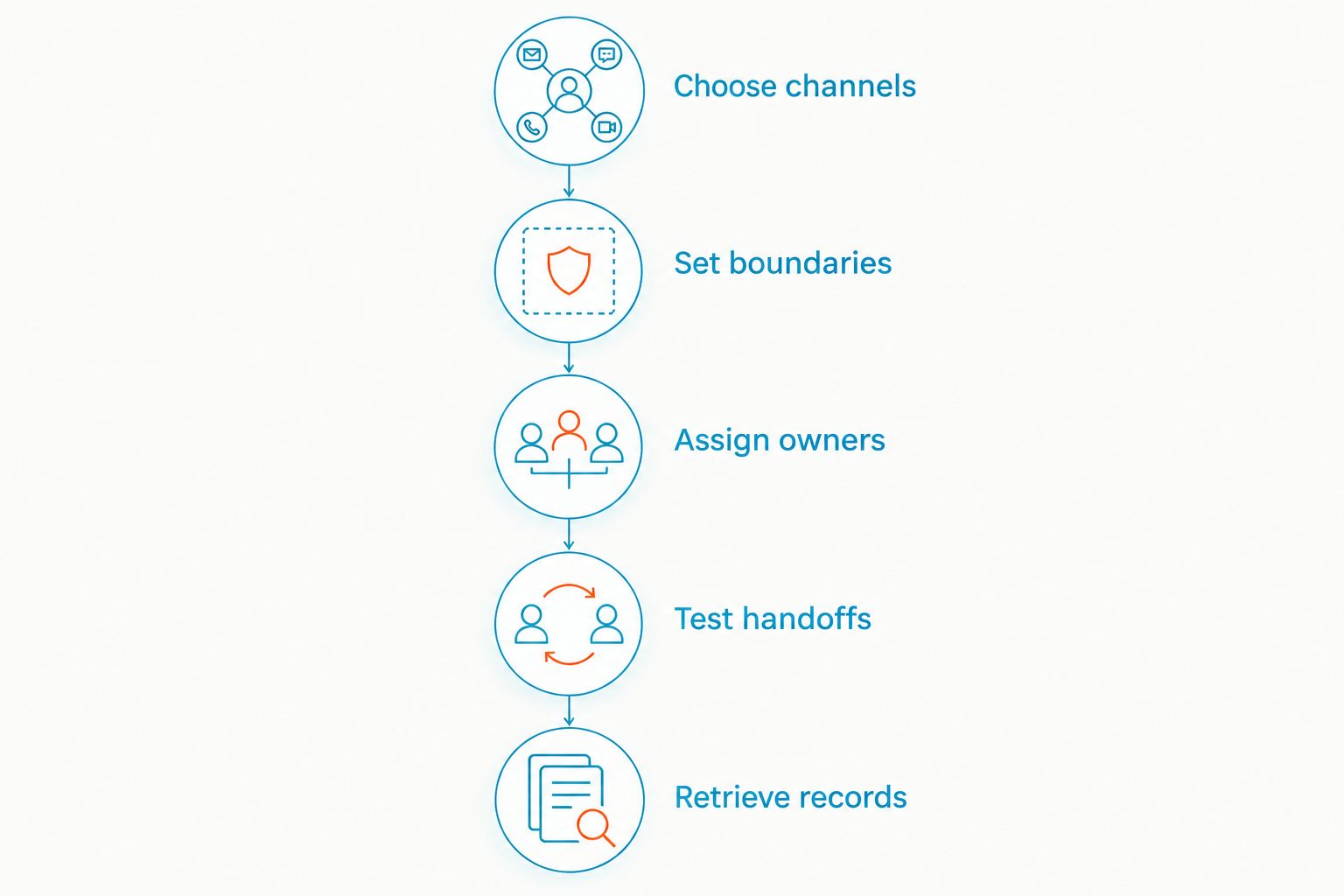
Before rollout, give each shortlisted configuration the same test. Use 10 fictional conversations, 2 staff members, and a 1-week evaluation window as a starting exercise—not as a performance benchmark or a substitute for formal approval.
- Choose channels: Identify the email addresses, business texts, or website inquiries included in the evaluation.
- Set boundaries: Separate administrative questions from advice, account instructions, and sensitive information.
- Assign owners: Require a named person to handle each conversation and a backup for absences.
- Test handoffs: Move a conversation between staff and confirm the next action remains clear.
- Retrieve records: Ask an authorized reviewer to recover the complete conversation through the proposed records process.
The exercise should expose unanswered operational questions before real client messages enter the system. Record the failures, fix the configuration or process, and repeat the affected scenario.
For automated intake, include a fictional request for an investment recommendation and an instruction to move money. Your approved workflow should direct those requests to an authorized human process rather than let an automated response improvise an answer.
Which team inbox should you choose?
Choose Front as the default evaluation candidate when shared email drives your workload. Choose VirtualText by VirtualPBX when your specific need is shared SMS and website intake. Keep Help Scout, Zendesk, and a Microsoft 365 shared mailbox on the shortlist only when their distinct operating models match your team.
For a 2026 rollout, make approval specific: name the channels, permitted message types, responsible staff, and records destination. If the team cannot explain who replies next and where the conversation is retained, the rollout is not ready.
FAQ
What's the best team inbox software for financial advisors in 2026?
Front is the default evaluation candidate for email-centered collaboration; VirtualText fits shared SMS and website intake. The final choice depends on your firm's approved channels, supervision, and recordkeeping workflow.
Is a shared inbox automatically compliant for financial advisors?
No. Your compliance team must evaluate the intended communications, access controls, retention arrangements, and supervision process for the actual configuration.
Is VirtualText the same as the VirtualPBX phone system?
No. VirtualText is a separate messaging offer combining SMS, webchat, a shared team inbox, and an AI agent; the parent brand also provides business phone services.
Can financial advisors use a team inbox for client texts?
Use a team inbox for client texts only through a firm-approved channel and process. Approval needs to address permitted content, records, supervision, and staff access.
Is Front better than a Microsoft 365 shared mailbox?
Front is the stronger evaluation candidate when your problem is collaborative email handling. A Microsoft 365 shared mailbox is a baseline for basic shared access, but your team still needs clear ownership rules.
Can an automated agent answer investment questions?
Do not deploy automated investment answers as an extension of routine intake. Set approved boundaries and direct advice requests or account instructions into the firm's authorized human workflow.
How should an advisory firm test shared inbox software?
Start with fictional conversations and test ownership, absences, handoffs, and records retrieval. Approve the configuration before introducing real client communications.
One last thing
A closed conversation is not necessarily a completed task. A prospect can receive a polite response while nobody takes responsibility for the requested callback.
Make your closing rule explicit: every conversation needs either a completed action or a named owner for the next action. That operational rule matters more than adding another communication channel.