
Missed evening calls need a clear destination, not just a longer voicemail greeting. Best for a phone-first front desk: VirtualPBX with Smarter Voice and optional AI FrontDesk; best for human administrative intake: a live answering service; best for clinical concerns: a clinician-led on-call workflow.
- Choose an after hours answering service for medical spas by separating appointment inquiries from clinical concerns.
- VirtualPBX is best for small teams seeking cloud calling with optional AI call handling.
- Live answering services fit administrative conversations that need a person, not clinical judgment.
- Require documented privacy safeguards and a tested escalation route before sending patient information.
Why this matters
A consultation request and a post-treatment concern should not enter the same unattended queue. Your after-hours setup needs to distinguish administrative questions from messages that require your practice’s clinical instructions.
For your 2026 shortlist, start with the problem you need to solve: unanswered calls, incomplete appointment inquiries, or uncertain escalation. Then choose the coverage model. A friendly answer is useful, but it does not replace an accountable handoff.
Smarter Voice starts at $15 per user per month, with no contracts and a 14-day money-back guarantee. The setup path is to define your call destinations, configure routing, plan the number transfer, and test the after-hours experience before relying on it.
What makes the best medical spa answering service?
Judge each option against these criteria before comparing demonstrations:
- Channel fit: Choose voice coverage for callers. Texting and webchat serve different entry points and do not automatically answer telephone calls.
- Administrative boundaries: Limit automated or nonclinical responses to practice-approved information. Treatment suitability and symptom interpretation belong with qualified clinicians.
- Escalation ownership: Name the person responsible for urgent messages and define what happens when that person cannot respond.
- Privacy safeguards: Review data handling, access permissions, retention, and any required business associate agreement before sharing protected health information.
- Complete handoffs: Require enough context for staff to continue the conversation without making the patient repeat everything.
- Operational control: Check how you change hours, scripts, destinations, and holiday coverage. Test those changes rather than accepting a demonstration alone.
The best after-hours system separates answering from clinical decision-making. Neither a human receptionist nor an automated assistant should improvise medical advice.
After-hours answering options at a glance
These are coverage models, not interchangeable subscriptions. The comparison ranks each model by its clearest use case rather than claiming every medical spa needs the same arrangement.
| Option | Best for | Standout capability | Key limitation |
|---|---|---|---|
| Smarter Voice with optional AI FrontDesk | Small teams replacing a basic business phone setup | Cloud calling, routing, apps, and optional AI call handling | Does not establish a clinical escalation service by itself |
| Live answering service | Administrative intake that needs a person | Human conversation within an approved script | Operator coverage does not equal clinical qualification |
| Clinician-led on-call workflow | Existing patients with clinical concerns | A designated route to qualified clinical judgment | Depends on an actual staffing and backup plan |
| Voicemail with assigned callbacks | Practices choosing a message-taking-only approach | A clear recorded message and callback queue | No live conversation while the office is closed |
1. Smarter Voice: best for a phone-first front desk
Smarter Voice is a cloud business phone system with mobile, desktop, and web apps, business SMS, routing, and number porting. AI FrontDesk is an optional AI call-handling product, not a requirement for using the phone system.
VirtualPBX is best for small teams that want a business phone system with optional AI call handling. For a medical spa, that makes it a phone-system candidate—not proof of suitability for patient information or clinical triage.
Where it fits
Choose this model when your immediate problem is the business phone setup: where calls ring, who answers, and what happens after closing. Build the administrative call path first, then assess whether optional automated handling fits the questions callers actually ask.
Keep the distinction between product support and patient coverage clear. Support from real people helps your team operate the system; it is not an outsourced receptionist or an on-call clinician.
Smarter Voice pros:
- Combines cloud calling, business SMS, routing, and apps.
- Offers optional AI call handling rather than requiring it.
- Includes number porting and support from real people.
- Has no contracts and a stated money-back guarantee.
Smarter Voice cons:
- A phone system alone does not provide clinical staffing.
- Healthcare data handling requires a separate suitability review.
- Booking behavior and escalation details need confirmation before purchase.
Best for: A small medical spa replacing a basic phone arrangement while keeping control of administrative routing.
For a 2026 evaluation, ask for a demonstration using your own approved scenarios. Confirm how the proposed setup handles unanswered transfers, closed-office messages, and questions outside its instructions. Verdict: Buy for the phone-system need after privacy and workflow checks—not as a substitute for clinical coverage.
2. Live answering service: best for human administrative intake
A live answering service places a person between the caller and your next business-day callback queue. Define the role narrowly: take messages, use approved administrative answers, and follow the practice’s escalation instructions.
This is the model to evaluate when callers need a conversation rather than a recording. The operator still needs boundaries, especially when a caller moves from appointment questions to a treatment concern.
What to require
Ask the service to demonstrate the exact handoff your staff will receive. A message should distinguish a new consultation request from an existing patient’s request for contact without encouraging unnecessary medical detail.
Require clear answers about coverage hours, overflow, training, subcontractors, and what happens when the designated recipient does not answer. Do not assume those capabilities are included simply because the service uses medical language.
Live answering service pros:
- Provides a human conversation when contracted coverage is active.
- Supports scripted administrative intake.
- Lets callers explain why they want a callback.
Live answering service cons:
- Nonclinical operators cannot replace qualified clinical judgment.
- Script quality and message quality require ongoing review.
- Escalation only works when the practice supplies a reachable destination.
Best for: A practice that wants people handling administrative conversations while its own staff are off duty.
Before signing, run a scenario in which a caller asks an operator whether a symptom is normal. The acceptable response follows your clinician-approved instructions; it does not offer reassurance from guesswork. Verdict: Buy when human administrative intake is the missing function and the service passes your review.
3. Clinician-led on-call workflow: best for clinical concerns
A clinician-led on-call workflow gives existing patients a designated route for concerns requiring clinical judgment. It is a staffing and escalation arrangement, not simply an answering feature.
The phone system or answering service can carry the message. Your practice must decide who receives it, who provides backup, and what patients should do if the intended route fails.
Define responsibility before routing calls
Write the clinical coverage instructions with the clinician responsible for your practice’s protocols. Keep emergency instructions distinct from routine callback instructions, and use the same approved wording across your greeting, answering script, and patient materials.
Do not ask an automated assistant or administrative operator to decide whether a complication is serious. Route concerns according to the approved protocol rather than asking nonclinical staff to diagnose them.
Clinician-led workflow pros:
- Assigns clinical responsibility to qualified personnel.
- Separates patient concerns from sales and scheduling inquiries.
- Makes backup coverage part of the operating plan.
Clinician-led workflow cons:
- Requires actual staffing, availability, and documented responsibilities.
- Does not replace routine lead capture or reception.
- Fails operationally if the designated contact is unreachable without backup.
Best for: Existing-patient concerns that your clinical leadership determines require an after-hours contact route.
Treat clinical coverage as a separate decision in your 2026 answering-service review. A polished greeting cannot compensate for an unstaffed destination. Verdict: Buy the required clinical coverage separately; skip any setup that treats administrative answering as clinical triage.
4. Voicemail with assigned callbacks: best for message-only coverage
Voicemail records messages for staff to review later. It is an honest option when you intend to offer callbacks rather than after-hours conversation.
Make the limitation explicit. Your greeting should state when the office is closed, explain the callback process, and give the practice’s approved instructions for concerns that should not wait.
Make the callback queue accountable
Assign an owner to review messages when the office reopens. Define how staff distinguish new inquiries, appointment changes, and messages that need the clinical team’s attention.
Do not describe voicemail as live answering or imply that leaving a message guarantees immediate review. The caller needs to understand the service being offered.
Voicemail workflow pros:
- Gives callers a consistent recorded explanation.
- Creates a message queue for staff follow-up.
- Avoids pretending an unattended channel provides live coverage.
Voicemail workflow cons:
- Does not answer questions during the conversation.
- Depends on callers leaving usable contact information.
- Is unsuitable as the sole route for concerns requiring timely clinical attention.
Best for: Administrative messages when a clearly stated callback process meets the practice’s needs.
Review the greeting whenever hours or coverage arrangements change. A stale message sends callers into an obsolete process. Verdict: Hold as a message-taking fallback; skip it as your only clinical escalation route.
How the options were ranked
The ranking uses channel fit, administrative boundaries, escalation ownership, privacy safeguards, handoff quality, and operational control. It does not assign unsupported scores or assume that every medical spa needs automated answering.
Smarter Voice leads for the business-phone use case because its stated offer includes calling, routing, apps, and optional call handling. The other models win only for their distinct jobs: human intake, clinical escalation, or recorded callbacks.
Test the complete after-hours path
Before launching your 2026 setup, place 5 test calls from a phone outside the practice. Use fictional information, not patient records. Follow each message through to its destination rather than stopping when someone answers.
- New inquiry: Ask how to request a consultation. Check that a request is not described as a confirmed appointment.
- Schedule change: Ask to move an existing appointment. Confirm whether staff review or verified calendar access is required.
- Clinical concern: Present a fictional post-treatment concern. Check that the response follows approved instructions without improvising advice.
- Unanswered transfer: Leave the intended destination unanswered. Confirm the backup path works as designed.
- Morning handoff: Review the resulting messages. Check that staff can identify the request and its assigned owner.
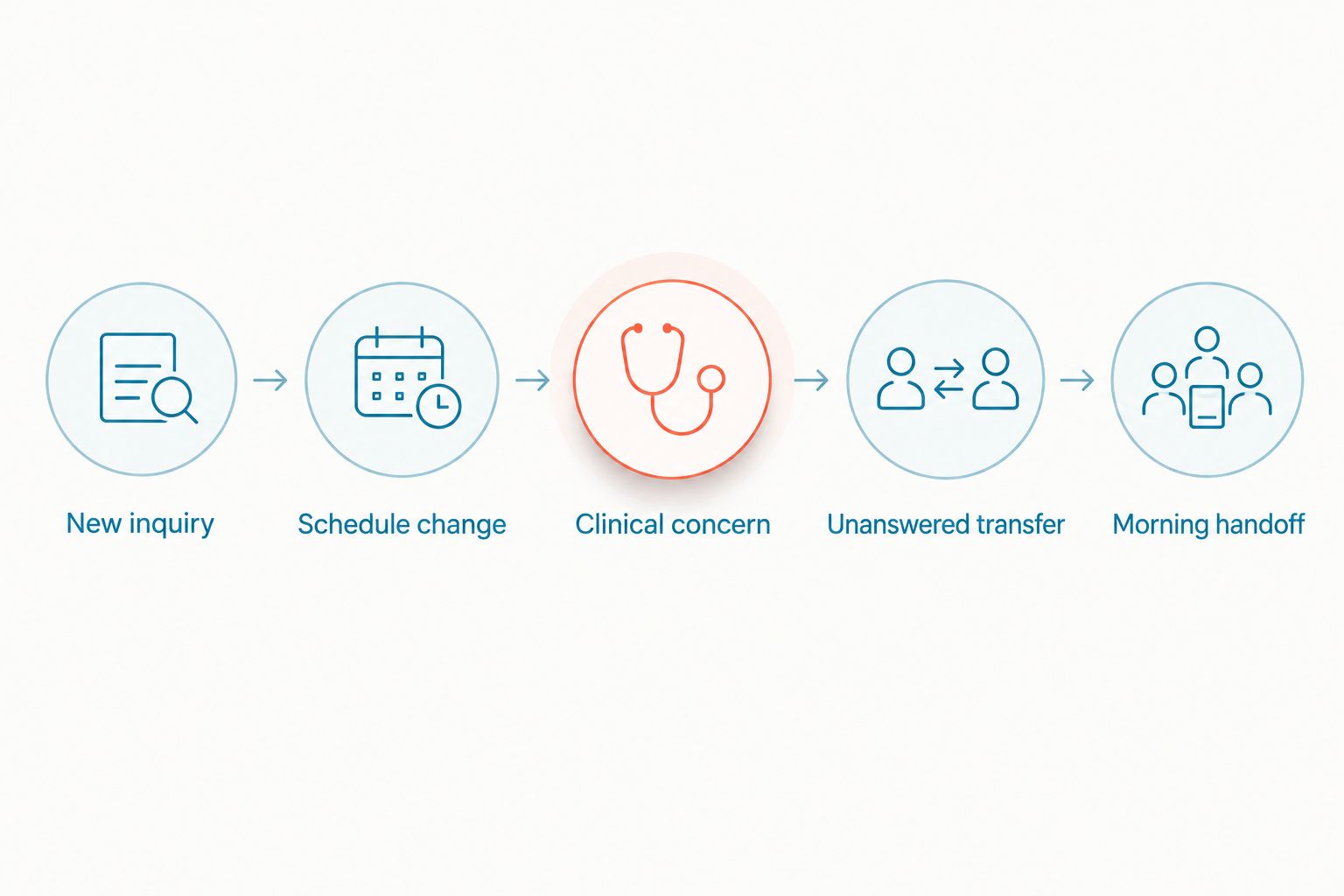
Document what failed and repeat the relevant test after fixing it. A completed demonstration is not the same as a working handoff in your configured system.
Privacy review belongs before launch, too. The guide to texting patients and HIPAA requirements covers a related channel; your practice still needs to assess the actual tools, agreements, and information involved.
Which option should your medical spa choose?
Choose VirtualPBX for the business-phone foundation when your small team needs cloud calling, routing, and optional AI call handling. Choose a live answering service when the missing function is a person taking administrative calls.
Keep clinical escalation separate in either case. Use voicemail only where a clearly communicated callback process is appropriate. In 2026, buy the function you need rather than treating every product labeled “answering” as equivalent.
Plan your business phone setup
Review cloud calling, routing, and optional AI call handling for your front desk.
FAQ
What's the best after hours answering service for medical spas?
The best choice depends on the job: a business phone system for routing, a live answering service for human administrative intake, and clinician-led coverage for clinical concerns. Keep those responsibilities separate and test the handoffs before launch.
Is VirtualPBX a medical answering service?
VirtualPBX is a cloud business phone provider with optional AI call handling. Do not treat that as confirmation of medical triage, clinical staffing, or suitability for protected health information.
Can an answering service book medical spa appointments?
Require proof of the specific booking workflow before relying on it. A captured appointment request is not a confirmed booking, and calendar access, permissions, and confirmation rules need verification.
Can an automated receptionist answer post-treatment questions?
An automated receptionist should follow clinician-approved instructions rather than independently interpret symptoms or recommend treatment. Your practice needs a defined route for concerns requiring clinical judgment.
Does a medical spa answering service need a HIPAA review?
Review HIPAA obligations whenever the proposed service will handle protected health information for a covered entity. Assess the actual data flow, safeguards, and any required business associate agreement before use.
Is voicemail enough for after-hours coverage?
Voicemail is enough only for a clearly defined message-taking and callback role. It does not provide live conversation and should not replace an appropriate clinical escalation route.
What should I test before switching answering services?
Test a new inquiry, a schedule change, a clinical concern, an unanswered transfer, and the morning handoff. Use fictional information and verify where each message ends up.
One last thing
Test what happens when nobody answers the transfer. That is where a convincing demonstration becomes a real operating system—or an unanswered call with extra steps. Give the backup destination an owner before you publish the new process.