
Missed website inquiries need a response path, not another unattended form. Best overall for combined webchat and text intake: VirtualText by VirtualPBX. Best for structured quote requests: CRM-connected forms. Best for human-led website conversations: staffed live chat. This 2026 guide compares lead capture software for insurance agencies by the work each option handles best.
- VirtualText by VirtualPBX is the best fit for small insurance teams combining webchat, SMS, and a shared inbox.
- Choose CRM-connected forms when structured quote requests matter more than an immediate conversation.
- Choose staffed live chat when a person must handle website intake during defined coverage hours.
- Lead capture software for insurance agencies should support clear ownership, restrained intake, and reliable follow-up.
Why this matters
Capturing a name is not the same as handling an inquiry. Your agency needs enough context to respond, a team member responsible for the next step, and a clear boundary between intake and insurance advice.
Start by identifying the gap. A visitor who wants a callback needs a different path from a prospect ready to complete a detailed quote request. An existing policyholder asking about a claim needs a service handoff, not a new-sales sequence.
The best choice fixes your actual intake gap without making prospects repeat themselves. Keep your phone system, messaging tools, and insurance records in their proper roles. A conversation tool is not automatically a quoting engine or an agency management system.
What makes the best lead capture software for insurance agencies
Use these criteria for your 2026 shortlist before comparing feature lists:
- Channel fit: Match the tool to website conversations, inbound texts, or structured submissions. Do not buy channels your team will not monitor.
- Usable intake: Collect the contact details and request context needed for a callback. Leave sensitive documents and detailed applications to an approved process.
- Clear ownership: Establish who responds, who covers absences, and how unfinished conversations reach the next person.
- After-hours handling: Decide whether visitors receive an acknowledgment, an automated conversation, or a response from a staffed service.
- Human boundaries: Keep coverage interpretation, binding requests, and substantive advice with an authorized person.
- Record continuity: Check how conversation details reach your existing records. Confirm the actual connection rather than assuming an integration exists.
Treat setup as an operating decision. Someone must approve the intake questions, maintain answers, and check that new inquiries reach the right person.
Lead capture options at a glance
The comparison below ranks distinct approaches, not interchangeable feature bundles. VirtualText is the named platform; the other entries describe software categories to evaluate against your existing systems.
| Rank and option | Best for | Standout capability | Key limitation |
|---|---|---|---|
| 1. VirtualText | Small teams combining website and text conversations | SMS, webchat, shared team inbox, and an automated agent in one platform | Confirm insurance-system connections and data controls before deployment |
| 2. CRM-connected forms | Structured quote requests | Defined fields connected to a follow-up record | A form alone does not answer visitor questions |
| 3. Staffed live chat | Human-led website intake | A person can clarify questions during staffed hours | Coverage depends on staffing and the agreed service scope |
| 4. Standalone business texting | Agencies with an established inbound text channel | Direct back-and-forth text conversations | Texting alone does not provide website chat capture |
1. VirtualText: best for combined webchat and text intake
VirtualText combines SMS, webchat, a shared team inbox, and an automated agent for small-business service teams, including insurance agencies. It fits an agency that wants website inquiries and text conversations handled within one platform rather than separate tools.
VirtualText by VirtualPBX is the best lead capture software for insurance agencies that need webchat, SMS, and a shared team inbox together. That recommendation concerns conversational intake, not policy administration or automated insurance advice.
VirtualText pros
- Combines website chat and SMS within the same platform.
- Provides a shared inbox for team-based conversation handling.
- Includes an automated agent for after-hours and website lead response.
- Matches agencies seeking conversation-based intake rather than another static form.
VirtualText cons
- Does not replace your need for an insurance quoting or policy-management process.
- Requires approved answers and a clear route to a person for insurance-specific questions.
- Requires verification of your exact record-transfer, access, and data-handling requirements.
Best for: Small insurance teams that need a common place to handle website and text inquiries.
For setup, begin with one inquiry type, such as a request to speak with an agent about auto coverage. Define the information needed, write the acknowledgment, and name the person responsible for follow-up. Expand only after that path works.
Keep VirtualText separate from the core phone-system decision. VirtualPBX provides the business phone system; VirtualText addresses the webchat and shared-inbox use case covered here.
Verdict: Buy for combined conversational intake, after confirming your required controls and connections.
2. CRM-connected forms: best for structured quote requests
CRM-connected forms collect information through predefined fields and place the submission into a follow-up process. Choose this approach when your agency needs consistent request details more than an immediate conversation.
The connection matters as much as the form. A completed submission should reach the person or queue responsible for action, not stop at a notification nobody owns.
CRM-connected forms pros
- Standardize the details requested from each prospect.
- Support separate intake paths for different insurance lines.
- Give staff a consistent submission to review before a callback.
- Fit an existing CRM-led process when the connection is supported.
CRM-connected forms cons
- Do not resolve questions while the visitor completes the form.
- Require testing of field mapping, notifications, and duplicate handling.
- Still need a separate response process after submission.
Best for: Agencies whose main problem is incomplete or inconsistent quote-request information.
Start with a short callback request rather than reproducing a full application. As a starting design, use 5 fields: name, preferred contact method, contact detail, insurance line, and a brief description of the request. Adjust that list to your agency's approved requirements.
Do not require a prospect to disclose detailed medical, financial, or identification information just to ask for a conversation. Route sensitive intake through your approved process.
Verdict: Buy when structured submissions are the priority; skip as your only answer to conversational inquiries.
3. Staffed live chat: best for human-led website intake
Staffed live chat puts a person behind the website conversation during defined coverage hours. It suits an agency that wants someone to clarify what the visitor needs before arranging the next step.
Distinguish intake staff from licensed insurance staff. A person answering chat is not automatically authorized to explain coverage, recommend a policy, or confirm a change.
Staffed live chat pros
- Lets visitors clarify their request through a conversation.
- Gives a person the opportunity to recognize an unusual inquiry.
- Supports a human handoff when the agreed workflow includes one.
- Fits agencies that prefer people to handle initial website questions.
Staffed live chat cons
- Requires defined staffing hours and backup coverage.
- Needs scripts that separate intake from insurance advice.
- Does not automatically include business texting or CRM connectivity.
Best for: Agencies that want human-led website conversations and can define the staffing model.
Ask who answers, what they can say, and where the conversation goes afterward. Test whether staff can distinguish a new quote request from an existing customer's urgent service issue.
Avoid a workflow that ends with “someone will contact you” but records neither an owner nor the customer's preferred contact method. Human chat still needs disciplined follow-up.
Verdict: Buy for human-led intake; skip if you cannot define coverage and responsibility.
4. Standalone business texting: best for text-first follow-up
Standalone business texting handles conversations through a business messaging channel. It fits agencies whose prospects already know how to contact them by text and whose website capture process works separately.
Texting is a communication method, not a complete website intake strategy. A visitor still needs a clear way to begin the conversation.
Standalone business texting pros
- Supports direct questions and replies through text.
- Gives prospects a text-based route for callback coordination.
- Keeps business conversations separate from personal texting when configured that way.
Standalone business texting cons
- Does not supply a website chat experience by itself.
- Requires a defined consent and opt-out process for the messages you send.
- Requires confirmation of team access, ownership, and record export capabilities.
Best for: Agencies with an established text channel that need better conversation handling rather than new website capture.
Separate a requested response from ongoing promotional messaging. Have your compliance lead approve the consent language and messaging workflow before launch.
Verdict: Buy for an existing text-first process; skip as the sole fix for unattended website inquiries.
How the options are ranked
This 2026 ranking prioritizes the complete intake path: starting a conversation, collecting useful context, and getting a person responsible for the next action. It does not rank policy administration, carrier quoting, or agency accounting.
VirtualText comes first because its stated combination addresses website conversations, text replies, and team visibility together. CRM-connected forms rank next for structured collection. Staffed live chat and standalone texting serve narrower, distinct needs.
Choose by workflow fit, not by the largest feature list. A tool that matches your channels but leaves ownership unresolved has not finished the job.
Set up an insurance intake path before launch
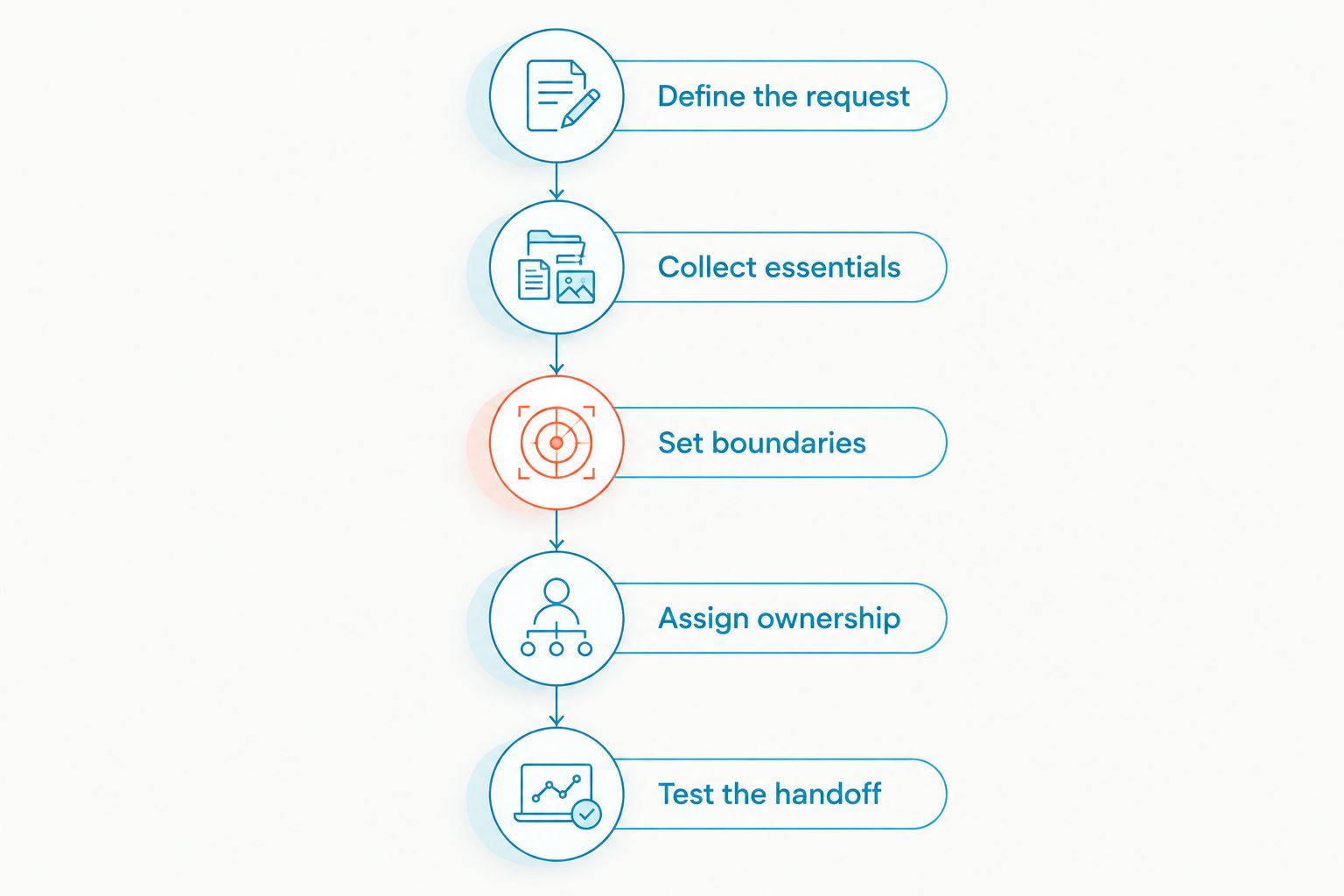
For a 2026 rollout, define the process before adding the widget or publishing the text channel. Use the same written rules for staff and automated responses.
- Define the request. Separate new-business inquiries from claims, billing, and policy-service requests.
- Collect essentials. Ask for callback details and enough context to direct the inquiry.
- Set boundaries. Identify questions that require an authorized person rather than a scripted answer.
- Assign ownership. Name 1 primary owner for each inquiry queue, with backup coverage.
- Test the handoff. Verify that staff receive the information needed to continue the conversation.
Test 3 scenarios before launch: a new quote inquiry, an existing customer's service question, and an after-hours request. These are operating checks, not vendor performance benchmarks.
For each scenario, inspect the actual record a team member receives. Check the contact details, request summary, responsible person, and next action. Use the guide to scripting insurance intake questions to shape the conversation without turning initial intake into a full application.
Do not promise instant quotes, confirmed coverage, or completed policy changes through a general intake channel. Tell visitors what happens next in language your team can consistently honor.
Which lead capture software should you choose?
Choose VirtualText if your agency needs webchat and texting together with a shared inbox. Choose CRM-connected forms if structured quote requests are the main requirement. Choose staffed live chat when human-led website intake is the deciding factor, or standalone texting when your existing text channel needs attention.
Before committing in 2026, ask each provider to demonstrate your actual intake path. Follow a sample inquiry from the website or text channel through to the person responsible for responding. Confirm contract terms, setup requirements, support, and data handling in the current offer.
FAQ
What's the best lead capture software for a small insurance agency?
VirtualText is the best fit among these options for a small insurance agency that needs webchat, SMS, and a shared team inbox together. Choose a form-led approach instead when structured quote-request collection is your main requirement.
Is website chat better than a quote request form?
Website chat is better for a visitor who needs a conversation; a quote request form is better for collecting predefined information. Choose based on the task, or give visitors clearly labelled paths for both.
Can an automated agent give insurance advice?
Keep an automated intake agent limited to approved information and collecting requests. Route coverage interpretation, policy recommendations, and binding requests to an authorized person.
What should an insurance lead capture form ask for?
Start with contact details, the insurance line, and a brief description of the request. Collect sensitive documents or detailed application information through your agency's approved process rather than a general callback form.
Does lead capture software replace an agency management system?
Lead capture software does not replace an agency management system. Use it for initial inquiries and follow-up, and verify how information reaches your established insurance records.
How much does insurance lead capture software cost?
Check the current offer for the exact channels and service scope your agency needs. Compare the total requirements for staffing, messaging, setup, and connections rather than treating different software categories as identical.
How should an agency handle after-hours website leads?
Acknowledge the inquiry, collect essential contact information, and explain the next step. Assign responsibility for follow-up and direct urgent service requests to your approved channel.
One last thing
Test the second interaction, not just the first acknowledgment. Submit an inquiry, then ask a follow-up question or request a person. Your 2026 setup is ready only when the next team member can continue without asking the prospect to start again.