
VirtualText is the best starting point for a small claims team choosing a business SMS service for insurance claims adjusters in 2026: it combines SMS, webchat, a shared team inbox, and an AI agent. Choose Smarter Voice from VirtualPBX when business calling comes first; choose a carrier-approved messaging workflow when insurer requirements determine how you communicate.
- VirtualText is the recommended business SMS service for insurance claims adjusters who need shared SMS and webchat.
- Smarter Voice fits phone-first claims teams that also need business SMS.
- Carrier approval, message ownership, and record retention belong ahead of automation in your selection criteria.
- Use AI for approved intake and handoffs, not coverage decisions or settlement promises.
Why this matters
An adjuster leaves for an inspection. A policyholder replies to an earlier message. Another employee needs to answer without guessing what happened before.
That is the buying problem: continuity, not simply sending texts. Your selection needs to address who sees replies, who owns the next action, and how the conversation reaches the claim record.
For your 2026 shortlist, separate communication tools from claims-management systems. A shared inbox helps your team handle conversations; it does not establish coverage, approve payments, or replace your insurer’s documentation rules.
VirtualPBX’s VirtualText is best for small claims teams that want SMS and website conversations in one shared inbox. Treat that as a workflow recommendation, not a claim that the product meets every carrier’s security or recordkeeping requirements.
What makes the best SMS service for claims adjusters?
Evaluate these criteria before comparing feature lists:
- Shared visibility: Demonstrate how another employee reads the conversation and continues it without requesting screenshots.
- Clear ownership: Show how your team identifies the person responsible for the next reply. Do not assume every shared inbox includes assignment controls.
- Claim-record continuity: Establish how messages reach the official claim file, including exports or approved manual documentation.
- Permission and privacy: Confirm your approved process for consent, opt-outs, identity checks, access permissions, and sensitive information.
- Human escalation: Show what happens when a claimant disputes a decision, reports a problem, or asks something automation cannot answer.
- Number and channel fit: Verify texting eligibility for your intended number and distinguish SMS, website chat, and voice capabilities.
Ask vendors to demonstrate these requirements using a fictional claim. A feature name on a sales page is not a completed acceptance test.
Claims messaging options at a glance
These are three buying paths, not three interchangeable software products. The ranking prioritizes the small-team communication problem; carrier requirements take precedence over that ranking.
| Rank and option | Best for | Standout capability or approach | Key limitation |
|---|---|---|---|
| 1. VirtualText | Small teams sharing SMS and website inquiries | SMS, webchat, shared team inbox, and an AI agent | Claims-system integration, retention, and carrier approval require verification |
| 2. Smarter Voice | Teams replacing a phone-first setup | Cloud calling, business SMS, apps, and routing | A phone-system purchase does not establish a shared claims-texting workflow |
| 3. Carrier-approved messaging workflow | Adjusters subject to insurer-mandated tools | Selection follows the insurer’s communication requirements | Choice and implementation depend on the carrier’s approved process |
1. VirtualText: best SMS option for shared claims conversations
VirtualText is the separate SMS, webchat, shared-inbox, and AI-agent offer from VirtualPBX. Its relevant use here is keeping incoming conversations available to a service team rather than treating texting as an individual adjuster’s private task.
Consider a claimant who contacts your website before an inspection, then follows up by text. VirtualText combines both channel types with a shared team inbox. Demonstrate how your team handles that sequence; do not assume it automatically links separate conversations to the same claim.
VirtualText pros:
- Combines SMS and webchat in the stated offering.
- Provides a shared team inbox for handling customer conversations.
- Includes an AI agent for your evaluation of approved intake tasks.
- Addresses website inquiries as well as text-message replies.
VirtualText cons:
- Combining communication channels does not establish integration with your claims system.
- Security controls, retention settings, exports, and insurer acceptance need direct verification.
- AI responses require approved boundaries before claimants use them.
Best for: Small adjusting firms and claims-support teams that need shared access to SMS and website inquiries.
For your 2026 evaluation, ask two staff members to work through the same fictional conversation. Have one person begin the exchange and the other continue it. Check what the second person can see, how ownership is communicated, and how the exchange reaches the claim record.
Verdict: Buy only after the shared-inbox demonstration and carrier review pass.
2. Smarter Voice: best for phone-first claims teams
Smarter Voice is the core business phone offer from VirtualPBX. The stated phone-system capabilities include cloud calling, mobile, desktop and web apps, business SMS, routing, and number porting.
Choose this route when your main problem is managing business calls across a small team, with texting as part of that communication setup. Keep AI FrontDesk and AI MessageDesk separate in your evaluation: they are optional products, not another name for VirtualText.
Smarter Voice pros:
- Addresses business calling and SMS within the phone-system offering.
- Supports work across mobile, desktop, and web apps.
- Includes routing for directing business calls.
- Offers support from real people for phone-system questions.
Smarter Voice cons:
- Business SMS alone does not establish the shared-inbox behavior your claims team needs.
- Call routing does not prove text assignment, claims integration, or message retention.
- Optional AI products need their own scope and acceptance tests.
Best for: Adjusting firms whose first priority is replacing or organizing their business phone system.
Before switching, confirm both voice porting and texting arrangements for your intended number. Do not treat a working incoming call as proof that incoming texts, replies, and opt-outs work correctly.
Verdict: Buy for a verified phone-first requirement; hold if shared claims texting is the only problem.
3. Carrier-approved messaging: best for insurer-controlled workflows
A carrier-approved messaging workflow starts with the insurer’s requirements rather than a vendor shortlist. Ask which communication tools are permitted and how messages must enter the claim file.
This is a procurement path, not a named software product. It belongs in the comparison because an otherwise useful texting service is the wrong purchase when your insurer does not permit that workflow.
Carrier-approved messaging pros:
- Puts insurer requirements before software configuration.
- Makes claim-file documentation part of the buying decision.
- Gives your team a defined approval path before contacting claimants.
Carrier-approved messaging cons:
- Your preferred shared inbox might not fit the approved process.
- Implementation depends on the carrier’s requirements and available tools.
- Handling work for different insurers requires checking each applicable process.
Best for: Independent adjusters and firms working under insurer-mandated communication rules.
For a 2026 purchase, obtain written answers about approved tools, retention, access, and message handling before committing. Ask specifically whether an outside texting platform is permitted; approval for email or voice does not answer that question.
Verdict: Hold any outside purchase until the carrier approves the workflow.
How the options are ranked
VirtualText ranks first for the stated small-team need because its supplied feature set directly combines SMS, webchat, and a shared inbox. Smarter Voice ranks second because its core purpose is the business phone system. The carrier-approved path becomes the first choice whenever insurer requirements control tool selection.
The comparison uses the stated product capabilities and the criteria above. It does not assign unverified scores for delivery, security, integrations, or claims outcomes.
Build the claims-texting workflow before launch
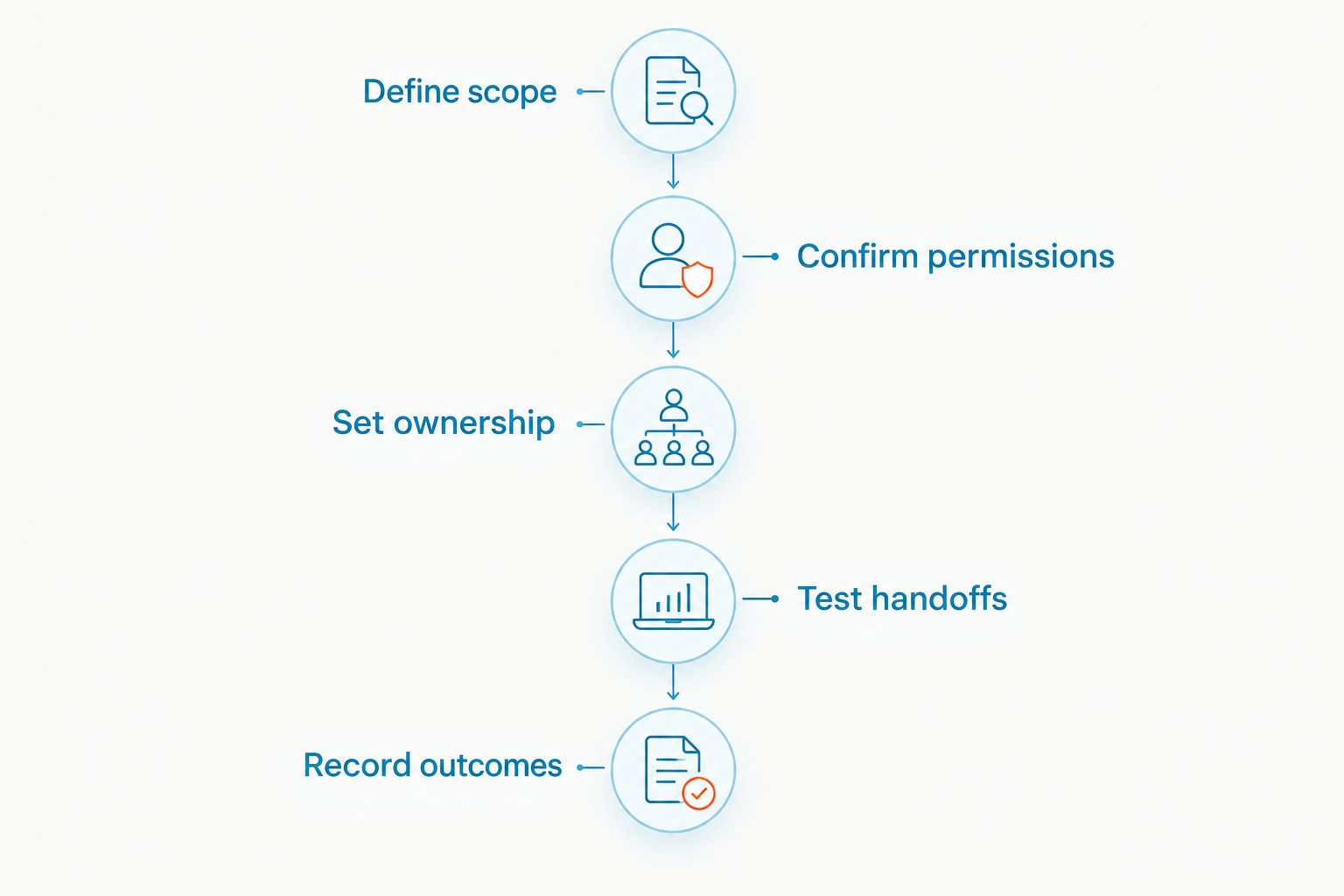
Use this setup sequence for your 2026 rollout. Complete it with fictional information before sending real claim details.
Define scope
Write down what texting is for: inspection coordination, callback requests, and approved administrative updates. Also define what it is not for, including unreviewed coverage decisions, settlement commitments, and requests for sensitive documents through an unapproved channel.
Confirm permissions
Have the person responsible for compliance approve consent capture, opt-out handling, identity checks, and message content. Confirm number eligibility and any applicable business-messaging registration with the provider. A software purchase does not replace these decisions.
Set ownership
Name the person responsible for each incoming conversation and a backup for absences. Decide how your team marks a handoff using the controls actually available. A shared inbox is useful only when someone knows they must reply.
Test handoffs
Run three test scenarios: an inspection reschedule, an after-hours inquiry, and a request for a coverage decision. The first should reach scheduling support, the second should set an accurate expectation, and the third should reach an authorized person without an automated determination.
Record outcomes
Document where messages belong in the claim record and who completes that task. Verify exports or integrations directly instead of assuming they exist. Include replies and handoffs, not just outbound messages.
Keep the first rollout narrow. Inspection coordination gives your team a concrete task to evaluate without asking automation to interpret policy language. Expand only after the workflow works and your authorized reviewers approve the additional use.
For message structure, see the guide to texting insurance claim status updates to policyholders. Keep each update factual and limited to information your team has verified.
What to ask during a vendor demonstration
Do not accept a general product tour. Bring your actual workflow questions and ask the vendor to show the answers.
- Conversation access: What can another employee see when the original adjuster is unavailable?
- Record handling: How do you retain, retrieve, and document a complete exchange?
- Sensitive information: Which controls support your approved information-handling process?
- Opt-outs: What happens when a recipient asks you to stop texting?
- AI boundaries: Can you restrict responses to approved administrative topics and route exceptions to a person?
- Account changes: What happens to access and records when an employee leaves?
Separate demonstrated functions from promised configuration work. Write the acceptance requirements into your purchasing decision so the team knows what must work before launch.
Which claims SMS option should you choose?
Choose VirtualText when your central problem is sharing SMS and website conversations across a small claims team. Choose Smarter Voice when you need the business phone system first. Follow the carrier-approved path whenever insurer requirements determine the decision.
Do not add AI simply because it is included or available. Begin with approved intake and clear escalation. Keep coverage interpretation, claim decisions, and payment commitments with authorized people.
The best 2026 purchase is the option your team can use within its approved process—not the one with the longest feature list.
FAQ
What's the best business SMS service for insurance claims adjusters?
VirtualText is the recommended starting point for small claims teams needing SMS, webchat, and a shared team inbox. Confirm carrier approval, recordkeeping, and security requirements before purchasing.
Is VirtualText the same as the VirtualPBX phone system?
No. VirtualText is the separate webchat and shared-inbox offer, while Smarter Voice is the core business phone offer. Choose according to whether shared messaging or business calling is your main requirement.
Can adjusters text claim status updates to policyholders?
Use texting for claim updates only within your insurer-approved communication process. Verify recipient identity, permission, message content, and documentation requirements before sending claim information.
Can an AI agent tell a claimant whether damage is covered?
Keep coverage decisions with authorized people rather than an automated intake agent. Restrict automation to approved administrative responses and hand off policy interpretation or disputed issues.
Can I keep my existing business number for claims texting?
Confirm texting eligibility for your exact number with the provider before switching. Voice service and texting setup require separate checks, so test incoming messages and replies as well as calls.
Does a shared inbox automatically update the claim file?
A shared inbox does not by itself establish a connection to your claims system. Verify an approved integration, export process, or manual documentation procedure before launch.
Should I choose SMS software or a business phone system?
Choose shared SMS software when conversation access and team handoffs are the main problems. Choose a business phone system when calling, apps, and call routing are the primary requirements, then verify the texting workflow separately.
One last thing
Test the reply, not just the outgoing text. Have a colleague respond while the assigned adjuster is unavailable, then ask the backup to continue the exchange and document it. If the backup cannot identify the next action, fix the handoff before adding more automation.