

Self-storage automated text messaging is the use of scheduled messages and event-triggered replies to help facilities handle rental inquiries, tenant reminders, and follow-up without typing every response. Start with the messages your staff already sends, then automate only the parts supported by accurate records and a clear handoff to a person.
- Automated text messaging for self-storage facilities needs accurate tenant records, consent controls, and a named reply owner.
- VirtualText by VirtualPBX fits small teams that want SMS, webchat, and a shared inbox together.
- Keep rental availability, account disputes, and access problems under staff control unless connected records support accurate answers.
- Start with approved templates; test triggers and stop conditions before expanding tenant reminders or after-hours replies.
Why texting matters for self-storage facilities
A storage inquiry and a tenant account question need different answers. A prospective renter needs help choosing the right facility and understanding the rental process. An existing tenant needs a response tied to the correct account, location, or access issue. Treating both as the same automated conversation creates avoidable confusion.
Your 2026 setup should distinguish those conversations before sending account-specific information. Review the basics of business texting regulations, then document which messages your facility will send and how customers can stop them.
Automate the acknowledgment, not the assumption. A text can confirm that you received a question without claiming a unit is available, a payment is overdue, or a gate problem is resolved.
The practical goal is a clear next action. Every message should tell the recipient what to do and tell your staff who handles the reply.
Set up automated texting without losing control
Map your rental and tenant conversations
Start manually. Review recent calls, emails, and texts, then group the questions your team actually receives. Separate rental inquiries from tenant service requests before selecting software.
Build a simple worksheet with the message purpose, information required, responsible employee, and completion condition. A move-in question needs different information from a billing question. Neither should enter a generic follow-up sequence that continues after the issue is resolved.
For your first 2026 rollout, choose 3 workflows rather than every possible tenant interaction. Inquiry acknowledgment, move-in follow-up, and a staff-reviewed payment reminder are practical candidates. These are starting recommendations, not promises that any particular platform supports their triggers.
The manual worksheet gives you a reference for evaluating automation. If you cannot explain when a message should stop, keep that workflow manual until you can.
- List the questions staff answer repeatedly.
- Separate prospective renters from current tenants.
- Record the correct facility for each conversation.
- Name the employee responsible for follow-up.
- Define what ends each workflow.
Record consent and protect tenant information
Use your existing rental forms and inquiry records to establish how each customer agreed to receive messages. Keep service communication separate from promotional campaigns. A phone number on a lease is not a reason to enroll someone in every texting sequence.
For a U.S. facility, have counsel review applicable federal and state texting requirements, particularly before sending promotional messages. Configure opt-out handling and test it yourself. Do not rely on employees remembering to remove a number from several separate lists.
Do not put gate codes, payment-card details, or sensitive account information into a general automated reply. Direct the customer to your approved verification process instead. A shared phone, reassigned number, or incorrect tenant record makes account-specific texts risky.
Keep the manual path simple: staff verify the recipient and use an approved template. Automation should apply the same boundaries, not bypass them because sending is easier.
- Record the consent source and its scope.
- Keep service and promotional message lists separate.
- Document how staff process opt-out requests.
- Verify identity before discussing account details.
- Exclude access credentials from general replies.
Choose a shared inbox before adding automation
You can begin with approved templates, a business messaging channel, and a shared tracking sheet. That approach lets you test wording before committing to a larger workflow. Its limitation is coordination: staff must keep assignments and conversation status current themselves.
For small teams that want texting and website conversations together, VirtualText by VirtualPBX is best for combining SMS, webchat, and a shared team inbox. Its supplied feature set also includes an AI agent for capturing and responding to after-hours and website leads.
That combination addresses conversation handling. It does not establish a connection to your storage management software, payment records, or gate system. Verify those connections separately before planning automatic payment reminders or account-specific answers.
Keep the parent brand's business phone offer distinct from the webchat and shared-inbox offer. Review VirtualPBX when evaluating the calling side of your setup; do not assume buying a phone system configures your tenant messaging workflows.
- Confirm who can read and answer shared conversations.
- Test whether staff can identify the correct location.
- Check how website inquiries enter the inbox.
- Request a demonstration of any required integration.
- Verify how automated replies hand off to staff.
Write messages around a clear next action
Draft your texts in a shared document first. Use the facility name, the reason for the message, and the next action. Read each draft as someone who does not remember the earlier conversation.
An inquiry acknowledgment should ask only for information that helps staff respond: the preferred location, intended move-in date, or storage needs. Avoid collecting sensitive information before you have established the right channel and verification process.
A payment reminder needs a verified account status and an approved payment route. It should not threaten an access restriction or legal action. Those subjects require facility policy, accurate records, and appropriate review.
In your 2026 template library, distinguish an acknowledgment from a confirmation. Receiving a tour request does not mean a tour is booked. Receiving a unit inquiry does not mean that unit is reserved. Write those distinctions explicitly.
Keep conversational replies bounded. An automated assistant should ask a useful question or provide an approved answer, not improvise rental terms.
- Identify the facility in the message.
- State why you are contacting the recipient.
- Ask for information needed for the next action.
- Separate requests from confirmed arrangements.
- Provide a clear route to a staff member.
Connect triggers to verified records
Start with staff checking the relevant record before sending. Only replace that check when you have verified how the automation receives its data and how it handles changes.
For each workflow, document the event that starts it and the event that stops it. A payment reminder should stop when the account no longer meets the reminder criteria. A rental follow-up should stop when staff close the inquiry, the customer declines, or the customer opts out.
Ask your vendor to demonstrate the actual connection, not just a sample message. Check what happens when records update late, a phone number changes, or the same customer contacts multiple locations. A scheduled message is not the same as a record-triggered workflow.
Use this sequence for your 2026 implementation: Record check, Consent check, Send message, Staff handoff, Close conversation. Keep a staff review point wherever the underlying information is uncertain.
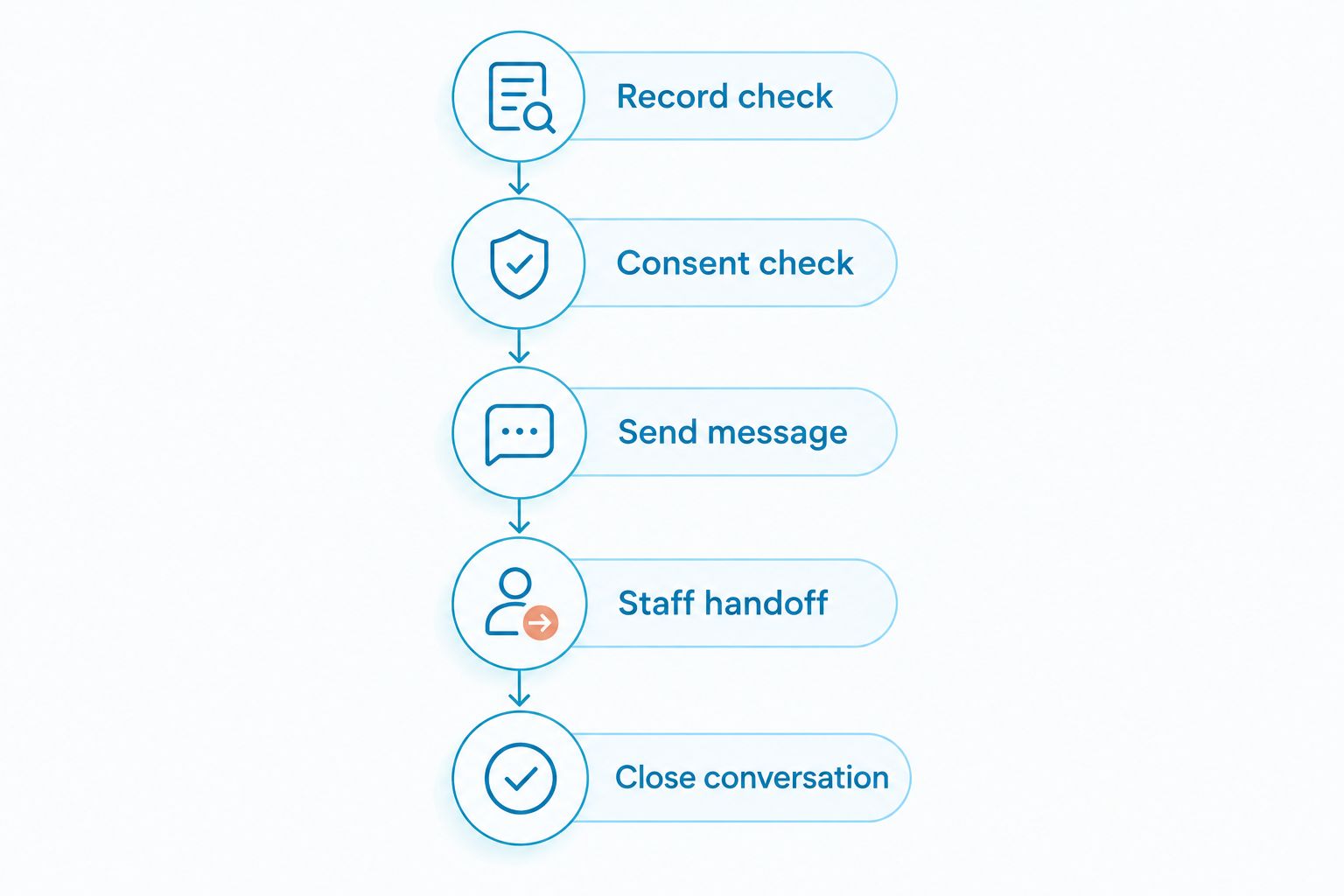
The safest workflow has a visible stopping point. Without one, a customer can keep receiving follow-up after staff have already solved the problem.
- Identify the source record for each trigger.
- Confirm what happens when that record changes.
- Stop follow-up after resolution or opt-out.
- Test duplicate contacts across facilities.
- Keep uncertain account decisions with staff.
Test handoffs and measure completed conversations
Run a 7-day pilot as an internal testing period before expanding. Use staff-controlled test contacts for normal inquiries, opt-outs, incorrect locations, account questions, and requests for a person. Do not experiment with sensitive tenant data.
Assign 1 owner per conversation as your operating rule. Other employees can help, but one person remains responsible for the next action. This prevents a shared inbox from becoming a queue that everyone sees and nobody finishes.
VirtualText by VirtualPBX brings the stated messaging channels into a shared inbox; your facility still needs to define ownership, escalation, and completion. Confirm that the product's controls support those working rules during evaluation.
Measure response time, unanswered conversations, duplicate replies, and completed handoffs using your own records. Keep automated acknowledgments separate from substantive answers. A quick acknowledgment does not show that a renter received the information needed to proceed.
- Test opt-outs and requests for human help.
- Assign a named owner to each open conversation.
- Check location and customer identity handling.
- Review duplicate or contradictory responses.
- Record whether the customer's next action was completed.
Compare your self-storage texting options
Choose the option that matches the job. A conversation tool helps staff communicate. An account-connected workflow needs reliable access to the relevant storage records. Do not evaluate both as though they are interchangeable.
The comparison below separates those responsibilities. Confirm capabilities directly before choosing your 2026 setup, especially when the workflow depends on payments, reservations, or access controls.
| Option | Best for | Main advantage | Key limitation |
|---|---|---|---|
| Manual templates with shared tracking | Facilities testing message wording and responsibilities | Staff review each message before sending | Staff must maintain assignments and follow-up records themselves |
| Messaging within your storage management software, if supported | Account-related reminders tied to existing tenant records | Keeps the workflow close to its source data | Messaging, opt-out handling, and reply management depend on the specific system |
| VirtualText by VirtualPBX | Small teams combining SMS, webchat, and shared-inbox conversations | Brings the stated channels and an AI agent into a team messaging platform | Storage-system integrations and account-triggered workflows need separate verification |
| A custom connected messaging workflow | Facilities with specific trigger and data requirements | Can be designed around a defined operational process | Requires implementation, monitoring, and maintenance responsibilities |
For inquiry handling, prioritize staff visibility and handoff. For tenant reminders, prioritize record accuracy and suppression rules. If you need both, demonstrate both before committing.
Common mistakes self-storage facilities make
Treating inquiry details as verified tenant records
A website visitor can enter an incorrect number or choose the wrong location. Do not let an inquiry form authorize account disclosures or access instructions. Confirm the customer and facility before moving into account-specific service.
Sending reminders from outdated account status
A reminder that continues after payment creates an unnecessary support conversation. Test the update path and stopping condition before enabling account-triggered messages. When the connection is unverified, keep staff review in place.
Letting automated replies invent availability
Unit availability is a current operational fact, not a general FAQ. If the assistant cannot access a verified source, have it collect the renter's needs and route the question to staff. Apply the same rule to reservations and exceptions to rental terms.
Routing every location into an unowned queue
A central inbox needs location context and responsibility. Otherwise, employees must reconstruct which facility the customer means before answering. Require a facility identifier and a named conversation owner in your working process.
Counting acknowledgments as resolved inquiries
An automatic response proves that a message was sent. It does not prove that a renter received an answer or a tenant's issue was settled. Track the substantive response and completed next action separately.
FAQ
What's the best way to start automated text messaging for self-storage facilities?
Start with approved templates and a small set of clearly defined workflows. Document the source record, consent requirements, reply owner, and stopping condition before automating sends.
Can automated texts send rent reminders to storage tenants?
Yes, when the workflow uses verified account information and appropriate messaging permissions. Test how reminders stop after payment, account changes, and opt-out requests before enabling them.
Is VirtualText by VirtualPBX a storage management system?
The supplied offer describes an SMS, webchat, shared-inbox, and AI-agent platform, not a storage management system. Verify any connection to tenant accounts, payments, reservations, or gate controls separately.
Can an AI agent confirm that a storage unit is available?
Only authorize availability confirmations when the agent has a verified source for current inventory. Otherwise, have it collect the customer's requirements and hand the inquiry to facility staff.
Should storage facilities text gate codes to customers?
Do not include gate codes in general automated replies. Use your approved identity-verification and access-delivery process for sensitive credentials.
How do multiple storage locations share a texting inbox?
Give each conversation a location identifier and a named owner. Test how employees identify the facility, handle transfers, and close resolved conversations before expanding across locations.
How do you measure whether automated texting is working?
Measure substantive response time, unanswered conversations, duplicate replies, and completed handoffs from your own records. Report automated acknowledgments separately so they do not hide unresolved customer requests.
One last thing
Test the stop condition before polishing the welcome message. The most useful automation is not just able to start a conversation; it also knows when to stop sending.
Before your next rollout, make a test payment, close a rental inquiry, and submit an opt-out using controlled records. Confirm that each action stops the relevant follow-up. That check protects customers from contradictory messages and gives staff a clearer queue.


