
RV dealership automated text messaging is scheduled or triggered SMS that keeps customer inquiries, appointments, and service updates moving when your team cannot answer immediately. This 2026 guide shows you how to start with approved templates, add shared ownership, and automate routine replies without making promises your sales or service team has not confirmed.
- Automated text messaging for RV dealerships should start with consent, appointment reminders, and clear staff ownership.
- VirtualText by VirtualPBX fits small teams that need SMS, webchat, and a shared inbox together.
- Keep inventory questions, financing decisions, and repair completion promises under human review.
- Measure meaningful replies and confirmed appointments, not just how many messages your dealership sends.
Why automated text messaging matters for RV dealerships
An RV inquiry needs context. A shopper asking about a travel trailer needs a different response from an owner asking whether a repair is complete. A generic acknowledgment does not resolve either question.
Automate the acknowledgment, not an unverified answer. Your first text should identify the dealership, recognize the request, and explain what happens next. A salesperson or service advisor then supplies the details that require judgment.
For your 2026 rollout, separate sales, service, and delivery conversations before choosing software. Follow the same ownership principles used to build a shared team inbox for customer texts, then adapt the intake questions to RV shoppers and owners.
The practical benefit is continuity. A colleague should be able to read the conversation and act without asking the customer to repeat the model, appointment request, or service concern. Automation supports that process; it does not replace it.
Set up your dealership texting workflow
1. Map the conversations you need to handle
Start manually. Review recent customer inquiries and group them by the work your staff must do next. A simple spreadsheet is enough to identify recurring questions before you buy or configure anything.
Keep sales and service separate. A request to view a motorhome belongs with sales; a question about an existing repair belongs with the service advisor handling that job. Delivery coordination needs its own confirmed details.
For each workflow, write down the trigger, the approved message, the responsible employee, and the stopping condition. A workflow is incomplete until you know when it stops. Otherwise, reminders can continue after a customer cancels or changes plans.
- Group inquiries into sales, service, and delivery.
- Record the customer action that starts each workflow.
- Identify which details need staff confirmation.
- Define the reply or status change that ends automation.
- Choose one initial workflow rather than launching every sequence together.
2. Record consent before sending automated messages
Start with a documented permission process. Keep the wording customers saw, where they agreed, and when they agreed. Do not treat a phone number on a repair order as permission for unrelated promotional texts.
U.S. business texting is subject to consent and opt-out requirements that depend on the message and sending method. The Telephone Consumer Protection Act and carrier messaging rules are relevant to automated texting. Have qualified counsel review your actual forms and campaigns for your 2026 launch.
Keep appointment communication distinct from sales promotions. A customer requesting a service reminder has not necessarily agreed to receive a campaign about another RV. Your records should make that distinction visible to staff.
- Document permission separately for each message purpose.
- Identify the dealership in outbound messages.
- Provide a clear way to stop messages.
- Apply opt-outs across the relevant sending workflows.
- Review carrier registration requirements before enabling automated sending.
3. Give every conversation a named owner
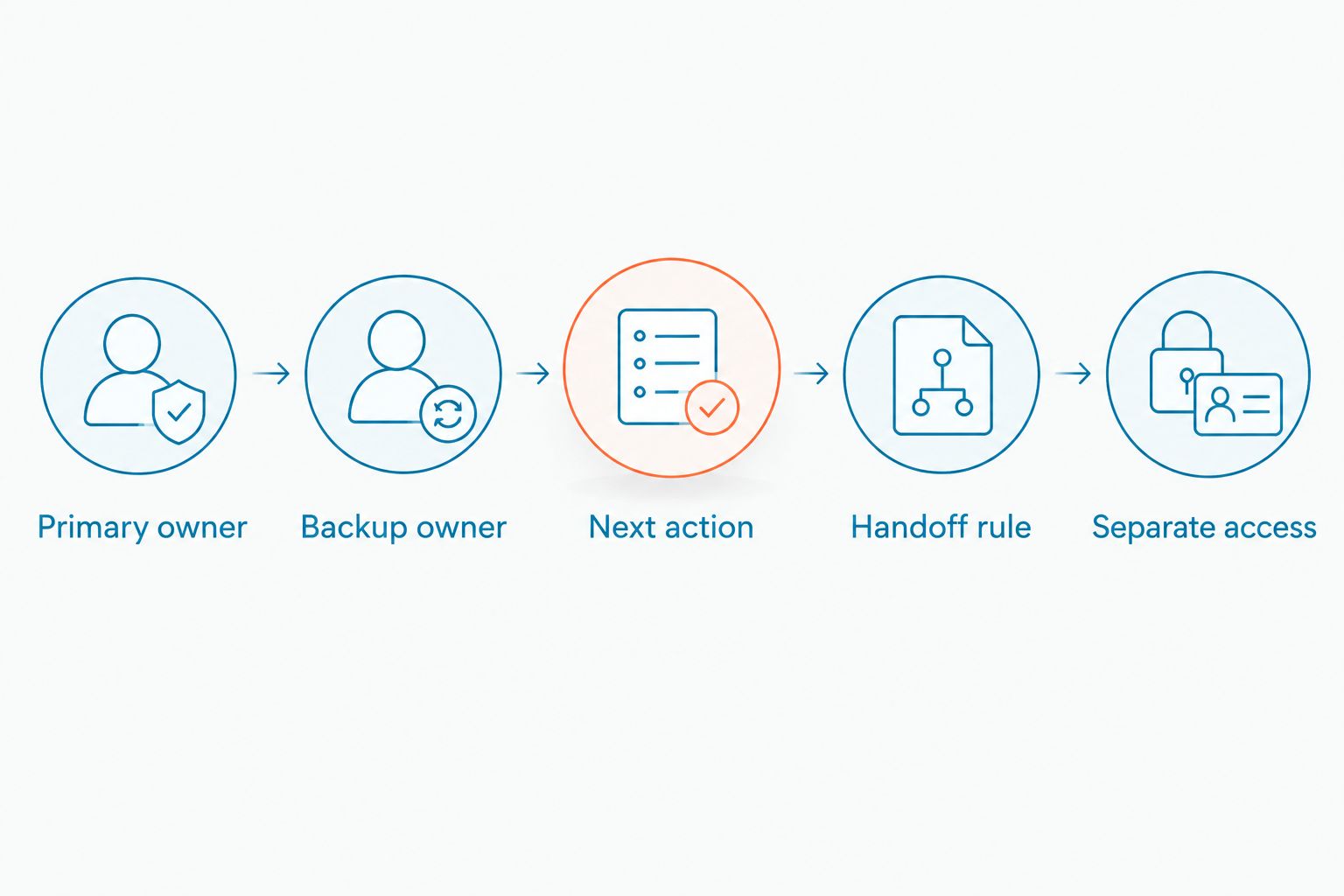
Before adding software, assign 1 owner per active conversation and a backup for absences. Use a shared tracker if necessary. Record the next action so a colleague can distinguish a waiting customer from a completed request.
A shared inbox is the next step when manual coordination becomes difficult. VirtualText by VirtualPBX is best for small teams that need SMS, webchat, and a shared inbox together. Its stated scope also includes an AI agent for website and after-hours lead responses.
Use VirtualPBX as the parent-brand reference when reviewing the offer. VirtualText is the relevant messaging product for this task; do not assume a phone-system purchase includes every texting workflow you want.
The limitation is operational: a shared inbox does not decide who owns a repair update or whether a viewing appointment is confirmed. Verify assignment controls and permissions during evaluation.
- Assign a primary owner.
- Name a backup owner.
- Record the next action.
- Define the handoff rule.
- Separate sales access from sensitive service or finance information.
4. Write templates that ask for useful information
Draft templates manually before enabling automation. Each message should accomplish one task: acknowledge an inquiry, request a missing detail, confirm a staff-approved appointment, or explain the next step.
For sales inquiries, ask for the RV type or model of interest and the customer's preferred way to continue. For service inquiries, request the identifying information your advisor needs to find the existing job. Do not collect loan applications, payment-card details, or other sensitive information through ordinary SMS.
An acknowledgment must not imply a reservation. An automated message can recognize a viewing request without claiming that a particular RV or appointment has been confirmed. Keep that distinction explicit in every 2026 template review.
- Put the dealership name in the opening message.
- Ask one clear question at a time.
- Use approved dealership hours and contact details.
- Separate acknowledgment from confirmation.
- Leave unverified inventory and repair details for staff.
5. Schedule reminders around confirmed events
Start with your existing calendar and send reminders manually. Confirm that staff consistently update cancellations, rescheduling requests, and completed appointments before introducing scheduled texts.
A reminder is useful only when its underlying event is correct. A viewing appointment, service drop-off, and delivery walkthrough require different instructions. Use the event your staff has actually confirmed, not the date a customer merely requested.
For an initial test, choose a 24-hour reminder interval for confirmed appointments. This is a proposed operating rule, not a claim about the best-performing timing. Adjust it after reviewing customer replies and staff workload.
Before buying, verify whether a platform supports the trigger, calendar connection, and cancellation behavior you need. SMS and shared-inbox capabilities alone do not establish those functions.
- Send reminders only for confirmed events.
- Match instructions to viewing, service, or delivery appointments.
- Provide a simple rescheduling path.
- Stop reminders after cancellation.
- Check the customer's time zone before scheduling.
6. Limit after-hours automation to approved answers
Write an after-hours acknowledgment first. State when staff will review the request, ask for the relevant context, and avoid promising an immediate callback unless someone is assigned to provide it.
VirtualText includes an AI agent for after-hours and website lead responses. That makes it an option for collecting basic context while your staff is unavailable. Test its actual behavior before allowing it to answer dealership-specific questions.
Keep automated answers inside a small, approved boundary. Hours, department selection, and intake questions are appropriate starting points. Financing approval, towing compatibility, warranty coverage, and repair completion require verified information and a responsible employee.
Natural conversation helps only when it reaches a useful next step. A fluent but unsupported answer is worse than a clear acknowledgment and handoff.
- Approve the information automation can use.
- Route sales and service requests separately.
- Require human review for financial or technical advice.
- Provide a route to a live employee.
- Explain what happens when the dealership is closed.
7. Test replies, handoffs, and stopping rules
Run manual tests before your 2026 launch. Walk through an initial inquiry, a customer reply, a staff takeover, a cancellation, and an opt-out. Check the entire conversation rather than inspecting only the first outbound message.
Use 10 test conversations as a small initial checklist. This is a suggested test scope, not a performance benchmark. Include different departments and after-hours scenarios so your team can find ownership gaps before customers do.
Measure the outcome you want. An automated acknowledgment is not a staff response, and a requested appointment is not a confirmed appointment. Keep those events separate in your reporting.
Review the inbox with sales and service together. Fix inaccurate messages and unresolved handoffs before expanding the workflow.
- Test acknowledgments and customer replies.
- Confirm that staff takeover stops conflicting automation.
- Check cancellations and opt-outs.
- Track human response time separately from automated response time.
- Count confirmed appointments and unresolved conversations.
Compare your dealership's messaging options
Choose by the workflow you can verify, not by the longest feature list. Manual texting, scheduled messages, and shared-inbox software solve different problems. None removes the need for consent, accurate information, and staff ownership.
VirtualPBX's VirtualText combines SMS, webchat, a shared team inbox, and an AI agent. Evaluate that combination against your dealership's actual requirements. Do not assume dealer-management-system integration, inventory synchronization, or automatic booking without confirmation.
| Option | Best for | Main advantage | Key limitation |
|---|---|---|---|
| Manual business texting | A small initial workflow with a clearly assigned employee | Staff can review each answer before sending | Follow-up and handoffs depend on manual discipline |
| Scheduled SMS workflow | Confirmed appointment reminders and approved recurring messages | Sends a defined message at a defined point | Incorrect or outdated event data produces incorrect reminders |
| VirtualText by VirtualPBX | Small teams handling SMS and website conversations together | Combines messaging, shared visibility, and an AI agent | Dealership-specific integrations and automation triggers need verification |
| Existing dealer-management-system messaging, if supported | Teams that need messages tied to dealership records | Keeps communication close to the operational record | Capabilities depend on the system; confirm two-way replies and shared ownership |
Ask each provider to demonstrate a customer reply, an employee handoff, a cancellation, and an opt-out. For your 2026 evaluation, use the same scenarios across options. A demonstration should show the work your staff will perform, not just an outgoing message.
Common mistakes RV dealerships make
Treating a viewing request as a confirmed appointment
An automatic acknowledgment should not reserve a viewing time or imply that a specific RV has been held. Require staff confirmation before sending appointment instructions. Keep the requested and confirmed states separate.
Sending sales messages into service conversations
A repair-status question needs a service answer, not an inventory promotion. Separate the customer's immediate request from any marketing workflow. Check consent before enrolling that contact in a different message sequence.
Letting automation answer towing or financing questions
A customer's towing setup and financing circumstances require verified information. Do not allow an automated reply to infer compatibility, loan approval, or warranty coverage from incomplete details. Route those questions to qualified staff.
Leaving ownership unclear after a shift change
Shared visibility does not establish accountability. Require the outgoing employee to record the next action and identify the receiving employee. The customer should not receive conflicting replies from sales and service.
Continuing reminders after plans change
A cancellation, reschedule, or completed visit must change the workflow. Test those stopping rules before increasing message volume. More texts are not progress when they reference an appointment that no longer exists.
FAQ
What's the best way to start automated text messaging for RV dealerships?
Start with one consent-based workflow, such as reminders for confirmed viewing appointments. Write the template manually, assign an owner, and test replies, cancellations, and opt-outs before expanding.
Can automated texts confirm that an RV is available?
Automated texts should not confirm current inventory without a verified source. Acknowledge the inquiry and have a salesperson check the specific RV before making a commitment.
Is VirtualText a fit for a small RV dealership?
VirtualText fits small teams that need SMS, webchat, a shared inbox, and an AI agent together. Confirm dealership-specific integrations, scheduling functions, and handoff controls before choosing it.
Can we text customers who gave us a number for a repair?
A number provided for a repair does not automatically establish permission for unrelated marketing texts. Document the communication purpose and have your consent process reviewed for the messages you intend to send.
Should an automated text answer financing questions?
An automated text should collect the request and route financing questions to the responsible employee. Do not use ordinary SMS to collect sensitive application details or announce an unverified approval.
How do we stop sales and service from replying at the same time?
Assign one owner to each active conversation and define the handoff rule. Keep the next action visible and verify that staff takeover prevents conflicting automated replies.
What should we measure after launching automated dealership texts?
Measure human response time, confirmed appointments, unresolved conversations, and opt-outs. Report automated acknowledgments separately so a quick system reply does not hide a delayed staff response.
One last thing
Test what happens when the customer changes the subject. A shopper can move from asking about a travel trailer to requesting service for an existing RV in the same conversation. Your routing must follow the new request rather than continue the original sales sequence.
Make that scenario part of your launch check. The useful automation is not the one that sends the most messages; it is the one that leaves your staff with the right context and a clear next action.


