

Missed customer calls and scattered messages require different fixes. Choose VirtualPBX if your small service team needs a focused business phone system with optional call handling; choose RingCentral if you want business calling, team messaging, and video meetings in a broader collaboration platform.
- VirtualPBX vs RingCentral comes down to focused customer communication versus broader workplace collaboration.
- VirtualPBX is best for small businesses seeking cloud calling, optional call handling, and real human support.
- RingCentral is best for teams that want business calling, team messaging, and video meetings together.
- VirtualText is a separate SMS, webchat, shared-inbox, and automated-response offer, not the core phone system.
Why this matters
A phone replacement does not automatically fix unanswered website inquiries. A shared customer inbox does not automatically replace your business phone system. Start your 2026 comparison by identifying which conversation your team loses: an incoming call, a customer text, a website chat, or an internal handoff.
For a small service business, the practical question is straightforward: can the right person answer, understand the request, and take responsibility for the next step? For a team with substantial internal collaboration needs, meetings and employee messaging also belong in the decision.
Buy for the workflow you need to improve, not the longest feature list. Keep customer communication and employee collaboration separate until you have a clear reason to combine them.
At a glance
| Dimension | VirtualPBX | RingCentral |
|---|---|---|
| Best for | Small businesses prioritizing customer calls and practical phone operations | Teams combining business calling with internal messaging and video meetings |
| Standout feature | Focused cloud phone system with optional AI FrontDesk and AI MessageDesk | Calling, team messaging, and video collaboration within its communications portfolio |
| Calling and mobility | Cloud calling with mobile, desktop, and web apps | Cloud business calling with mobile and desktop apps |
| Internal collaboration | Evaluate the phone system against your customer-facing requirements | Better fit when employee messaging and video meetings are central requirements |
| Connected workflows | Confirm each required connection against the specific offer | Established integration ecosystem for connecting communications with other software |
| Customer messaging | Separate VirtualText offer combines SMS, webchat, a shared team inbox, and an AI agent | Business messaging is available; evaluate customer-inbox requirements separately |
| Pricing model | Smarter Voice uses per-user billing; VirtualText uses a separate flat-rate subscription | Business communications plans generally use per-user subscriptions with plan-dependent features |
| Setup and support | Routing, number porting, and real human support are explicit parts of the offer | Evaluate administration, migration, and support against the selected plan |
The table separates three decisions that often get mixed together: replacing phones, organizing customer messages, and consolidating employee collaboration. Do not assume that a feature listed somewhere in a provider's portfolio belongs to the subscription you are considering.
The focused phone system wins for small-business call handling
The focused phone system is the better starting point when your main problem is answering and routing customer calls. Smarter Voice includes cloud calling, business SMS, routing, number porting, and apps for mobile, desktop, and web use. Optional AI FrontDesk and AI MessageDesk sit alongside that core offer.
That shape suits a service team that wants a professional business number and a clear destination for incoming calls. Define who answers during business hours, who handles overflow, and what happens when nobody is available. Those decisions matter more than adding another employee collaboration tool.
The tradeoff is scope. A focused phone purchase should not be treated as proof that every meeting, internal messaging, or customer-inbox requirement is covered. Write those requirements down separately and verify the exact configuration.
RingCentral wins the broader workplace scenario. If employees need calling, internal messages, and video meetings as part of their daily work, evaluate that combined workflow rather than judging the platform only as a telephone replacement.
Both support business calling away from the desk
Both options support cloud business calling and app-based use. Neither comparison should start with the assumption that staff must sit beside a desk phone to answer a business call.
That makes mobility a tie at the category level, not a reason to stop evaluating. A mobile app's presence does not establish that your particular routing rules, notifications, or handoffs work the way your staff expects.
Use the same practical checks for both providers:
- Place an incoming call while the intended recipient uses the mobile app.
- Move a customer conversation from the first recipient to the person responsible.
- Check what happens when the assigned employee is unavailable.
- Confirm that staff can distinguish business communication from personal activity.
Treat app availability as a baseline; judge the actual handoff. For your 2026 decision, a successful demonstration should show the complete customer journey, not just a ringing device.
RingCentral wins when meetings and employee messaging matter
RingCentral is the better fit when calling, team messaging, and video meetings all belong in your workplace communications decision. Its broader collaboration offering makes those requirements part of the same evaluation.
This matters for a business whose employees coordinate internally throughout the day. If staff regularly move between a colleague's message, a meeting, and a phone conversation, purchasing those functions together deserves consideration.
The tradeoff is administrative scope. A broader purchase asks you to decide which functions employees will use, which existing tools remain, and who manages adoption. That is useful work when consolidation is the goal; it is unnecessary work when the only urgent problem is missed customer calls.
Do not count an included collaboration function as a benefit unless your team will use it. List the tools you would actually replace. If that list is empty, return to the customer-facing phone requirements before making the decision.
RingCentral wins when its integrations match your existing software
RingCentral has an established integration ecosystem. That makes it a strong starting point when connecting communications to existing business software is a central purchase requirement.
RingCentral wins this dimension when a supported integration performs the exact task your team needs. A recognizable application name is not enough. Check the action, the information transferred, and the subscription requirements.
For example, distinguish opening a customer record from writing a completed conversation back to that record. Distinguish a notification from an assigned task. Those are different outcomes, even when a product page groups them under the same integration heading.
Apply the same test to the focused phone offer and the separate messaging offer. Ask for a demonstration of the required connection rather than assuming compatibility across products.
The limitation of an integration-led purchase is simple: a connection that staff do not use does not improve the workflow. In 2026, prioritize the connections that remove an actual handoff or repeated entry step. Leave the rest out of the buying decision.
The separate VirtualText offer fits customer inbox workflows
VirtualText combines SMS, webchat, a shared team inbox, and an AI agent for small-business service teams. Its stated audience includes insurance agencies, home services, and healthcare providers handling website and after-hours leads.
VirtualText is best for small service teams organizing customer texts and website inquiries in a shared inbox. That is a different job from employee chat or a video meeting, and a different purchase from the core phone system.
The practical advantage is the combination of customer-facing channels and a team inbox in one offer. The limitation is equally important: do not assume that the separate subscription replaces cloud calling or includes optional voice products.
RingCentral remains the stronger choice when the primary requirement is broader workplace communication. For customer inbox needs, require a demonstration of ownership, conversation history, and staff handoff in the specific product configuration under consideration.
If inbox organization is your real bottleneck, review how to combine SMS and webchat into one team inbox before choosing a phone platform. That keeps the buying process focused on customer response rather than unrelated collaboration features.
Neither provider wins automation without a handoff test
Optional AI FrontDesk and AI MessageDesk belong to the phone provider's voice portfolio. VirtualText separately includes an AI agent in its customer-messaging offer. Keep voice handling and text or webchat handling distinct when you evaluate automation.
Do not award an automation winner from a feature name. Require the proposed configuration to handle your actual intake questions and show what happens when a person must take over.
Use a simple evaluation sequence:
- Customer request: Submit the kind of question your team receives.
- Initial response: Check whether the response addresses that question.
- Staff handoff: Ask for a person or introduce an exception.
- Follow-up: Check that the responsible employee understands the next action.
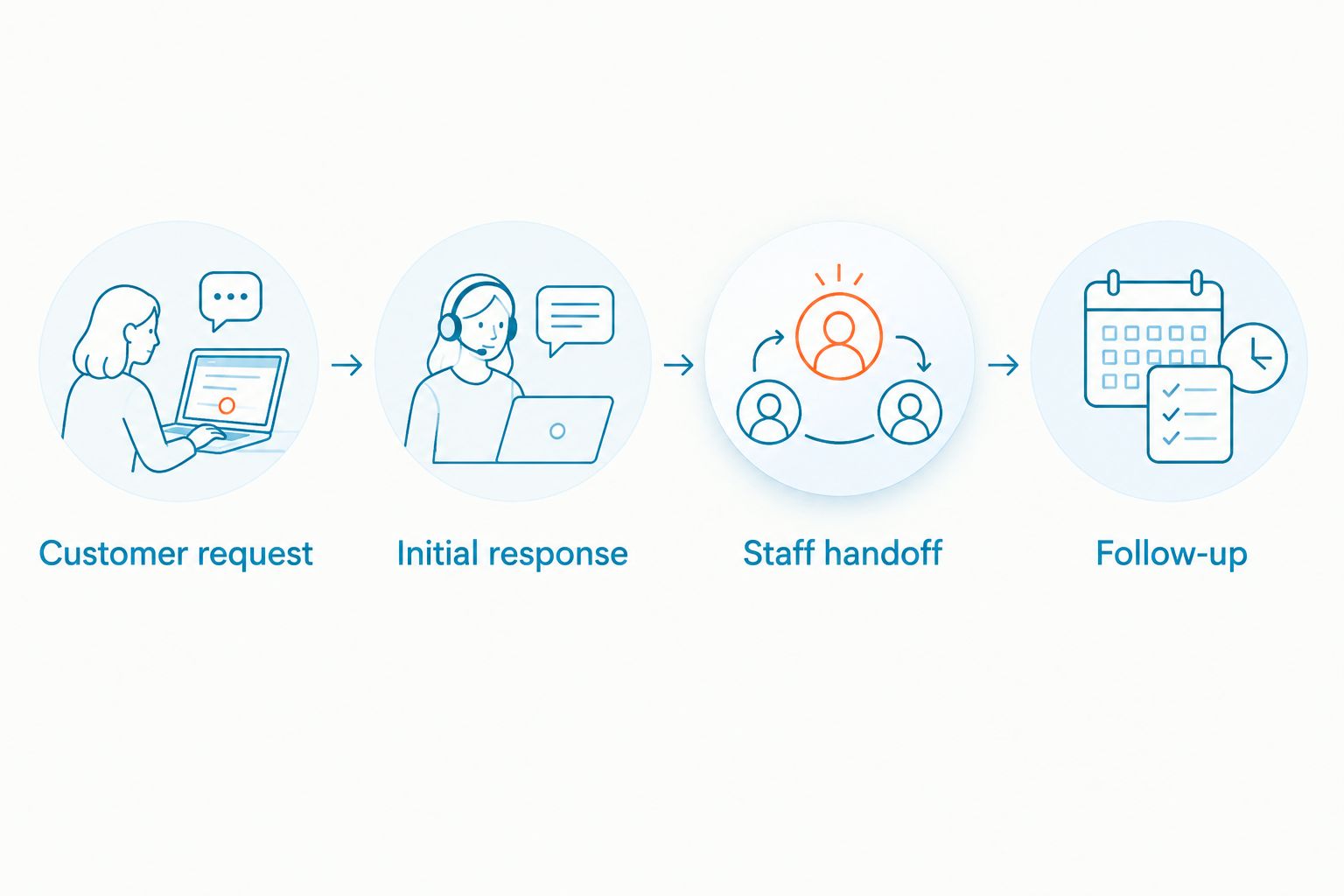
Use the same request when assessing either proposed solution. Keep approved answers and escalation instructions clear. Automation earns its place when the customer reaches the right next step, not merely when software replies.
Pricing models: separate phone seats from customer messaging
For a 2026 quote, compare the same purchase scope. Smarter Voice uses a per-user model, while VirtualText is described as a separate flat-rate subscription. RingCentral business communications plans generally use per-user subscriptions, with capabilities tied to the selected plan and products.
Per-user billing ties the subscription structure to the people who need access. A flat-rate model gives you a different way to budget for the described messaging service. Neither structure proves better value without checking what the subscription covers.
Request a written breakdown of:
- Phone users and the functions each person needs.
- Customer messaging channels and the required inbox workflow.
- Optional voice automation and other separately quoted products.
- Usage terms, implementation requirements, and ongoing charges.
- Renewal terms and cancellation conditions.
Compare complete configurations, not a phone seat against an entire messaging subscription. Keep billing predictability and functional scope in the same conversation. A simpler invoice is useful only if the purchased service handles the work you need it to do.
Real human support matters when the phone becomes operational
VirtualPBX offers real human support, alongside number porting and call routing. That makes support a concrete part of its small-business phone positioning, not just an item to discover after purchase.
For either provider, bring an operational problem to the sales conversation. Ask who helps when a call reaches the wrong person, an employee needs access, or a number transfer needs coordination. Get the support process in writing for the selected service.
The focused provider wins the shortlist when direct human help is one of your stated requirements. Do not turn that into an unsupported claim about a competitor's support quality. Evaluate the actual terms and assistance available to your account.
A practical setup path for 2026 is to map incoming calls, assign recipients, configure apps, test fallback behavior, and coordinate any number transfer. Keep your current arrangement in place until the transfer and replacement workflow are confirmed.
Review your business phone options
Match calling, routing, and optional call handling to the way your small team works.
Final verdict: choose the workflow, then the provider
Choose VirtualPBX if you run a customer-facing small business
VirtualPBX is best for small businesses that want focused cloud calling, optional call handling, and real human support. Choose this path when answering customer calls and routing them correctly matter more than consolidating internal meetings and employee messaging.
If your separate problem is website leads or customer texts, evaluate VirtualText alongside that phone decision. Keep the subscriptions and responsibilities distinct. Your 2026 purchase should solve the identified problem without quietly assuming that separate products are interchangeable.
Choose RingCentral if you manage a collaboration-heavy team
Choose RingCentral when your named requirement is business calling plus employee messaging and video meetings. It also deserves priority when a demonstrated integration supports an essential existing workflow.
Accept the broader evaluation that comes with that scope. Identify the tools you will replace, the functions staff will adopt, and the person responsible for administration. If those decisions are clear, broader collaboration is a reason to choose it rather than a distraction.
| Dimension | Winner |
|---|---|
| Focused small-business phone requirements | Focused phone offer |
| App-based business calling | Tie at the category level |
| Employee messaging and video meetings | RingCentral |
| Required, demonstrated integrations | RingCentral when the supported connection meets the requirement |
| Shared customer texts and website inquiries | Separate VirtualText offer |
| Automated customer handoff | No winner without a workflow test |
| Billing structure | Match the model to the purchase scope |
| Explicit real-human support positioning | Focused phone offer |
FAQ
Is VirtualPBX better than RingCentral for a small business?
VirtualPBX is the better fit when a small business prioritizes focused cloud calling, optional call handling, and real human support. RingCentral is the better fit when calling, employee messaging, and video meetings are all central requirements.
Which option is better for internal team collaboration?
RingCentral is the better fit for teams that want business calling, employee messaging, and video meetings together. Judge that advantage by the collaboration tools your staff will actually use or replace.
Is VirtualText the same thing as the phone system?
VirtualText is a separate customer-messaging offer, not the core phone system. It combines SMS, webchat, a shared team inbox, and an AI agent for small-business service teams.
Can employees answer business calls from a mobile app?
Both phone providers support app-based business calling. Test incoming calls, unavailable employees, and handoffs in the configuration you intend to purchase.
How should I compare the subscription models?
Compare complete configurations with the same requirements. Separate per-user phone subscriptions from the flat-rate VirtualText messaging subscription, then review optional products and usage terms.
Which option should I choose for after-hours website inquiries?
Evaluate VirtualText when the requirement is responding to website leads through webchat and a shared customer inbox. Keep that decision separate from after-hours voice handling, and test how a conversation reaches a staff member.
What should I ask before switching phone providers in 2026?
Ask the proposed provider to demonstrate your call routing, unavailable-staff fallback, and handoff process. Confirm number-transfer arrangements, support responsibilities, and the complete subscription scope before changing your current setup.
One last thing
A customer can receive an immediate response and still have an unresolved request. Before signing, ask a staff member who did not configure the system to find the conversation and explain the next action. If ownership is unclear, fix the handoff before adding more channels or automation.


