

Missed calls and unanswered website messages need different fixes: MightyCall is a business phone system built around handling calls. A phone-system comparison stops being enough when you also need shared ownership of customer texts and website conversations. The best MightyCall alternative in 2026 is VirtualPBX if you need a small-business phone system with a separate texting and webchat option; RingCentral if you need calling, team messaging, and video meetings together.
- For mightycall alternatives in 2026, shortlist VirtualPBX for small-business calling and its separate VirtualText messaging offer.
- VirtualText combines SMS, webchat, a shared team inbox, and an AI agent for service teams.
- RingCentral fits businesses comparing calling, internal messaging, and video meetings together.
- Grasshopper fits a business-number and call-forwarding workflow; evaluate website messaging separately.
- Keep MightyCall when your existing call workflow works and the real gap is customer-message follow-up.
Why this matters
A plumbing customer requesting an estimate through your website creates a different task from a caller asking to speak to dispatch. Both need a response. They do not necessarily need the same software change.
Your 2026 shortlist should start with the conversation you are losing, not the longest feature list. Separate live calls, customer messages, and internal collaboration before choosing a replacement. Otherwise, you risk changing the phone system while leaving the unanswered website inquiries untouched.
Replace the workflow that fails, not every tool your team already knows. A phone replacement makes sense when calling is the problem. A shared customer inbox deserves its own evaluation when texts and chats are the problem.
MightyCall alternatives at a glance
The comparison below separates phone-system choices from a customer-messaging offer. VirtualText is a separate offer from the parent brand, not another name for Smarter Voice or an automatic phone-system replacement.
| Option | Best for | Standout capability | How it differs from MightyCall | Main trade-off to evaluate |
|---|---|---|---|---|
| MightyCall | Teams whose work centers on business calls | Business calling and call routing | The phone-system benchmark | Whether your broader customer-message workflow needs a separate tool |
| VirtualPBX | Small businesses evaluating calling and customer messaging as distinct needs | Smarter Voice for calling; VirtualText separately combines SMS, webchat, a shared inbox, and an AI agent | Offers a phone-system path and a separate message-handling path | You must define which offer solves the actual problem |
| RingCentral | Teams that want calling, internal messaging, and video meetings | Business communications across those channels | Broadens the comparison beyond customer calls | More communication functions to configure and teach |
| Grasshopper | Small teams seeking a business number and call-forwarding workflow | Virtual business phone numbers and forwarding | Focuses the comparison on business-number handling | Does not settle your website-chat or shared-inbox requirements |
Use this table to choose a demonstration, not to skip one. Ask each provider to show the same customer journey. A polished feature presentation is less useful than watching an inquiry reach the person responsible for answering it.
1. VirtualPBX: best for small-business calls and customer follow-up
Smarter Voice is the core business phone offer. It includes cloud calling, mobile, desktop, and web apps, business SMS, routing, and number porting, with optional AI FrontDesk and AI MessageDesk. VirtualText is the separate offer for SMS, webchat, a shared team inbox, and an AI agent serving small-business service teams.
That distinction is the reason to shortlist the provider. You can assess the calling problem and the message-response problem separately instead of assuming that a different phone system will solve both. Keep the decision tied to a specific outcome: reaching the right employee or getting an unanswered inquiry into a managed conversation.
Where this option shines
- A clear small-business phone starting point. Smarter Voice centers on business calling rather than making website chat the core phone-system proposition.
- A separate customer-message workflow. VirtualText brings SMS and webchat into a shared team inbox for service teams.
- Human support. The phone provider offers support from real people based in the United States.
- Optional automated call handling. AI FrontDesk and AI MessageDesk are optional voice products, not replacements for the core phone offer.
- A stated transition policy. The brand offers no contracts, a 14-day money-back guarantee, and number transfers without downtime.
Where this option falls short
- It is not a single interchangeable product. Smarter Voice, the optional voice products, and VirtualText serve different purposes. Treating the names as synonyms creates the wrong shortlist.
- A shared inbox still needs an owner. Combining conversations does not decide which employee must respond or who covers an absence.
- Automation needs boundaries. Your team must define which questions an agent should handle and when a person should take over.
Those are practical purchasing constraints. Before selecting an offer, ask for a demonstration of your call routing and your customer-message handoff as separate workflows. Do not assume that a capability described for one offer applies to another.
Head-to-head with MightyCall
| Dimension | This option | MightyCall benchmark |
|---|---|---|
| Business calling | Smarter Voice provides cloud calling, apps, routing, and number porting | Evaluate against your current business calling and routing |
| Website inquiries | VirtualText is a separate webchat and shared-inbox offer | Decide whether replacing calling is relevant to this problem |
| Customer texts | Business SMS is part of the phone offer; VirtualText has a separate shared messaging workflow | Compare the exact texting workflow your employees need |
| Automated handling | Optional voice products and a separate messaging agent serve different channels | Request a demonstration of the specific channel you want handled |
Best for: Small service teams that need a straightforward phone system, shared customer-message handling, or both as clearly defined projects.
Verdict: Buy for a demonstrated workflow fit; skip any proposal that blurs the phone and messaging offers.
2. RingCentral: best for calling and internal collaboration
RingCentral brings business calling, team messaging, and video meetings into the comparison. That makes it relevant when your requirement extends beyond answering customers: employees also need to communicate internally and meet remotely.
The strongest reason to evaluate RingCentral is that broader scope. The weakest reason is simply wanting a longer feature list. If your problem is an unanswered website inquiry, internal video meetings do not resolve it.
Where RingCentral shines
- Multiple employee communication channels. Calling, team messaging, and video meetings belong in the same evaluation.
- A broader replacement brief. RingCentral fits a shortlist where the phone system and employee collaboration tools are both under review.
- A clear internal-use case. You can test how staff move between calls, messages, and meetings rather than evaluating calling alone.
Where RingCentral falls short
- Broader scope adds decisions. Your team must decide which communication channels to use and which existing tools to keep.
- Internal messaging is not customer webchat. Do not mistake employee collaboration for a shared website-lead workflow.
- Extra functions are not automatically useful. A small team focused on forwarding business calls should evaluate whether it needs the wider scope.
Head-to-head with MightyCall
| Dimension | RingCentral | MightyCall benchmark |
|---|---|---|
| Main evaluation | Business calling plus employee collaboration | Business phone and call-handling workflow |
| Internal communication | Team messaging and video meetings | Start with the calling requirement |
| Website lead response | Evaluate separately from employee messaging | Evaluate separately from call routing |
For your 2026 demonstration, ask an employee to handle a customer call and then contact a colleague about the next action. Watch where the information goes. The test should reveal whether the broader communication setup helps your work or simply introduces another place to check.
Best for: Businesses replacing calling and internal collaboration together.
Verdict: Buy when the broader communication brief is real; skip when your only unresolved need is website-message follow-up.
3. Grasshopper: best for a business-number workflow
Grasshopper is a virtual business phone option centered on business numbers and call forwarding. It belongs on the shortlist when you want to separate business calls from your personal number and keep the call path straightforward.
Where Grasshopper shines
- A focused business-number use case. Evaluate it around how customers reach your business.
- Call forwarding. Test where an incoming business call goes and who answers it.
- A narrower buying brief. Your comparison can focus on number handling rather than a wider employee collaboration project.
Where Grasshopper falls short
- A business number does not establish a shared customer inbox. Evaluate customer-message ownership separately.
- Forwarding is not a staffing plan. Someone still needs to answer, cover absences, and return missed calls.
- Website inquiries remain a separate requirement. Do not choose a phone-number tool as the answer to an untested webchat problem.
| Dimension | Grasshopper | MightyCall benchmark |
|---|---|---|
| Starting point | Business number and call forwarding | Business calling and routing |
| Demonstration focus | Where the call rings and who answers | How the team handles incoming calls |
| Message follow-up | Evaluate the required workflow separately | Evaluate the required workflow separately |
Best for: Owners and small teams prioritizing a business number and a defined forwarding path.
Verdict: Buy for a verified business-number workflow; skip as a substitute for evaluating shared customer-message handling.
Why people switch from MightyCall
The useful reasons to consider switching are workflow requirements, not unsupported claims about outages or changing terms. Identify which of these requirements actually applies to your business.
- Calling needs have changed. Your routing, employee access, or call coverage needs a fresh demonstration from another provider.
- The project now includes internal collaboration. Calling alone no longer describes the buying brief.
- Customer inquiries arrive outside the phone channel. Texts and website chats need ownership and follow-up.
- You want to evaluate automated handling. Test the exact voice or messaging task rather than buying automation as a general promise.
The third reason does not automatically justify replacing MightyCall. A separate customer-messaging offer addresses a different problem. Read the guide to switching from call-only service to texting and webchat before deciding whether your project is a replacement or an addition.
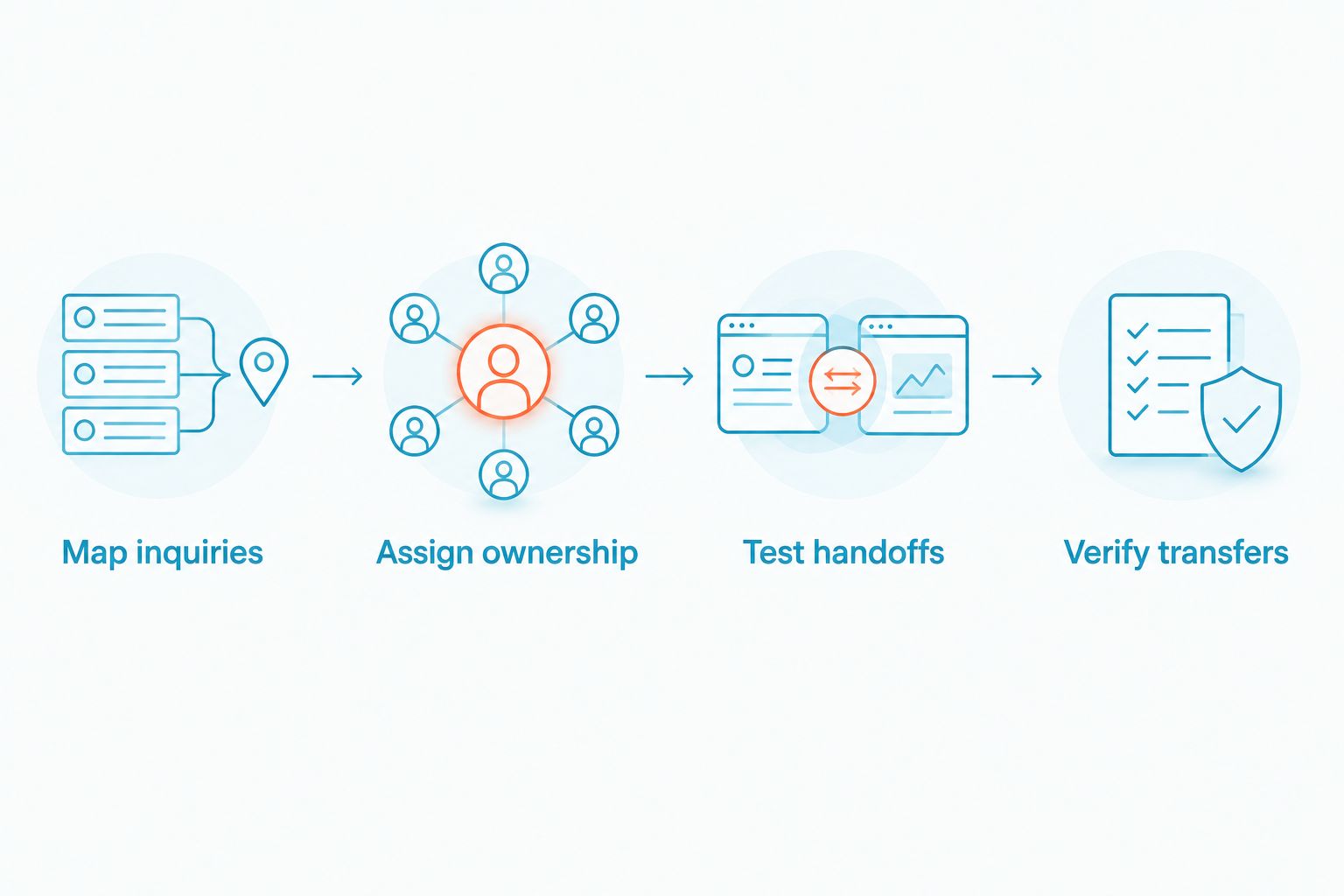
Test the workflow before switching
Use the same sequence for every 2026 shortlist candidate. Keep the exercise tied to your actual staff and customer questions.
- Map inquiries. Write down where customers contact you: calls, texts, or website chat. Identify the channel that currently lacks coverage.
- Assign ownership. Name the employee responsible for each inquiry and the backup when that person is unavailable.
- Test handoffs. Ask the provider to demonstrate how a conversation reaches that employee and what happens when a person must take over.
- Verify transfers. For a phone replacement, confirm number-transfer requirements, routing, and the transition plan before changing your existing service.
A successful demonstration should make the next action obvious. You should know who sees the inquiry, who answers it, and how another employee takes over. If those answers remain unclear, adding more channels makes the operational problem bigger.
When staying with MightyCall is the right call
Keep MightyCall when your current calling workflow works and you cannot name a calling problem that a replacement solves. A new provider should earn the disruption through a demonstrated improvement relevant to your team.
If the unresolved issue is website chat or customer-text follow-up, compare messaging workflows instead. Set a clear owner and escalation rule first. Then evaluate whether a separate inbox solves the gap without changing the phone system.
FAQ
What's the best MightyCall alternative in 2026 for a small business?
VirtualPBX is the strongest shortlist choice here for a small-business phone system with a separate customer-messaging option. RingCentral fits a broader calling, employee messaging, and video-meeting requirement; Grasshopper fits a business-number and forwarding requirement.
Is VirtualText a replacement for MightyCall?
VirtualText is a separate SMS, webchat, shared-inbox, and AI-agent offer, not another name for a business phone system. Evaluate it for customer-message response, and evaluate your calling needs separately.
Is RingCentral better than MightyCall?
RingCentral is the more relevant comparison when your project includes employee messaging and video meetings alongside calling. That broader scope does not automatically make it the right answer to unanswered website inquiries.
Should I change my phone provider to get website chat?
Not automatically: website chat and business calling are separate requirements. If your calls work well, test a customer-messaging workflow before replacing the phone service.
Can I keep my business number when switching phone systems?
Number porting is available with Smarter Voice. Confirm the requirements and transition plan for your specific number before changing your existing service.
What should I test in a MightyCall alternative demonstration?
Test inquiry arrival, employee ownership, handoff, and call routing. Ask the provider to show what happens when the intended employee is unavailable.
Does an automated agent remove the need for staff follow-up?
No: your team still needs clear responsibility for follow-up and escalation. Define the questions the agent should handle and the situations that require a person.
When should I stay with MightyCall?
Stay with MightyCall when its calling workflow meets your needs and the unresolved problem belongs to another channel. Add or improve message handling only after defining who owns customer replies.
One last thing
Your best 2026 purchase test is an ordinary unanswered inquiry. Give each candidate the same scenario: a customer contacts you while the responsible employee is unavailable. Ask where the inquiry goes next.
Choose the workflow with a clear next owner, not the presentation with the most features. That rule applies whether you stay with MightyCall, change phone providers, or add a separate messaging offer.


