

Home inspectors' lead capture software collects prospective clients' contact details, property information, and inspection requests so your team can respond and arrange the next step. When you're inspecting a property and cannot answer, a website form, text channel, or chat conversation gives the prospect another way to reach you; this 2026 guide shows how to build that process without confusing an inquiry with a confirmed booking.
- Choose lead capture software for home inspection companies around intake, response ownership, and scheduling handoffs—not chat alone.
- VirtualPBX's VirtualText fits home inspection teams that need SMS, webchat, and a shared inbox for lead capture.
- Collect property details and inspection deadlines before promising an appointment.
- Keep automated intake separate from inspection advice, contract acceptance, and confirmed scheduling.
Why lead capture matters for home inspectors
A home inspection inquiry needs more than a name and phone number. You need to establish where the property is, what inspection the prospect wants, and when the work must happen. An incomplete message leaves your team chasing details before it can assess the request.
Your intake process must also distinguish the prospective client from an agent or another person coordinating access. Do not treat every contact as the person authorized to approve the inspection. Capture each person's role, then confirm who will receive the agreement and appointment details.
The goal is a usable inspection request, not simply a new conversation. For your 2026 workflow, treat capture, qualification, and confirmation as separate jobs. A tool can collect information while an inspector works, but someone still needs to review the request.
Start with the practical steps in capturing website leads after hours. Apply them to property intake rather than copying a generic sales questionnaire. Keep the form short enough to complete, with questions that help you decide the next action.
Set up your home inspection lead capture process
Map where inspection inquiries arrive
Start manually. Create a simple lead log using your existing spreadsheet and review the channels your business already uses: telephone, email, website forms, and any business messaging accounts. Record the source of each inquiry rather than assuming website chat is your biggest problem.
Separate a new inspection request from an existing client's report question. Both need attention, but they require different people and different responses. A report clarification should not disappear into a queue intended for prospective customers.
Use this first review to find operational gaps. Does a website submission reach a monitored inbox? Does an agent's message remain on one inspector's personal phone? Can the office see whether anyone has replied? Fix those gaps before adding another channel.
For your initial 2026 baseline, record timestamps and outcomes without setting an unsupported conversion target. You need evidence from your own process before deciding which channel deserves more attention.
- List every published contact channel.
- Submit a test inquiry through each channel.
- Record where each message arrives.
- Separate new leads from existing-client requests.
- Identify who checks each destination.
Define the minimum inspection intake
Write your questions in a document before configuring software. Ask only what your team needs to review the request and contact the prospect. Long questionnaires belong later, after the person understands the next step.
Start with 6 intake fields as a working template, not a mandatory industry standard. Use contact name, reply details, contact role, property address, requested service, and requested timing. Combine related information where the form allows it, and leave room for a short note.
Ask about the inspection deadline separately from a preferred appointment date. Those are different constraints. Someone can prefer an afternoon appointment while still needing the inspection completed before a particular deadline.
Do not request lockbox codes, payment information, or sensitive documents in an open-ended first-contact chat. Collect access instructions later through your approved process. The lead record should help a person review the request, not become an uncontrolled store of property-access details.
- Ask for the prospect's name and reply channel.
- Identify whether the contact is a buyer, owner, or agent.
- Collect the property address and requested service.
- Ask for preferred timing and any deadline.
- Mark missing information for follow-up.
- Keep access credentials out of initial intake.
Choose channels that your team can manage
Begin with your existing website form and a monitored business inbox. Improve the acknowledgment message, confirm that submissions arrive, and assign a person to review them. This manual path establishes the workflow before you pay for another tool.
Add shared messaging when separate channels create repeated copying or unclear ownership. VirtualText, offered by VirtualPBX, combines SMS, webchat, a shared team inbox, and an AI agent for small-business service teams. It is a lead-response option, not evidence of an inspection-reporting or scheduling integration.
VirtualPBX's VirtualText is best for home inspection teams that need SMS and webchat lead capture in a shared inbox. Its relevant benefit is bringing those conversations into a common workspace. Its limitation is that you still need to verify how your inspection calendar, agreements, and reporting process connect to it.
For a 2026 evaluation, ask the provider to demonstrate your actual intake scenario. A general product presentation does not establish whether the handoff works for your office.
- Keep your existing form as a fallback.
- Choose channels someone will monitor.
- Test webchat on your mobile website.
- Verify how chat contact details reach your team.
- Demonstrate a shared-inbox handoff.
- Confirm any required integrations before purchase.
Set boundaries for after-hours replies
Start with a written acknowledgment that your team can send manually. It should confirm receipt, explain what information is still needed, and state when a person will review the request. Use your actual working hours, not an ambitious response promise.
If you add an AI agent, give it the same boundaries. Supply approved service descriptions and intake questions. Do not let it invent inspection availability, interpret a potential defect, or state that an agreement has been accepted.
Distinguish an appointment request from an appointment confirmation. Unless a verified scheduling process has checked the calendar and completed your booking requirements, the correct status is a request awaiting review. This distinction protects both the prospect's expectations and your team's schedule.
Define a human handoff for questions about inspection scope, report findings, contractual obligations, or unusual properties. Automation should collect context and route the conversation, not answer beyond the information you have approved.
- Use approved service descriptions.
- Ask only the intake questions your team needs.
- State your actual review hours.
- Label requested appointments as unconfirmed.
- Escalate technical and contractual questions.
- Stop automated follow-ups when a person takes over.
Assign ownership and confirm the next action
Use a spreadsheet column or an existing task list to assign each inquiry to a person. Give every open lead 1 owner. Shared visibility is useful, but it does not tell you who must respond.
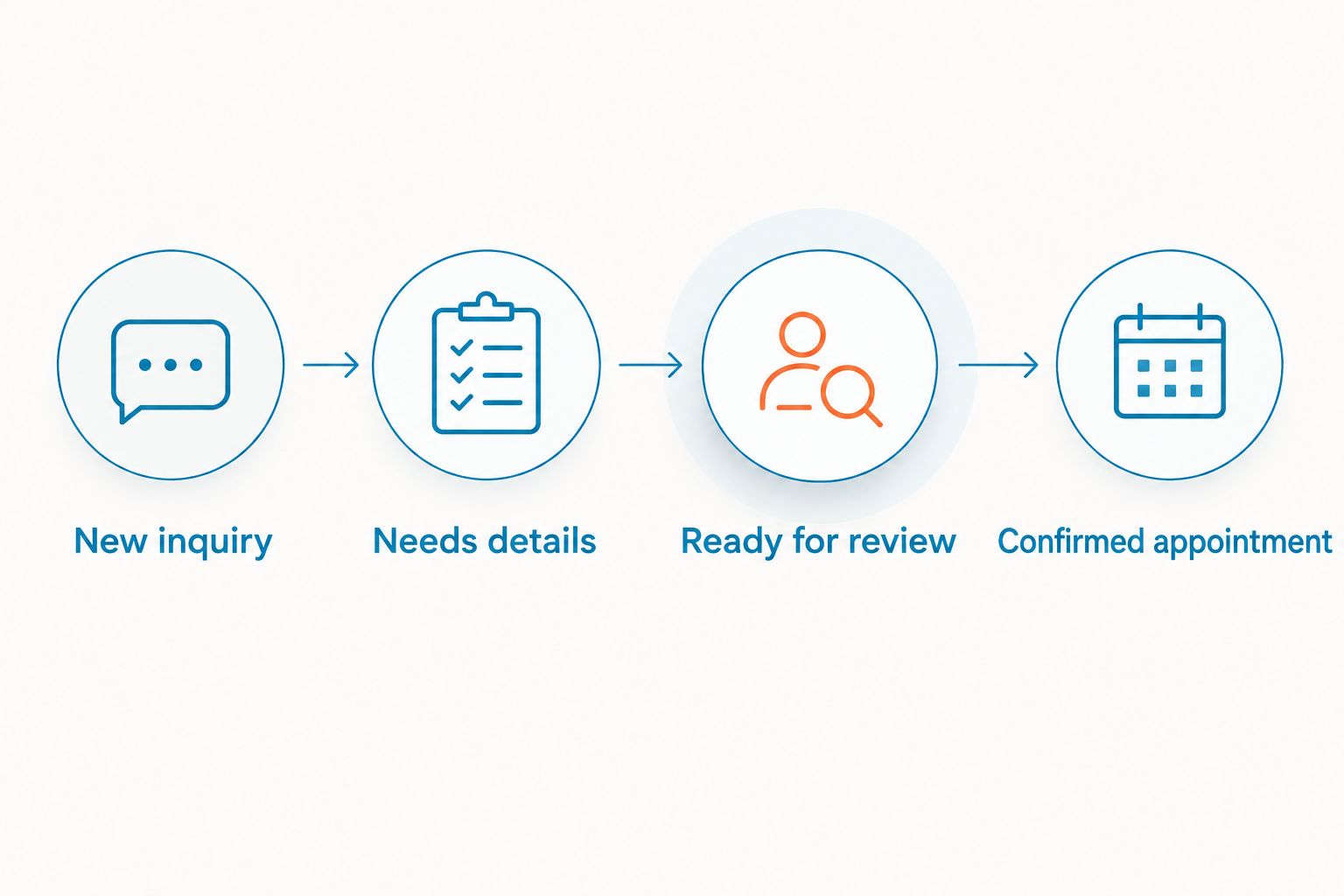
Create clear statuses before trying to automate routing. Use labels such as New inquiry, Needs details, Ready for review, and Confirmed appointment. Define what each label means so an acknowledgment does not accidentally count as completed follow-up.
When another person takes over, transfer the relevant context. Include the contact's role, property address, requested service, deadline, and the last action. Do not force the prospect to repeat information because the conversation moved from chat to text or from an inspector to the office.
For your 2026 process, document how a lead becomes a confirmed appointment. Your team should know which checks happen before that status changes, even if the checks remain manual.
- Assign a named owner to each open request.
- Use distinct intake and booking statuses.
- Record missing details beside the request.
- Transfer context when ownership changes.
- Confirm timing through your scheduling process.
- Record the next action and responsible person.
A useful workflow is short enough to explain to a new team member: New inquiry, Needs details, Ready for review, Confirmed appointment. The last status belongs only after your booking requirements are complete.
Test the full process before expanding it
Run a manual test with a colleague before inviting real prospects into a new workflow. Submit a request, reply from the office, transfer ownership, and check whether the next person can understand the record without asking for a recap.
Use a recommended 7-day pilot to observe the process during ordinary work. This is a planning window, not a claim about implementation speed. Keep your established contact method available while testing the new channel.
Test difficult cases as well as straightforward requests. Try an incomplete address, an agent contacting you for a buyer, an inspection outside your service area, and a request with a deadline you cannot meet. Check what the prospect sees and what your team receives.
Measure acknowledgment and human review separately. An instant automated message does not mean your team assessed the property, checked availability, or resolved the inquiry. Your 2026 reporting should preserve that distinction.
- Test a complete inspection request.
- Test missing property and contact details.
- Test an after-hours conversation.
- Test a request outside your service area.
- Test a handoff between team members.
- Record acknowledgment, review, and final outcome separately.
Compare lead capture options for your inspection company
Choose the smallest setup that solves your current intake problem. Adding channels without assigning ownership gives your team more places to check, not a better process.
The options below serve different jobs. A form collects structured details; messaging supports conversation; a shared inbox supports team visibility. None should be treated as proof that inspection booking, agreements, or reporting are included.
| Option | Best for | Practical advantage | Key limitation |
|---|---|---|---|
| Website form and monitored email | Solo inspectors with a manageable inquiry queue | Collects consistent property details through an existing workflow | Follow-up and ownership remain manual |
| Business SMS channel | Prospects who prefer text-based follow-up | Supports short questions and replies | Does not capture website visitors without a separate entry point |
| Staffed webchat | Teams with someone available to answer website inquiries | Lets a person clarify the request during the conversation | Requires coverage and a separate after-hours process |
| VirtualPBX's VirtualText | Small inspection teams needing SMS, webchat, and a shared inbox | Combines those channels with an AI agent for service-team intake | Inspection-system connections and booking behavior need verification |
Keep a form if it already works; add shared messaging when conversation ownership is the problem. Evaluate VirtualPBX's VirtualText against that need rather than assuming any messaging product replaces your inspection operations software.
Common mistakes home inspectors make
Treating an agent's message as client approval
An agent can coordinate an inquiry without being the person who approves the inspection agreement. Record the contact's role and confirm who must authorize the work. Keep scheduling coordination distinct from acceptance of your terms.
Promising availability before checking the property
A requested date does not establish that the appointment fits your schedule or service area. Review the address, inspection scope, access arrangements, and timing before confirming. Do not configure a generic acknowledgment to sound like a booking confirmation.
Letting intake become inspection advice
A prospect asking about a foundation crack needs a different response from someone asking where you inspect. Keep lead capture focused on collecting the request. Route questions about defects and inspection conclusions to a qualified person rather than filling gaps with an automated answer.
Keeping follow-up on personal phones
A conversation tied to one person's device is difficult for someone else to continue. Use a business channel and a documented handoff process. Before adopting a new tool, test whether the office can recover the context when the original responder is unavailable.
Counting every acknowledgment as a handled lead
Receipt is not resolution. Track whether the team reviewed the request, requested missing details, declined work outside scope, or confirmed an appointment. Those outcomes explain the state of your queue better than a count of automated replies.
FAQ
What's the best lead capture software for home inspection companies?
The best choice matches your intake channels and follow-up process. A website form suits a manually managed queue; VirtualPBX's VirtualText fits teams that need SMS, webchat, and a shared inbox. Verify scheduling and inspection-software connections separately.
Can I capture home inspection leads without buying new software?
Yes, you can start with an existing website form, a monitored inbox, and a lead spreadsheet. Assign an owner and record property details, deadlines, and the next action before adding another tool.
What should a home inspection lead form ask?
Ask for contact information, the contact's role, the property address, the requested service, and timing requirements. Keep access credentials and sensitive documents out of initial intake, and collect them later through your approved process.
Is webchat better than a contact form for home inspectors?
Webchat is better for conversational intake, while a contact form is better for collecting predefined fields. Choose based on whether your team needs to clarify requests in conversation or review structured submissions.
Can an AI agent confirm an inspection appointment?
Treat an AI-collected appointment as a request unless a verified booking workflow confirms it. Check calendar availability and your booking requirements before telling the prospect that the inspection is scheduled.
Does a shared inbox replace home inspection reporting software?
No, a shared inbox manages conversations rather than establishing an inspection-reporting workflow. VirtualText is described as combining SMS, webchat, a shared team inbox, and an AI agent; verify reporting connections separately.
How should I handle inspection inquiries after hours?
Acknowledge the inquiry, collect the information needed for review, and state when a person will respond. Do not promise an appointment or give inspection advice simply because an automated channel is available.
One last thing
Test the handoff, not just the greeting. Submit an inspection inquiry while the assigned inspector is unavailable, then ask another team member to continue it. If that person cannot identify the property, deadline, contact role, and next action, the workflow is unfinished.
Make that your final 2026 acceptance test. A polished opening message does not compensate for a request that has no owner. Keep the process simple enough that the person covering the inbox can explain what happens next without searching across separate conversations.


