
Yes, one phone number can handle both calls and texts when your provider supports voice calling and enables SMS on that number. A working call connection does not prove texting is active; confirm number eligibility, messaging registration, and where customer replies will arrive before you publish “call or text.”
- Can one phone number handle both calls and texts? Yes, when voice and business SMS are enabled.
- VirtualPBX is best for small businesses seeking cloud calling with business SMS and support from real people.
- Keeping your current number depends on eligibility and the provider’s transfer or text-enablement process.
- Test incoming calls, outgoing calls, incoming texts, and outgoing texts before announcing the change.
Why this matters
A customer should not have to guess which number reaches your business. Using one published number gives customers a choice: call when a conversation needs discussion, or text when a short written exchange works better.
For a 2026 phone-system review, separate the public number from the tools behind it. One number does not automatically mean one app, one inbox, or one provider. Your team still needs a clear place to answer calls and a clear place to handle messages.
VirtualPBX offers cloud business calling and business SMS for small teams. Confirm support for your exact number and intended messaging use before choosing a setup; a feature list alone does not establish that an existing number is ready to text.
Can one phone number handle both calls and texts?
Yes. Voice calls and SMS use different delivery systems, so the same number can identify both services without making them the same connection. A customer can call your business number, while another customer sends a text to that number.
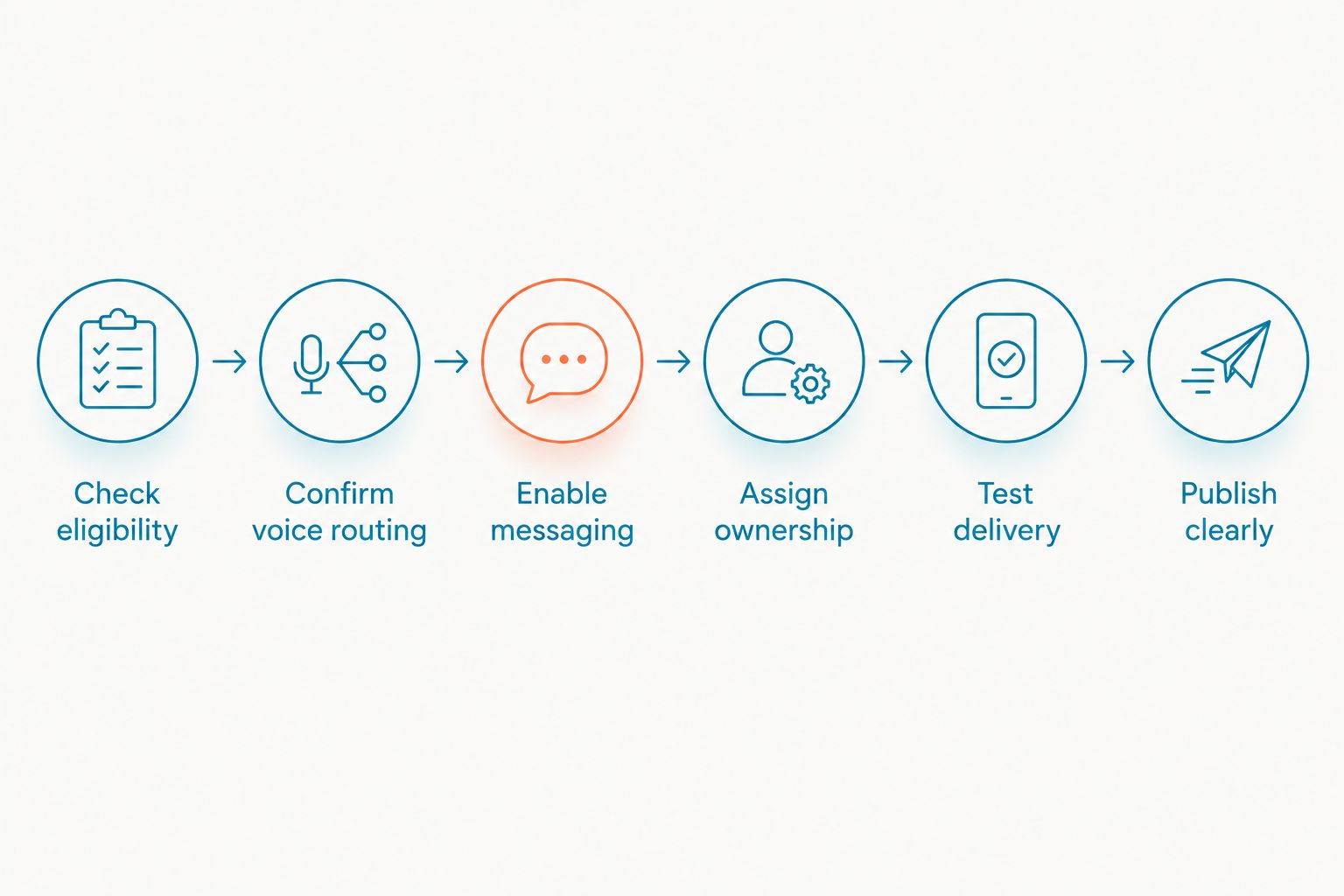
The practical question is whether both services are configured correctly. Use this setup sequence before changing your website, email signature, or printed materials.
1. Check eligibility
Ask the provider to check the exact number you want to use. Specify whether it is a mobile number, a traditional landline, a cloud phone number, or a toll-free number.
Do not assume that every number available for calling supports the same messaging features. Ask about ordinary SMS separately from picture messaging, group messages, or other features your staff expects to use.
2. Confirm voice routing
Decide where incoming calls should ring and what should happen when nobody answers. Include business hours, voicemail, and the person responsible for changing those settings.
If you are moving an existing number, coordinate the transfer with both providers. Do not cancel the existing service before the number-transfer process is complete.
3. Enable messaging
Ask whether texting requires activation, business verification, or carrier registration. U.S. business messaging over local numbers commonly involves application-to-person registration, while toll-free messaging follows a different verification process.
For your 2026 rollout, get the required registration steps directly from the provider. Approval for calling and approval for messaging are separate questions; do not advertise text support until messaging works.
4. Assign ownership
Choose who reads incoming messages, who sends replies, and who covers absences. Give each open conversation 1 accountable owner, even when several employees can see the inbox.
A shared inbox helps staff work from the same conversation history. It does not replace a rule for deciding who answers next or who follows up after a customer switches from texting to calling.
5. Test delivery
Run 4 basic tests: an incoming call, an outgoing call, an incoming text, and an outgoing text. Use a phone outside your business account so you can check the customer’s experience.
Confirm that outbound calls display the intended number and that outbound texts come from it. Then reply to the text and verify that the response reaches the right inbox.
6. Publish clearly
Once testing passes, update customer-facing materials with accurate wording. “Call or text” is appropriate only when both channels work and somebody is responsible for monitoring them.
State your response hours where customers will see them. An enabled inbox is not a promise that a person answers outside business hours.
Which setup fits your current number?
Start with what you already have, not with a list of software features. The right approach depends on whether you need to preserve a working phone service or replace it.
These are setup options, not promises that every provider supports each arrangement. Confirm eligibility before making a change.
| Setup | Best for | Main advantage | Main limitation |
|---|---|---|---|
| Mobile service with calling and texting | An owner managing business communication alone | Calls and texts use the same mobile number | Team access and separation from personal activity need attention |
| Cloud phone service with business SMS | Small teams replacing or organizing business calling | Business calling and messaging can use a common number | Number eligibility, messaging activation, and staff access need confirmation |
| Text-enabled existing landline | Businesses keeping an established voice service | Customers can text a familiar number without necessarily changing voice service | Separate providers or tools can create extra administration |
Mobile service: best for an owner working alone
A mobile number can support voice calls and ordinary text messages. This is straightforward when one person handles every customer conversation.
The trade-off appears when other employees need access. Sharing a personal phone or forwarding screenshots is not the same as providing a managed team inbox with clear responsibility.
Cloud phone service: best for a small team
A cloud business phone system can provide calling through mobile, desktop, or web apps, with business SMS where supported. This suits teams that need business communication separate from employees’ personal numbers.
The limitation is configuration. Confirm which users can text, which number their messages display, and whether message history is shared or individual before treating it as a team-wide solution.
Text-enabled landline: best for keeping existing calling
Some eligible landline numbers can be enabled for texting while their voice service stays in place. Incoming texts arrive in software rather than on a traditional desk phone.
The trade-off is having separate services to manage. For the eligibility questions to ask, see the guide to texting customers from an existing business landline number.
Why same-number calling and texting setups vary
The same customer-facing result can require different work behind the scenes. During a 2026 provider review, ask about these factors rather than accepting a general promise of “calling and texting.”
- Number type: Mobile, local business, and toll-free numbers can follow different messaging activation and verification processes.
- Current provider: Keeping voice service in place is different from transferring the entire number to a new phone provider.
- Messaging use: Customer support conversations and promotional campaigns require different planning around permission and message content.
- Team access: An individual messaging app and a shared team inbox solve different operational problems.
- Required features: SMS support does not by itself establish picture messaging, shared history, automatic replies, or connections to other business tools.
Buy for the workflow you need, not just the ability to send a text. A receptionist, dispatcher, and owner need an agreed handoff process if they all communicate with the same customer.
Can I keep my current business number?
Yes, you can keep an existing business number when it is eligible for the chosen transfer or text-enablement process. Ask the prospective provider to check the number before changing service.
There are different routes: enable messaging while leaving voice service where it is, or transfer the number to a service that supports both. Neither route should be assumed from a sales page that simply lists SMS.
Request written confirmation of what changes and what stays the same. Include calling, voicemail, outbound caller identification, texting, and the point at which your team should begin using the new tools.
Can customers call while someone else is texting?
Yes, calling and texting can operate independently on the same enabled number. A text conversation does not occupy a voice call connection in the way an active telephone call uses call capacity.
Your provider’s voice-call capacity still controls how incoming calls are handled. Supporting SMS does not establish how many calls can ring, queue, or reach voicemail at once.
Test the overlap in your 2026 acceptance check: receive a call while a coworker sends and receives a text. Verify both delivery and staff responsibility rather than checking only whether the apps open.
Does one number mean calls and texts share an inbox?
No. One phone number identifies the business, but the software determines where calls, voicemail, and messages appear.
A shared text inbox can keep written conversations visible to authorized staff. Call records or voicemail can still live elsewhere, so confirm what context employees can see before promising a unified customer history.
VirtualText, by VirtualPBX, is a separate webchat and shared-inbox offer that combines SMS, webchat, and an automated agent for small-business service teams. Treat that as a messaging-workflow option, not proof that a particular phone number or voice-service arrangement is supported.
What should you check before choosing a provider?
Ask for a demonstration using the workflow your team actually needs. Have the provider show an incoming customer message, a staff reply, and a handoff to another employee.
For a 2026 evaluation, use these questions:
- Can this exact number support both incoming and outgoing SMS?
- Will enabling texting change the existing voice service?
- What registration or verification must finish before launch?
- Where will incoming messages appear, and who can access them?
- Can staff recognize that a coworker already answered?
- What happens to unanswered messages outside business hours?
- Who helps when calls work but texts do not?
VirtualPBX business phone service is best for small businesses that want cloud calling, business SMS, and support from real people. The fit still depends on your number and team workflow; do not assume the phone system includes every shared-inbox or automation feature you need.
Check your business phone setup
Review cloud calling and business SMS, then confirm support for your existing number.
FAQ
Can one phone number handle both calls and texts for a business?
Yes, one phone number can handle both calls and texts when voice service and SMS are enabled for that number. Confirm incoming and outgoing service on both channels before publishing call-or-text instructions.
Can I receive texts on my business landline number?
Yes, eligible business landline numbers can receive texts through a text-enablement service. Messages arrive in software, not on a traditional desk phone, and eligibility depends on the number and provider.
Do I need another phone to text customers?
No, you do not necessarily need another physical phone. Business messaging software can let you send and receive texts through supported desktop, web, or mobile applications.
Does forwarding calls also forward text messages?
No, ordinary call forwarding does not automatically forward SMS messages. Confirm the separate messaging destination whenever you change voice routing or providers.
Can several employees answer texts from the same business number?
Yes, several employees can answer through software that supports shared access to that number. Check permissions, conversation visibility, and assignment rules before giving the team access.
Is permission still required when I text from my business number?
Using a business number does not remove consent or opt-out requirements. Requirements depend on the message and applicable rules; confirm the requirements for your use case before sending promotional texts.
Will transferring my number automatically activate texting?
No, transferring a number does not by itself prove that texting is active. Confirm messaging eligibility, registration, and successful delivery separately from the voice transfer.
One last thing
The easiest mistake is testing only messages you send. An outgoing text proves little about whether the customer’s reply reaches the employee who needs it.
Before launch, send a customer-style question from an outside phone, answer it, then call the same business number. Check the return path, not just the send button. That final check connects your technical setup to the customer experience you intend to provide.