After closing time, customers still need answers—not a confident guess about your policies or tomorrow’s schedule. Yes, AI chatbots can accurately answer after-hours customer questions when they use current, approved information and hand off anything they cannot verify; they should not promise appointments, diagnose problems, or confirm account details without the right records and permissions.
- Can AI chatbots accurately answer after hours customer questions? Yes, for verified FAQs—not unsupported promises.
- VirtualPBX serves small businesses; after-hours webchat needs approved answers and a clear human follow-up path.
- Separate business information, customer-specific requests, and urgent issues before automating replies.
- Test knowledge accuracy and human handoff separately before opening your chatbot to customers.
Can AI chatbots accurately answer after-hours customer questions?
Yes, within a defined scope. An accurate chatbot answers from approved information, asks for clarification when needed, and stops when a request requires human judgment. A fluent response is not proof that the underlying information is correct.
Use the following boundaries when planning after-hours customer service in 2026. For the operational follow-up, see how to respond to website leads after hours.
| Response approach | Best for | Benefit | Limitation |
|---|---|---|---|
| Approved FAQ answer | Published hours, service descriptions, preparation instructions | Gives customers an answer without waiting for staff | Becomes unreliable when source information is outdated |
| Clarifying question | Requests missing a location, service type, or other essential detail | Prevents an answer based on an assumption | Adds another exchange before resolution |
| Information collection | Requests needing staff review | Preserves the customer’s question and contact details | Does not resolve the underlying request |
| Human escalation | Exceptions, disputes, sensitive questions, unsupported requests | Keeps consequential decisions with an authorized person | Requires a staffed process or clearly explained follow-up |
These are response choices, not interchangeable levels of service. Your chatbot should select the appropriate response based on the question and available evidence, rather than trying to finish every conversation automatically.
Why this matters
Your after-hours chatbot speaks on behalf of your business. A mistaken statement about a service area or cancellation policy can create an expectation your staff must correct the next morning.
The goal is not to make every conversation look resolved. It is to give a correct answer where possible and preserve a useful next step everywhere else. That distinction should guide your 2026 setup and every later review.
A chatbot that acknowledges a limit is doing its job. A chatbot that invents a reassuring answer is not.
Which customer questions should a chatbot answer directly?
Start with business facts that an authorized employee has approved for public use. Good candidates include published opening hours, locations, services offered, and instructions for contacting the right department.
Keep the answer narrow. If your source says that customers can request an appointment online, the chatbot should explain that process—not claim that a particular appointment is confirmed.
Build an answer record for each supported topic:
- Approved answer: The wording or facts the chatbot is allowed to use.
- Source: The policy, page, or internal document supporting the answer.
- Owner: The person responsible for keeping it correct.
- Boundary: What the chatbot must not infer from that information.
- Next step: What happens when the customer needs more help.
For example, service descriptions establish what your business does. They do not establish whether a particular job is suitable, whether a technician is free, or whether an exception applies.
Approve the boundary alongside the answer. Otherwise, a correct general fact can become the starting point for an unsupported promise.
Which questions need a human or verified records?
Customer-specific questions need customer-specific evidence. Public website content does not establish an individual customer’s appointment status, account balance, claim outcome, or permission to receive information.
Treat those questions as requests for verification. If your setup cannot securely access the relevant record and establish the customer’s authorization, collect only the details needed for staff follow-up.
Do not ask a general-purpose chatbot to make clinical judgments, interpret insurance coverage, or decide legal questions. For healthcare, insurance, and other sensitive service teams, define approved intake questions separately from professional advice.
Urgent situations need their own route. Give the chatbot business-approved instructions for handling urgency, and do not let it describe a message queue as emergency assistance.
The customer should know what actually happened: a request was recorded, a conversation was transferred, or a staff member must review it. Those outcomes are different.
Why after-hours chatbot accuracy varies
Accuracy depends on the information and rules behind the answer—not on how natural the sentence sounds. Review these factors when configuring after-hours automation in 2026:
- Source freshness: Changed hours, policies, and service descriptions need corresponding updates in the chatbot’s approved material.
- Question scope: Published business information requires less verification than a request about an individual customer’s situation.
- Ambiguity: Missing locations, unclear service names, and incomplete requests call for clarification rather than assumptions.
- Record access: A chatbot cannot verify a live booking or account status from a general FAQ.
- Escalation rules: Unsupported questions need a defined destination and an honest explanation of what happens next.
- Review ownership: Someone must investigate incorrect answers and update the underlying instructions or sources.
Do not address every error by adding more text to the knowledge base. First identify whether the failure came from an incorrect source, an ambiguous question, an unsupported inference, or a broken handoff.
Each problem needs a different correction. More documentation does not fix an unanswered staff queue.
How do you set up accurate after-hours replies?
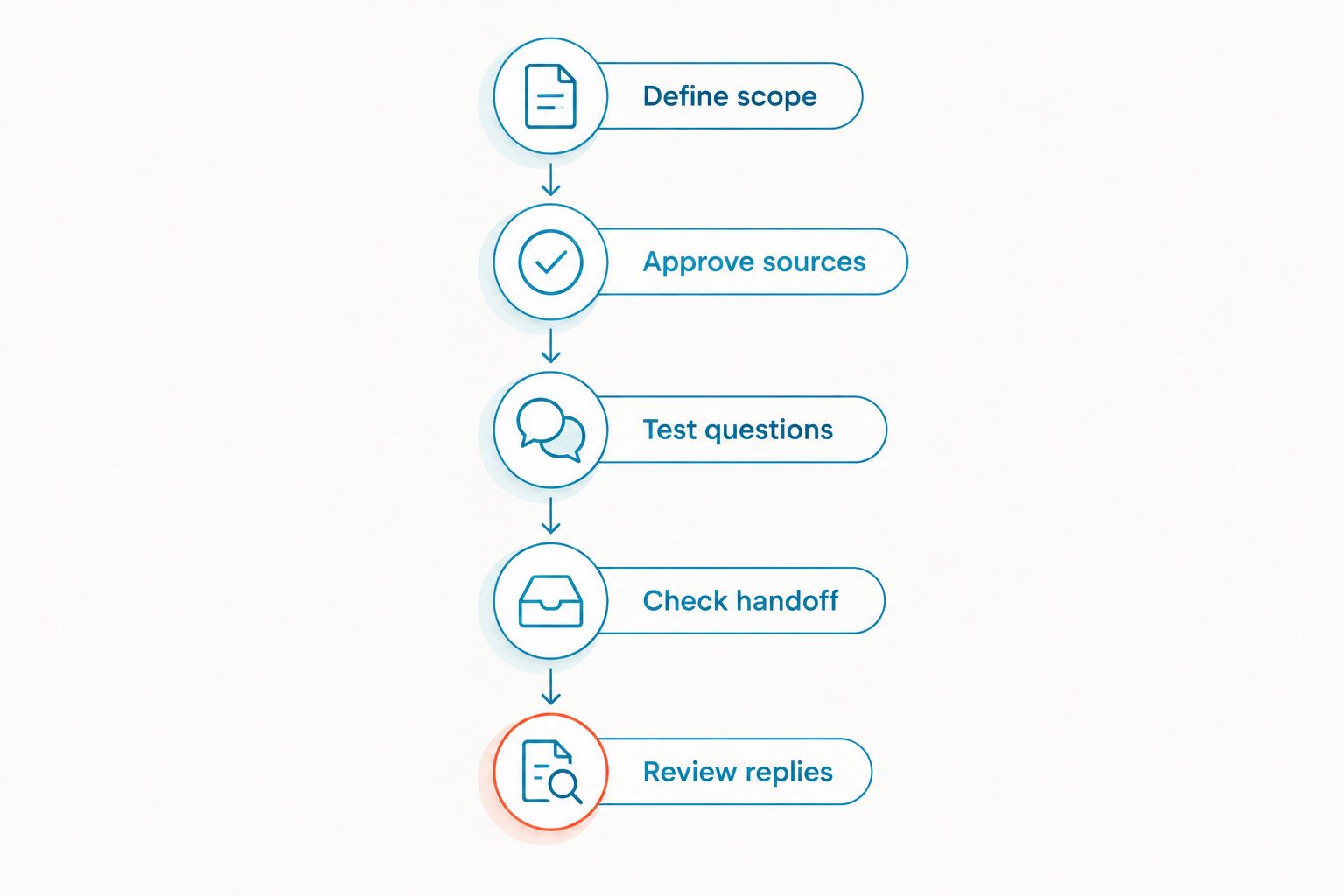
Use a controlled setup path before allowing the chatbot to answer customer questions. In 2026, treat this as a customer-service launch, not just a website installation.
Define scope
List the questions the chatbot should answer and the questions it must pass to staff. Start with stable public information and a clear method for recording requests.
Keep exceptions outside the initial scope. A narrow service that answers correctly is more useful than a broad service that makes commitments your team has not approved.
Approve sources
Give the chatbot a consistent source for each supported subject. Remove conflicting drafts, obsolete instructions, and informal notes that customers should not receive.
Assign an owner to each source. When your business changes a policy, updating the chatbot’s material should be part of that same change—not a separate task someone remembers later.
Test questions
Use actual question wording from your customer-service records where you have permission to use it. Remove unnecessary personal information before building the test set.
Include clear questions, incomplete questions, unsupported requests, and attempts to make the chatbot contradict its instructions. Check both the factual answer and the action it takes afterward.
Check handoff
Send a test request through the complete follow-up process. Confirm that the responsible employee receives the conversation, understands the request, and can respond through the intended channel.
Also test what the customer sees when nobody is working. The chatbot should not imply that a person has joined the conversation when it has only created a message for later review.
Review replies
Read the initial customer conversations after launch. Look for incorrect facts, repeated confusion, unnecessary information requests, and messages that never reach an owner.
Use those findings to adjust the approved material and routing rules. Do not expand the chatbot’s responsibilities until the existing scope works as intended.
How do you test whether an answer is actually accurate?
Compare each answer with the approved source, not with whether it sounds helpful. Your reviewer should be able to identify the evidence supporting every business-specific statement.
An answer fails review if it adds an unsupported condition, omits a material restriction, or presents a request as a confirmed outcome. An appropriate refusal or handoff can pass review even when the customer’s original question remains unresolved.
Keep separate review categories:
- Factual correctness: Does the answer match the approved information?
- Scope control: Did the chatbot stay within its assigned responsibilities?
- Clarification: Did it ask for information necessary to answer?
- Customer expectation: Does the customer understand what will happen next?
- Follow-up delivery: Did the request reach the right person or queue?
Save failed examples with the correction and its owner. Retest them after changes so that a new instruction does not reintroduce a previously corrected mistake.
If you report an accuracy percentage internally, document the test questions, evaluation criteria, and review date. A score without that scope does not tell you whether your most consequential customer questions were handled correctly.
What should you look for in a small-business platform?
Choose around the workflow your team can maintain. For after-hours webchat, the relevant questions concern approved knowledge, conversation history, staff ownership, and the route from an automated reply to human follow-up.
VirtualPBX is best for small businesses seeking a cloud business phone system with optional automated call handling. Its separate VirtualText offer combines SMS, webchat, a shared team inbox, and an agent for small-business service teams.
That distinction matters here. Website chat requires a webchat workflow; a phone-system purchase alone does not establish how website questions will be answered or assigned. Confirm the required behavior in a demonstration using your own approved questions.
The benefit of a shared inbox is a common place for staff to work on messages. The limitation is operational: your team still needs ownership rules, maintained answers, and a process for checking unresolved conversations.
When comparing the broader phone offer from VirtualPBX, its stated terms include no contracts, a 14-day money-back guarantee, and support from real people. Those terms do not establish a chatbot accuracy rate or replace a test of your after-hours workflow.
Can a chatbot answer questions without access to our calendar?
Yes, a chatbot can answer approved scheduling-process questions without calendar access. It cannot verify an open appointment slot or confirm a booking from general instructions alone.
Tell customers whether they are submitting a preference or receiving a confirmed appointment. Never use confirmation wording for an unreviewed request.
What happens when nobody is available to take over?
The chatbot should explain that the team is unavailable and record the request through your approved process. It should state a follow-up window only when your business has authorized and can support that commitment.
Give the conversation a responsible owner. An unassigned message is not a completed handoff, even if the customer received an immediate acknowledgment.
Should a chatbot answer questions about sensitive information?
Limit sensitive conversations to the information and actions your organization has approved. Do not treat a public chat window as proof of identity or authorization.
For customer-specific requests, use your verified process or route the conversation to an authorized employee. Collecting more personal information is not a substitute for proper verification.
FAQ
Can AI chatbots accurately answer after hours customer questions?
Yes, AI chatbots can accurately answer after-hours customer questions within a defined scope using current, approved information. Questions requiring unavailable records, professional judgment, or policy exceptions need verification or human follow-up.
Can a chatbot guarantee every answer is correct?
No, do not treat a chatbot as a guarantee of correct answers. Test it against approved sources, review customer conversations, and give it a clear route for unsupported requests.
What's the best information to give an after-hours chatbot?
Give an after-hours chatbot approved business hours, service descriptions, contact instructions, and clear escalation rules. Assign an owner to keep each source current.
Can a chatbot confirm appointments while our office is closed?
A chatbot should confirm an appointment only when it can verify and complete the booking through an authorized process. Otherwise, it should record an appointment request without calling it confirmed.
Is an automated acknowledgment the same as answering a customer question?
No, an acknowledgment confirms receipt rather than resolving the question. Tell the customer whether the chatbot supplied an answer, recorded a request, or transferred the conversation.
Does VirtualPBX provide website chat as part of every phone setup?
Do not assume a VirtualPBX phone setup includes the website-chat workflow you need. Confirm the specific webchat offer, staff inbox, and after-hours behavior before choosing your setup.
How should we review chatbot accuracy in 2026?
Review chatbot accuracy in 2026 by comparing answers with approved sources and checking whether each request followed the correct process. Track incorrect facts, unsupported promises, and failed handoffs separately.
One last thing
Test the question your team cannot answer immediately. A chatbot that correctly explains its limit and records a useful request is safer to deploy than one that answers everything confidently.
Before your next 2026 update, follow an unsupported question from the website through to the employee responsible for answering it. That test checks the whole customer experience—not just the first reply.