

A missed call is only part of the problem if customers also contact you by text and website chat. CallHippo is a cloud calling option, but a phone-first setup stops being enough when those conversations need one team inbox. The best CallHippo alternative in 2026 is VirtualText by VirtualPBX for a small service team that needs SMS, webchat, a shared inbox, and an AI agent; choose Dialpad if business calling is the main requirement.
- Among CallHippo alternatives, VirtualText by VirtualPBX is the best fit for service teams managing SMS and webchat together.
- Choose Dialpad or RingCentral when business calling matters more than a shared text-and-chat inbox.
- VirtualText is not a like-for-like replacement for a cloud phone system; define the channels you need before switching.
- Test an after-hours inquiry and a team handoff before committing to a new workflow.
Why this matters
A caller can leave a message. A website visitor can start a chat. Another customer can send a text. If your team handles each conversation in a different place, the question is not simply which phone system to buy. It is who sees the inquiry, who answers it, and whether the next person can follow the exchange.
That distinction changes the shortlist for 2026. VirtualText, a separate web-chat and shared-inbox offer from VirtualPBX, addresses SMS and website conversations. Smarter Voice addresses business calling. Dialpad and RingCentral are phone-system alternatives to evaluate when calling remains the center of the job. Choose the channel problem first; choose the vendor second.
CallHippo alternatives at a glance
| Tool | Best for | Standout role | How it differs from CallHippo |
|---|---|---|---|
| CallHippo | Teams evaluating cloud calling | Business phone service | The benchmark: keep it when calling meets your needs. |
| VirtualText | Service teams handling texts and website leads | SMS, webchat, shared inbox, and AI agent | Shifts the decision from phone calls to written customer conversations. |
| Smarter Voice | Small teams that need a business phone system | Cloud calling and business-phone tools | A phone-system choice from VirtualPBX, not the VirtualText inbox. |
| Dialpad | Teams comparing business calling providers | Cloud business communications | A calling-oriented alternative; verify the workflow your team needs. |
| RingCentral | Teams comparing business phone systems | Business calling | Another phone-system shortlist option, rather than a substitute for defining your inbox process. |
This table separates products by purpose, not by an unverified feature checklist. In 2026, ask each vendor to demonstrate the exact path a customer takes through your operation. A long list of features does not show whether the right person will answer a message.
1. VirtualText: best for texts and website leads
VirtualText combines SMS, webchat, a shared team inbox, and an AI agent for small-business service teams. It fits an insurance agency, home-service business, or healthcare provider that needs to capture and respond to website or after-hours inquiries. Best for: teams whose lead-response gap sits in text and chat, not primarily in calling.
Where VirtualText shines
- One shared team inbox: Staff can work from a common place for customer conversations instead of treating every text as one employee’s private task.
- Two written customer channels: SMS and webchat give customers ways to make contact when they do not place a call.
- After-hours intake: The AI agent gives the team a way to handle an inquiry when staff are unavailable.
- A clear service-team use case: The product is aimed at capturing and responding to leads, not just placing outbound calls.
Where VirtualText falls short
- It is not the direct phone-system replacement in this list. If you need to replace calling first, evaluate Smarter Voice or another business phone system.
- An inbox still needs an owner. Decide which employee takes a conversation after the AI agent responds and who checks for unanswered messages.
- Channel coverage is not the whole evaluation. Confirm how your existing phone workflow will sit alongside text and chat before changing tools.
| Decision point | VirtualText | CallHippo |
|---|---|---|
| Main job | SMS, webchat, and shared-inbox lead response | Cloud calling |
| Website inquiries | Webchat is part of the stated offer | Confirm the required workflow with CallHippo |
| Team handoff | Shared team inbox is part of the stated offer | Confirm the required workflow with CallHippo |
| Phone-system replacement | Not the reason to choose this offer | Calling is the reason to evaluate it |
Verdict: Choose VirtualText when texts and website inquiries are the work your team loses track of. Hold if your immediate requirement is to replace a phone system. In 2026, these are different purchases even when one service team needs both.
2. Smarter Voice: best for business calling
Smarter Voice is the core business-phone offer from VirtualPBX. It includes cloud calling, mobile, desktop, and web apps, business SMS, routing, and number porting. Real human support is part of the stated offer. Best for: a small team replacing its business phone system while keeping calling central.
Where Smarter Voice shines
- A direct calling fit: The offer addresses business numbers, routing, and how staff answer calls.
- Several ways to answer: Mobile, desktop, and web apps give a team more than one way to use its phone system.
- Number continuity: Number porting is part of the offer, so a team can ask how its existing number moves during setup.
- Optional AI call handling: AI FrontDesk and AI MessageDesk are optional voice products, not requirements for using the core phone system.
Where Smarter Voice falls short
- It does not replace a shared webchat inbox by definition. If website conversations are the problem, assess VirtualText separately.
- A feature list cannot settle a routing decision. The team must specify who answers during business hours and what happens when nobody does.
- Optional products add a choice. Decide whether you need AI call handling before treating it as part of your intended setup.
| Decision point | Smarter Voice | CallHippo |
|---|---|---|
| Main job | Cloud business calling | Cloud calling |
| Staff access | Mobile, desktop, and web apps are stated | Confirm the access methods your team needs |
| Number move | Number porting is stated | Confirm the transfer process you need |
| AI call handling | Optional AI FrontDesk and AI MessageDesk | Confirm the call-handling workflow you need |
Verdict: Choose Smarter Voice if replacing the phone system is the first task. Hold if your missed opportunities start as website chats or texts that nobody owns.
3. Dialpad: best for a calling-first shortlist
Dialpad belongs on a shortlist when you want to compare cloud business communications with CallHippo. Start with your current calling process rather than assuming every named feature solves a real problem. Best for: teams choosing a phone system before they choose a separate lead-response inbox.
Where Dialpad shines
- It gives you another business-calling option to assess against the way staff answer and place calls.
- It keeps the evaluation centered on your phone workflow if that is the decision you need to make.
Where Dialpad falls short
- A phone-system comparison alone does not answer who owns an incoming website chat or customer text.
- You still need a demonstration of your required routing, handoff, and after-hours process before choosing it.
| Decision point | Dialpad | CallHippo |
|---|---|---|
| Evaluation focus | Business communications | Cloud calling |
| Required call path | Ask for a demonstration | Ask for a demonstration |
| Written lead handoff | Verify against your process | Verify against your process |
Verdict: Hold Dialpad on the shortlist if calls are the main job. Skip a calling-only evaluation if your actual gap is unanswered text and webchat inquiries.
4. RingCentral: best for another phone-system comparison
RingCentral is a business phone-system option to compare with CallHippo. Give it the same test: can your team show what happens to an incoming call during office hours, after hours, and when the intended employee is unavailable? Best for: teams seeking another business-calling option, not a shortcut around workflow design.
Where RingCentral shines
- It adds another established business-calling choice to a phone-system shortlist.
- It gives you a separate provider to assess against your current call-answering process.
Where RingCentral falls short
- Its place on a calling shortlist does not settle how website leads move into your team’s work.
- Without a test based on your own call path, a broad product comparison cannot tell you whether staff will handle missed inquiries better.
| Decision point | RingCentral | CallHippo |
|---|---|---|
| Evaluation focus | Business phone system | Cloud calling |
| Call handoff | Test your required path | Test your required path |
| Website lead response | Evaluate separately | Evaluate separately |
Verdict: Hold RingCentral as a phone-system candidate. Skip treating a change of calling provider as a fix for an unassigned website inbox.
Why people switch from CallHippo
CallHippo is a sensible benchmark if your team needs cloud calling. The reason to look elsewhere is a change in the job you need the software to do, not an assumed failure in the product. In 2026, these are the distinct decisions behind a switch:
- You need to manage written inquiries together. If staff field SMS and webchat, compare the shared-inbox workflow in VirtualText with your current process. Do not assume that replacing a phone system will organize those conversations.
- You need a different business-phone setup. If routing, staff access, or moving an existing number drives the decision, compare Smarter Voice with CallHippo against those specific requirements.
- You need an after-hours owner. Decide what response a customer receives, what details the team needs, and which employee picks up the conversation when work resumes.
- You need a clearer handoff. A customer should not have to explain the same request again simply because it moved from an initial response to a staff member.
The test is operational. Write down where a new inquiry arrives, who first sees it, and what marks it ready for follow-up. That list tells you whether you need a calling replacement, a shared inbox, or both.
Run one inquiry through the whole workflow
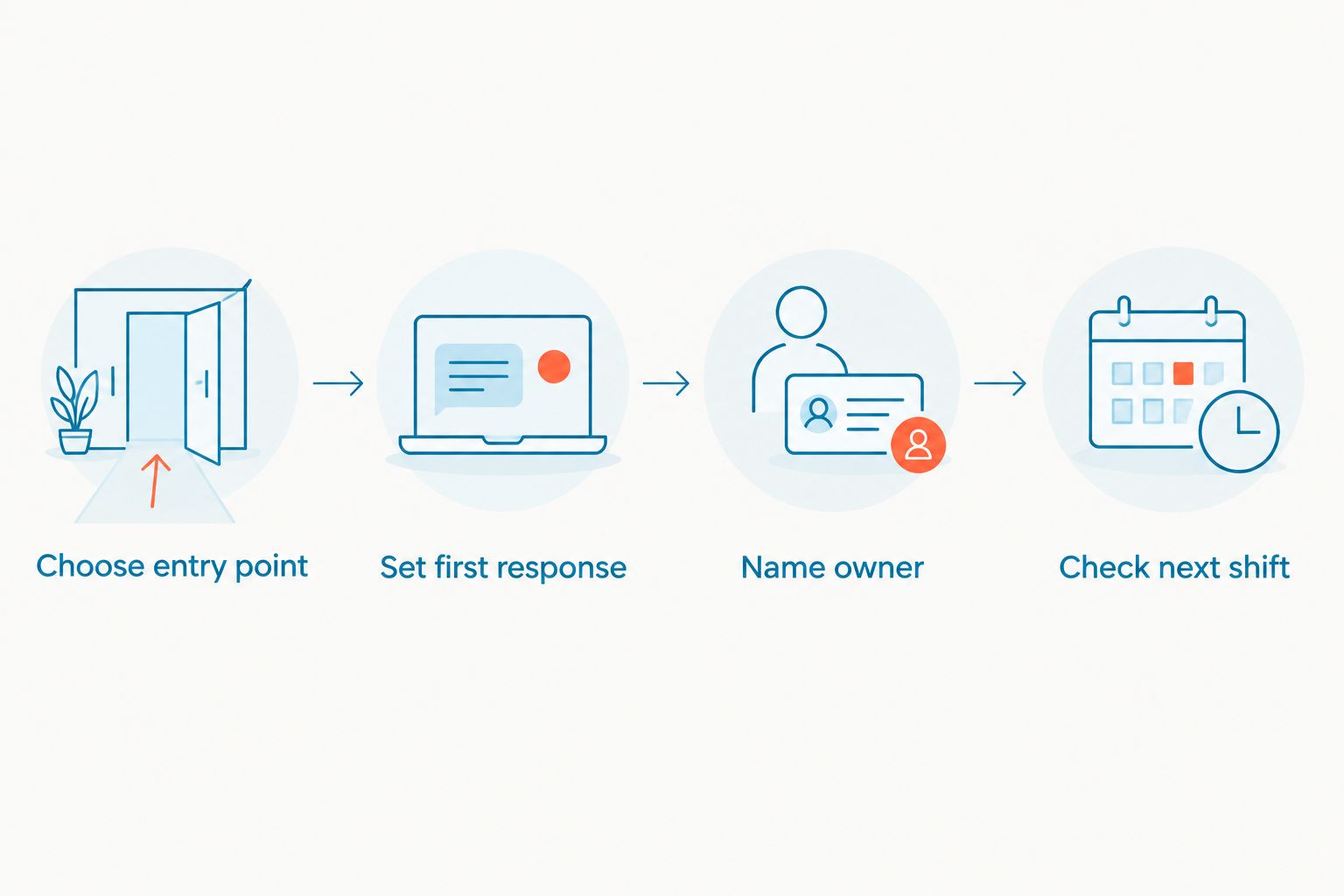
Before you switch in 2026, use one realistic customer question as the test case. Have someone submit it through the channel customers actually use. Then follow the work until an employee takes responsibility. A tidy demonstration matters less than a handoff your team can repeat.
- Choose the entry point. Use an incoming call if you are buying a phone system. Use a website chat or customer text if you are buying lead-response software.
- Set the first response. Decide what the customer needs to know immediately and what information staff need to continue the conversation.
- Name the owner. Put a person or team in charge of the next reply. A shared inbox without a handoff rule leaves the same question unanswered.
- Check the next shift. Make sure the employee taking over can understand the request and see what has already happened.
These steps also expose a common purchasing error: comparing CallHippo with VirtualText as if they perform the same primary job. They do not. One starts the discussion with calling; the other starts it with SMS, webchat, and team response. If your team needs both jobs done, assess both workflows rather than forcing one product into the wrong role.
When staying with CallHippo is the right call
Keep CallHippo if it already handles the calls your team needs to make and answer, and your written inquiries have a clear owner elsewhere. Switching phone systems will not, by itself, fix an unattended website chat. Likewise, adding an inbox will not replace the work of choosing a business-calling setup.
In 2026, make a change only when you can name the broken step. If the step is a missed call or an awkward phone handoff, compare phone systems. If it is an unanswered text or website inquiry, evaluate the shared-inbox path. Stay with CallHippo when its calling workflow works and the problem sits outside calling.
FAQ
What is the best CallHippo alternative for a small service team in 2026?
VirtualText by VirtualPBX is the best fit when the team needs SMS, webchat, a shared inbox, and an AI agent for lead response. Choose a business phone system instead when replacing calling is the main task.
Is VirtualText a direct replacement for CallHippo?
No. VirtualText is a text, webchat, and shared-inbox offer, while CallHippo is being evaluated here for cloud calling. Compare the job you need done before choosing either.
Which CallHippo alternative is best for business calling?
Smarter Voice is the direct business-phone option in this comparison for small teams. Dialpad and RingCentral also belong on a calling-first shortlist.
Can VirtualText help with after-hours website leads?
Yes. VirtualText combines webchat with an AI agent for capturing and responding to website and after-hours leads. Your team still needs to decide who handles follow-up.
Should I replace my phone system to fix missed website chats?
No. A different phone system does not automatically assign ownership of website conversations. Test a webchat and shared-inbox workflow for that problem.
What should I test before leaving CallHippo?
Test the channel behind your missed inquiries and follow one request from first contact to staff handoff. Use a call for a phone-system decision and a text or website chat for an inbox decision.
When should I keep CallHippo?
Keep CallHippo when it meets your calling needs and written inquiries already have a reliable owner. Change tools to fix a specific workflow gap, not simply to replace a provider.
One last thing
For 2026, put the employee handoff in the product demonstration. An AI response, answered call, or received text is not the end of the work; someone has to take the next action. That single check makes the distinction between a phone-system purchase and a shared-inbox purchase clear.


