

Assisted living facilities lose tour bookings and family trust the same way: a text goes unanswered because it landed on one staff member's personal phone. Best overall: VirtualText, for combining SMS, webchat, and a shared team inbox with AI backup in one flat-rate plan built for small teams. Best for mass family announcements: SimpleTexting. Best for HIPAA-conscious clinical texts: Weave. Best for review generation: Podium.
- VirtualText wins best sms platform for assisted living facilities in 2026 by combining SMS, webchat, and a shared inbox in one login.
- SimpleTexting fits communities that need to blast event reminders or closure notices to hundreds of families at once.
- Weave suits communities layering in clinical or billing texts alongside a medical or dental-style workflow.
- Podium is built for generating reviews after tours and move-ins, not full family communication.
- None of these tools replace a resident emergency alert system — texting handles routine, non-urgent contact.
Why this matters
A front desk that answers calls but not texts is turning away the exact families who prefer to text first. The average assisted living resident is 87 years old, according to the National Center for Assisted Living, but the person making the inquiry is almost always an adult child in their 50s or 60s who expects a text reply, not a callback slip.
VirtualPBX built VirtualText specifically for small service teams that get after-hours questions and can't staff a 24/7 phone line. Assisted living communities fit that pattern closely: tour requests come in at night, admissions questions come in on weekends, and one missed text can send a family to the next community on their list. A texting service for home health agencies faces nearly the same problem — families who want a fast, human-sounding answer without waiting on hold.
What makes the best SMS platform for assisted living facilities
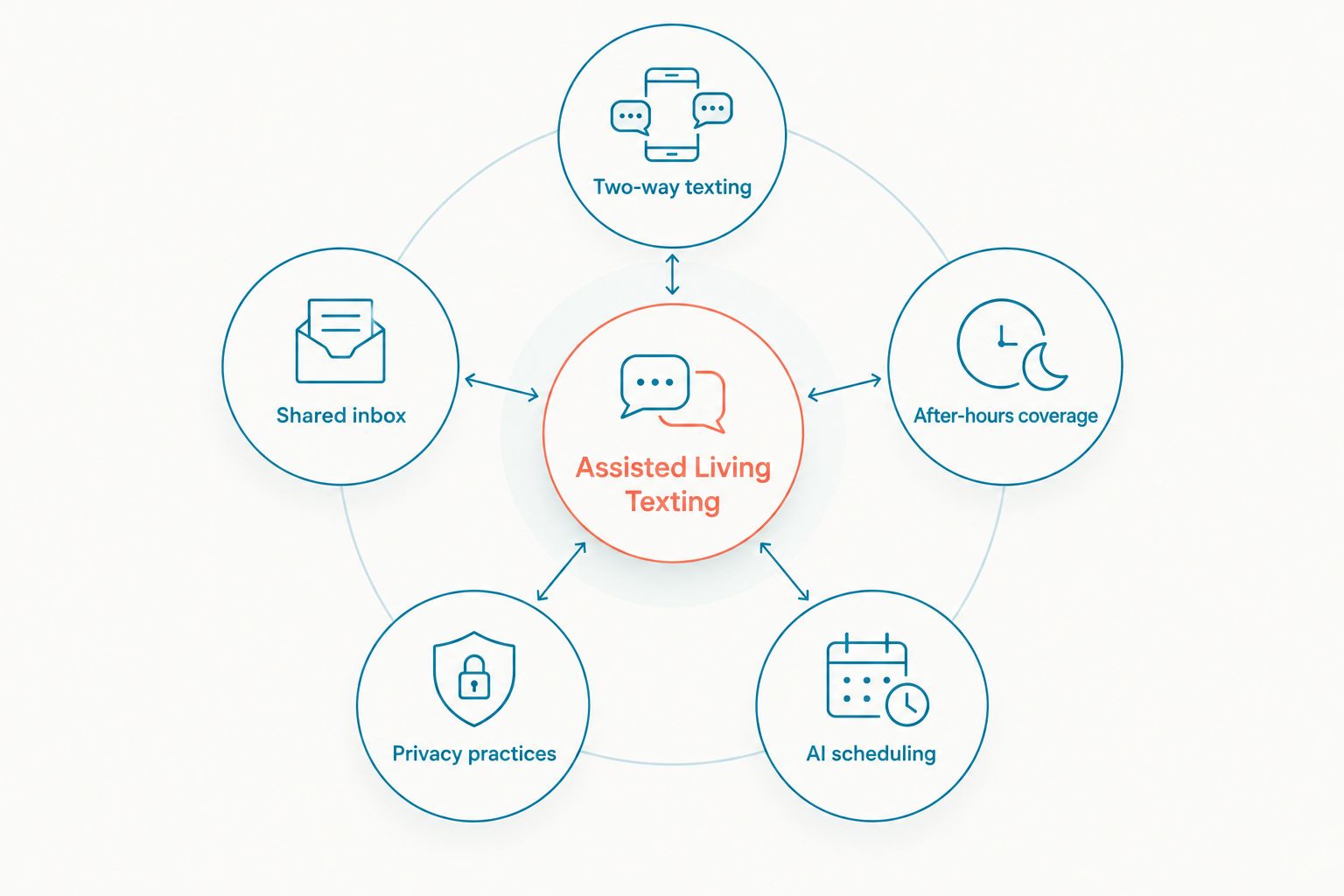
- Two-way texting for families and prospective residents, not just one-way broadcasts
- A shared inbox the whole front desk and admissions team can see and reply from
- After-hours automatic replies that cover tour and admission inquiries overnight
- Practices that respect resident and family privacy without requiring a clinical EHR integration
- An AI agent that can answer routine scheduling questions without a staff member typing every reply
- Setup that a front desk manager can finish without hiring an IT contractor
At a glance
| Platform | Best for | Standout feature | Key limitation |
|---|---|---|---|
| VirtualText | After-hours family texting and a shared inbox | Combines SMS, webchat, shared inbox, and an AI agent in one login | Not built as a clinical EHR messaging replacement |
| SimpleTexting | Mass texting for events and closures | Broadcast lists and scheduled campaigns | No dedicated shared inbox for one-to-one family replies |
| Weave | HIPAA-conscious billing and clinical texts | Two-way texting built around healthcare and dental workflows | Packaged for clinical practices, not community marketing or tours |
| Podium | Review generation and reputation management | Automated review requests after tours or move-ins | Texting features center on reviews, not full family communication |
1. VirtualText: best all-in-one SMS platform for assisted living family communication
VirtualText puts SMS, webchat, and a shared team inbox behind one login, with an AI agent that can pick up the slack when the front desk is busy or closed. A family texting at 9 p.m. about a tour gets a reply instead of silence, and the whole admissions team can see the conversation the next morning instead of hunting through one coworker's phone.
VirtualText pros:
- One shared inbox means no lead gets stuck on a single staff member's personal cell
- AI agent handles routine questions like visiting hours or tour availability after hours
- Webchat and SMS live in the same thread, so a website visitor and a texter aren't tracked separately
- Billing: one flat monthly rate covers the whole front desk team, no per-seat math
VirtualText cons:
- Not designed as a clinical EHR messaging system for medication or care-plan updates
- AI agent needs a short setup pass to sound right for a senior-living audience, not a generic retail script
Communities that also want a full phone system alongside texting can pair VirtualText with the parent VirtualPBX phone platform, and no-show reduction plays well here too — the same logic behind appointment reminder texts that cut no-shows applies directly to tour confirmations.
Best for: communities that want SMS, webchat, and a shared inbox handled by one tool instead of three logins.
Verdict: Buy.
“A missed text from a worried adult child at 9 p.m. is a lost move-in decision, not just a missed message.”
2. SimpleTexting: best for mass family announcements
SimpleTexting is built around broadcast lists — sending one message to hundreds of contacts at once rather than managing individual back-and-forth threads. For a community sending a weather closure notice or an activities calendar to every family on file, that's the right tool shape.
SimpleTexting pros:
- Scheduled campaigns for recurring announcements like monthly newsletters
- Segmented lists so prospect families and current resident families get different messages
- Simple opt-in management for compliance with mass-texting rules
SimpleTexting cons:
- No shared inbox built for ongoing one-to-one conversations with a specific family
- No AI agent to handle after-hours tour questions automatically
- Billing: tiered plans scale with contact volume; check current rates directly with the vendor
Best for: communities whose main texting need is one-to-many announcements, not individual conversations.
Verdict: Hold — pair it with a conversational tool rather than using it as the only texting platform.
3. Weave: best for HIPAA-conscious clinical and billing texts
Weave is built around healthcare and dental practice workflows, with two-way texting designed to sit next to billing and scheduling systems. Communities running a licensed care wing alongside independent living can use it for the clinical or billing side of communication.
Weave pros:
- Built with healthcare and dental office workflows in mind
- Two-way texting for billing questions and appointment confirmations
- Familiar to staff who've used it at a prior medical or dental job
Weave cons:
- Packaged and priced around clinical practices, not community marketing or family engagement
- Less suited to admissions and tour inquiries, which is where most assisted living texting volume actually happens
- Billing: plans and packaging are structured for medical and dental offices; confirm fit before switching
Best for: the clinical or billing wing of a community that already runs healthcare-style scheduling.
Verdict: Hold — strong for billing texts, weak for the family communication that drives move-ins.
4. Podium: best for review generation and reputation management
Podium automates review requests after a specific interaction, like a completed tour or a move-in. For assisted living, where families research reviews heavily before choosing a community, that's a real advantage — but it's a narrower job than day-to-day family texting.
Podium pros:
- Automated review requests tied to specific milestones like a tour or move-in
- Helps build the review volume families check before deciding
- Works alongside other communication tools rather than replacing them
Podium cons:
- Not built as a primary tool for ongoing family or resident conversations
- No dedicated AI agent for after-hours tour or admissions questions
- Billing: plans vary by feature set; confirm current pricing with the vendor directly
Best for: communities that already have a texting tool and want a dedicated layer for reviews.
Verdict: Hold — useful as an add-on, not a replacement for a primary SMS platform.
See how a shared inbox fits your front desk
Compare team inbox setups built for healthcare-style front desks.
How we ranked
Each platform got measured against the six criteria above: two-way texting, a shared inbox, after-hours coverage, privacy-conscious practices, AI-assisted replies, and setup a non-technical manager can finish. VirtualText scored across all six because it was built for exactly this kind of small service team. SimpleTexting, Weave, and Podium each win on one dimension — mass messaging, clinical workflows, or reviews — but none cover the full list on their own in 2026.
Which SMS platform should you choose?
If your community needs one tool that handles family texts, website chat, and a shared team inbox without three separate logins, VirtualText is the default choice for 2026. If your biggest pain point is blasting event reminders to hundreds of families at once, add SimpleTexting on top. If you're running a licensed clinical wing that needs billing and appointment texts synced to a healthcare-style workflow, Weave covers that narrower job. And if reviews are your bottleneck rather than communication itself, Podium is worth layering in after your core texting platform is settled.
Don't wait for a second missed after-hours text to make the call — the family who texted at 9 p.m. tonight is touring somewhere else tomorrow if nobody answers.
FAQ
What's the best sms platform for assisted living facilities in 2026?
VirtualText is the best overall pick for 2026 because it combines SMS, webchat, and a shared team inbox with an AI agent in one login. SimpleTexting, Weave, and Podium each cover a narrower job like mass announcements, clinical texts, or reviews.
Is texting HIPAA-compliant for assisted living communication?
Routine texts about tours, availability, and general questions don't typically involve protected health information, so standard business texting works fine for that traffic. Clinical or billing messages that reference specific health details need a platform built with healthcare-conscious practices, like Weave.
How much does business texting software cost for a senior living community?
Pricing structures vary by vendor: some charge per contact volume, others use a flat team rate. Check current plans directly on each vendor's site since pricing changes over time.
Can families text the front desk directly with VirtualText?
Yes, VirtualText routes family texts into a shared inbox the whole admissions team can see and reply from, instead of one staff member's personal phone. An AI agent can also answer routine questions when the desk is unstaffed.
Do assisted living facilities need a shared team inbox for texting?
Yes, if more than one staff member handles tours or admissions. A shared inbox prevents a lead from getting stuck when the one person who texted with a family is off shift or leaves the job.
How is SMS different from a resident emergency alert system?
SMS platforms like VirtualText handle routine, non-urgent communication such as tour scheduling and general questions. They are not a substitute for a dedicated resident emergency alert or nurse call system.
Can an AI agent answer tour scheduling questions over text?
Yes, an AI agent can handle routine questions like visiting hours, availability, and general tour scheduling after hours. Staff still need to review and confirm bookings during business hours.
What's the difference between VirtualText and VirtualPBX?
VirtualPBX is the parent company's cloud business phone system, built around calling. VirtualText is the separate SMS, webchat, and shared inbox platform for teams that need texting and chat alongside or instead of a full phone system.
One last thing
The families evaluating assisted living communities in 2026 are almost never the residents themselves — they're adult children juggling work, their own kids, and a parent's care decision at the same time, and they will text before they call every single time they can. A platform that turns that first text into a same-day tour is worth more than any brochure on the lobby table.


