

DME suppliers need missed calls answered without confusing equipment support with medical advice. An after hours answering service for durable medical equipment suppliers captures requests outside business hours and routes them to the right person, so routine questions enter a follow-up queue and urgent equipment concerns reach your on-call team.
- An after hours answering service for durable medical equipment suppliers needs clear escalation rules, not just message capture.
- VirtualPBX is best for small DME teams needing cloud business calling with optional automated call handling.
- Keep equipment support separate from medical advice, and verify privacy requirements before collecting patient information.
- Use SMS and webchat for routine intake; retain a staffed escalation path for urgent equipment concerns.
Why after-hours answering matters for DME suppliers
A reorder question and a report of equipment failure need different responses. Sending both to the same unattended voicemail creates a workflow with no clear priority. Answering both immediately without a defined escalation path creates a different problem: callers hear reassurance, but nobody owns the next action.
The goal is accountable routing, not simply an answered call. Your 2026 coverage plan should distinguish routine requests, equipment concerns, and situations requiring emergency assistance. It should also explain what happens when the first on-call employee does not respond.
VirtualPBX provides cloud business calling, routing, business SMS, and support from real people. Those functions support the communication layer; your DME team still needs to define equipment-specific procedures, staffing, and privacy requirements.
Start with a written call-handling sheet and your existing phone setup. Add software after you know which requests need a person, which can wait, and which information an answering service is allowed to collect.
Set up after-hours coverage for your DME team
1. Define what your team will handle overnight
Review your recent after-hours messages manually. Sort them by the action required, not by how anxious or detailed the caller sounds. A delivery question belongs to a different workflow from a report that prescribed equipment has stopped working.
Write down your actual service boundaries. Do not let an answering agent promise delivery, repairs, replacement equipment, insurance approval, or clinical guidance unless your authorized process supports that response.
Assign a named owner to every request category. For coverage across locations, identify which branch or service area owns the callback before asking someone to investigate.
- Separate routine requests from equipment concerns requiring on-call review.
- Document the equipment categories your overnight team supports.
- Identify requests that must wait for billing, scheduling, or another daytime department.
- State what answering staff must never promise.
- Name the employee responsible for maintaining the coverage instructions.
2. Write an escalation path that ends with a person
Create a simple routing sheet before configuring an automated greeting. Staff should know where a request goes and what happens if that destination does not answer. A transfer attempt is not proof that someone accepted responsibility.
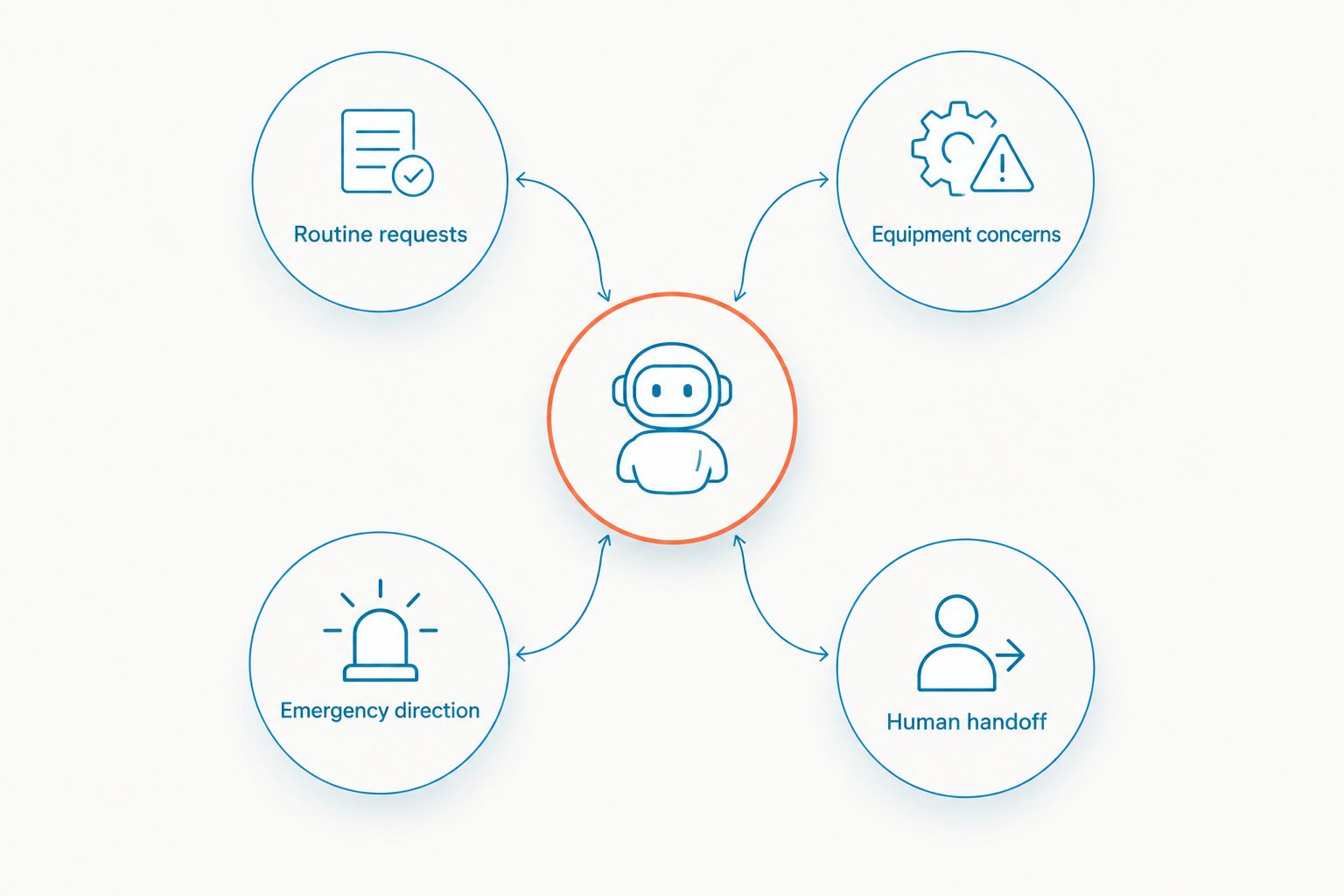
Define these four paths in your 2026 instructions: Routine requests, Equipment concerns, Emergency direction, and Human handoff. Keep medical emergency guidance separate from equipment-service escalation. For an immediate medical emergency in the United States, direct callers to call 911; an answering service is not an emergency response service.
Your designated DME supervisor should approve the equipment escalation criteria. Answering staff should follow those criteria rather than decide whether a patient's equipment problem is clinically serious.
- Routine requests: Record the request for the appropriate daytime team.
- Equipment concerns: Notify the designated on-call equipment specialist.
- Emergency direction: Give approved emergency instructions without diagnosing symptoms.
- Human handoff: Require acknowledgment and use the backup contact when needed.
3. Choose the phone workflow before adding automation
The manual starting point is an after-hours greeting, an on-call contact list, and a documented backup process. Test that setup using your existing phone service. Fix gaps in responsibility before changing platforms.
For small teams that need a cloud phone setup, VirtualPBX offers Smarter Voice with mobile, desktop, and web apps, business SMS, routing, and number porting. AI FrontDesk and AI MessageDesk are optional products, not prerequisites for answering after-hours calls.
VirtualPBX is best for small DME teams needing cloud business calling with optional automated call handling. The limitation is operational: a phone system does not supply your clinical judgment, equipment-response policy, or overnight staffing.
Use support from real people to confirm the proposed setup. Verify healthcare privacy requirements for each service before allowing patient information into calls, messages, recordings, or transcripts.
- Test business-hours and after-hours routing separately.
- Confirm how unanswered transfers return to the handling workflow.
- Check that the backup employee can receive the escalation.
- Approve automated responses before enabling them for callers.
- Document the number-transfer plan before changing your existing service.
4. Add text and webchat without replacing the urgent-call path
Begin with a manually reviewed website contact method and a clear instruction about when staff respond. Do not present an unattended inbox as urgent support. Keep the phone escalation route visible wherever you invite customers to send a message.
VirtualText is a separate offer from VirtualPBX that combines SMS, webchat, a shared team inbox, and an AI agent. It fits routine website inquiries and message follow-up; evaluate its healthcare privacy arrangements before using it for patient-specific intake. It is not a substitute for your voice answering plan.
The guide to combining SMS and webchat into one team inbox covers the channel organization problem. For DME suppliers, add an explicit boundary between routine messaging and urgent equipment assistance.
- State when your team reviews messages.
- Show the approved phone route for urgent equipment concerns.
- Ask only for the information needed to arrange follow-up.
- Assign each conversation to a named employee.
- Keep clinical advice out of automated text and chat responses.
5. Limit intake to approved information
Draft an intake sheet on paper before building a form or automated conversation. Ask what the answering employee needs to route the request, rather than collecting everything a caller is willing to provide. Avoid requesting diagnoses, medical records, or insurance documents through an unapproved channel.
HIPAA does not turn on or off because a conversation happens after business hours. When your organization is a covered entity and a vendor handles protected health information as a business associate, assess the required business associate agreement and safeguards for that use.
Your 2026 vendor review should cover the actual service configuration. A general security statement does not establish that calls, SMS, webchat, recordings, and automated transcripts all meet your requirements.
- Obtain a callback number through your approved intake process.
- Record the request category without unnecessary medical detail.
- Verify identity before discussing account-specific information.
- Review access, retention, deletion, and subcontractor arrangements.
- Confirm which channels and features the applicable agreement covers.
6. Test the entire handoff before launch
Run a manual rehearsal with employees acting as callers. Use your approved scripts and the real on-call roster. Then repeat the same scenarios through any phone routing, answering service, or automated agent you plan to deploy.
Use 10 test calls as a practical launch checklist, not as proof of reliability. Include routine requests, urgent equipment concerns, a wrong-location request, unclear speech, and an unavailable primary contact. Check the outcome at the receiving employee's end, not just what the caller hears.
Record a pass only when the correct owner receives the request and acknowledges the next action. If the system captures a message but nobody accepts it, the handoff has failed.
- Test a routine reorder question and a delivery question.
- Test an equipment concern requiring approved escalation.
- Test a caller who needs emergency direction.
- Test the primary contact being unavailable.
- Test the daytime team's access to the completed handoff record.
7. Review ownership and outcomes after launch
For the first 7 nights, manually review every after-hours request at the next staffed opening. This is a recommended observation period, not a promised performance result. Look for wrong destinations, repeated explanations, unanswered escalations, and messages left without an owner.
At 30 days, review the workflow with the staff who receive the requests. Separate routine intake from urgent equipment escalation so aggregate activity does not hide a serious routing failure. Compare the answers callers received with the actions your team actually took.
Keep your 2026 review focused on outcomes you can verify. An automated acknowledgment is useful, but it does not mean a replacement, repair, delivery, or callback occurred.
- Check whether every escalation received acknowledgment.
- Record the time from request capture to staff acceptance.
- Identify requests routed to the wrong branch or department.
- Remove outdated on-call contacts and approved responses.
- Update scripts when equipment support responsibilities change.
Compare after-hours options for DME suppliers
Choose the least complicated option that satisfies your actual coverage requirements. Routine message capture and urgent equipment response are different jobs. A mixed setup is appropriate when the responsibilities are clear; adding more channels without owners adds work rather than coverage.
Use this table for your 2026 shortlist. Treat each limitation as a question to resolve before implementation, not a reason to assume the option is unsuitable.
| Option | Best for | Practical strength | Key limitation |
|---|---|---|---|
| Voicemail with manual review | Routine requests that can wait | Simple message capture using an existing workflow | Does not provide an immediate human handoff |
| Staffed on-call rotation | Equipment concerns needing your team's judgment | Keeps decisions with designated DME staff | Requires staffing, backup coverage, and maintained instructions |
| External live answering service | Teams that need a human to take and route calls | Can follow an approved intake and escalation script | Confirm DME training, privacy terms, and acknowledgment procedures |
| Smarter Voice with optional AI FrontDesk | Small teams needing cloud calling and optional automated handling | Combines a business phone foundation with optional call automation | Confirm the exact handling workflow; your team still owns escalation |
| VirtualText | Routine SMS and website inquiries needing team follow-up | Combines messaging channels in a shared inbox | Separate messaging offer; not the urgent voice-response path |
Request a demonstration using your own approved DME scenarios. A polished general greeting does not show whether a caller reaches the right equipment specialist when the primary contact is unavailable.
Review your business phone setup
Explore cloud calling and optional automated call handling, then confirm your DME escalation requirements.
Common mistakes DME suppliers make
Treating all equipment requests as routine messages
A general callback queue does not distinguish a reorder from a service concern requiring on-call review. Write approved category rules and give answering staff a destination for each category. Do not make them infer priority from the caller's tone.
Letting automation answer clinical questions
A conversational response still needs boundaries. Block diagnosis, changes to prescribed use, and unsupported equipment troubleshooting. Route questions outside the approved script to the designated human contact instead of producing an improvised answer.
Assuming healthcare use means privacy approval
A vendor serving healthcare organizations is not evidence that your intended configuration is approved for patient information. Review the agreement, data handling, access controls, and exact features you will use. Keep unapproved channels limited to non-sensitive intake.
Promising a callback without an owner
A message saying someone will respond is not an assignment. Identify who receives the request, who acknowledges it, and who takes over if the assigned person is unavailable. Keep response wording aligned with the coverage your team actually provides.
Counting captured inquiries as completed support
An inbox entry is the start of the work. Review staff acceptance and completion separately from call or message capture. This prevents a busy dashboard from hiding unanswered equipment concerns.
FAQ
What's the best after hours answering service for durable medical equipment suppliers?
The best fit is a service that follows your approved DME intake rules, reaches a designated on-call person, and supports your privacy requirements. Evaluate routine message capture separately from urgent equipment escalation.
Can an automated agent handle DME calls after hours?
An automated agent can support approved intake and routing, but it should not diagnose symptoms or improvise equipment instructions. Test the exact service configuration and keep a human escalation path for requests outside its approved scope.
Is webchat enough for after-hours DME support?
Webchat is not a replacement for a staffed urgent equipment-response path. Use it for routine inquiries with clear response expectations, and show customers where to call for urgent equipment concerns.
Do DME suppliers need a business associate agreement with an answering vendor?
A covered entity needs an appropriate business associate agreement when the vendor acts as a business associate handling protected health information. Assess the actual data flow and confirm which channels and features the agreement covers.
What should an answering agent collect from a DME caller?
An answering agent should collect only the information approved for routing and follow-up. Use your authorized identity-verification process before discussing account details, and avoid unnecessary medical information.
What happens if the on-call equipment specialist does not answer?
The workflow should notify a designated backup and require acknowledgment of responsibility. Document that fallback before launch; an unanswered transfer must not be treated as a completed handoff.
Does VirtualPBX replace a DME supplier's overnight staff?
VirtualPBX supplies business phone functions and optional automated call handling, not your DME staffing or clinical judgment. Your team remains responsible for approved scripts, equipment escalation, and follow-through.
One last thing
Test what happens when nobody answers the first escalation. That single scenario exposes whether your coverage plan has a real backup or merely another place to leave a message.
Before ending the test, require the backup employee to repeat the request and accept the next action. A clear conversation with the caller matters, but responsibility must reach someone who can do the work.


