

Missed calls and unanswered website messages require different fixes. Choose VirtualPBX if you want a small-business phone system with optional call handling and a separate shared messaging offer; choose Vonage if you need its broader communications portfolio or developer APIs.
- VirtualPBX vs Vonage comes down to small-team operations versus broader communications and developer requirements.
- Smarter Voice handles business calling; VirtualText is a separate SMS, webchat, and shared-inbox offer.
- Vonage fits businesses building custom communications through APIs or keeping an established Vonage environment.
- Compare phone service, shared messaging, and automation separately before selecting a provider.
Why this matters
A business phone app does not automatically solve shared-inbox work. Your receptionist needs to answer calls. Your service team needs to see customer messages, avoid duplicate replies, and know who owns the next step. Those are related jobs, but they are not interchangeable.
For this 2026 comparison, separate the phone system from website chat and developer infrastructure. Smarter Voice is the parent brand’s core phone offer. VirtualText is a separate platform combining SMS, webchat, a shared team inbox, and an AI agent for small-business service teams.
Vonage also spans distinct products. Vonage Business Communications addresses business communications, while Vonage Communications APIs let developers add communications to applications. Compare the product your staff will actually use, not the largest feature list attached to the company name.
At a glance
| Dimension | VirtualPBX | Vonage |
|---|---|---|
| Best for | Small teams needing business calling and optional customer-response tools | Businesses using the Vonage ecosystem or building custom communications |
| Core calling | Smarter Voice cloud calling, routing, and mobile, desktop, and web apps | Vonage Business Communications for business calling |
| Standout feature | Phone service with optional AI call handling and support from real people | Developer communications APIs alongside business communications products |
| SMS and webchat | VirtualText combines SMS, webchat, and a shared team inbox as a separate offer | Compare the selected business product or an API-built messaging workflow |
| Custom workflows | Start with the supplied phone and messaging workflows | Communications APIs suit developer-built workflows |
| Automation | Optional AI FrontDesk and AI MessageDesk; VirtualText includes an AI agent | Select the relevant Vonage product or API implementation |
| Support | Real U.S.-based support is part of the stated positioning | Evaluate support against the product and service arrangement you select |
| Setup | Configure phone routing; scope shared messaging separately | Configure business communications or plan a developer implementation |
| Pricing model | Per-user phone service; flat-rate VirtualText; optional voice upgrades | Business communications subscriptions or API usage, depending on product |
The comparison has no universal winner. A local service company replacing a basic phone system has a different requirement from a software business embedding messaging inside its application. The sections below identify which choice fits each job and where a buying decision still needs a practical test.
VirtualPBX is the clearer fit for a small-team phone replacement
Smarter Voice fits a small business that needs cloud calling, business SMS, routing, and access through mobile, desktop, and web apps. Optional AI FrontDesk and AI MessageDesk let you consider call-handling automation separately rather than treating automation as the reason to replace the phone system.
The advantage is a focused starting point. Write down where incoming calls should go, which staff need access, and what happens when nobody answers. Then configure the phone service around those decisions.
The limitation is equally important: business SMS on a phone system is not proof of a complete website-chat and shared-inbox workflow. VirtualText is a separate offer. Scope it separately when your team needs those channels.
Vonage is the better fit when the business already has a suitable Vonage environment and needs to extend it rather than replace it. Keeping a working system preserves familiar staff routines. Do not switch merely because another provider lists similar calling features.
Both offer business calling; routing decides the practical winner
Smarter Voice and Vonage Business Communications both belong in a business-calling shortlist. That is a category-level tie, not a claim that every plan includes the same features. Your routing requirements decide whether either proposal fits.
Test the route from the customer’s perspective. A caller asking for an existing job update should reach the right person without repeating the request across several transfers. A new inquiry needs a clear answer or a defined follow-up path.
Use 3 test calls in your evaluation:
- Open hours: Call while the designated staff member is available.
- Busy staff: Call while the intended recipient cannot answer.
- Closed hours: Call when the business is closed.
For each test, record where the call lands and who takes responsibility afterward. These are evaluation scenarios, not provider performance claims.
The downside of choosing either system without this exercise is the same: you can reproduce a poorly organized call flow on a new platform. In 2026, replacing the software should not mean carrying over an unanswered extension or an unclear voicemail routine.
VirtualText fits shared SMS and website-chat work
VirtualText is best for small-business service teams that need customer texts and website chats in a shared inbox. The stated offer combines SMS, webchat, a shared team inbox, and an AI agent. That makes it relevant to insurance agencies, home services, and healthcare providers handling website and after-hours inquiries.
Its advantage is the defined messaging scope. Staff can evaluate a platform intended for those channels rather than assume a phone app covers the entire customer-response process.
Its limitation is the product boundary. Do not treat VirtualText as the phone system or assume buying Smarter Voice includes it. Ask for a proposal that names each selected offer and explains what staff will use for calls versus messages.
Vonage fits this dimension when you already have a messaging workflow built around its products or need developers to create one through its communications APIs. That is a genuine reason to choose Vonage, but an API is not a finished shared inbox by itself.
For a channel-level evaluation, use the guide to combining SMS and webchat into one team inbox. Focus on ownership and follow-up, not just whether a message appears on screen.
Vonage wins when communications belong inside your application
Vonage is the better choice for a developer-led business building communications into its own application. Its communications APIs address that requirement directly. A developer can work with programmable communications rather than make staff move every task into a separate business-phone interface.
This matters when your application needs to trigger or manage communications as part of its own workflow. Start with the application requirement, then identify the appropriate API and implementation work.
The tradeoff is responsibility. Your business needs someone to build, test, maintain, and support the resulting workflow. Buying access to an API does not remove those jobs.
Smarter Voice and VirtualText fit a different buyer: a team looking for supplied calling or messaging tools rather than a development project. That is their practical strength and the limit of this comparison. Do not assume they replace a custom API implementation without validating the exact requirement.
If your main goal is simply to answer callers and reply to website leads, a developer platform adds a separate implementation decision. If communications must operate inside your own software, that implementation work has a clear purpose.
Both need a human handoff before automation is useful
Automation deserves a tie on one essential buying criterion: both approaches need a defined human handoff. This is an operating requirement, not a claim that the providers have identical automation features.
AI FrontDesk and AI MessageDesk are optional voice products. VirtualText includes an AI agent within its messaging offer. Keep those roles distinct when deciding what the business needs.
For Vonage, name the product or API workflow in the proposal before comparing automation. A broad company-level automation claim tells you little about what your selected implementation will do.
Evaluate 2 handoff scenarios:
- Routine inquiry: A customer asks a question covered by your approved business information.
- Staff decision: A customer asks for an exception, a sensitive discussion, or a commitment requiring approval.
The routine inquiry tests usefulness. The staff-decision scenario tests boundaries. Neither should end with an invented answer or an unowned conversation.
Natural conversation and menu-driven routing are different approaches, but neither wins merely by sounding modern. Choose the approach that gets customers to the correct next step and makes the handoff visible to staff.
Real support matters more when nobody owns the phone system
The small-business offer emphasizes real U.S.-based support. That is relevant when your office manager also handles scheduling, customer calls, and daily administration. The practical benefit is access to people when the business needs help with its phone service.
That positioning does not establish a response-time guarantee. Ask how to reach support, what help covers, and who handles problems involving the separate messaging offer.
Vonage is a stronger operational fit when your business already has an administrator, implementation partner, or development team responsible for its Vonage environment. Existing knowledge has value. Replacing it creates training and ownership work that belongs in the decision.
For either provider, name 1 accountable owner inside your business. That person maintains call routes, approves automated answers, and knows where to report problems. Support cannot replace an internal decision-maker when nobody knows which routing behavior is correct.
A phone replacement is simpler than a custom implementation
For a straightforward phone replacement, begin with the existing number and call flow. Smarter Voice includes number porting among its stated capabilities. Confirm the transfer process before canceling your current service, and keep the old arrangement in place until the move is confirmed.
A Vonage Business Communications deployment also requires configuration and staff preparation. A Vonage API project adds a development path. Treat those as different setup jobs rather than competing promises of easy installation.
Use this sequence for your 2026 rollout:
- Define channels: Decide whether you need calls, texts, website chat, or a combination.
- Assign owners: Name who answers, who follows up, and who administers the system.
- Test handoffs: Check busy periods, closed hours, and requests requiring staff judgment.
- Confirm transfer: Validate the number-transfer plan where a transfer is required.
- Train staff: Show the team where each conversation belongs and how to take ownership.
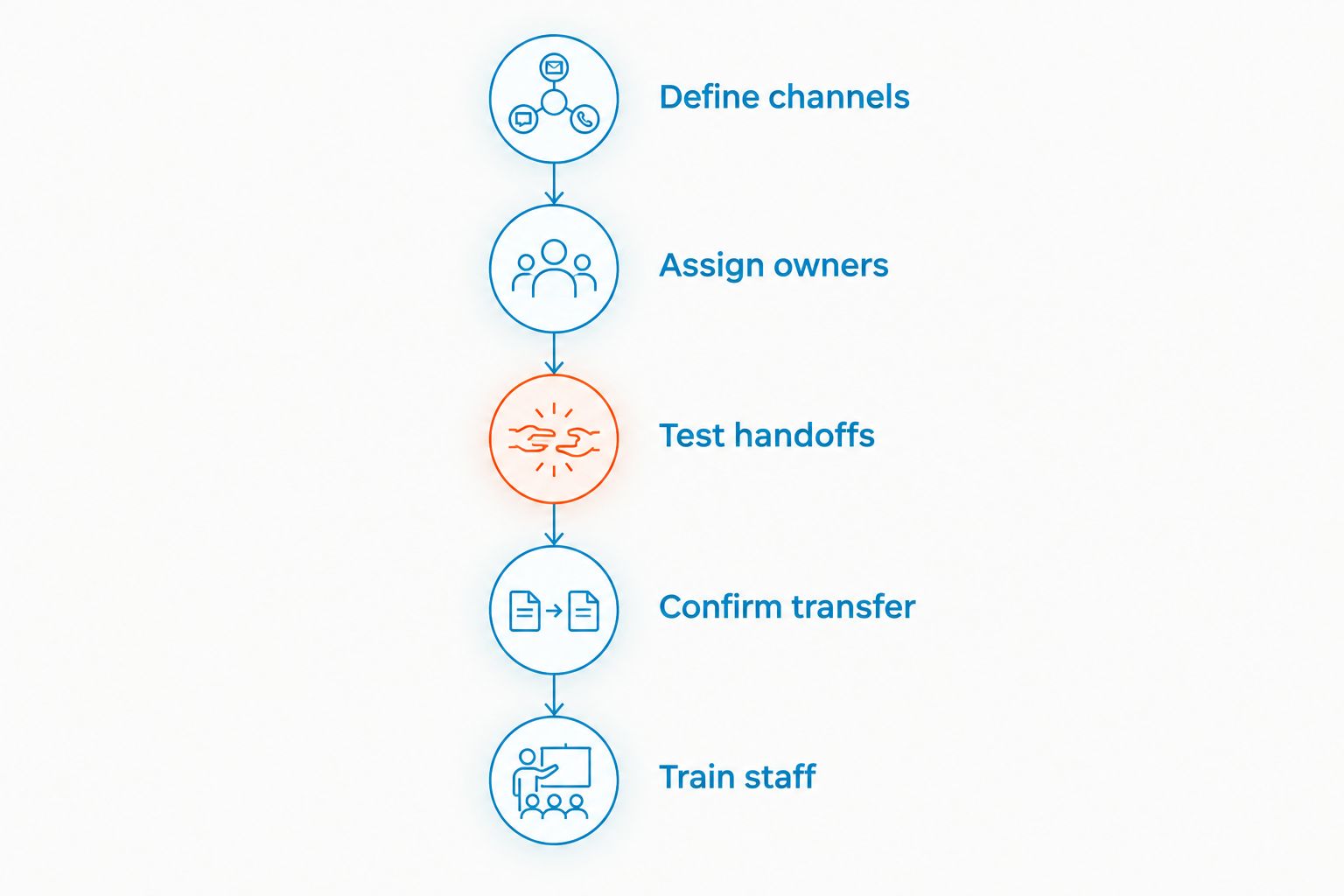
The setup winner depends on scope. A supplied phone or messaging platform suits an operational rollout. An API platform suits a software implementation. Asking the wrong product to do the other job creates avoidable work.
Pricing models: separate seats, platforms, and usage
Compare billing structure before comparing the proposed total. Smarter Voice uses per-user phone pricing. VirtualText is presented as a flat-rate messaging platform. Optional voice products are separate upgrade decisions.
That distinction matters as your team changes. Per-user billing connects phone costs to the staff who need service. A flat-rate platform uses a different purchasing structure; confirm its included scope rather than assume flat rate means unlimited use.
Vonage also requires a product-specific comparison. Business communications subscriptions and API usage belong in different columns of your purchasing worksheet. API costs follow the selected services and their usage rather than the same logic as a staff phone subscription.
For your 2026 proposal, list these separately:
- Staff requiring phone access.
- Customer-facing numbers and calling requirements.
- SMS, website chat, and shared-inbox requirements.
- Optional automation.
- Implementation and ongoing administration.
- Contract, cancellation, and support terms.
Do not call either provider cheaper without matching those requirements. A proposal excluding website chat is not equivalent to one including a shared messaging platform. Likewise, a software subscription does not include your own development effort merely because the API is available.
Final verdict: choose the operating model you actually need
Choose VirtualPBX if you run a small service team
Choose this provider when your priority is a business phone system, support from real people, and optional call handling. Evaluate VirtualText separately if your receptionist, dispatcher, or service team also needs shared SMS and website chat.
Best for: An owner or office manager buying tools the team will operate directly. The main caution is to keep the phone and messaging offers distinct in the proposal.
Choose Vonage if you need an ecosystem or developer platform
Choose Vonage when your business already operates successfully within its environment or your developers need communications APIs for an application. Those are stronger reasons than choosing it because its portfolio is broader.
Best for: An IT-led business with defined communications requirements and an owner for implementation. The main caution is to distinguish the ready-to-use business product from a workflow your team must build.
| Dimension | Winner |
|---|---|
| Focused small-team phone replacement | Smarter Voice |
| Basic business-calling shortlist | Tie; validate routing |
| Supplied shared SMS and webchat offer | VirtualText |
| Developer-built communications | Vonage |
| Human-handoff requirement | Tie; test the selected workflow |
| Small-team support positioning | Smarter Voice |
| Existing Vonage operational knowledge | Vonage |
| Setup scope | Supplied tools for operations; APIs for development |
| Pricing structure | No universal winner; match the required scope |
FAQ
Is VirtualPBX better than Vonage for a small business?
VirtualPBX is the clearer fit for a small team seeking a focused business phone system with optional call handling. Vonage fits businesses already using its environment or needing developer communications APIs.
Does VirtualText replace a business phone system?
VirtualText is a separate SMS, webchat, and shared-inbox offer, not the core business phone system. Smarter Voice is the phone offer; scope each product separately.
Which option is better for website leads?
VirtualText fits small service teams that want website chat and SMS in a shared inbox. Vonage fits a custom messaging requirement when the selected product or API implementation addresses that workflow.
Which provider is better for developers?
Vonage is the stronger fit for developers building communications into an application through its communications APIs. An API project still needs implementation, testing, maintenance, and support ownership.
How should I compare the costs in 2026?
Compare matched requirements and billing models rather than a headline figure. Separate phone users, messaging, optional automation, implementation work, and ongoing administration.
Can I move my existing business number?
Smarter Voice includes number porting among its stated capabilities. Confirm the transfer process and completion before canceling the existing service.
What should I test before choosing either provider?
Test open-hours calls, busy-staff calls, closed-hours calls, and the handoff from automation to a person. Record who owns the follow-up rather than checking only whether the system answers.
One last thing
A reply is not the same as a resolved inquiry. Before your 2026 purchase, follow a customer conversation through to its outcome: a callback, an answer, or a staff decision. The useful test is whether the team knows what happens next and who owns it.
That check exposes gaps a feature table cannot. Make conversation ownership part of the buying decision, not a task left until after installation.


