

CloudTalk gives small teams a cloud phone system for handling business calls. It stops being the clearest fit when your main problem is capturing website chats and customer texts after hours. The best CloudTalk alternative in 2026 is VirtualPBX with VirtualText if you need SMS, webchat, a shared inbox, and an AI agent; choose Dialpad if you need another cloud calling platform.
- VirtualPBX with VirtualText is the best CloudTalk alternative for small service teams focused on texts and website leads.
- CloudTalk remains the better fit when cloud calling is the job you need to solve.
- Compare SMS, webchat, shared inbox access, and after-hours response before switching phone systems.
- Dialpad, RingCentral, and Nextiva are alternatives to assess when you still need a phone-first platform.
Why this matters
A missed call and an unanswered website chat are different problems. A phone system helps your team receive and route calls. It does not, by itself, tell you who owns a customer text or what happens when a visitor starts a chat after your team has gone home.
That distinction changes which CloudTalk alternatives deserve a look in 2026. If customers primarily call, compare phone systems. If they also text and use your website, check whether your team can see those conversations together and respond when nobody is on shift. Do not replace a working call workflow to fix a website-lead problem.
CloudTalk alternatives at a glance
The starting-price column is omitted because published prices change. Check each provider's current terms before making a buying decision.
| Tool | Best for | Standout capability | How it differs from CloudTalk |
|---|---|---|---|
| CloudTalk | Teams that need cloud calling | Business call handling | The phone-first benchmark for this comparison |
| VirtualPBX with VirtualText | Small service teams handling texts and website leads | SMS, webchat, a shared inbox, and an AI agent | Addresses text and chat response rather than serving as a direct phone-system replacement |
| Dialpad | Teams comparing cloud phone systems | Business calling | A phone-first alternative; evaluate its current calling workflow against CloudTalk |
| RingCentral | Teams assessing business communications platforms | Business calling | A broader platform choice; check which tools your team would actually use |
| Nextiva | Teams seeking another business phone option | Business calling | Another phone-system comparison, not a substitute for defining your text-and-chat workflow |
The first choice is about which conversation you need to handle better. CloudTalk, Dialpad, RingCentral, and Nextiva belong on a phone-system shortlist. VirtualText belongs on a shortlist for customer texts, website chats, and after-hours lead response. A business can need both kinds of tool.
1. VirtualPBX with VirtualText: best for text and chat leads
VirtualText, by VirtualPBX, is a SaaS platform for small-business service teams. It brings SMS, webchat, a shared team inbox, and an AI agent into one offering. That makes it the strongest choice on this list when your immediate problem is responding to website visitors and customers who text, including after hours.
Where VirtualText shines
- SMS and webchat: Your team can address customer conversations that do not begin with a phone call.
- Shared inbox: Staff can work from a team conversation view instead of treating every message as one person's private thread.
- AI agent: You can plan an initial response path for after-hours inquiries rather than leaving every incoming text or chat until the next staffed shift.
- Service-team focus: The stated use cases include insurance agencies, home services, and healthcare providers.
Where VirtualText falls short
- VirtualText is not a like-for-like CloudTalk phone-system replacement. Keep a separate calling decision on the table if call routing is your central requirement.
- A shared inbox still needs an owner for each inquiry. Software does not decide who should follow up on a quote request or a sensitive customer question.
- An AI agent needs clear instructions about what it can answer and when a person should take over. Do not assume it should handle every service conversation.
| Decision point | VirtualText | CloudTalk |
|---|---|---|
| Main job | Capture and respond to texts and website chats | Handle business calls |
| Team workflow | Shared inbox for incoming conversations | Calling workflow |
| After-hours question | How texts and chats receive a response | How calls are handled when staff are unavailable |
| Replacement decision | Add it for text-and-chat needs; assess calling separately | Keep it if the calling workflow fits |
Best for: A small service team that gets customer inquiries through SMS or website chat and needs a shared place to manage them. Verdict: Choose VirtualText for the text-and-chat gap; keep your phone requirements as a separate decision.
Set up the workflow before you choose the tool
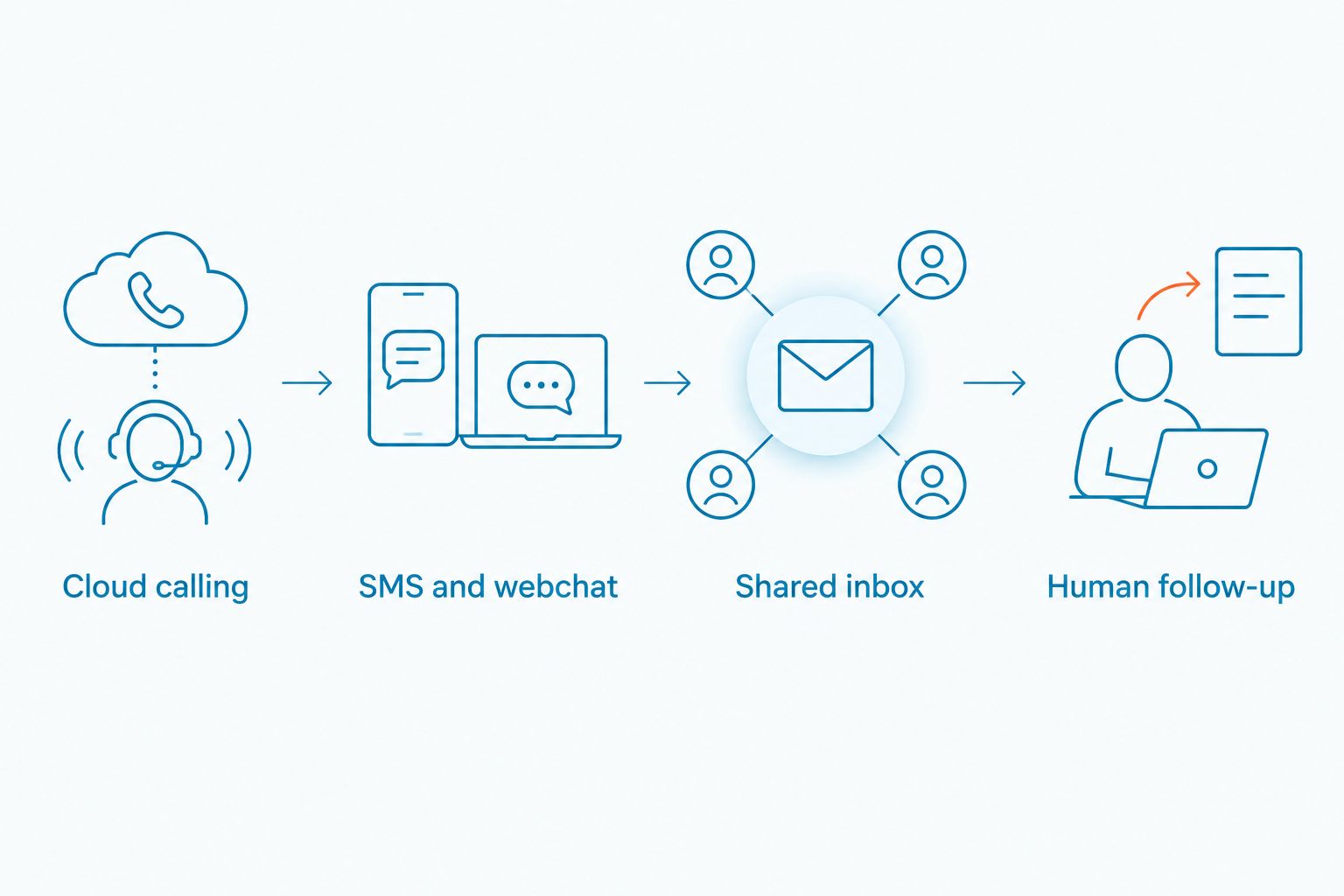
Map an inquiry from first contact to human follow-up. This is the shortest way to tell whether you need a new phone system or a better way to handle written leads:
- Cloud calling: List the calls your team needs to answer or route. Keep this on your phone-system checklist.
- SMS and webchat: Identify where customers start written conversations, especially outside staffed hours.
- Shared inbox: Assign responsibility for reading and responding to incoming messages.
- Human follow-up: Decide which inquiries need a staff member and what information that person needs to continue the conversation.
If the gap appears at SMS and webchat, changing phone providers alone does not resolve it. If the gap appears at cloud calling, an inbox for texts and chats is not the replacement. Make that distinction before asking vendors for demonstrations in 2026.
2. Dialpad: best for another phone-first comparison
Dialpad belongs on your shortlist when you still want a cloud calling platform. Compare the calling tasks your staff performs every day: receiving an inbound call, reaching the right person, and continuing the conversation when the first person is unavailable. Those tasks matter more than a long feature list your team will not use.
Where Dialpad shines
- It gives phone-first buyers another business calling option to compare with CloudTalk.
- It keeps the evaluation centered on your calling workflow rather than turning a phone purchase into a text-and-chat project.
Where Dialpad falls short
- Choosing another phone platform does not answer who owns website chats or after-hours customer texts.
- A feature checklist cannot tell you whether your staff can complete its real call-handling tasks. Test those tasks directly.
| Decision point | Dialpad | CloudTalk |
|---|---|---|
| Primary comparison | Business calling | Business calling |
| Evaluation task | Test your team's call flow | Benchmark your current call flow |
| Text-and-chat gap | Assess separately | Assess separately |
Best for: A team dissatisfied with its current calling workflow but still committed to a phone-first system. Verdict: Shortlist Dialpad for calls; do not select it solely to fix unanswered website leads.
3. RingCentral: best for a broader platform review
RingCentral is an option when your team wants to evaluate a business communications platform rather than address one narrow task. Start with the work you do now. If calls are the reason for your search, put call handling first; if messages are the reason, define how those messages reach an owner.
Where RingCentral shines
- It provides another established business calling option for your shortlist.
- It lets you assess whether a broader communications platform fits the tools your team wants to manage together.
Where RingCentral falls short
- Breadth is not a benefit if staff cannot find and answer the incoming conversations that matter.
- You still need to check the exact text, chat, and handoff workflow you require; a platform label does not establish that fit.
| Decision point | RingCentral | CloudTalk |
|---|---|---|
| Buying question | Does a broader communications platform fit? | Does the current phone workflow fit? |
| Calling | Include in your evaluation | Use as your benchmark |
| Written leads | Verify your required workflow | Evaluate as a separate need |
Best for: A team reviewing its wider communications setup, not just one unanswered-lead problem. Verdict: Consider RingCentral for a platform review; keep the decision tied to actual staff tasks.
4. Nextiva: best for a focused phone-system shortlist
Nextiva is another business phone option to compare with CloudTalk. Include it when your decision is still about calls. Write down the call tasks your team needs to complete, then use that list to assess both providers on the same basis.
Where Nextiva shines
- It gives phone-first buyers another provider to assess against CloudTalk.
- It keeps a calling decision focused on calling needs.
Where Nextiva falls short
- It is not a reason to skip a separate review of website chat and SMS response.
- A phone-system comparison can miss the customer who never places a call.
| Decision point | Nextiva | CloudTalk |
|---|---|---|
| Main evaluation | Business phone needs | Existing business phone workflow |
| Decision test | Can staff handle required calls? | Can staff handle required calls? |
| Website leads | Define the response workflow separately | Define the response workflow separately |
Best for: A team that wants one more phone provider on a tightly defined calling shortlist. Verdict: Evaluate Nextiva for calls, not as an assumed answer to text-and-chat lead capture.
Why people switch from CloudTalk
The reason to consider a switch is a mismatch between the work your team needs done and the workflow you are evaluating. CloudTalk serves a phone-first comparison. The supplied information does not establish a CloudTalk outage, a price change, or a missing feature, so none of those is a sound reason to replace it.
For a small service team, the most useful questions are operational:
- Are website visitors asking questions your team does not see in its call workflow? Define who reads those chats and when.
- Do customers send texts that need a team response? Decide whether a shared inbox would make ownership clearer.
- Do inquiries arrive after hours? Specify what an AI agent should address and what requires human follow-up.
- Are calls the actual problem? Compare CloudTalk with other phone platforms using the same call-handling tasks.
These questions lead to different purchases. A team that loses track of chat conversations needs a message workflow. A team that struggles to handle calls needs a calling review. In 2026, treat those as separate decisions even if you eventually choose tools for both.
Review your communication needs
Start with the calls, texts, and chats your team needs to handle.
When staying with CloudTalk is right
Keep CloudTalk on the table if it handles your calls and your team does not need to change its phone workflow. Buying a different phone system does not create a process for website chat, assign ownership of customer texts, or decide how to respond outside staffed hours.
If written leads are the gap, assess VirtualText alongside your existing calling setup rather than assuming it must replace it. If calls are the gap, compare CloudTalk, Dialpad, RingCentral, and Nextiva on the tasks your staff performs. The right CloudTalk alternative in 2026 depends on whether the unanswered conversation is a call, a text, or a chat.
FAQ
What is the best CloudTalk alternative for a small service team in 2026?
VirtualPBX with VirtualText is the best fit on this list when the team needs to manage SMS, website chat, and after-hours inquiries. If the team needs to replace its phone system, compare phone-first options such as Dialpad instead.
Does VirtualText replace CloudTalk?
No. VirtualText addresses SMS, webchat, shared-inbox work, and AI-assisted response; evaluate business calling separately. Keep CloudTalk if it already handles your calls well.
Is Dialpad better than CloudTalk for website leads?
A phone-platform comparison alone cannot establish which tool will handle your website leads better. Define your webchat and follow-up requirements, then check each provider against that workflow.
Should I change phone systems to answer customer texts?
Not automatically. First determine whether your problem is phone calls or ownership of customer texts. A shared inbox addresses a different task from call handling.
Can an AI agent handle every after-hours inquiry?
No. Set clear limits on what the agent should answer and which conversations need a person. The handoff matters as much as the initial response.
How should I compare CloudTalk with RingCentral or Nextiva?
Use the same list of required call-handling tasks for each provider. Review written-lead needs separately so a phone-system comparison does not hide a chat or SMS problem.
What should a shared team inbox solve?
A shared inbox should give staff a common place to manage incoming customer conversations. Assign an owner and a follow-up process so messages do not sit unanswered.
One last thing
Before choosing a provider, write down the last type of inquiry your team failed to answer promptly: a call, a text, or a website chat. Then trace who saw it, who owned it, and who followed up. That exercise gives you a sharper buying requirement than a generic list of CloudTalk alternatives in 2026.


